Skip to content
Back to Modules
Part IA Easter Term

Software and Security Engineering

Software-Engineering Security-Engineering Engineering-Mindset Requirements Specifications UML Agile Scrum XP Testing CI-CD Deployment Cloud Containers Software-Evolution SemVer API-Design Refactoring SRE Chaos-Engineering AI STRIDE Access-Control Authentication Part IA Easter Term Paper 2
  • Engineering Mindset & The Cost of Failure

    Programming vs Software Engineering, Brooks's Law, the complexity of discrete state, life-cycle cost, the five classic case studies in catastrophic failure (Therac-25, Mars Climate Orbiter, London Ambulance Service, Post Office Horizon, Boeing 737 MAX), technical debt, and professional responsibility

    • Programming vs Software Engineering: The Engineering Mindset

      The Software Crisis (1968)

      In 1968 NATO held a conference in Garmisch, Germany, that marked the birth of the term Software Engineering. The participants — leading computer scientists and practitioners — recognised that software was fundamentally different from hardware. Projects routinely ran over budget and over time; delivered systems had massive inefficiencies; code was unmaintainable and broke frequently. The term “Software Engineering” was deliberately provocative: it demanded that code creation adopt the rigour, discipline, and systematic approach of traditional engineering disciplines.

      The distinction between programming and software engineering is not simply one of scale — it is one of kind:

      DimensionProgrammingSoftware Engineering
      Team sizeSingle developerTeams of developers
      ScaleSmall (< 1,000 lines)Massive (1,000,000+ lines)
      LifespanDays or weeksYears or decades
      Primary metric”Does it work today?”Maintainability, security, extensibility over decades
      ValidationManual “does this look right?”Automated test suites, CI/CD, formal review

      Brooks’s Law and The Mythical Man-Month

      In 1975, Fred Brooks published The Mythical Man-Month, which introduced what became known as Brooks’s Law:

      Adding manpower to a late software project makes it later.

      The reason is twofold:

      Training overhead. Senior engineers must stop coding to mentor new hires. The skilled engineers who were delivering features become full-time trainers, and their productive output plummets. The new hires themselves contribute nothing useful for weeks or months while they learn the codebase.

      Communication overhead. As team size nn grows, the number of communication paths grows quadratically:

      Communication paths=n(n1)2\text{Communication paths} = \frac{n(n-1)}{2}

      A team of 5 people has (52)=10\binom{5}{2} = 10 communication paths. Add 5 more people and the paths jump to (102)=45\binom{10}{2} = 45 — not double, but 4.5 times the coordination overhead. Every path represents a potential channel for miscommunication, a merge conflict, or a misaligned design assumption. Software is highly interdependent: unlike digging a ditch (which can be partitioned perfectly among diggers with minimal coordination), code modules constantly interact and assumptions made in one module propagate to others.

      The myth of the man-month is the belief that effort and time are interchangeable — that if one person takes 10 months, 10 people can do it in 1 month. In software, sequential constraints, inter-module dependencies, and communication costs make this false.

      Communication paths grow quadratically with team size: 5 people → 10 paths, 10 people → 45 paths

      The Complexity of Discrete State

      Physical structures have continuous stress limits. A bridge degrades gradually: cracks appear, stress concentrates, and engineers can inspect and measure the remaining margin of safety. A bridge tested to withstand 100 tonnes of load can be trusted (within its design margin) to withstand 90.

      Software state is discrete. A single flipped bit — one wrong branch in a conditional, one off-by-one loop index — can move a system instantly from a perfectly safe state to catastrophic failure. There is no gradual warning, no “the paint is peeling” equivalent. The system is fine, and then it is not.

      The state space of a non-trivial programme is combinatorially vast. Even a simple function with two 32-bit integer inputs has (232)2=2641.8×1019(2^{32})^{2} = 2^{64} \approx 1.8 \times 10^{19} possible input combinations. Exhaustive testing of all possible states is mathematically impossible for any real system. This is why software risk profiles differ fundamentally from those of physical engineering, and why engineering process — requirements, specifications, testing strategies, code review — is necessary to manage something that can never be fully enumerated.

      Moore’s Law vs Human Cognition

      Moore’s Law (Gordon Moore, 1965) observed that transistor density on integrated circuits doubled roughly every two years. Hardware capability exploded exponentially over the following decades.

      The critical point for software engineering is this: as hardware capacity exploded, the ambition of the software we build on top of it exploded too. But human cognitive ability to manage complexity did not scale at the same rate. We have the same brains our predecessors had in 1968.

      The widening gap between what hardware can do and what humans can safely programme and verify is precisely the space in which engineering processes become necessary. Requirements elicitation, version control, testing, and continuous integration are not optional bureaucracy — they are the only tools we have to manage complexity beyond what a single human mind can track.

      Systems and Emergent Behaviour

      Software rarely exists in a vacuum. It is built from components — databases, front ends, APIs, sensors, network layers, message queues — that combine into systems. A system can exhibit emergent behaviour: behaviour not present in any individual component, arising from their interactions.

      Emergent behaviour can be:

      • Positive: combining a user-authentication module and an e-commerce module produces a personalised shopping experience — a capability neither component alone possessed.
      • Negative: two independently well-written, tested components interacting produce a deadlock or a race condition that neither module’s tests covered. The Therac-25 disaster (covered in a later note) is a classic case of negative emergent behaviour.

      Critically, when a system fails, the bug is often not localised to one function. It arises from the interaction between two perfectly correct components — each of which passes its own unit tests — because no one tested the combination.

      Expected Learning

      After this topic you should be able to:

      • Explain the difference between programming and software engineering in terms of scale, lifespan, and metrics of success.
      • State Brooks’s Law, calculate communication paths for a given team size, and explain why adding manpower to a late project is counterproductive.
      • Articulate why discrete state makes software risk qualitatively different from physical engineering risk, and why exhaustive testing is impossible.
      • Explain how Moore’s Law and the limits of human cognition drive the need for engineering processes.
      • Define emergent behaviour and give examples of how it can produce both capabilities and failures.

      Past Paper Questions

      2025 Paper 2 Question 5 (introductory context): The question sets a scenario of a “rapidly growing social media service” — the very kind of system where the distinction between “it works today” and “it works reliably for 10 million users” is the difference between programming and software engineering. The failure case studies from this section (Therac-25, MCO, LAS, Horizon, 737 MAX) directly inform the testing strategies and authentication design answers later in the question.

    • The Cost and Lifecycle of Software

      The 80/20 Rule of Lifecycle Cost

      One of the most important economic realities in software engineering is this: only about 20% of a software system’s total lifetime cost is spent on initial development; roughly 80% is spent on maintenance and evolution.

      This has a profound implication: code must be written for the engineer who reads it five or ten years from now, not optimised purely for the speed of initial writing. A clever one-liner that saves 10 minutes today but takes a future maintainer 3 hours to decipher is a net loss. Readability, clear structure, and explicit intent are economic virtues, not aesthetic preferences.

      The Four Types of Maintenance

      Software maintenance is not a monolithic activity. It falls into four categories, each with different triggers and cost profiles:

      TypeDescriptionTypical effort share
      CorrectiveFixing bugs discovered by users after deployment~20%
      AdaptiveMaking the system work in a changed environment (new OS, new hardware, cloud migration, new tax regulations)~25%
      PerfectiveAdding new features or improving performance demanded by users; improving maintainability or readability without changing behaviour~50%
      PreventiveRefactoring code to prevent future decay; finding and fixing latent problems before they become actual bugs~5%

      The striking observation is that most maintenance effort (~50%) is perfective — keeping the system relevant and competitive by adding features and improving performance. Only ~20% is about fixing bugs. Software is maintained not because it is broken, but because the world around it changes and user expectations rise.

      Bit Rot (Software Entropy)

      Software does not physically wear out in the sense that metal fatigues or concrete crumbles. A .c file from 1995, stored on a disk, will contain exactly the same bytes in 2025.

      Yet software that is never touched will eventually stop working. The surrounding environment changes around it:

      • Libraries are updated or deprecated; newer versions break old APIs.
      • Security protocols are deprecated (TLS 1.0, SSLv3); servers stop accepting old connections.
      • Operating system APIs change; the old syscall is removed.
      • Hardware interfaces evolve; the driver model from 2005 no longer compiles.

      The software’s own source code never changed — but the world it was written for no longer exists. This phenomenon is called bit rot or software entropy. It means that even a “finished” system requires ongoing adaptive maintenance simply to continue functioning, which reinforces the economics of the 80/20 rule.

      The Four Dimensions of Lifespan Cost

      Beyond the initial-development vs maintenance split, there are several reasons maintenance dominates:

      1. The reading-to-writing ratio. Engineers spend far more time reading code than writing it — estimates range from 10:1 to 20:1. Every minute spent making code clear saves many minutes of future reading.

      2. Accumulating technical debt. Quick fixes and shortcuts compound. A small corner cut in version 1.0 becomes a tangled mess by version 5.0, requiring exponentially more effort to change.

      3. Dependency churn. Modern software depends on hundreds of third-party libraries (npm, PyPI, Maven). Each must be updated periodically for security patches and compatibility, even if your own code hasn’t changed.

      4. Regulatory and compliance drift. Tax laws change, data-protection regulations (GDPR, CCPA) evolve, accessibility standards rise — all of which may require modifications to existing, working software.

      Code as a Liability

      A counterintuitive insight from lifecycle economics: lines of code are a liability, not an asset. Managers often view code quantity as a measure of progress, but every line written must be:

      • Tested
      • Maintained
      • Secured
      • Understood by future engineers
      • Kept compatible with evolving dependencies

      The best code is the code you did not have to write. Simpler solutions that achieve the same outcome with fewer lines, fewer dependencies, and fewer moving parts produce less maintenance burden over the decades of the system’s life.

      Expected Learning

      • State the 80/20 rule and explain its implications for how code should be written.
      • Name and distinguish the four types of maintenance with their typical effort shares.
      • Explain what bit rot is, why it occurs, and what kind of maintenance addresses it.
      • Justify why lines of code should be viewed as a liability rather than an asset.

      Past Paper Questions

      In scenario-based questions, you may be asked to argue why investing in test suites, documentation, or clean architecture is economically rational. The 80/20 rule and the four maintenance types give you the quantitative framing to do so: a decision that seems expensive at development time is often cheap compared to the decades of maintenance work it enables or hinders.

    • Case Studies in Failure

      The five case studies that follow are not merely cautionary tales — they are the evidence base that justifies every engineering principle taught in this course. When you are asked to justify an engineering practice (defence in depth, integration testing, phased rollouts, single points of failure, audit trails), you are expected to name the matching case study and explain the causal mechanism, not just assert the principle in the abstract.


      Case Study 1: Therac-25 (1985–1987)

      Background. The Therac-25 was a medical linear accelerator for radiation therapy, built by AECL (Atomic Energy of Canada Limited). It was the successor to the Therac-20.

      The fatal cost-cutting decision. The Therac-20 had hardware interlocks — physical switches and circuits that prevented the high-power electron beam from firing unless the targeting shield was physically in place. AECL, to reduce cost, removed these hardware interlocks from the Therac-25 and entrusted safety entirely to software.

      The bug. The control software used a shared variable to track operator input. An operator might type “X” to select X-ray mode, realise it was a mistake, then quickly press “Up” arrow and “E” to correct it to Electron mode. If this sequence occurred within a specific narrow timing window, a race condition in the software would configure the high-power beam without deploying the physical shield.

      The UI failure. When the system detected an anomaly, it displayed a cryptic error — “Malfunction 54” — with no explanation. Operators could simply press “P” (Proceed) to dismiss the error and fire again.

      The cost. At least six patients received massive radiation overdoses — up to 100 times the intended dose. Several died from radiation poisoning. AECL initially denied any software fault, attributing the injuries to patient sensitivity.

      Engineering lessons:

      1. Defence in depth — never rely on a single software check for human safety. Hardware interlocks are essential because they fail in predictable, visible ways and cannot be bypassed by a race condition.
      2. Concurrency is dangerous — shared mutable state in multi-threaded systems must be managed with formal rigour. A race condition that is harmless 99.99% of the time will eventually kill someone.
      3. UX is safety — error messages must be actionable and hard to blindly dismiss. “Malfunction 54” is not fit for purpose in a life-critical system.

      Case Study 2: Mars Climate Orbiter (1999)

      Background. A $327 million NASA/JPL probe (with Lockheed Martin as contractor) to study the Martian climate. On 23 September 1999, during Mars orbit insertion, the orbiter’s signal was lost. It had entered the atmosphere too low and disintegrated.

      The root cause: a unit mismatch. Lockheed Martin (Colorado) wrote the thruster-impulse software using Imperial units (pound-force-seconds). NASA JPL (California) wrote the navigation software expecting metric units (Newton-seconds). Every thruster firing command was off by a factor of ~4.45 (1 lbf·s ≈ 4.45 N·s). Over the course of the interplanetary journey, this tiny per-burn error accumulated into a 170 km altitude error at Mars — well inside the atmosphere.

      Why it was not caught. The Software Interface Specification (SIS) explicitly required metric units. Lockheed Martin did not adhere to it. More critically, the teams tested their components in isolation with no end-to-end integration testing — each subsystem’s own tests passed, but no one ran a joint test that would have exposed the unit mismatch.

      Engineering lessons:

      1. Type safety — strongly typed languages with typed units (e.g. newtons vs pound_seconds as distinct types that cannot be implicitly converted) can catch such errors at compile time. Where typed units are not available, explicit naming conventions and code review are essential.
      2. Integration testing is not optional — isolated component testing proves nothing about the system. The boundaries between teams and organisations are precisely where failures propagate.
      3. Process adherence over blame — this was a systemic process breakdown (the contractor ignored the interface specification), not one programmer’s arithmetic error. The engineering process failed to enforce the agreed contract.

      Case Study 3: London Ambulance Service CAD (1992)

      Background. In October 1992, a new Computer-Aided Dispatch (CAD) system was rolled out to automate ambulance dispatch across London. The previous system had operated with paper and radio.

      The doomed procurement. The contract was awarded to a company with no prior experience building emergency dispatch systems. The company won by significantly underbidding. Timelines were compressed by political pressure to show results.

      The hostile user base. Ambulance locations were tracked via imperfect radio triangulation. Paramedics felt micromanaged and distrusted the system. Because they had received minimal training, they often pressed incorrect status buttons on their in-vehicle terminals — feeding the CAD system corrupt availability data (ambulances marked “available” when they were not, “busy” when they were free).

      The system overload. A memory leak in the server caused progressive slowdown over the course of the shift. As response times grew, citizens re-called repeatedly, flooding the system with duplicate call records. The CAD began dispatching multiple ambulances to the same address while other genuine emergencies were ignored.

      The collapse. Within 36 hours of launch, the system locked up entirely. The control room reverted to pen and paper. Patients died waiting for ambulances that never arrived.

      Engineering lessons:

      1. This is a socio-technical system — software does not exist in isolation from human psychology, organisational culture, and hardware. The CAD did not fail purely for technical reasons; it failed because of a combination of procurement failure, user distrust, inadequate training, unrealistic timelines, and insufficient testing.
      2. Phased rollouts — never do a “Big Bang” deployment for a critical system. The CAD should have been introduced in stages: one borough at a time, running in parallel with paper dispatch with a manual fallback.
      3. Load testing — test under extreme, anomalous, bursty load, not just the happy path of normal evening traffic. The memory leak that ultimately destroyed the system would have been detected under a sustained stress test.

      Case Study 4: Post Office Horizon Scandal (from 1999)

      Background. The Horizon IT system, built by Fujitsu for the UK Post Office, automated accounting for thousands of local post office branches. Subpostmasters began reporting inexplicable financial shortfalls. The Post Office insisted that Horizon was “robust” and “effectively infallible,” and prosecuted subpostmasters for theft and false accounting.

      What was really happening. The Horizon system had multiple critical bugs that could silently create, modify, or delete financial transaction records. Fujitsu’s own developers were aware of some of these bugs. Fujitsu engineers could remotely access branch terminals and alter data — including without the subpostmaster’s knowledge.

      The cost. Over 700 subpostmasters were prosecuted. Many were imprisoned, went bankrupt, or lost their homes. Several took their own lives. This was the largest miscarriage of justice in British legal history.

      Engineering lessons:

      1. Audit trails — in any financial or legal system, every automated action must be transparent, auditable, and attributable to a specific human actor or process. The ability for engineers to remotely alter data with no visible trace is indefensible.
      2. Engineering integrity — developers who identified bugs were ignored or overruled by management. Technical truth must override business convenience or reputational defence. Engineers have a professional obligation to escalate concerns beyond their immediate chain of command if necessary.
      3. Presumption of infallibility — the law at the time effectively presumed computer evidence to be correct unless proven otherwise. Engineers must challenge this “myth of infallibility” wherever it surfaces. Computers are no more inherently reliable than the humans who programmed them — less so, in many cases, because humans can exercise judgement.

      Case Study 5: Boeing 737 MAX — MCAS (2018–2019)

      Background. Boeing needed to fit larger, more fuel-efficient engines to the 737 airframe. To achieve the necessary ground clearance, the engines were mounted further forward and higher on the wing, altering the aircraft’s aerodynamics. The new configuration was prone to pitching up under certain conditions, risking a stall.

      The “fix”: MCAS. The Manoeuvring Characteristics Augmentation System (MCAS) was a software system that, on detecting a high angle of attack, would automatically push the nose down to prevent a stall. Critically, MCAS relied on data from a single Angle-of-Attack (AoA) sensor — a single point of failure.

      The failure. If that one sensor failed (as it did on two flights — Lion Air 610 and Ethiopian Airlines 302), the system would read an erroneously high AoA and repeatedly command nose-down trim. Pilots, unaware of MCAS’s existence (Boeing had deliberately “hidden” it to avoid costly pilot retraining certification), fought against the system but could not overcome it. 346 people died.

      Engineering lessons:

      1. Single point of failure — never design a critical safety system that relies on data from only one sensor. Use redundancy (at least three sensors with voting logic) for any input that can command irreversible physical action.
      2. Complexity hiding — software must not act autonomously without the operator’s knowledge. Pilots must know what systems exist, what inputs they depend on, and — critically — how to disable them.
      3. The “software fix” trap — do not use software to patch a fundamental hardware or aerodynamic design flaw. If the airframe is aerodynamically unstable without software intervention, the risk profile is radically different from a conventionally stable airframe. Software should augment safety, not be the sole safety mechanism.

      Why These Case Studies Matter for the Exam

      These are not trivia. Each illustrates a distinct engineering failure mechanism:

      Case studyPrimary failure modeEngineering principle
      Therac-25Race condition; no hardware interlockDefence in depth; concurrency
      Mars Climate OrbiterUnit mismatch; no integration testingType safety; integration testing
      London AmbulanceSocio-technical; Big Bang deploymentPhased rollout; load testing
      Post Office HorizonNo audit trail; ignored engineersAudit trails; professional integrity
      Boeing 737 MAXSingle AoA sensor; hidden complexityRedundancy; operator transparency

      When asked to justify an engineering principle, name the case study and explain the causal chain — this grounds your answer in evidence and is rewarded by examiners.


      Past Paper Questions

      These case studies are directly referenced in Example Sheet 1, Question 1 (the health system vs the to-do app — how risk profiles differ) and inform every scenario-based Tripos question where safety, testing, or process reliability is at stake.

    • Technical Debt and Professional Responsibility

      What Is Technical Debt?

      The term Technical Debt was coined by Ward Cunningham in 1992. It is a financial metaphor: you take out a loan when you write quick, messy code to meet a deadline.

      • Principal: the effort required to eventually rewrite the code properly.
      • Interest: the extra time it takes to add features or fix bugs in the meantime, because the messy code slows you down and introduces side effects.

      Like financial debt, technical debt is not inherently bad. Taking on debt is a rational decision when the return on the borrowed capital exceeds the cost of the interest — e.g. launching a product to market before a competitor captures the audience. But like financial debt, technical debt that is never repaid accumulates interest that eventually consumes all productive capacity.

      The Technical Debt Quadrant

      Not all technical debt is the same. It falls into a 2×2 quadrant based on intent and care:

      Deliberate (chosen knowingly)Inadvertent (unintentional)
      Reckless (no plan to fix)“We must ship now and fix later” — but later never comes, and no one tracks the debt.”What’s pytest?” — the team simply does not know how to write clean code.
      Prudent (informed, tracked)“We have no time for full design; we will hardcode the DB connection for Friday’s launch and refactor next sprint (ticket #142).""Now that we’ve built it, we understand the domain — and we know how we should have structured it.”

      Prudent/Deliberate debt can be a valid business strategy. You knowingly accept a cost to hit a critical deadline, track the debt explicitly, and schedule repayment. Inadvertent debt is more dangerous: it accumulates silently because nobody realises it is there until it manifests as a production incident or an inability to ship new features.

      The Iron Triangle

      The Iron Triangle of project management (also known as the triple constraint):

      Fast, Good, Cheap — pick two.

      You can build something quickly and to a high standard — but it will be expensive (hire more engineers, buy better tooling). You can build something cheaply and quickly — but quality will suffer. You can build something cheaply to a high standard — but it will take a long time.

      Every decision in software engineering is a negotiation among these three constraints. Perfect code shipped two years after the market has moved on is a business failure. Terrible code shipped tomorrow that bankrupts the company in technical debt is also a business failure. Balancing this — knowing when to accept debt and when to insist on quality — is what distinguishes an engineer from a programmer.

      Professional Responsibility

      Engineers hold specialised knowledge that managers, users, and clients do not. With that knowledge comes a professional obligation to push back against decisions that compromise safety or core quality.

      “Management told me to do it” is not an acceptable defence against catastrophic failure. The engineers at AECL (Therac-25), Fujitsu (Horizon), and Boeing (737 MAX) all faced pressure to cut corners, ship on schedule, or downplay technical concerns. In each case, the failure to push back — to say “this is not safe and I will not sign off on it” — contributed to deaths.

      The BCS Code of Conduct and other professional bodies explicitly require engineers to:

      • Have regard for public health, safety, and the environment.
      • Avoid any situation that may give rise to a conflict of interest.
      • Not misrepresent or withhold information.

      This is not abstract ethics — it is a concrete engineering requirement. If your technical judgement says a system is unsafe, and management overrules you, you must escalate — and document that you did so.

      The Economics of Refactoring

      Technical debt is repaid through refactoring: restructuring existing code without changing its observable behaviour. Refactoring is a disciplined engineering technique, not just “cleaning up.”

      The critical prerequisite for refactoring is a comprehensive automated test suite. If tests pass before and after a refactoring step, you have reasonable confidence that behaviour was preserved. Without tests, refactoring is indistinguishable from breaking changes — you cannot safely change structure without a way to verify correctness.

      This is one reason the 80/20 rule of lifecycle cost matters: an investment in test suites at development time enables safe, fast refactoring over the decades of the system’s life, paying back its cost many times over.

      Expected Learning

      • Define technical debt in terms of principal and interest, and name the four quadrants of the technical debt matrix.
      • Explain when deliberate/prudent debt can be a valid business decision, and why inadvertent debt is more dangerous.
      • State the Iron Triangle and apply it to trade-offs in a given scenario.
      • Articulate the professional responsibility of an engineer to push back against unsafe or unsustainable decisions, referencing specific case studies.
      • Explain why automated tests are a prerequisite for safe refactoring.

      Past Paper Questions

      Example Sheet 1, Question 4 directly addresses technical debt with a legacy system scenario. Example Sheet 1, Question 3(b) asks about the hidden costs of adding developers to a late project, which is a form of communication debt that compounds existing technical debt.

  • Requirements and Specifications

    Problem space vs solution space, requirements elicitation (interviews, ethnography), functional vs non-functional requirements, the '-ilities' and fit criteria, UML class and sequence diagrams, roles (PM, EM, TPM), MoSCoW prioritisation, PRDs, and requirement traceability

    • Problem Space, Solution Space, and Elicitation

      Problem Space vs Solution Space

      Peter Drucker observed:

      There is nothing quite so useless as doing with great efficiency something that should not be done at all.

      This captures the central risk of requirements engineering: building the wrong thing perfectly. Engineers must separate two distinct conceptual spaces:

      • Problem Space (the “Why”): technology-agnostic; business value, user needs, market realities, the actual friction or opportunity. Example: “Our warehouse packing process is too slow and error-prone, causing delayed shipments and customer complaints.”
      • Solution Space (the “What”): introduces technology, architecture, and engineering constraints. Example: “We will build a tablet-based barcode scanning application that calculates optimal walking routes through the warehouse.”

      The problem space exists objectively — the warehouse is slow. The solution space is a human choice among many possible options; a tablet app is one option among many (faster conveyors? better training? a different warehouse layout?).

      The Translation Gap

      The Translation Gap is the distance between how stakeholders describe their needs and what engineers actually build:

      • Stakeholders know the problem intimately — they live in the warehouse every day — but they speak vaguely. They say “make it faster” without quantifying, and they are prone to describing a solution (“give us tablets”), not the underlying problem.
      • Engineers know how to build solutions but lack domain expertise. They don’t know the warehouse layout, the packing protocols, or the edge cases that occur at 4 a.m.

      Requirements Engineering is the discipline that formally bridges this gap — eliciting the real problem before designing the solution.

      Requirements Elicitation Methods

      Interviews

      Direct conversations with stakeholders. Useful for initial scoping and understanding high-level business goals.

      Strengths: efficient; gives rich context; builds rapport between engineers and users.

      Weakness: the “faster horses” problem. Users often describe a solution to what they think the problem is, not the underlying need. Henry Ford’s (possibly apocryphal) observation: “If I had asked people what they wanted, they would have said faster horses.” Users lack the technical vocabulary to imagine a fundamentally different solution, so they propose incremental improvements to the status quo.

      Ethnography (Observation)

      Observing users in their real working environment, doing their real work.

      Strengths: reveals invisible workarounds that users consider “normal” and would never think to mention in an interview.

      Weakness: time-consuming; requires physical access to the real environment; can be expensive.

      The Nurse and the Sticky Note

      The classic illustration of why ethnography matters: a nurse who keeps a sticky note of passwords on her monitor.

      If you interview her, she would never mention this. She considers it a normal, unremarkable part of her daily workflow — the system logs her out too frequently, so she keeps the password handy. She is not consciously hiding a security vulnerability; she has simply adapted to a poorly designed system and forgotten that it was ever an issue.

      Only direct observation would reveal the sticky note, and only further observation would reveal why: the mandatory re-login timeout is too aggressive for a fast-paced clinical environment where a nurse may need to enter data in 30-second bursts between patient interactions. The workaround — writing down the password — is a rational adaptation to a system that does not fit the real workflow.

      The engineer’s job is not to scold the nurse. It is to fix the timeout policy so the workaround becomes unnecessary.

      The Danger of Natural Language

      Human language is ambiguous, context-dependent, and imprecise. Code is binary, deterministic, and merciless. This asymmetry is at the heart of why requirements go wrong.

      Consider this requirement:

      “The search system should be fast and easy to use.”

      What does “fast” mean — 100 ms? 2 seconds? Under what load? What does “easy to use” mean, and how would you programme a test for it? If the client later rejects the software as “too slow,” the engineer has no contractual defence. The requirement was never defined in falsifiable terms.

      A better version:

      “The search system shall return results for a database of 1 million records in under 500 milliseconds for 95% of queries under a sustained load of 100 concurrent users.”

      This is quantifiable, testable, and sets a clear boundary for acceptance. The engineer can write a load test that passes if 95% of queries return within the threshold. Both parties can agree on what “done” looks like.

      The Cost of Fixing Requirements Errors: Boehm’s Curve

      Getting requirements wrong does not just produce the wrong product — it is exponentially expensive to fix. Boehm’s empirical observation of real-world software projects shows that the cost of fixing a defect rises dramatically the later it is discovered:

      Design  (1×)    Coding  (5×10×)    Testing  (10×)    Production  (100×+)\text{Design} \; (1\times) \;\to\; \text{Coding} \; (5\times\text{--}10\times) \;\to\; \text{Testing} \; (10\times) \;\to\; \text{Production} \; (100\times+)

      During the design phase, fixing a misunderstood requirement costs 1×1\times: you update the document, email the team, and carry on. During coding, you have rewritten modules built on the wrong assumption — perhaps 5×5\times to 10×10\times the original cost. During testing, you must not only fix the code but re-integrate, re-test the fix, and verify no new bugs were introduced — roughly 10×10\times. In production, fixing a requirements error may require: patching live services without downtime, migrating corrupted data, compensating affected users, dealing with regulatory penalties, and repairing reputational damage — 100×100\times or more.

      This is why Waterfall (where testing happens in Phase 4, years after the requirements were frozen) is so dangerous for projects with unstable requirements. Agile reduces this risk by delivering working software every two weeks: if a requirements error is present, it is caught in the next Sprint Review, not years later, when the cost is still near the design end of the curve.

      Expected Learning

      • Distinguish the problem space from the solution space and explain why this separation is critical.
      • Define the Translation Gap and explain how it causes requirements failures.
      • Compare interviews and ethnography as elicitation methods, giving concrete examples of what each misses.
      • Explain why a good requirement must be quantifiable and testable, not ambiguous.

      Past Paper Questions

      Example Sheet 1, Question 6 presents a hospital-ward scenario that directly tests your understanding of why ethnography might surface requirements that interviews miss. Example Sheet 1, Question 2 asks you to critique the ambiguous requirement “ultra-fast and safe” and rewrite it as three testable NFRs.

    • Functional vs Non-Functional Requirements

      Definitions

      Requirements fall into two fundamental categories:

      Functional Requirements (FR) describe what the system does — the specific actions, behaviours, inputs, and outputs. They are the verbs of the system. If a functional requirement is not met, the system is fundamentally broken.

      Non-Functional Requirements (NFR) describe how well the system performs its functions — the quality attributes, constraints, and characteristics. They are the adjectives and adverbs of the system. NFRs often dictate the entire system architecture because they constrain the solution space far more severely than FRs do.

      Examples

      For an e-commerce website:

      Functional Requirements (FRs)Non-Functional Requirements (NFRs)
      Allow a user to add an item to a shopping cartPage load time < 2 seconds under normal load
      Calculate total cost including VAT and delivery99.9% uptime per month (~43 minutes maximum downtime)
      Send a confirmation email on successful paymentWCAG 2.1 AA accessibility compliance
      Display order history for the past 12 monthsPasswords stored using bcrypt with a salt factor of 12

      The “-ilities” (NFR Categories)

      NFRs are often grouped under the mnemonic “-ilities”:

      • Scalability: can the system handle growth? (Vertical: bigger servers. Horizontal: more servers. Elastic: auto-scaling based on load.)
      • Reliability: does it work correctly over time? (Availability, fault tolerance, recovery.)
      • Maintainability: can it be modified easily? (Code clarity, modularity, documentation, test coverage.)
      • Portability: can it run in different environments? (OS independence, containerisation, cloud-agnostic design.)
      • Usability: can humans use it effectively? (Learnability, efficiency, error rates, satisfaction.)

      Other common NFRs include security, performance, and compliance.

      Latency vs Throughput

      A common source of confusion within performance NFRs:

      • Latency: the time required to complete a single operation. “The page must load in under 2 seconds.”
      • Throughput: the number of operations the system can handle concurrently. “The system shall handle 5,000 transactions per second.”

      You often must design differently to optimise one over the other. A system optimised for extremely low latency (single-threaded, in-memory, no coordination) may have poor throughput. A system optimised for high throughput (distributed, parallel, batched) may have higher per-operation latency.

      NFRs Beget FRs

      An NFR often generates specific functional requirements:

      • NFR: “The system must comply with GDPR.”
      • Generated FRs: “The system shall provide a button for the user to request deletion of all personal data.” “The system shall log every access to personal data with timestamp and user ID.” “The system shall encrypt personal data at rest using AES-256.”

      This is how architectural security NFRs cascade into concrete, implementable, testable FRs.

      Fit Criteria

      Every NFR needs a fit criterion — a measurable, testable target. Without one, the NFR is indistinguishable from a wish.

      NFR (vague)Fit criterion (testable)
      “The system should be fast”95th percentile response time < 300 ms for logged-in users
      ”The system should be reliable”99.99% uptime per calendar month (~4.3 minutes downtime max)
      “The system should be secure”OWASP Top 10 vulnerabilities absent; penetration test passed by an accredited third party
      ”The system should be easy to use”90% of new users complete the primary task (purchase) within 5 minutes without assistance

      NFR Trade-offs

      NFRs are in constant tension with each other. Engineering is the art of balancing them:

      • Security vs Usability: a 24-character password with mandatory 2FA is highly secure but a terrible user experience. A 4-digit PIN is highly usable but trivially insecure.
      • Performance vs Maintainability: hand-optimised inline Assembly achieves maximum speed but destroys maintainability, portability, and readability. A clean, modular design may be slightly slower but survives decades of evolution.
      • Scalability vs Cost: an architecture designed to handle 10 million concurrent users costs far more upfront than one designed for 1,000. Build for your actual expected scale, not your fantasy.

      The Iron Triangle (Fast, Good, Cheap) applies to NFRs just as it applies to overall project scope.

      Classifying FR vs NFR

      It is a classic exam trap to mistake an implementation detail for a functional requirement or vice versa. Helpful rules of thumb:

      • If the statement describes a specific action or output the system must produce, it is an FR (or an FR generated from an NFR).
      • If the statement describes a constraint on how the system operates, it is an NFR.
      • “The system shall calculate VAT” → FR (an action the system performs).
      • “The system shall calculate VAT in under 10 ms” → NFR (a performance constraint on that action).
      • “Database passwords must be stored using bcrypt with salt factor 12” → NFR (a security constraint on how data is handled).
      • “The system shall allow a student to reserve a book currently checked out” → FR (a specific action).

      Expected Learning

      • Define FR and NFR, and classify given statements into each category.
      • Name the “-ilities” and explain their role in constraining system architecture.
      • Distinguish latency from throughput and explain why they may require different design trade-offs.
      • Explain how an NFR can generate FRs, with examples.
      • Define fit criteria and explain why they are essential for testable requirements.
      • Identify and resolve trade-offs between competing NFRs in a given scenario.

      Past Paper Questions

      Example Sheet 1, Question 2 directly asks you to classify drone requirements as FR or NFR, critique a vague requirement, and provide testable NFRs with fit criteria. Example Sheet 1, Question 6(c) tests the Security-vs-Usability NFR trade-off in a clinical setting.

    • Modelling for Communication: UML

      Why Model?

      Models abstract away complexity so that stakeholders can discuss, critique, and understand a system without reading 10,000 lines of code. A model is a simplified representation of reality, highlighting the aspects relevant to the current discussion and suppressing irrelevant detail.

      UML (Unified Modeling Language) was standardised in the 1990s and defines 14 diagram types. Historically, some organisations attempted to generate entire codebases from highly detailed UML “Blueprints.” This largely failed — the diagrams became as complex as the code they were meant to simplify, and maintaining two synchronised representations (diagrams + code) doubled the maintenance burden.

      Modern best practice is to use UML as sketches — informal, whiteboard-level diagrams that ignore strict syntax in favour of speed and clarity. If a diagram fits on a whiteboard and the team understands the design, it has served its purpose.

      Class Diagrams: Static Structure

      A class diagram shows what exists — classes, their attributes, their operations, and the relationships between them. It describes structure, not behaviour over time.

      Anatomy of a class box:

      UML Class Box Anatomy: Class name (Student), Attributes (name, year, email), and Operations (enrol, calculateFees) compartments

      Visibility markers:

      • + Public — accessible by anyone.
      • - Private — accessible only within the class.
      • # Protected — accessible within the class and its subclasses.
      • ~ Package — accessible within the same package.

      Key relationships:

      RelationshipNotationMeaningExample
      AssociationPlain lineA general connectionStudent is enrolled in Course
      Inheritance (“is-a”)Arrow with hollow triangle pointing to parentChild is a specialised kind of parentUndergraduate inherits from Student
      Aggregation (“has-a”, independent lifecycle)Line with hollow diamond at the containerContainer holds parts, but parts can exist independentlyDepartment has Professors; a professor can exist without the department
      Composition (“has-a”, dependent lifecycle)Line with filled/solid diamond at the containerParts are created and destroyed with the containerBuilding has Rooms; demolish the building, the rooms cease to exist
      DependencyDashed arrowClass A uses class B temporarily (e.g. as a parameter)ReportGenerator uses Database to fetch data

      Multiplicity can be annotated on either end: 1 (exactly one), 0..1 (zero or one), * (zero or more), 1..* (one or more). For example, a Student is enrolled in 1..* Courses, and a Course has * Students — the classic many-to-many relationship.

      Sequence Diagrams: Dynamic Behaviour

      A sequence diagram shows how processes interact over time — the order of messages exchanged between objects. It excels at modelling network calls, API interactions, and authentication flows.

      Elements of a sequence diagram:

      • Lifelines: vertical dashed lines extending downward from each participating object or actor. Time flows from top to bottom.
      • Messages: horizontal arrows from one lifeline to another, representing a method call or signal. Solid arrowheads for synchronous calls; open (stick) arrowheads for asynchronous messages.
      • Activation boxes: thin vertical rectangles on a lifeline, showing the period during which an object is actively processing (i.e. execution time).
      • Return messages: dashed arrows going back, showing the return of control and optionally a return value (e.g. 200 OK).

      Choosing the Right Diagram

      You are modelling…Use a…
      Database schema / entity relationships / static domain modelClass Diagram
      How OAuth2 login flows between the browser, your server, and Google’s auth serverSequence Diagram
      What states a shopping cart can be in (Empty, Active, CheckedOut) and what events trigger transitionsState Machine Diagram
      The high-level flow of an order from placement through warehouse to dispatchActivity Diagram
      How a product’s software modules are packaged and deployed to nodesDeployment Diagram

      The Anti-pattern: Analysis Paralysis

      Spending three weeks perfecting a UML diagram in a commercial modelling tool is usually wasted effort. By the time the diagram is finished, the requirements have almost certainly changed — because stakeholders learn about what they actually need by seeing working code, not by staring at diagrams.

      Rule of thumb: if the diagram fits on a whiteboard and the team understands the design, it is good enough. Move on to building and testing. The diagrams that survive are the ones you draw retrospectively to communicate the design to new team members, not the ones you drew a priori to plan the design.

      Expected Learning

      • Name the main UML diagram types and know which to use for a given modelling task.
      • Draw a class diagram showing classes, attributes, operations, and the four relationship types (association, inheritance, aggregation, composition) with correct arrowhead/diamond notation.
      • Draw a sequence diagram showing lifelines, messages, activation boxes, and return messages, with time flowing top to bottom.
      • Explain why UML is best used as a sketch rather than a formal blueprint, and describe the risks of analysis paralysis.
      • Identify multiplicity constraints in a given domain and annotate them correctly on a class diagram.

      Past Paper Questions

      UML is a standard Part IA topic. You may be asked to draw a class or sequence diagram from a textual description of a system, or to critique a given diagram for missing relationships, wrong notation, or impossible multiplicities.

    • Roles, Deliverables, and Prioritisation

      Roles in Software Development

      The boundary between “what to build” and “how to build it” is managed by distinct roles:

      RoleResponsibilityKey deliverables
      Product Manager (PM)Owns the “Why” and the “What.” Conducts user research, analyses markets and competitors, defines priority by business value, and shields engineers from changing whims.Product Requirements Document (PRD), user stories, roadmap
      Engineering Manager (EM)Owns technical execution. Decides who builds what, oversees architecture and code quality, manages developer career growth and team health.Technical design documents, sprint plans, team staffing
      Technical Programme Manager (TPM)Manages complex cross-team dependencies. Common at large tech companies (Google, Amazon) where a feature spans five teams each with their own PM and EM.Cross-team timelines, risk registers, dependency maps

      The PM decides what should be built and in what order. The EM decides how to build it and with whom. The TPM ensures that when something from Team A is needed by Team C, everyone knows and has planned for it. Clear role separation prevents Product from micromanaging architecture (PM saying “use React”) and Engineering from unconsciously steering the product to what is technically fun rather than what users need.

      The MoSCoW Prioritisation Method

      When scope is larger than time and budget allow (which is always), MoSCoW provides a structured framework for triage:

      • Must have: the product is completely unviable without this. If this is missing, there is no point launching. Example: a login mechanism for a user-account-based service.
      • Should have: highly important; the product is significantly weakened without it, but a Version 1 could launch and still deliver value. Example: a “reset password” email flow — users who forget their password cannot use the service, but many will remember.
      • Could have: nice to have if time and budget permit; easily deferred to Version 2 without reputational or competitive damage. Example: a dark-mode toggle.
      • Won’t have: explicitly out of scope for this release. This is as important to document as the included features — it prevents scope creep and manages stakeholder expectations.

      The Product Requirements Document (PRD)

      The PRD is the “source of truth” for a feature or product. Authored by the PM, it typically contains:

      • Background: the market context, competitive landscape, and why this feature matters now.
      • Business goals: measurable outcomes (e.g. “reduce checkout abandonment by 15%”).
      • Personas: the target users, described concretely (not “a user” but “Emma, a 34-year-old shift manager in a warehouse, who checks inventory on a tablet while walking between aisles”).
      • Functional requirements: what the system must do, ideally structured as user stories (“As a [persona], I want [feature], so that [value]”).
      • Non-functional requirements: the -ilities, with fit criteria.
      • Out of scope: explicit “Won’t have” items.

      A good PRD answers “what?” and “why?” but does not prescribe “how?” — that is the EM’s domain.

      Requirements Traceability

      Traceability is the ability to follow a requirement from its origin to its implementation and verification:

      RequirementDesignCode (commit/PR)TestRelease\text{Requirement} \to \text{Design} \to \text{Code (commit/PR)} \to \text{Test} \to \text{Release}

      In practice, this means linking IDs across artifacts: Requirement #42 in the PRD is addressed by Pull Request #105, which adds a new module, and the module is verified by test_req_42() in the test suite. When all these links exist and are maintained, you can answer questions like “Why was this line of code written?” and “Is every requirement from the PRD actually tested?”

      Highly regulated industries (aviation, medical devices, nuclear) require formal traceability matrices — a table mapping every requirement to every test that verifies it, signed off by independent auditors. This is the engineering reality behind “move fast and break things” vs “people will die if we get this wrong” — the regulatory environment determines how much process overhead is required by law.

      Expected Learning

      • Distinguish the PM, EM, and TPM roles, explaining what each owns and what they deliver.
      • Apply the MoSCoW framework to prioritise a given list of features.
      • Describe the purpose and typical contents of a PRD.
      • Define requirements traceability and explain why it is essential in safety-critical or regulated domains.

      Past Paper Questions

      Scenario-based Tripos questions often describe a team structure and ask you to assess whether the roles and assignment of responsibilities are appropriate. MoSCoW prioritisation is a natural framework for answering “which of these features should be cut to meet the deadline?” — name the method explicitly.

  • Engineering Process

    What a software process is, the Waterfall model and its fatal flaw, the Spiral model, iterative/incremental development, the Agile Manifesto and Extreme Programming, the Scrum framework (pillars, artifacts, events, roles, estimation), Kanban, and scaling Agile (SAFe, LeSS, Spotify)

    • What is a Software Process? Waterfall and Spiral

      What Is a Software Process?

      A software process is a structured set of activities required to develop a software system. Every process, however formal or informal, includes four fundamental activities:

      1. Specification — define what the system should do.
      2. Design and Implementation — organise the system and build it.
      3. Validation — verify that the system does what the customer wants.
      4. Evolution — change the system in response to changing needs.

      “Code-and-fix” — the absence of process — works fine for one person and 500 lines. It is catastrophic at scale: developers overwrite each other’s work, duplicate effort, test inconsistently, miss deadlines, and produce unmaintainable systems. A process formalises who does what, when, and how the work is verified.

      The Waterfall Model

      Origin: Winston Royce (1970), borrowing heavily from civil and manufacturing engineering. You do not build the roof before the foundation is inspected.

      The five sequential phases:

      1. Requirements Definition — write an exhaustive specification document. Every feature, every constraint, every edge case, documented upfront.
      2. System and Software Design — produce exhaustive architecture diagrams, UML schemas, data models, and interface specifications.
      3. Implementation and Unit Testing — programmers write code according to the design, testing individual units against the spec.
      4. Integration and System Testing — assemble all components and test the complete system against the requirements document.
      5. Operation and Maintenance — deploy to the customer and maintain.

      The defining rule: no going back. Each phase must be 100% complete and signed off before moving to the next. Changes discovered later are either ignored (to preserve the schedule) or trigger an expensive formal change-request process.

      Waterfall model: Requirements to Design to Implementation to Integration & System Testing to Operation & Maintenance, strictly sequential with no back-arrows

      Why Management Loved Waterfall

      • It looks beautiful on a Gantt chart: clear milestones, predictable schedules, a linear pipeline.
      • The paper trail shifts accountability: the developers built exactly what was in the specification. If the specification was wrong, that is the requirements team’s fault.
      • It mirrors construction: you pour foundations, erect the frame, install the plumbing, paint the walls — in order, each phase inspected before the next begins.

      The Fatal Flaw

      Software is not a bridge. If you realise halfway through building a bridge that it needs to move 10 miles left, you restart. In software, clients change their minds constantly because they do not know what they want until they see it.

      The core problem with Waterfall is the time gap between requirements and delivery. In Phase 1, the team writes an exhaustive specification. Years later, in Phase 5, the customer sees working software for the first time. In the intervening years:

      • The market has changed; competitors have shipped; business priorities have shifted.
      • The customer, on seeing the actual software, realises what they actually needed — which is different from what they thought they needed back in Phase 1.
      • Any fundamental architectural flaw, undetected because integration testing happens only in Phase 4, now requires a near-total rewrite.

      The result: software that is obsolete on arrival, or software that is technically correct against the spec but solves the wrong problem.

      The Spiral Model

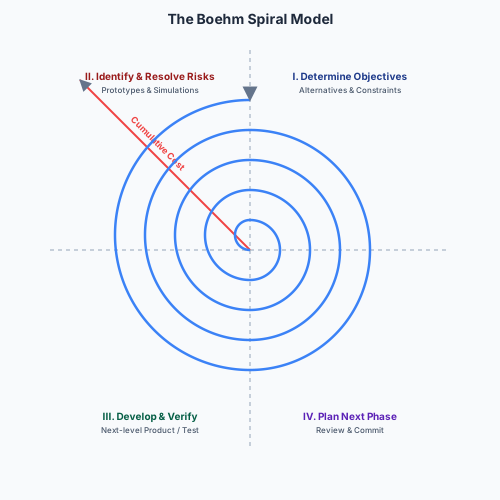
      Barry Boehm (1986) proposed an early fix for Waterfall’s rigidity. The Spiral Model is risk-driven: instead of doing everything once in a single pass, development happens in a series of loops (spirals), each incorporating risk evaluation and prototyping before committing to full development.

      The four quadrants of each loop:

      1. Objective Setting — define the objectives, constraints, and alternatives for this iteration.
      2. Risk Assessment and Reduction — identify the biggest remaining risks. Build prototypes, run simulations, gather data. Do NOT commit resources to full development until the key risks for this iteration are understood and mitigated.
      3. Development and Test — design, code, unit test, and verify. The nature of this work depends on the iteration: early spirals may produce only a prototype or proof-of-concept; later spirals produce production code.
      4. Planning the Next Phase — review the results with stakeholders. Commit to the next iteration (or decide to stop). Plan what the next spiral will address.

      Distance from the centre of the spiral represents cumulative cost expended. Early loops are cheap (prototypes); later loops are expensive (production code). This visual mapping makes explicit the relationship between investment and risk reduction: you spend a little to reduce risk, then you spend more to build.

      When to Use Waterfall vs Spiral

      ScenarioRecommended processReasoning
      Flight control softwareWaterfall (or heavily gated Spiral)Requirements are stable and well-understood (physics of flight); the cost of a late-discovered defect is catastrophic (loss of life, cf. 737 MAX); extensive upfront verification and certification is mandated by law
      A lecture-notes sharing app for studentsAgile / SpiralRequirements are unstable and best discovered by shipping to real students and iterating; the cost of a bug is low (inconvenience, not danger)
      A new government tax-calculation systemSpiral with formal checkpointsRequirements (tax law) change annually by legislation, so Waterfall’s frozen spec is impossible; but the financial and legal stakes demand formal sign-off gates between spirals

      Expected Learning

      • Define a software process and list its four fundamental activities.
      • Describe the five Waterfall phases and explain why the model fails for most software projects, using the time-gap argument.
      • Describe the four Spiral quadrants and explain how risk-driven iteration addresses Waterfall’s rigidity.
      • For a given scenario, recommend an appropriate process (Waterfall, Spiral, or Agile) and justify the choice with reference to the specific risks and constraints in the scenario.

      Past Paper Questions

      Example Sheet 1, Question 5 asks you to choose an appropriate process for two contrasting scenarios (flight-control software vs a lecture-notes app) and to explain how a Sprint reduces the Translation Gap. You must be able to justify process choices with specific, scenario-relevant arguments — not generic textbook descriptions.

    • Iterative, Incremental, and Agile Development

      Iterative vs Incremental

      These two terms are often confused, but they describe different strategies for managing development:

      • Iterative: build a rough version of the whole system, then refine it over multiple passes. Like drafting an essay — you write a rough draft, then revise and polish.
      • Incremental: build the system piece by piece, fully finishing one piece before starting the next. Like building with Lego — you complete each module before attaching the next.

      Modern processes combine both: building incrementally (feature by feature, delivering a working subset each Sprint) and iteratively (improving each feature over time as feedback arrives).

      The Agile Revolution

      In February 2001, 17 pioneers representing lightweight methodologies (XP, Scrum, DSDM, Crystal, FDD) met at a ski resort in Snowbird, Utah. They produced one of the most influential single-page documents in software history.

      The Agile Manifesto

      We are uncovering better ways of developing software by doing it and helping others do it. Through this work we have come to value:

      1. Individuals and interactions over processes and tools.
      2. Working software over comprehensive documentation.
      3. Customer collaboration over contract negotiation.
      4. Responding to change over following a plan.

      The framing is critical. The manifesto does not say processes and tools are worthless — it says that when they conflict, the item on the left takes priority.

      ValueMeaning
      Individuals & interactionsProcess should serve the team, not constrain it. A fool with a tool is still a fool; a brilliant team with a whiteboard can produce better software than a dysfunctional team with the most expensive toolchain.
      Working softwareThe primary measure of progress. A perfect specification document with zero lines of working code has delivered zero value. Show working software every ~2 weeks and adapt.
      Customer collaborationThe client is part of the team, not an adversary to be managed via contract. It is cheaper and faster to course-correct after a 2-week Sprint than after a 2-year Waterfall phase.
      Responding to changeA plan is a snapshot of what you knew yesterday. If the market has moved or the customer has learned, clinging to the plan is not discipline — it is waste. Architecture must stay modular so change is cheap.

      What Agile Is Not

      Agile is frequently misrepresented:

      • Agile does not mean zero documentation. It means just enough documentation for the task at hand, prioritising working code over tomes that go out of date the moment they are published.
      • Agile does not mean zero planning. Agile teams plan more frequently than Waterfall teams — they just plan in smaller, tighter loops (Sprint Planning every 2 weeks, daily sync) rather than one massive upfront plan.
      • Agile does not mean chaos. It requires immense discipline: rigorous testing (often TDD), continuous integration, relentless refactoring, and a commitment to transparency and inspection.

      Extreme Programming (XP)

      Kent Beck developed XP in the 1990s. The philosophy: take recognised good practices and turn them up to “extreme” levels. XP is focused on technical execution — unlike Scrum, which is a management framework.

      Key XP practices:

      • Pair Programming: two developers, one keyboard. The driver types; the navigator reviews line by line, spots edge cases, and thinks strategically. Pairs switch roles frequently. Benefits: continuous real-time code review, knowledge sharing, fewer defects. Cost: roughly 15% more person-hours but measurably fewer bugs — typically a net saving when maintenance is accounted for.
      • Test-Driven Development (TDD): write the test before the code. Red-Green-Refactor. Covered in depth in the testing notes.
      • Continuous Integration: merge to main multiple times a day. Every merge triggers a full automated build and test suite. The team never has a “broken” main branch for more than a few minutes.
      • Simple Design: do the simplest thing that could possibly work. YAGNI (You Ain’t Gonna Need It). Resist the temptation to build a hyper-scalable distributed architecture for a product with zero users.
      • Refactoring: continuously restructure code to keep it clean, simple, and expressive — enabled by the comprehensive test suite.

      Few companies practise pure XP today, but its technical practices (TDD, CI, pair programming, refactoring) are universally recognised and widely adopted in various combinations.

      Premature Optimisation and YAGNI

      Donald Knuth’s famous observation: “Premature optimisation is the root of all evil” — in programming, at least.

      The engineering rule: get correctness first, optimise only when a performance bottleneck is demonstrated by measurement. Guessing where the bottleneck is almost always wrong. Profiling a running system tells you where time is actually spent, and it is rarely where you assumed.

      YAGNI (You Ain’t Gonna Need It) is the Agile corollary: only build what is necessary for the current requirement. Adding a caching layer, a message queue, or a microservice architecture “in case we need it later” adds complexity, maintenance burden, and potential bugs for a use case that may never materialise. When you do need it later, you will know exactly what requirements it must satisfy, and you can build it properly.

      Expected Learning

      • Distinguish iterative from incremental development, and explain how modern processes combine both.
      • State the four values of the Agile Manifesto and explain the priority relationship (“over,” not “instead of”).
      • Describe at least three XP practices and explain how each addresses a specific software-engineering risk.
      • Explain YAGNI and premature optimisation, and give examples of what each guards against.
      • Correct common misconceptions about Agile (no documentation, no planning, chaos).

      Past Paper Questions

      Example Sheet 1, Question 8 directly asks you to apply the Agile Manifesto’s values to a scenario involving a government contract with a fixed-price, fully-specified 500-page document — testing whether you understand that “customer collaboration over contract negotiation” is in direct tension with that model, and how prototyping (Spiral-style) might reconcile both.

    • The Scrum Framework, Kanban, and Scaling Agile

      Scrum: The Dominant Agile Framework

      Scrum is a management framework, not a technical one. Unlike XP (which tells you how to write code), Scrum tells you how to organise the work. It is the most widely adopted Agile framework today.

      Scrum is founded on empiricism: knowledge comes from experience, and decisions are made based on what is actually observed — not what was planned six months ago.

      The Three Pillars

      PillarMeaning
      TransparencyThe process, the work, and the blockers must be visible to everyone involved. Hidden problems cannot be solved.
      InspectionArtifacts (Product Backlog, Sprint Backlog, Increment) must be frequently inspected to detect undesirable divergence from the goal.
      AdaptationIf inspection reveals that a process or product is deviating outside acceptable limits, it must be adjusted as soon as possible — not deferred to the next quarterly review.

      Scrum Artifacts

      • Product Backlog: the master, ever-evolving to-do list. Replaces the 500-page Waterfall spec. Items near the top are small, highly detailed, and ready for Sprint selection. Items near the bottom are large, vague ideas that will be refined later. The Product Owner is the sole owner.
      • User Story format: a lightweight way to express a backlog item. Template: “As a [user/persona], I want [action/feature], so that [value/reason].” Example: “As a student, I want to filter my timetable by term, so that I only see current lectures.”
      • Acceptance Criteria: specific, testable conditions that must be met for the story to be considered Done. They define the boundaries of the story’s scope.
      • Definition of Done (DoD): a universal team checklist, shared across all stories. Typical items: code reviewed by at least one peer, all automated tests pass, documentation updated, deployed to a staging environment and smoke-tested. If a story does not meet the DoD, it is not done — no exceptions, no “mostly done,” no “done except for testing.”
      • Sprint Backlog: the set of Product Backlog items selected for this Sprint, plus the team’s plan for delivering them.
      • Increment: the sum of all completed Product Backlog items during a Sprint. It must be potentially releasable — meaning it meets the DoD and could, if the Product Owner decides, be shipped to real users at the end of the Sprint.

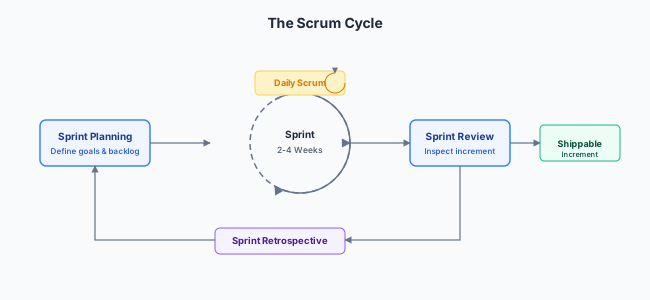
      Scrum Events (Ceremonies)

      Scrum cycle: Sprint Planning leads to Daily Scrum within a Sprint, ending with Sprint Review then Sprint Retrospective, before the next Sprint Planning
      EventDurationPurpose
      SprintFixed timebox, usually 2 weeksProduce a Done, usable, potentially releasable Increment. During the Sprint, no changes are made that would endanger the Sprint Goal; urgent new work goes into the next Sprint’s backlog.
      Sprint PlanningMax 8 hours for a 1-month SprintDefines the Sprint Goal, selects backlog items, and decomposes them into technical tasks the Developers commit to.
      Daily Scrum (Standup)15 minutes, time-boxedDevelopers synchronise: What did I do yesterday? What will I do today? Any blockers? It is not a status report for management — it is a developer coordination meeting.
      Sprint ReviewMax 4 hoursAt Sprint end, the team presents the Increment to stakeholders. A working session — not a formal slide-deck presentation. Feedback updates the Product Backlog for future Sprints.
      Sprint RetrospectiveMax 3 hoursAfter the Review, before the next Planning. The team inspects its own process: what went well, what went wrong, what should we change? Produces at least one concrete improvement action.

      Scrum Roles

      RoleResponsibility
      Scrum MasterServant-leader. Facilitates Scrum events, removes blockers (impediments), protects the team from external interruptions and scope injection during a Sprint. Does not assign tasks or dictate technical decisions. Coaches the team and the organisation in Scrum.
      Product Owner (PO)Represents the business and the customer. Sole owner of the Product Backlog — determines priority by business value. The single person the Developers go to for requirements clarification.
      DevelopersCross-functional, self-organising. Nobody — not the Scrum Master, not the PO — tells them how to turn backlog items into a Done Increment. They own the “how.”

      Estimation: Story Points

      Humans are terrible at estimating absolute time (“this will take 3 days”) but much better at relative sizing (“this story is about twice as complex as that one”).

      Story Points are an abstract measure of complexity, effort, and risk — not time. Common scales: Fibonacci (1, 2, 3, 5, 8, 13) or T-shirt sizes (S, M, L, XL).

      Planning Poker: the team votes simultaneously using numbered cards. Large discrepancies (e.g. Alice votes 2, Bob votes 8) trigger a brief discussion: Bob explains what complexity Alice may have missed, or Alice explains a simpler approach Bob hadn’t considered. The team re-votes. This surfaces hidden complexity without anchoring on the first number spoken.

      ”Scrum-but”: Fake Agile

      “We do Scrum, but our Sprints are 6 weeks.” “Management injects urgent tasks into the Sprint at will.” “We skip Retrospectives because we are too busy.” The result is Waterfall disguised with Agile vocabulary — a team that has adopted the terminology without the discipline, leading to burnout and failed projects. The Retrospective is often the first ceremony abandoned under pressure, but it is arguably the most important: it is the mechanism by which the process itself improves.

      Kanban

      Kanban originates from the Toyota Production System (lean manufacturing). It visualises work on a board with columns: To Do, In Progress, In Review, Done. Unlike Scrum, there are no time-boxed Sprints — items are pulled continuously as capacity frees up.

      WIP (Work-In-Progress) Limits: each column has a strict limit (e.g. “at most 3 items in ‘In Progress’ at once”). If the limit is reached, no one may pull new work — they must instead help clear the column’s bottleneck. This optimises for flow (throughput) rather than batching features into Sprints.

      When to use Kanban over Scrum: operations and maintenance teams that handle a continuous stream of incoming tickets, where the work arrives unpredictably and varies wildly in size — triaging security alerts, responding to customer-reported bugs, or maintaining a legacy system with no new feature development.

      Scaling Agile

      Scrum works for a single team of 5–9 people. To coordinate work across tens or hundreds of teams:

      • SAFe (Scaled Agile Framework): highly structured, hierarchical. Popular in large enterprises and government. Critics call it “Waterfall in Agile disguise” because of its top-down planning layers.
      • LeSS (Large-Scale Scrum): keeps Scrum principles while scaling to multiple teams sharing a single Product Backlog and one Product Owner.
      • Spotify Model: Guilds (communities of interest across Squads), Tribes (collections of Squads in a business area), Squads (autonomous, cross-functional mini-startups). Spotify themselves no longer strictly follow this model — it evolved and they evolved with it, which is itself a lesson in process adaptation.

      Expected Learning

      • Name the three pillars of Scrum and explain how each enables empiricism.
      • List the three Scrum artifacts and describe their contents and purpose.
      • Name the five Scrum events with their maximum durations and purposes.
      • Distinguish the three Scrum roles.
      • Explain what Story Points measure and describe how Planning Poker works.
      • Contrast Kanban with Scrum in terms of Sprints, WIP limits, and appropriate use cases.
      • Recognise “Scrum-but” anti-patterns and explain why they undermine the framework.
      • Name at least one scaling framework and describe the coordination problem it addresses.

      Past Paper Questions

      Example Sheet 1, Question 7 tests your ability to identify which Scrum principles are violated by a dysfunctional team (standups lasting 2 hours, no working software at Sprint end) and to suggest how the Retrospective — the specific Scrum ceremony — could be used to fix these problems. Example Sheet 1, Question 8 tests the “customer collaboration over contract negotiation” value in the context of a government project.

  • Quality Assurance & Reliable Delivery

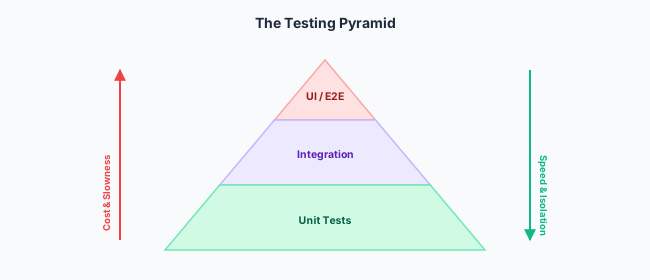
    Version control (centralised vs distributed, Git, branching strategies, pull requests), the testing pyramid (unit, integration, E2E), mocking vs stubbing, code coverage vs correctness, mutation testing, TDD, CI/CD/CDP pipelines, deployment strategies (Blue-Green, Canary, Feature Flags), SLOs and error budgets, cloud service models (IaaS/PaaS/SaaS), containers vs VMs, Kubernetes, and observability

    • Version Control and Git

      Why Version Control Exists

      Agile teams move fast. Without coordination, two developers editing the same file will inevitably overwrite each other’s changes. A Version Control System (VCS) solves this by providing:

      • A single source of truth — the canonical, authoritative version of the codebase.
      • History — every change ever made, by whom, and why (commit messages). Enables auditing, compliance, rollback, and blame-free investigation of production incidents.
      • Branching and merging — developers can work on separate features in parallel and integrate when ready.
      • Collaboration — a VCS is the mechanism by which a team agrees on what “the current state of the code” actually is.

      Centralised vs Distributed VCS

      Centralised (SVN, CVS)Distributed (Git, Mercurial)
      ModelSingle central server holds the entire project history and the canonical current versionEvery developer has a full local copy of the entire history
      ProsSimple mental model; easy access control; single source of truth by constructionFast (most operations are local); works offline; no single point of failure — if the server dies, any developer’s clone has the full history
      ConsSingle point of failure (server goes down, team stops working); every operation requires a network round-trip; history is only on the serverSteeper learning curve; local clones can diverge significantly; the “source of truth” is a social convention (the blessed remote), not enforced by the tool

      Git has won the VCS war decisively. Its design — inspired by Linus Torvalds’s need to coordinate thousands of Linux kernel contributors without a single central authority — proved to be the right architecture for the open-source and Agile paradigms.

      Git Fundamentals

      • Commits: a snapshot of the entire project at a point in time. Each commit is identified by a unique SHA-1 hash (e.g. a1b2c3d...), which is a content-addressable cryptographic fingerprint of the commit and its entire ancestry. The hash depends on the contents of the files, the commit message, the author, and the parent commit(s) — so any tampering with history is immediately detectable.
      • Staging area (index): a “loading zone” where you assemble exactly which changes go into the next commit. git add moves changes into the staging area; git commit snapshots the staging area.
      • Safety: once committed, data is nearly impossible to lose accidentally. You can experiment locally — delete files, rewrite entire modules, break everything — and git checkout back to any known-good commit.

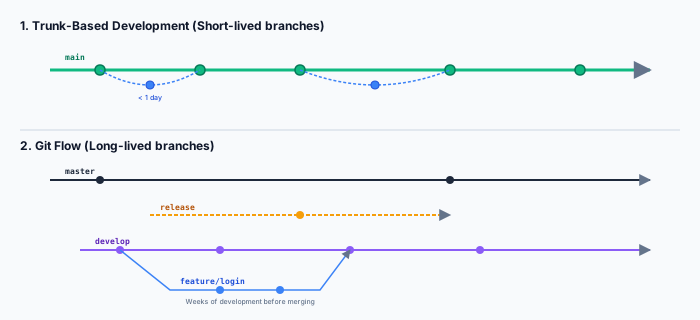
      Branching and Merging

      A branch is a lightweight, movable pointer to a commit. The default branch is usually called main (or master). Branches enable parallel work streams.

      A merge integrates the changes from one branch into another. Git performs a three-way merge using the two branch tips and their most recent common ancestor. If both branches modified the same region of the same file, Git cannot determine which version is correct — this is a merge conflict. Git marks the conflicted region in the file and pauses for a human to resolve it.

      Trunk-based development: short-lived feature branches branching off main and merging back within a day. Contrasted with Git Flow showing develop/release/hotfix long-lived branches

      Branching Strategies

      Git FlowTrunk-Based Development
      StyleMultiple long-lived branches: main (production), develop (integration), release/*, hotfix/*, and per-feature branchesEveryone works directly on main (trunk). Features live on very short-lived branches (< 1 day).
      Good forTraditional versioned software releases (v1.0, v2.0) with scheduled release cycles, where release/2.1 freezes while the team prepares the launchAgile/CI-heavy teams shipping continuously; any commit to main is deployable
      Pain point”Merge Hell” — long-lived branches that diverge significantly from develop and produce enormous, painful merge conflicts when finally integratedRequires excellent automated test coverage and a fast CI pipeline to keep main stable; a broken commit on main blocks the entire team

      Pull Requests and Code Review

      A Pull Request (PR) is the mechanism for contributing code to a shared branch. The workflow:

      1. Developer creates a feature branch, makes changes, commits, and pushes it to the remote.
      2. Developer opens a PR: a request to merge their branch into the target branch (usually main).
      3. Code review: at least one other developer reviews the changes — line by line — looking for bugs, design issues, style violations, and security concerns. The reviewer may request changes before approving.
      4. When the review passes and all automated checks (build, tests, linting) are green, the PR is merged.

      Code review is not just about catching bugs (though it catches many). It is also about knowledge sharing — ensuring that at least two people understand every change, mitigating the “bus factor” (if the sole author is hit by a bus, the knowledge is lost). It enforces style consistency without a central Design Authority dictating from on high.

      Bug Lifecycle and Traceability

      A bug’s journey through an issue tracker:

      NewTriaged (confirmed and prioritised)In ProgressResolved (code written, tests pass)Verified (QA/reporter confirms fix)Closed\text{New} \to \text{Triaged (confirmed and prioritised)} \to \text{In Progress} \to \text{Resolved (code written, tests pass)} \to \text{Verified (QA/reporter confirms fix)} \to \text{Closed}

      Traceability is maintained by linking commits to issue IDs: a commit message containing Fixes #42 automatically links the code change to the bug report, and the bug report links back to the commit. This connects the Why (the bug report with reproduction steps and priority) to the How (the actual diff that resolves it).

      Coding Standards and Linters

      Since ~80% of a system’s lifetime cost is maintenance and code is read far more than it is written, uniform code style is an economic necessity. Linters (e.g. ESLint for JavaScript, Pylint for Python, Clippy for Rust) enforce rules automatically: no disputed style in code review (the linter is the authority), reduced cognitive load when switching between files, and safer automated refactoring because the tool can rely on consistent patterns.

      Expected Learning

      • Contrast centralised and distributed VCS, naming a key advantage of each.
      • Explain the Git commit model (snapshot, SHA-1 hash, staging area) and why it enables safe experimentation.
      • Describe the PR/code-review workflow and its benefits beyond bug detection.
      • Compare Git Flow and Trunk-Based Development, and recommend one for a given scenario.
      • Trace the bug lifecycle and explain the value of linking commits to issue-tracker IDs.

      Past Paper Questions

      Example Sheet 2, Question 1(a-c) tests your understanding of Git merges — what creates a conflict vs what auto-merges cleanly — and asks you to recommend a branching strategy for a team of 30 developers under tight deadlines. Example Sheet 2, Question 1(b) contrasts centralised and distributed VCS behaviour when a conflict does occur.

    • Testing: The Pyramid, Mocking, Coverage, Mutation, and TDD

      Why Test?

      Testing is not a clerical exercise or a box-ticking activity. It serves four distinct purposes:

      1. Confidence: it provides evidence that the system behaves correctly, and that recent changes have not broken existing functionality (regression).
      2. Documentation: test cases are executable specifications of how a function or module is meant to behave. They describe the contract more precisely than any prose comment.
      3. Enabling refactoring: you cannot safely restructure code without a suite of tests that proves external behaviour was preserved. Refactoring without tests is just breaking things with confidence.
      4. Improving design: code that is difficult to test often reveals poor architecture — tight coupling, hidden dependencies, global mutable state. Writing tests forces modular, composable design.

      Manual vs Automated Testing

      Manual TestingAutomated Testing
      ProsExploratory; catches visual and UX glitches (“this button is misaligned on mobile”); applies human intuition to find edge cases no script would think ofFast; repeatable; runs on every commit without human intervention; scales to millions of test cases; produces reproducible results
      ConsSlow; unrepeatable (humans miss things differently each time); does not scale; expensive in person-hoursHigh initial setup cost; tests themselves need maintenance as the system evolves; cannot judge whether a UI is “ugly” or “confusing”

      The goal is not to eliminate manual testing — it is to automate everything that can be automated, freeing human testers to do the creative, exploratory work that only humans can do.

      The Testing Pyramid

      The testing pyramid: broad base of many fast unit tests, middle layer of fewer integration tests, narrow top of few slow E2E tests
      LayerScopeSpeedNumberExample
      Unit Tests (base)Test a single function or class in complete isolation. All external dependencies (database, network, file system) are mocked.< 10 ms per testMany (thousands)assert sum(2, 3) == 5
      Integration Tests (middle)Test the boundary between two or more modules, with real implementations of some dependencies (a test database, a local HTTP server running on a random port).100–1000 msSome (hundreds)Seeds a PostgreSQL container, calls createUser(), then queries the DB directly to verify the row exists
      End-to-End (E2E) Tests (top)Test the complete system from the user’s perspective — a browser navigating pages, a mobile app making real API calls.Seconds to minutesFew (tens)Selenium script: open Chrome, log in as “Alice,” click “Checkout,” verify the confirmation page appears

      As you move up the pyramid: cost increases, speed decreases, isolation decreases (a failing E2E test tells you something is wrong but not where — it could be the front end, the API, the database, the network, or any interaction between them), and confidence that the system works as a whole increases.

      Mocking and Stubbing

      Unit tests must be fast and isolated. If your function calls an external payment API, you cannot call the real API in a unit test — it would be slow, costly (transaction fees), non-deterministic (network failures), and potentially dangerous (real money moving).

      Instead, you replace the real dependency with a test double:

      TypeBehaviourUsed to verify…
      StubReturns a hardcoded, canned response regardless of input. paymentGateway.charge() always returns {"status": "success"}.That the code under test handles the response correctly — it lets the test run without a real dependency.
      MockRecords every call — how many times, with what arguments. After the test, you assert that the mock was called exactly once with the expected arguments.That the code under test used the dependency correctly — not just that it handled the response, but that it issued the right request at the right time.

      Exam distinction: a Stub answers the question “did the code work given this response?” A Mock answers the question “did the code even call the right thing the right number of times?” Getting these confused is a classic exam trap.

      Code Coverage ≠ Correctness

      Code coverage measures the percentage of source lines (or branches, or paths) that are executed by the test suite. It is a useful metric for identifying dead code and completely untested regions.

      It is not a measure of correctness.

      The classic trap:

      def average(scores):
          return sum(scores) / len(scores)
      
      def test_average():
          assert average([10, 20]) == 15

      This single test achieves 100% line coverage — every line of average is executed. But average([]) crashes with a ZeroDivisionError. Coverage tracked which lines ran; it did not track which edge cases were verified.

      High coverage is a necessary condition for a good test suite, but it is never sufficient. You can have 100% coverage and still have bugs; you cannot have 0% coverage and have a reliable system. The metric is a floor, not a ceiling.

      Mutation Testing: Testing Your Tests

      If high coverage only proves code was executed, not verified, how do you measure test quality? Mutation testing automatically injects small, artificial bugs (“mutants”) into the source code and checks whether the existing test suite catches them.

      Examples of mutations:

      • Change > to >= (off-by-one sensitivity).
      • Change + to - (arithmetic sensitivity).
      • Delete a method call entirely (side-effect sensitivity).
      • Swap true and false in a conditional.

      After injection, the test suite is re-run:

      • If the tests fail, the mutant is killed — the tests were strong enough to detect the injected bug. Good.
      • If the tests still pass, the mutant survived — the tests executed the mutated line but did not have an assertion that would detect the change. Bad.

      A high survival rate indicates that the test suite is executing code without actually verifying its behaviour — coverage without meaningful assertion. Mutation testing is computationally expensive because the entire test suite must be re-run against every mutant, so it is typically run periodically rather than on every commit for large codebases.

      Test-Driven Development (TDD): Red-Green-Refactor

      TDD inverts the traditional sequence. Instead of writing code then testing it:

      1. Red: write a failing test for the new behaviour. Run it; it fails because the code does not exist yet. This proves the test is actually testing something (a test that never fails is a test that never catches bugs).
      2. Green: write the minimum code to make the test pass. No more. It may be ugly, inefficient, or incomplete — the goal is to satisfy the test’s contract as quickly as possible.
      3. Refactor: clean up the code — extract methods, rename variables, improve the algorithm — while keeping the tests green. The suite ensures that external behaviour is preserved during restructuring.

      Result: 100% test coverage by construction (every line of production code was written to satisfy a failing test), and the code is inherently designed for testability because the tests existed first.

      Expected Learning

      • Describe the Testing Pyramid and explain why the layers are arranged as they are (cost, speed, isolation, confidence).
      • Distinguish a Stub from a Mock, and explain when each is appropriate.
      • Explain why 100% code coverage does not guarantee correctness, with a concrete example.
      • Define mutation testing, and distinguish a killed mutant from a survived mutant.
      • Describe the Red-Green-Refactor cycle and explain what each phase achieves.
      • Explain why testing enables safe refactoring.

      Past Paper Questions

      Example Sheet 2, Question 2 directly tests mutation testing: why high coverage can coexist with bugs, what killed vs survived mutants mean, and why mutation testing is too expensive for every CI build. Example Sheet 2, Question 3 tests mocking/stubbing with a Stripe API scenario and explores how discrete state both helps and harms testing.

    • Continuous Integration, Delivery, and Deployment Pipelines

      The Problem: Integration Hell

      In Waterfall, integration happens once — at the end, after all components are built. This is when you discover that Alice’s module expects dates in DD/MM/YYYY and Bob’s module sends MM-DD-YYYY. The project is now late, over budget, and the fix requires rework across multiple components.

      Continuous Integration (CI) is the solution: integrate small pieces frequently so that integration bugs are caught while they are still small and cheap to fix.

      The CI/CD/CDP Spectrum

      TermMeaning
      Continuous Integration (CI)Developers merge to the main branch at least once per day. Every merge triggers an automated build and a full test suite. If anything fails, the team is notified within minutes and fixing the broken build becomes the top priority. This eliminates the “Merge Hell” of long-lived branches.
      Continuous Delivery (CD)Every version of the code that passes the pipeline is in a state that could be deployed to production at any moment. Automated tests pass → auto-deploy to a staging environment. A human decides when to actually push to production — this is a business decision (“is the marketing campaign ready? are the release notes written?”).
      Continuous Deployment (CDP)Fully automated path from code commit to live production. No human gate. All tests pass → auto-deployed to real users. Relies on automated monitoring and rollback: if error rates spike after a deployment, the system automatically reverts to the previous version.

      The progression is: CI (integrate frequently) → CD (always be ready to ship) → CDP (ship automatically on every passing commit). Most companies practise CI and CD; far fewer practise full CDP — usually those with extremely high deployment maturity (Netflix, Amazon, Google).

      Anatomy of a CI/CD Pipeline

      CI/CD pipeline: Commit → Build → Unit Tests → Lint & Security Scan → Integration Tests → Deploy Staging → Deploy Production, with Quality Gates at every step
      1. Commit — a developer pushes code to the shared repository.
      2. Build — the pipeline compiles/assembles the code, producing a versioned artifact (e.g. a Docker image tagged with the commit SHA). This artifact is used identically across all subsequent environments — ensuring that what you tested in Staging is exactly what reaches Production.
      3. Unit Tests — fast, isolated tests run first. If these fail, there is no point running the slower tests.
      4. Lint and Security Scan — static analysis for style violations, known vulnerabilities in dependencies (Dependabot/Snyk check against CVE databases), and common security anti-patterns.
      5. Integration Tests — spin up real infrastructure (test database, message queue) and verify that modules work together.
      6. Deploy to Staging — the artifact is deployed to a Staging environment, an exact replica of Production (same configuration, same infrastructure, but with test data).
      7. Smoke Tests / E2E Tests — a fast subset of E2E tests that prove the critical paths work (login, checkout, search).
      8. Deploy to Production — in CD, a human presses the button. In CDP, the pipeline does it automatically.

      Failing any step rejects the build. This is a Quality Gate: the artifact may not proceed to subsequent environments until all upstream checks pass.

      The Promotion Pipeline (Environments)

      Code moves through environments of increasing “production-likeness”:

      EnvironmentPurpose
      DevelopmentLocal developer machines. The “wild west” — anything goes, rapid iteration, frequent breakage.
      CI/TestClean, ephemeral environments spun up per pipeline run. Every test starts from a known state. Destroyed after the pipeline finishes.
      Staging / UAT (User Acceptance Testing)Identical to Production in every way except it does not serve real users. The “final dress rehearsal.” Product owners and QA test here.
      ProductionReal users, real data, real money. Zero tolerance for avoidable breakage.

      Google’s “xFood” Progressive Internal Testing

      Before any new feature reaches real users at Google, it goes through progressively larger internal audiences:

      • Fishfood: 20–30 developers on the immediate team. Unstable, fast iteration. The build may be broken for hours.
      • Teamfood: 50–100 people in the wider department. More stable, fewer breakages. Catches “annoyance” bugs the developers are too close to notice.
      • Dogfood: all Google employees (thousands of people). The Release Candidate closest to what external users will see. By this stage, UX friction and reliability issues that passed earlier stages are caught by a diverse, non-developer audience.

      The insight: expand the blast radius of a bug in controlled, concentric circles, with automatic rollback at any stage, rather than letting the first real user discover it in production.

      Expected Learning

      • Define CI, CD, and CDP, and explain the relationships and differences between them.
      • Trace a commit through a CI/CD pipeline, naming each stage and its purpose.
      • Explain the role of Quality Gates and why failing a stage must reject the build.
      • Describe the promotion pipeline (Dev → CI → Staging → Prod) and why each environment differs.
      • Explain Google’s xFood strategy and what problem it solves.

      Past Paper Questions

      Scenarios involving testing strategies for a rapidly growing service (2025 Tripos Q5a) naturally lead into discussing CI/CD pipelines and how automated testing gates prevent regressions. Example Sheet 2, Question 4 asks about deployment strategies; you must know the CI/CD context those strategies operate within.

    • Deployment Strategies, SLOs, and DevOps

      Blue-Green Deployment

      Blue-Green deployment: load balancer switches all traffic from Blue (old) to Green (new) in a single operation. Instant rollback by switching back.

      Two identical, fully-provisioned environments run in parallel. At any moment, one serves 100% of production traffic. The other is idle or running tests.

      • Blue runs the current version, serving all users.
      • Green receives the new version. Engineers run final smoke tests against it.
      • The load balancer switches all traffic from Blue to Green in a single operation.

      Benefits: instant rollback — if the new version is broken, switch back to Blue. Zero downtime; no request is ever served by two different versions simultaneously.

      Drawback: requires double the infrastructure (two full environments), which is expensive for large systems. Not ideal for a high-risk change (e.g. a database migration) because 100% of users are immediately exposed to any defect.

      Canary Deployment

      Deploy the new version to a small subset of servers or users (e.g. 5%). Monitor error rates, latency, and business metrics. If the canary is healthy, progressively expand to 25%, 50%, 100%. If errors spike — auto-rollback to the previous version for all users on the old version.

      Better than Blue-Green for high-risk changes (database migrations, framework upgrades, algorithm changes) because the “blast radius” of an unforeseen issue is limited to the canary group. If 5% of users experience a crash, you have a problem — but 95% of users are unaffected while you diagnose.

      Exam trap: do not confuse Canary (technical health — error rate, latency) with A/B Testing (business/product value — does a red “Buy” button increase sales vs a blue control?). They are distinct concepts.

      Feature Flags (Toggles) and Progressive Delivery

      Deployment (moving code to production servers) is decoupled from Release (making the feature visible to users). New code sits behind an if statement controlled by a database flag:

      if (featureFlag.isEnabled("new_checkout_flow", user.id)) {
          newCheckout();
      } else {
          oldCheckout();
      }

      This enables:

      • Gradual rollout: turn on for developers → beta testers → 10% of users → everyone.
      • Emergency shutoff: flip the flag to OFF in the database. The feature vanishes instantly without a code rollback or redeployment.
      • Progressive Delivery: the combination of Feature Flags and Canary-style monitoring — deploy code, then release it incrementally while measuring health.

      SLOs, SLIs, and Error Budgets

      These concepts, formalised by Google’s SRE teams, govern the balance between shipping new features and maintaining reliability:

      TermDefinitionExample
      SLI (Service Level Indicator)The thing you measure. A specific, quantifiable metric.Request latency, error rate, uptime
      SLO (Service Level Objective)The target value for the SLI over a measurement window.”99.9% of requests complete within 200 ms over a rolling 30-day window”
      SLA (Service Level Agreement)A contractual promise to customers, with financial penalties for breach.”If uptime falls below 99.5% in a calendar month, customers receive a 10% credit”

      SLO > SLA. You set your internal SLO more strictly than your contractual SLA so that you have a buffer: the SLO alarm fires and the team fixes the issue before the SLA is breached and the company pays penalties.

      The Error Budget

      SLO and Error Budget: SLO bar showing the target reliability vs the error budget slice.

      Error Budget=100%SLO\text{Error Budget} = 100\% - \text{SLO}

      If your SLO is 99.9% uptime, your error budget is 0.1% — roughly 43 minutes of acceptable downtime per month.

      The error budget is a release throttle:

      • If the budget has remaining capacity, the team may ship risky features and experiments.
      • If the budget is exhausted (too many incidents this month), all feature releases freeze. The entire team redirects effort to reliability work until the error rate stabilises.

      This replaces the toxic dynamic of “Operations wants stability, Development wants velocity” with a single, shared, objective number. Both teams want the error budget to be just right — not zero (which would mean no innovation), not exceeded (which would mean unreliable service).

      What Is DevOps?

      Historically, Developers and Operations were siloed with opposing incentives:

      • Dev: rewarded for shipping features. More deployments = success.
      • Ops: rewarded for stability and uptime. Fewer deployments = fewer incidents.

      The result: Dev threw code “over the wall” to Ops, who then struggled to deploy and maintain code they did not write, while Ops’ resistance to change frustrated Dev. This was a structural conflict, not a personality clash.

      DevOps (Patrick Debois, 2009, first “DevOpsDays” conference in Ghent) is the cultural and technical movement to merge these teams: “You build it, you run it.” Whoever writes a feature is also responsible for its production stability, its monitoring dashboards, its on-call alerts, and its incident response. This aligns incentives naturally: if you get woken up at 3 a.m. by a bug in your own code, you write more reliable code.

      Expected Learning

      • Describe Blue-Green deployment and explain why instant full-traffic switch enables instant rollback.
      • Describe Canary deployment and explain why it is more appropriate than Blue-Green for a high-risk change.
      • Distinguish Canary deployment from A/B testing.
      • Explain how Feature Flags decouple deployment from release and enable Progressive Delivery.
      • Define SLI, SLO, and Error Budget, and explain how the error budget governs the release process.
      • Define DevOps and explain the structural conflict it resolves.
      • Explain why “you build it, you run it” aligns incentives.

      Past Paper Questions

      Example Sheet 2, Question 4 directly asks about Blue-Green vs Canary for a high-risk database migration, the role of Feature Flags in Progressive Delivery, and how the Error Budget limits deployment velocity. The SLO/SLI/error-budget concepts are examinable and may appear in a scenario-based Tripos question.

    • Cloud, Containers, and Observability

      On-Premises vs Cloud

      On-PremisesCloud
      Cost modelCapEx (Capital Expenditure): you buy servers, storage, networking hardware upfront. Depreciation over years.OpEx (Operational Expenditure): pay-as-you-go. You rent compute by the second, storage by the GB-month.
      ScalingManual: order hardware, wait weeks for delivery, rack it, provision it. You must size for peak load, leaving idle capacity most of the time.Elastic: auto-scaling from 1 to 10,000 servers in minutes, scaling back down when demand drops.
      ControlComplete: you own the physical machine, the hypervisor, the network topology.Variable: depends on the service model (see below).

      Cloud Service Models: IaaS, PaaS, SaaS

      ModelYou getYou manageExampleTrade-off
      IaaS (Infrastructure as a Service)Raw virtual machines, block storage, virtual networksOS, runtime, middleware, application, data — you patch the OS yourselfAWS EC2, Google Compute Engine, Azure VMsMaximum control; high management overhead
      PaaS (Platform as a Service)A managed runtime — upload your code, the provider handles OS, scaling, load balancingOnly application code and dataHeroku, AWS Elastic Beanstalk, Google App EngineFast time-to-market; vendor lock-in risk, less control over the runtime environment
      SaaS (Software as a Service)A fully functional application accessible over the webNothing — you are the end userGmail, Slack, SalesforceZero maintenance; zero control over features, data residency, or security posture

      Shared Responsibility Model

      The cloud provider is responsible for security OF the cloud: physical data centres, hardware, network infrastructure, and the hypervisor. The customer is responsible for security IN the cloud: their application code, data, OS-level patches (in IaaS), firewall rules, and access controls.

      Analogy: the landlord supplies a lock on the front door; you must remember to turn the key.

      Containers vs Virtual Machines

      The problem containers solve: “it works on my machine” (which has Python 3.11, a specific version of libssl, and a library compiled with a particular compiler flag).

      Virtual MachinesContainers (Docker)
      What runsEach VM runs a full Guest OS (kernel, init system, libraries) on top of a Hypervisor, which virtualises hardware.Each container shares the Host OS kernel via the Docker Engine. The container image packages only the application and its dependencies (libraries, config files).
      Boot timeMinutes (the guest OS must boot)Milliseconds (just start a process with an isolated namespace)
      Resource overheadHeavy: each VM consumes RAM and disk for its own OS. A typical server runs 10s of VMs.Light: ~1/10th the resource use of a VM. A typical server runs 100s of containers.
      IsolationStrong: a kernel exploit in one VM cannot reach another VM without also breaking the hypervisor.Weaker: containers are process-level isolation (namespaces, cgroups). A kernel exploit can compromise all containers on the host.

      Kubernetes (K8s)

      Docker runs a single container. Kubernetes manages fleets of containers across many machines. Originally built by Google from their internal Borg system.

      Core capabilities:

      • Self-healing: a container crashes → K8s restarts it automatically.
      • Auto-scaling: traffic spikes → K8s adds more container replicas; traffic drops → K8s removes them.
      • Load balancing: distributes incoming requests across all healthy containers.

      Architecture:

      • A Control Plane (API server, Scheduler, etcd database) manages the cluster.
      • Worker Nodes are the physical or virtual machines that actually run workloads.
      • Pods are the smallest deployable unit — one or more tightly-coupled containers sharing a network namespace.
      • A Cluster is a single logical computer made of many physical worker nodes.

      Observability

      “You cannot manage what you cannot measure.”

      PillarDescriptionExample
      MetricsQuantitative, aggregatable numbers: counters (total requests), gauges (current memory usage), histograms (request latency distribution).CPU at 78%, 5xx errors = 42/minute
      LogsQualitative, timestamped, textual records of discrete events.2025-06-01 14:03:22 ERROR PaymentGateway: Connection refused to stripe.com:443
      TracesA single request’s journey through a distributed system: enters via the load balancer → hits the API gateway → calls the user service → queries the database → returns a response. Every hop is recorded with timing.”Request a1b2c3 spent 12 ms in the API gateway, 300 ms in the user service (of which 280 ms was a DB query), total 320 ms”
      DashboardsReal-time visualisation of the above: Grafana, Datadog. Aggregated, queryable views of system health.A dashboard showing 95th-percentile latency over the past 24 hours, broken down by endpoint

      Monitoring vs Observability:

      • Monitoring tells you that something is wrong. It addresses known unknowns — you set up an alert for “CPU > 90%,” and when it fires, you know there is a load problem. But you do not know why.
      • Observability tells you why something is wrong. It addresses unknown unknowns — you can ask arbitrary new questions of the system’s telemetry data after an incident, even for failure modes you did not predict in advance. “Which specific user request caused the memory leak?” requires observability (traces + logs), not just monitoring (CPU gauge).

      Expected Learning

      • Contrast on-premises and cloud deployment models in terms of cost, scaling, and control.
      • Distinguish IaaS, PaaS, and SaaS with examples of each, and explain the shared responsibility model.
      • Compare containers and VMs: what they share, what they isolate, and their relative resource overhead.
      • Describe what Kubernetes does (self-healing, auto-scaling, load balancing) and name the key architectural components (Control Plane, Worker Node, Pod, Cluster).
      • Define the three pillars of observability (metrics, logs, traces) and distinguish monitoring from observability.

      Past Paper Questions

      Example Sheet 2, Question 4 tests deployment strategies (Blue-Green, Canary) which are implemented in cloud environments. Cloud service models and containerisation are foundational knowledge for any deployment or scaling discussion in a scenario-based Tripos question.

  • Software Evolution

    Lehman's Laws of software evolution, the four types of maintenance, legacy code and software archaeology, API design as a contract, Semantic Versioning, Postel's Law, Hyrum's Law, deprecation, refactoring and code smells, characterisation tests, the Strangler Fig pattern vs the Big Bang rewrite, site reliability engineering (monitoring vs observability, golden signals, chaos engineering), and software supply-chain security (SBOMs, CVEs, Left-Pad, Log4Shell)

    • Lehman's Laws and Legacy Code

      Lehman’s Laws of Software Evolution

      Software is never “finished.” The vast majority of its lifetime is spent in evolution — maintenance, adaptation, and extension. Meir Lehman formulated a set of empirical laws describing how real-world E-type (embedded in the real world) software systems evolve:

      Continuing Change

      A system must be continually adapted, or it becomes progressively less satisfactory.

      The environment around a software system changes continuously: tax regulations are amended, competitors add features that raise user expectations, security threats evolve, hardware architectures shift. A system frozen in place becomes less useful (and less secure) with every passing month, even if its own source code is untouched. The system’s fitness relative to its environment degrades.

      Increasing Complexity

      As a system evolves, its complexity increases — unless active work is done to maintain or reduce it.

      Every modification adds new code, new dependencies, new interactions. Without deliberate refactoring, the system’s architecture drifts: a clean modular design becomes a tangled web over a decade of patches and additions. Entropy increases by default; reducing it requires energy (engineer effort).

      Self-Regulation

      Global evolution processes are self-regulating, with statistically determinable trends and invariants.

      At the scale of an organisation or an industry, the rate of growth, the distribution of release sizes, and the rate of defect introduction follow predictable statistical patterns. Individual projects vary wildly, but the aggregate is stable.

      The Four Types of Maintenance (with Effort Share)

      This is a reprise from Lecture 1, now with typical percentages from empirical studies:

      TypeTypical shareDescription
      Perfective~50%Improving performance, maintainability, readability, or adding new features that users demand. The system is not broken — it needs to be better.
      Adaptive~25%Updating the system to work in a changed environment: new OS version, cloud migration, new tax-regulation API, TLS 1.3 compliance.
      Corrective~20%Fixing bugs discovered after deployment.
      Preventive~5%Finding and fixing latent problems before they become actual bugs — refactoring a fragile module before it causes an incident.

      The headline: most maintenance is perfective (keeping the system relevant), not corrective (fixing breakage). Software is maintained because the world changes, not because it was built incorrectly.

      Legacy Code

      Legacy code is code without tests, or code we are afraid to modify.

      The colloquial definition — “code inherited from someone else” — captures the surface, but the deeper definition is about testability and modifiability. A system written last month, with no tests, is legacy code. A system written in 1975, with a comprehensive test suite and clean architecture, is not.

      Legacy code is the foundation of most profitable businesses. The original authors may have long since retired; the language (COBOL, Fortran) may have few living experts; but the system processes billions of pounds of transactions daily and cannot simply be turned off.

      The COBOL Pandemic Crisis (2020)

      During the COVID-19 pandemic, unemployment systems in several US states (New Jersey, Kansas, others) crashed under unprecedented load. The systems were written in COBOL in the 1970s — a language almost no living programmer under 60 years old knows. State governors went on television to recruit retired COBOL programmers as volunteers.

      Lesson: legacy code is often the most business-critical code an organisation owns. It is also the least understood, the least tested, and the hardest to change — precisely the combination that produces catastrophes under stress.

      Software Archaeology

      When you inherit a legacy system with no documentation, no tests, and no surviving original authors, you must reconstruct understanding from the only source that is always available: the source code itself.

      Tools and techniques:

      Tool / TechniquePurpose
      git blameSee who last modified each line, and when. Trace back through the change history to understand the evolution of a function.
      git log -S "functionName"Search the entire commit history for when a specific string or function was added, modified, or removed. Recover intent from the commit message that introduced it.
      Linked issue-tracker IDsCommit messages like Fixes #123 or PROJ-456 link code changes to business context — the bug report or feature request that motivated the change.
      Characterisation (Golden Master) TestsIf you have no tests and no specification, record the system’s current output for a given input. Assert that output stays identical after your changes. You are testing for consistency, not correctness.

      Key insight: software archaeology is about recovering intent, not just behaviour. Why was this sleep(500) statement added? What bug did it work around? Without understanding intent, you risk removing a hack that prevented a catastrophic failure under a specific, rare condition — which may re-surface months later in production.

      The High Cost of Reading

      Engineers spend far more time reading code than writing it (estimates range from 10:1 to 20:1). Understanding the side effects of a 500-line function, building a mental map of data flow you did not design, and tracing an edge-case bug across six modules written by four different teams — this is the expensive part of maintenance. Every minute invested in readability and clear structure during initial development returns itself many times over during the system’s decades of maintenance.

      Beware tribal knowledge: the implicit understanding that lives in engineers’ heads but is never captured in the system. When those engineers leave, the knowledge evaporates. Comments are cheap; the cost of losing critical undocumented context can be enormous.

      Expected Learning

      • State at least two of Lehman’s Laws and explain their implications for long-lived systems.
      • List the four types of maintenance with their typical effort shares, and classify a given maintenance task (e.g. migrating from on-premises to cloud → Adaptive).
      • Define legacy code in terms of testability and confidence, and explain why it is economically significant.
      • Describe the pandemic COBOL case study and the lesson it teaches about legacy systems.
      • Describe software archaeology — its tools, techniques, and goal of recovering intent.
      • Explain why the high cost of reading code makes readability an economic, not aesthetic, concern.

      Past Paper Questions

      Example Sheet 2, Question 5 tests the four maintenance types (classify given tasks) and asks you to explain why freezing a successful 20-year-old system is impossible, using Lehman’s Laws. Example Sheet 2, Question 8(a) directly tests software archaeology techniques.

    • API Design and Semantic Versioning

      APIs as Promises

      An API is a contract — a public, documented promise that, given input XX, the system will return output YY. Every caller that integrates with your API builds on that promise. Changing the promise after the fact breaks every caller, potentially causing cascading failures across an ecosystem of dependent systems.

      This is why API design requires far more care than internal implementation design. An internal function can be refactored with impunity because you control all its callers. A public API function cannot — once it is published and used by others, changing it is an ecosystem-breaking event.

      Semantic Versioning (SemVer): MAJOR.MINOR.PATCH

      SemVer is a specification for signalling the nature of changes through version numbers, so that consumers can assess the risk of upgrading:

      MAJOR.MINOR.PATCH\text{MAJOR}.\text{MINOR}.\text{PATCH}

      BumpWhenExample
      MAJORYou made an incompatible, breaking API change. Existing callers will need to modify their code to upgrade.Renaming a public function; removing a field; changing a parameter type; adding a required parameter. 2.4.1 → 3.0.0
      MINORYou added new, backwards-compatible functionality. Existing callers can upgrade without changing their code.Adding a new optional parameter with a default value; adding a new endpoint. 2.4.1 → 2.5.0
      PATCHYou made backwards-compatible bug fixes. No new functionality; no breaking changes.Fixing a calculation error; patching a security vulnerability without changing the API surface. 2.4.1 → 2.4.2

      Rule of thumb: when in doubt, bump MAJOR. Under-versioning (labelling a breaking change as MINOR) is far more damaging than over-versioning (labelling a compatible change as MAJOR). The former breaks consumers unexpectedly; the latter makes consumers unnecessarily cautious but does no harm.

      What Counts as Breaking?

      Anything that would cause an existing, correctly-written caller to fail:

      • Structural: removing or renaming a function, class, field, or endpoint. Changing a parameter’s type. Adding a required parameter (because existing callers do not provide it).
      • Behavioural: changing a default value. Changing the order of returned results. Throwing a new checked exception. Changing the format of a response field.
      • Semantic: changing the meaning of a return value. If getCount() previously returned the number of active users and now returns total users, this is a breaking change even though the function signature is unchanged. SemVer cannot encode semantic changes; they must be communicated through documentation.

      Dependency Constraints

      Package managers support different levels of version flexibility:

      ConstraintNotation (npm ecosystem)Meaning
      Exact1.2.3Only version 1.2.3. No bug fixes. Safest if you distrust the upstream author’s SemVer discipline.
      Tilde~1.2.3Allows PATCH-level updates: >=1.2.3 <1.3.0. You get bug fixes but no new features.
      Caret^1.2.3Allows MINOR and PATCH updates: >=1.2.3 <2.0.0. The industry default, assuming the author follows SemVer correctly and won’t ship breaking changes in a MINOR bump.

      Lockfiles (package-lock.json, Cargo.lock, yarn.lock) record the exact version of every dependency installed in the last successful build. This ensures reproducibility across the team: Alice and Bob both get identical dependency trees, even if a new version was published between Alice’s install and Bob’s.

      Postel’s Law (The Robustness Principle)

      Jon Postel, one of the architects of the early Internet, stated in RFC 760 (1980):

      Be conservative in what you send, be liberal in what you accept.

      • Conservative (Writer / Sender): stick strictly to the specification. Do not send extra fields, non-standard extensions, or “convenient” deviations from the contract. If the spec says a field is optional, do not assume it will always be present just because your current implementation always sends it.
      • Liberal (Reader / Receiver): gracefully handle input that does not perfectly match expectations. Ignore unrecognised extra fields instead of crashing — this is forward compatibility, letting newer systems add fields without breaking older ones.

      This principle is why the Internet has survived 40+ years of evolution. TCP implementations vary across operating systems, hardware, and decades — but Postel’s Law ensures they interoperate. A TCP stack that crashes on an unrecognised option byte would cause failures across every network path that passes through a newer router.

      Backward and Forward Compatibility

      Backward compatibility: newer code can handle requests or data from older code. This is essential during rolling deployments, where old and new versions of a service run simultaneously. A new version of user-service must still understand the message format that the old version sends.

      Forward compatibility: older code can gracefully handle data from newer code. This is achieved by ignoring unknown fields (Postel’s liberal reader) rather than crashing on them. In a distributed system, you cannot upgrade every node at the exact same instant — a mix of versions always coexists.

      Expected Learning

      • Explain why an API is a contract and why breaking that contract has ecosystem-wide consequences.
      • State the SemVer rules for MAJOR, MINOR, and PATCH, and determine the correct version bump for a given change.
      • Identify whether a described change is breaking (MAJOR) or compatible (MINOR or PATCH).
      • Distinguish exact, tilde, and caret constraints.
      • State Postel’s Law and explain how it enables forward compatibility.
      • Distinguish backward from forward compatibility and explain why both matter in distributed systems.

      Past Paper Questions

      Example Sheet 2, Question 8(b) tests SemVer: given a specific API change (adding a required parameter), determine the correct version bump and explain your reasoning. Example Sheet 2, Question 9(b-c) tests the deprecation path (covered in the next note) and why breaking a dependency contract causes cascading CI/CD pipeline failures.

    • Hyrum's Law and the Deprecation Path

      Hyrum’s Law

      Hyrum Wright, a software engineer at Google, observed:

      With a sufficient number of users of an API, it does not matter what you promise in the contract: all observable behaviours of your system will be depended on by somebody.

      This is not a cynical joke; it is an empirical observation about how large-scale software ecosystems actually behave. Even if your documentation explicitly states “the order of returned results is undefined and should not be relied upon,” at sufficient scale, someone’s integration test depends on the specific order that happens to be produced. When you change the ordering algorithm in a PATCH release, their CI pipeline breaks — and from their perspective, you broke it, not them, because “it worked before the upgrade.”

      The SimCity / Windows 95 Hack is the classic case study. During Windows 95 development, Microsoft discovered that the game SimCity crashed on the new OS due to a memory management bug in the game itself. Rather than let one of the world’s most popular games break on their flagship OS, Microsoft added special-case code to the Windows 95 kernel: “if the running application is SimCity, use a special, slower memory allocator that masks the game’s bug.”

      The takeaway: once you have enough users, every bug becomes a “feature” that someone depends on. This is why breaking changes and migrations are so difficult — you are not just changing the documented contract; you are breaking an uncountable number of undocumented, implicit dependencies that real systems rely on in production.

      The Deprecation Path

      Because many users depend on undocumented behaviour (Hyrum’s Law), you cannot simply delete an old endpoint, rename a function, or change a parameter type overnight. The responsible approach is a phased deprecation path:

      1. Announce — publish a notice that the feature (or the old endpoint, or the legacy format) will be removed in a future version. State the timeline explicitly: “this will be removed in version 4.0, expected Q3 2026.”

      2. Deprecate — mark the API as @Deprecated (in languages with annotations) or add a Deprecation HTTP header. The old functionality continues to work alongside the new one. Compiler warnings, runtime logs, and documentation all steer users toward the replacement. This is typically shipped in a MINOR version (the old API still works — it is backwards-compatible).

      3. Wait — give users a migration window: 6–12 months, or several minor versions. During this window, both old and new APIs coexist. Users migrate at their own pace. Usage of the deprecated API is monitored; when it drops to near-zero, the window closes.

      4. Remove — in a new MAJOR version, delete the deprecated code. Any remaining users who did not migrate will experience a breaking change on upgrade — but they had 6–12 months of warnings and working alternatives.

      This is why you cannot simply turn off an XML API endpoint tomorrow and replace it with a JSON one. Doing so would be an uncommunicated, no-window breaking change, instantly breaking every customer’s CI/CD pipeline and production system without warning — a violation of Postel’s Law and of the API-as-contract principle.

      Hyrum’s Law in a CI/CD World

      If you ship a breaking change without warning, every downstream consumer whose CI/CD pipeline tests against your API will experience failing builds the moment your change reaches them. Their automated tests assert “given XX, get YY”; your change breaks YY; their Quality Gate fails; their build is rejected. You have propagated your internal change into an involuntary production incident for every one of your consumers, simultaneously.

      Expected Learning

      • State Hyrum’s Law and explain its implications for API evolution.
      • Describe the SimCity/Windows 95 hack and what it demonstrates about implicit dependencies.
      • List the four steps of the deprecation path and explain why each is necessary.
      • Explain why an abrupt breaking change propagates through consumers’ CI/CD pipelines as cascading failures.
      • Justify why deprecation requires a MINOR version (add the replacement, keep the old), and removal requires a MAJOR version (break the contract).

      Past Paper Questions

      Example Sheet 2, Question 9(a) asks about turning off an XML endpoint tomorrow — testing whether you understand that this is an uncommunicated breaking change with no deprecation path. Example Sheet 2, Question 7(c) tests Hyrum’s Law in the context of migrating a 30-year-old COBOL mainframe system.

    • Refactoring, Code Smells, and the Strangler Fig Pattern

      Refactoring

      Refactoring is the disciplined restructuring of existing code without changing its observable behaviour. It is not “cleaning up” in a vague sense — it is a precise engineering technique with a clear invariant: tests pass before, tests pass after.

      Prerequisite: a comprehensive automated test suite. Without tests, refactoring is indistinguishable from breaking changes — you have no way to verify that behaviour was actually preserved.

      Code Smells

      A code smell is not a bug. It is a signal that the design is decaying — a pattern that often (though not always) indicates a deeper structural problem. Smells are heuristics, not rules; they invite investigation, not automatic refactoring.

      SmellDescriptionWhy it matters
      Long MethodA function that does too many things. If you cannot describe what it does in one sentence, it is too long.Hard to test in isolation; hard to understand; hard to reuse parts of it
      God ObjectA class that knows too much or does too much — violating the Single Responsibility PrincipleA change to any behaviour requires modifying this class; merge conflicts concentrate on this file
      Feature EnvyA method that accesses another class’s data far more than its own — it “envies” the other classSuggests the method belongs on the other class; indicates misplaced responsibility
      Data ClumpsGroups of variables that are always passed together (e.g. x, y, z coordinates; startDate, endDate)Suggests a missing abstraction — a Point class or a DateRange object
      Switch StatementsRepeated switch/if-else chains on type codesSuggests polymorphism should replace conditional logic — add a new type and you must find and update every switch statement

      Characterisation (Golden Master) Tests

      How do you refactor code that has no tests and no understood requirements? You cannot assert correctness (you do not know what “correct” means). Instead, you assert consistency:

      1. Feed the function a diverse set of real inputs.
      2. Record the exact output it currently produces for each input.
      3. This recording is the “Golden Master.”
      4. After refactoring, run the same inputs and assert the output is byte-for-byte identical.

      You are not testing that the code is correct — just that your restructuring did not change anything. This is a critical technique in the legacy-code toolbox.

      The Strangler Fig Pattern

      Strangler Fig pattern: a proxy/facade sits in front of the legacy system. New functionality is built as a separate service. Traffic is incrementally routed from legacy to new until legacy receives zero traffic and can be decommissioned.

      Named after the vine that grows around a tree, eventually replacing it entirely. In software, the Strangler Fig pattern is a low-risk, incremental approach to replacing a legacy system:

      1. Place a Proxy / Facade in front of the legacy system. All incoming requests go through the facade; the facade decides whether to route to the legacy system or to the new service.
      2. Build new functionality as a separate service alongside the legacy system — not touching the legacy code at all.
      3. Route specific calls to the new service. Start with the least risky, most isolated feature. The rest of the traffic continues to hit legacy.
      4. Incrementally migrate more and more functionality to the new service.
      5. When the legacy system receives zero traffic — decommission it.

      Benefit: low risk. At every point, the legacy system is still running and can handle any traffic not yet migrated. Features continue to ship during the migration (unlike a Big Bang rewrite). If the new service has a problem, the facade routes back to legacy.

      The Big Bang Rewrite: Netscape’s Disaster (1997)

      Netscape Navigator dominated the browser market in the mid-1990s — but its codebase was “messy.” In 1997, Netscape threw away Navigator’s codebase entirely and began a complete, from-scratch rewrite: Netscape Communicator 5.0.

      The rewrite took 3 years with zero new features shipped to users during that entire period. Meanwhile, Microsoft Internet Explorer — shipping new features continuously — captured 90% of the browser market. Netscape went bankrupt; the company was eventually acquired by AOL.

      The rule: never do a Big Bang rewrite of a successful system. It is high-risk because:

      • All feature delivery halts for an extended, uncertain period.
      • Competitors continue shipping and capturing market share.
      • The new system is built from a fresh, incomplete understanding of the old one — silently dropping features and behaviours that real users depend on (Hyrum’s Law).
      • The “all-or-nothing” cutover concentrates all migration risk into a single high-stakes event — if the new system has a critical bug on launch day, there is no fallback.

      The Y2K Bug: Technical Debt at Global Scale

      In the 1960s–1980s, memory was expensive. To save two bytes per date, years were stored as two digits: 98 instead of 1998. The assumption: “this code will be replaced long before the year 2000.”

      The reality (Lehman’s Law of Continuing Change): those systems stayed in use for 30–40 years. The “temporary” shortcut accruing interest for decades. In 1999, the world spent an estimated $300 billion to inspect and patch embedded systems, financial mainframes, and infrastructure control software to prevent global collapse when 00 rolled around.

      Lesson: short-term technical debt can carry multi-billion-pound long-term interest. The debt you take on today may outlive your career — and someone else will have to pay the interest.

      Expected Learning

      • Define refactoring and explain why an automated test suite is its prerequisite.
      • Name at least three code smells and describe why each indicates structural decay.
      • Explain what characterisation tests are and when they are used.
      • Describe the Strangler Fig pattern in four steps, and explain why it is lower-risk than a Big Bang rewrite.
      • Explain Netscape’s Big Bang rewrite failure as a case study in migration risk.
      • Describe the Y2K bug as an example of technical debt compounding over decades.

      Past Paper Questions

      Example Sheet 2, Question 7(a-c) tests the Big Bang rewrite risks (the Netscape case study) and asks you to describe the Strangler Fig approach for migrating a legacy COBOL system — including how Hyrum’s Law complicates the migration because undocumented behaviour is relied upon by downstream consumers.

    • SRE, Chaos Engineering, and Supply-Chain Security

      Site Reliability Engineering (SRE)

      Ben Treynor Sloss (Google) defined SRE as:

      SRE is what happens when you ask a software engineer to design an operations team.

      The core philosophy: treat operations as a software problem. If a task is repetitive, automate it. If a failure mode is predictable, build a system that survives it rather than hiring more people to wake up at 3 a.m. and manually restart servers.

      The 50% Rule

      Google SREs spend a maximum of 50% of their time on toil — manual, repetitive, automatable operational work (handling alerts, restarting services, running deployment scripts). The other 50%+ is spent on engineering projects that reduce future toil — building self-healing systems, improving monitoring, automating runbooks.

      If toil exceeds 50%, the SRE team escalates: management must either reduce the operational burden (by investing in automation) or accept that reliability will degrade.

      MTBF vs MTTR

      Traditional operations focuses on preventing failure: maximise MTBF (Mean Time Between Failures) through careful change management, redundancy, and hardened infrastructure.

      Modern SRE accepts that failure is inevitable — especially in large, distributed systems where hardware, networks, and third-party services can (and do) fail unpredictably. The focus shifts to MTTR (Mean Time To Recovery): how quickly can the system detect a failure and self-recover, ideally without human intervention?

      A system with a low MTBF but an MTTR of 30 seconds (automatic failover) is more reliable in practice than a system with a high MTBF but an MTTR of 4 hours (waiting for an on-call engineer to drive to the data centre).

      Blameless Post-Mortems

      When an incident occurs in production, the instinctive reaction is to identify who caused it. The SRE approach is the opposite: a blameless post-mortem asks why the system allowed the human to make this mistake, rather than who do we blame.

      The principle: in a well-engineered system, a single human error should not be able to cause a catastrophic failure. If an engineer can take down production by running a command, the system lacked sufficient safeguards — the failure is systemic, not personal. A blameless post-mortem produces:

      • A timeline of the incident: what happened, in what order, observed by whom.
      • Root causes framed as system weaknesses: “the deployment script did not require confirmation before running against the production database.”
      • Action items that are concrete, assigned, and tracked: “add a confirmation prompt that requires explicit typing of the target environment name.”

      The alternative — a blame culture — causes engineers to hide mistakes, delay incident reports, and avoid risky but necessary changes. A blameless culture causes engineers to report incidents immediately, share knowledge openly, and build safeguards that make the next incident less likely and less severe.

      Monitoring vs Observability (Revisited)

      MonitoringObservability
      AddressesKnown unknowns — you set up an alert for “CPU > 90%” because you predicted CPU might be a bottleneckUnknown unknowns — you can ask arbitrary new questions of the system after an incident, for failure modes you did not predict
      Pre-requisiteYou must know in advance what to monitorYou must have rich telemetry (metrics, logs, traces) that you can explore post-hoc
      Answers”Is something wrong?""What specifically went wrong, and why?”

      The Four Golden Signals

      Google’s SRE book identifies four metrics that cover the vast majority of service-health questions:

      SignalDefinitionWhy it matters
      LatencyTime taken to service a requestUser experience. High latency → slow pages → user abandonment.
      TrafficDemand on the system (e.g. requests per second)Capacity planning. A spike in traffic may saturate resources.
      ErrorsRate of failed requests (e.g. HTTP 5xx, timeouts, or application-level failures like “payment declined” when it should have succeeded)Direct measure of correctness. Errors that are invisible to the HTTP layer (e.g. a 200 OK response with a “null” body) still need tracking.
      SaturationHow “full” the system is — CPU utilisation, memory pressure, disk I/O queue depthLeading indicator of imminent failure. Saturation often rises before latency and errors spike.

      Saturation is harder to measure than latency because latency is a direct, unambiguous per-request timing — you just measure it. Saturation requires knowing a resource’s true maximum capacity (which varies with workload, caching state, and hardware configuration) to express “how full” the system is as a meaningful percentage.

      Chaos Engineering

      The discipline of experimenting on a software system to build confidence in its capability to withstand turbulent conditions in production.

      Chaos Monkey (Netflix, 2010): as Netflix migrated from stable on-premises data centres to the “unreliable” cloud (AWS), they knew EC2 instances would disappear randomly. Instead of hoping they wouldn’t, they built a tool that deliberately killed production servers during business hours. If your server might die at 2 p.m. on a Tuesday, engineers build services that survive it. Chaos Monkey forced this by design.

      The tool expanded into the “Simian Army”: Chaos Gorilla kills an entire AWS availability zone. Chaos Kong kills an entire AWS region. Each level tests whether the system’s redundancy is real or merely documented.

      The Chaos Engineering method:

      1. Define the Steady State — a measurable indicator of normal behaviour (e.g. error rate < 0.1%, 95th-percentile latency < 200 ms).
      2. Form a Hypothesis — “if we terminate the primary database, the read replica will be promoted and the cache will absorb reads during the failover.”
      3. Introduce a controlled Experiment — actually terminate the primary database (during business hours, with engineers watching).
      4. Verify whether the steady state was maintained. If it was, confidence increases. If it was not, you found a real vulnerability before a real failure exploited it.

      Software Supply-Chain Security

      Modern applications depend on hundreds of third-party libraries — often pulled automatically by package managers (npm, PyPI, Maven, Cargo). A transitive dependency is your dependency’s own dependency — a library you never explicitly chose, but is pulled in automatically.

      Left-Pad (2016)

      A developer deleted an 11-line npm package called left-pad (which padded strings with spaces on the left — truly trivial functionality). Within hours, thousands of projects failed to build — including React, Babel, and countless others. Many developers did not even know they had a transitive dependency on left-pad.

      Lesson: you are responsible for the security and availability of every library in your dependency tree, not just the ones you explicitly chose. An 11-line package deleted in a personal dispute can take down your entire CI/CD pipeline.

      Log4Shell (2021)

      A critical vulnerability in log4j, a ubiquitous Java logging library, allowed attackers to execute arbitrary code on a server simply by sending a crafted string to be logged — via a chat box, a search bar, or an HTTP header. Companies spent weeks manually searching their systems to determine whether they even used log4j anywhere in their dependency trees.

      The solution: an SBOM (Software Bill of Materials) — a machine-readable inventory of every component and library in a software system. When a new CVE (Common Vulnerabilities and Exposures) is published, you can query your SBOM to determine instantly whether you are affected, rather than performing a manual audit.

      Tools like Dependabot and Snyk automate this: they scan your dependency tree, cross-reference it against known CVEs, and open automated pull requests to upgrade vulnerable libraries.

      Expected Learning

      • Define SRE and explain the 50% rule (toil vs engineering work).
      • Contrast MTBF-focused (traditional ops) and MTTR-focused (SRE) approaches to reliability.
      • Name the Four Golden Signals and explain why saturation is harder to measure than latency.
      • Describe Chaos Monkey’s philosophy and the four-step chaos engineering method.
      • Explain the Left-Pad incident and what it teaches about transitive dependencies.
      • Explain the Log4Shell incident and the role of an SBOM in supply-chain security.

      Past Paper Questions

      Example Sheet 2, Question 6(a-c) directly addresses Chaos Monkey, the Four Golden Signals, and the monitoring vs observability distinction. These concepts are examinable and may appear in a scenario-based Tripos question about operating a rapidly growing distributed service.

  • Software Engineering in the AI Era

    AI as a coder (autocomplete, boilerplate, prototyping, translation, testing, self-healing CI/CD, debugging, refactoring), risks of AI coding (hallucination, bias, technical debt of ignorance), the Generator/Verifier architecture, AI throughout the workflow (design, team coordination, code review, documentation), AI agents and tool use, building FOR AI versus WITH AI, the reliability paradox, and the future role of the software engineer

    • AI as a Coder: Capabilities and Risks

      Note: this is a high-velocity area; breakthroughs occur frequently. Exam answers should focus on enduring engineering principles (verification, ownership, architecture) rather than which specific tool is currently fashionable.

      How AI Assists Coding

      LLM-based coding tools have capabilities that go far beyond traditional IDE autocompletion:

      • Semantic autocompletion vs syntactic IntelliSense. Traditional LSP-based completion knows that user. should be followed by a member of the User class. LLMs understand intent: a comment like // Calculate the Haversine distance between two GPS coordinates triggers the model to generate the full mathematical formula and implementation — it understands the semantics of the task, not just the syntax.
      • Project-level context (RAG for code). Modern tools read your package.json, your existing utility functions, your naming conventions, and your code style. They generate code that matches your codebase’s idioms, not a generic Stack Overflow solution.
      • Boilerplate elimination. Estimates suggest 40–60% of professional code is boilerplate: ORM schemas, DTOs, API route definitions, test scaffolding, CRUD endpoints. AI can generate this from a description, reducing “time to Hello World” from hours to seconds.
      • Rapid prototyping. An AI can generate an entire directory structure, Dockerfile, database schema, and API endpoints in a single pass. This enables rapid hypothesis testing: build a throwaway prototype in an afternoon to validate an idea before investing engineering resources.
      • Language translation. Switching languages involves “syntactic tax” — re-learning idioms, standard-library functions, and ecosystem conventions. AI handles much of this tax, making it practical to rewrite a Python proof-of-concept in Rust for performance, or migrate a C codebase to a memory-safe language.
      • Test generation. AI can generate comprehensive test suites — happy paths, edge cases, and mocks — from a function signature and a description. However, it tests what the code does, not necessarily what it should do. The test may faithfully verify incorrect behaviour.
      • AI fuzzing. Unlike random-byte fuzzing, AI-generated fuzz inputs are plausible but malformed — e.g. a JSON payload with a circular reference, or an HTTP request with valid syntax but logically contradictory headers. This targets deeper validation bugs.
      • Self-healing CI/CD. An AI agent reads a failing test’s error log, identifies the failing line, and proposes a fix commit. This acts as a “night watchman”: when the build breaks at 3 a.m., a candidate fix is ready by the time engineers wake up.
      • Debugging and anomaly detection. AI can correlate disparate information — “Service A expects ISO-8601 timestamps; Service B sends Unix timestamps” — across terabytes of logs, identifying cross-service mismatches that a human debugging session might not spot for hours.
      • Refactoring and semantic search. AI can restructure high-cyclomatic-complexity functions and perform semantic search across a 10-million-line codebase: “show me every place we calculate VAT.”

      Risks of AI-Assisted Coding

      These are not hypothetical — they are observed failures of current-generation tools. You must be able to name the specific failure mode, not just say “AI makes mistakes.”

      Hallucinations

      LLMs can confidently generate code that calls libraries that do not exist, API methods that were never implemented, or parameters in the wrong order. The model is pattern-matching against its training data, which includes documentation for old versions, deprecated APIs, and — occasionally — entirely fictional packages invented in someone’s blog post. The code looks correct and plausible, but does not compile.

      Technical Debt of Ignorance

      If you submit AI-generated code that you do not understand, you cannot maintain it. AI often produces “clever” solutions — a regex that handles every edge case but is incomprehensible, a concurrency pattern that passes tests but has a subtle race condition under specific timing — that violate long-term architecture and create maintenance burdens. You own every line you commit, regardless of its origin.

      Not All Models Are Equal

      A small, fast, locally-running model may produce quick-but-incorrect code. A larger, slower, cloud-based model may have better reasoning but higher latency and cost. The trap: assuming that because the model produced 10 correct answers, the 11th will also be correct. LLMs do not “know” when they are wrong — they produce the most statistically probable output, which is not the same as the correct output.

      Algorithmic and Training-Data Bias

      LLMs are trained on public code (GitHub, Stack Overflow). This training data reflects biases:

      • Popularity bias: the model favours well-known libraries and patterns, even when they are sub-optimal for the specific use case.
      • Security bias: the training data includes historically common-but-insecure patterns (e.g. SQL string concatenation instead of parameterised queries; outdated cryptographic primitives).
      • Demographic bias: in socio-technical systems (e.g. a loan-approval algorithm), the model may reflect biases in the training data that produce discriminatory outcomes.

      Mitigation: Generator/Verifier (Critic) Architecture

      One effective mitigation strategy is adversarial:

      • A Generator model writes the code.
      • A separate Verifier (Critic) model — which may use a different architecture or different training data — tries to find bugs, security flaws, style violations, or hallucinated APIs in the generated output.

      The verifier acts as an automated code reviewer, substantially reducing (though not eliminating) the rate of hallucinations reaching production. This is conceptually analogous to pair programming: two independent “perspectives” on the same code catch more defects than one.

      Expected Learning

      • Name at least five distinct capabilities AI brings to the coding workflow, with a concrete example of each.
      • Distinguish hallucinations, technical debt of ignorance, model quality variance, and training-data bias as distinct AI coding risks.
      • State the rule that the developer owns every line they commit, regardless of origin.
      • Describe the Generator/Verifier architecture and explain how it mitigates hallucinations.

      Past Paper Questions

      Example Sheet 2, Question 10(a) presents a scenario where AI generates code using an outdated, vulnerable library version — testing your ability to name the specific failure mode (training-data bias / hallucination) and to assign responsibility correctly (the developer, not the AI). Example Sheet 2, Question 11(b) asks you to design an AI review checklist for a senior engineer.

    • AI Throughout the Workflow: Agents, Building FOR AI vs WITH AI

      AI in Design and Planning

      Beyond writing code, AI assists earlier in the software lifecycle:

      • Design and brainstorming: generating candidate features, user personas, and “Jobs to be Done” as a creative partner for Product Management. AI can produce architectural trade-off tables and generate diagrams (Mermaid, PlantUML) from a natural-language description.
      • Team coordination: summarising long Slack threads, Jira tickets, and meeting notes into actionable items. Flagging blocked tasks from chat sentiment or stale tickets. Acting as a “Scrum Assistant.”
      • Automated code review beyond linting: AI can catch architectural violations — “this function is called in a loop but performs a synchronous database query; this will become a performance bottleneck as the number of users grows.” This goes beyond “you forgot a semicolon” to genuine design-level review.
      • Documentation generation and synchronisation: auto-generating and — critically — keeping in sync API documentation (Swagger/OpenAPI), docstrings, and READMEs. Flagging when documentation is stale because the code it references has changed.

      AI Agents

      An AI agent is an LLM with the ability to use tools — it can call functions, run shell commands, read and write files, and search the codebase. This enables agency: breaking a complex goal into multiple steps and executing them autonomously.

      Example (Claude Code / GitHub Copilot Workspace, “Implement Dark Mode”):

      1. The agent reads the project’s CSS/theme files, the component tree, and existing colour-token definitions.
      2. It identifies every file that needs modification.
      3. It generates the changes — CSS variables, component-level toggles, a theme-switcher component.
      4. It runs the test suite and checks for visual regressions.
      5. It opens a PR with a summary of changes.

      This is end-to-end task completion, not single-file code suggestions. The agent is acting as a junior developer directed by a high-level instruction.

      Building WITH AI vs Building FOR AI

      This is a critical distinction:

      Building WITH AIBuilding FOR AI
      DefinitionAI is a tool used during development; the final product contains no AI logic.An LLM is a core runtime component of the product itself.
      ExampleUsing Copilot to write a conventional e-commerce website. The deployed binary is standard code.An automated legal-document assistant where the LLM parses user questions and generates responses at runtime.
      Risk profileAI errors are caught during development (compilation, tests, code review). A bad suggestion is rejected before it reaches production.AI errors reach real users in real time. There is no “build time” to catch bad output.

      The Reliability Paradox

      Traditional code: f(x)yf(x) \to y, always. Deterministically. If you call the same function with the same input, you get the same result.

      AI code: f(x)yf(x) \to y, probably. The same input can produce different outputs on different calls. The model might behave differently tomorrow because the provider updated it.

      The fundamental engineering question: how do you build a reliable system on top of a non-deterministic black box?

      Why AI Coding Advances Faster than AI Medicine

      Code has ground truth — a compiler and a test suite. If the AI generates a Python function, it can immediately run python -c "import module; assert module.func(2) == 4" and learn whether it was correct. The feedback loop is instantaneous, objective, and automatable.

      There is no compiler for medical advice, legal opinions, or financial recommendations. The “Virtual Doctor Problem”: you cannot automatically verify whether an AI’s medical diagnosis is correct. You would need a panel of human doctors to grade every answer — slow, expensive, and subjective. This is why AI in creative, subjective, and high-stakes advisory domains lags behind AI in coding: coding has a built-in truth oracle.

      Architectural Challenges of Building FOR AI

      ChallengeDetail
      LatencyA database query takes ~10 ms. An LLM generation takes 2,000–10,000 ms. This requires streaming architectures (show text as it is generated, token by token) and asynchronous UX patterns.
      CostAI APIs charge per token — unlike traditional APIs that are “free once hosted.” A viral app that calls an LLM on every user interaction can generate enormous bills within hours. Rate-limiting, caching, and cost-tracking are essential.
      Provider lock-inBuilding tightly around one vendor’s proprietary API (e.g. OpenAI’s specific function-calling format) makes switching providers expensive. Best practice: build a model-agnostic abstraction layer that can swap between providers.

      Expected Learning

      • Describe at least three ways AI assists the non-coding parts of the software workflow.
      • Define an AI agent and distinguish it from a code-completion tool.
      • Distinguish Building WITH AI from Building FOR AI, with examples.
      • Explain the Reliability Paradox: deterministic code vs probabilistic AI.
      • Explain why AI coding advances faster than AI in other domains, invoking the concept of ground truth.
      • Name architectural challenges specific to Building FOR AI (latency, cost, provider lock-in).

      Past Paper Questions

      The Building WITH AI vs FOR AI distinction and the reliability paradox are examinable. Expect a scenario-based question asking you to assess whether a proposed AI-powered feature is appropriate, or to identify risks in an AI-augmented development workflow.

    • The New Engineer: Shifting Skills in the AI Era

      The Junior Developer Gap

      Junior developers have traditionally been assigned small, well-defined tasks: fix this bug, add this field to the API response, write tests for this module, add this validation rule. These tasks are incremental, bounded, and safe — and they build the experience and system-level intuition that eventually produces Senior Architects.

      AI is excellent at exactly these tasks. Boilerplate, small bug fixes, test generation, and CRUD endpoints are precisely what current AI tools handle most reliably.

      The risk: if companies stop hiring junior developers because “AI can do those tasks,” the traditional training pipeline that produces Senior Architects breaks. The new junior skill becomes orchestrating AI — directing it to do 10× more work, critically reviewing its output, and maintaining quality across a larger scope — rather than writing individual lines of code.

      Jevons Paradox

      William Stanley Jevons observed in 1865 that making coal engines more efficient did not reduce coal consumption — it increased it, because cheaper, more efficient engines were deployed in far more places.

      The same applies to software: making software 10× cheaper to build will not mean 1/10th the number of engineers are needed. It will mean companies demand 100× more software. The total amount of code the world needs is not fixed; it expands to absorb the available capacity to produce it.

      The Shifting Skillset

      Raw syntax knowledge is now a commodity. Knowing the exact parameter order of strpos() or the import path for numpy.linalg was valuable in 2010. In 2026, the AI knows that; you can ask and it will answer correctly in under a second.

      What remains valuable:

      SkillWhy AI cannot yet replace it
      Domain knowledgeUnderstanding the business, the users, the regulations, and the real-world constraints that the code operates within. AI only knows what was in its training data.
      System designChoosing architectures, trade-offs, and abstractions that will survive years of evolution. AI can generate a diagram; it cannot weigh the 5-year maintenance implications of a decision.
      Human communicationDefining the right problem to solve. Eliciting actual needs from stakeholders who do not speak technically. Navigating organisational politics. AI cannot sit in a meeting room and read the room.
      Critical judgementEvaluating whether AI-generated code is correct, secure, and aligned with architectural goals — not just whether it compiles and passes tests.

      You are not “a React developer” or “a Python developer.” You are a problem solver who applies the best available tools — including AI — to the problem at hand. A technology stack’s lifespan is now 2–3 years; identifying with a specific stack is a career risk.

      The Reasoning Ceiling

      Current LLMs are excellent at:

      • Pattern-matching against vast training data.
      • Tasks with a clear, objective, automatable feedback loop (does it compile? do tests pass?).

      They lack:

      • Long-horizon strategic judgement across ambiguous, conflicting stakeholder priorities.
      • Accountable ownership of consequences. If an AI makes a bad architectural decision that causes a production outage 18 months later, who is responsible? The AI cannot be; the engineer who approved the code is.
      • Tacit, cross-domain organisational context — the knowledge a Senior Architect accumulates over years about their specific company’s systems, customers, and constraints. This context is not in any training dataset.

      This is why an AI cannot currently replace a Senior Software Architect. It can accelerate their execution — generating 10 design options in the time it would take a human to sketch 2 — but it cannot exercise the judgement to choose among them.

      What AI Changes (and What It Doesn’t)

      AI changes the tools, not the goals. The core engineering questions remain:

      • Is the code reliable — tested, robust under load, resilient to failure?
      • Is it maintainable — can another human (or an AI) understand and modify it in 2 years?
      • Is it secure — is user data protected, are dependencies audited, are attack surfaces minimised?
      • Does it deliver real value — does it solve an actual human problem in a way that users will pay for or adopt?

      AI will not replace software engineers. Engineers who use AI will replace engineers who do not.

      Expected Learning

      • Describe the Junior Developer Gap and explain how AI disrupts the traditional training pipeline.
      • Explain Jevons Paradox as it applies to software development productivity.
      • List the skills that remain difficult for AI and explain why each one matters.
      • Define the Reasoning Ceiling and name at least two capabilities AI currently lacks.
      • State the enduring engineering questions that AI does not change.

      Past Paper Questions

      Example Sheet 2, Question 10(b) contrasts a 2010 junior engineer’s experience with a 2026 junior engineer’s — testing whether you understand the skillset shift and the training-ladder problem. Question 10(c) asks about the Reasoning Ceiling. Question 11(c) tests whether you understand that Software Archaeology (recovering intent from git blame, issue trackers, and tribal knowledge) remains necessary because AI can summarise what code does but not why it was written that way.

  • Security Engineering

    The security engineering perspective: access control (access matrix, ACLs vs capabilities), systematic threat modelling with STRIDE, one-way information flow for confidentiality and integrity, testing strategies for decentralised systems, and password vs public-key authentication (challenge-response, signed posts, trade-offs)

    • Access Control for Security Engineers: ACLs vs Capabilities

      The access control matrix — subjects (rows) × objects (columns) × permissions — is covered in depth in the Operating Systems notes, along with a full worked matrix-construction example. This note assumes you know that material and focuses on the security-engineering perspective: when and why you choose each representation as a system designer, and how the choice interacts with threat modelling and authentication.

      Quick Résumé

      ACLs (column-centric)Capabilities (row-centric)
      StorageEach object lists which subjects may access it, with which rightsEach subject holds unforgeable tokens granting specific rights to specific objects
      Check accessScan the object’s ACLPresent the capability
      ”What can this user do?”Hard — scan every objectEasy — inspect the subject’s capability set
      ”Who can access this file?”Easy — read the file’s ACLHard — scan every subject’s capabilities
      RevocationEasy — modify the object’s ACLHard — must track and invalidate all copies; cascading delegation makes this complex
      DelegationAwkward — owner must update the ACLNatural — pass a (possibly restricted) copy of the capability

      Access Control and STRIDE

      The choice between ACLs and capabilities directly affects which STRIDE threats are easier or harder to defend against:

      Elevation of Privilege

      ACLs centralise permission in the object. A single misconfigured ACL entry can leak read access to unauthorised parties — but it is a single, auditable point of failure. Auditing ACLs is straightforward: for a given object, its ACL is contained in one place; you can verify exactly who has access. A misconfiguration is detectable by a compliance script that scans object ACLs.

      Capabilities distribute permission across subjects. There is no single place to audit “who can access this file.” A leaked capability — e.g. a file descriptor passed accidentally to an unauthorised process, or a capability token stolen from a log file — grants access that is hard to detect centrally. Misuse is harder to trace and harder to revoke — you must find every copy of the leaked capability.

      Spoofing and Repudiation

      ACLs typically tie access to an identity (a username, a group membership). The system checks who you claim to be against the ACL. This makes authentication — proving identity — a prerequisite for access control. A compromised password (Spoofing) grants the attacker all the ACL-based permissions of that user.

      Capabilities are identity-agnostic: possession of the token is the proof. The system does not need to know who you are, only that you hold a valid capability. This decouples authentication from authorisation — a useful property in distributed systems where subjects may not share an identity namespace.

      Choosing an Approach for System Design

      When ACLs are natural

      • The system has a central authority that manages users and permissions (a corporate file server, a cloud platform with IAM, a single-tenant web application).
      • Auditability matters more than agility — you need to answer “who can access this customer’s data?” for GDPR compliance without scanning every user.
      • The set of subjects changes frequently but the set of objects and their access policies is relatively stable. Adding and removing users is easy when each object independently lists its authorised subjects.
      • The personal laptop case (see OS notes): millions of files, a handful of users. Every file carries a tiny owner/group/other triple.

      When capabilities are natural

      • The system is decentralised with no central authority — e.g. the 2025 Tripos federated social network, where servers are run by independent operators and identities are not globally managed.
      • Delegation is a core use case — a user needs to grant a third-party service access to a specific resource without involving an administrator.
      • Minimising the trusted computing base matters — a kernel can enforce that capabilities are unforgeable (held in kernel space, accessed via opaque handles) without any user-space policy engine.
      • Performance under high throughput — checking a presented capability is a faster operation than scanning an ACL for many access patterns, because the capability already encodes the exact permission.

      The UNIX hybrid

      UNIX provides a practical case study, also covered in the OS notes: ACLs at open() time (the kernel checks owner/group/other bits against the process’s UID and GID), then capabilities for the open file (the returned file descriptor is unforgeable and can be passed across fork()). This hybrid gives you auditable initial access with fast, delegable ongoing access.

      Access Control in the 2025 Tripos Context

      The 2025 Paper 2 Question 5(b) asks about introducing public-key authentication to a decentralised social network. The access control model of that system is implicit but relevant:

      • Under password authentication, each server independently manages its own ACLs. Cross-server trust — verifying that a post attributed to Server A’s user is genuine — has no cryptographic basis. Server B must trust Server A’s word (cf. STRIDE Spoofing).
      • Under public-key authentication with signed posts, the signed post itself acts as a form of capability — a cryptographically verifiable token proving that the author possessed a specific private key at signing time. Any receiving server can independently verify the token. This is capability-style decentralised trust: no central identity provider needed.

      The full authentication discussion is covered in detail in the password vs public-key note.

      Expected Learning

      • Recall the ACL-vs-capability trade-offs from the OS module.
      • Explain how the access control model connects to STRIDE threats (Elevation of Privilege, Spoofing).
      • Justify a choice of ACLs or capabilities for a given system scenario, citing the specific security properties that matter: auditability, delegation, centralisation, and identity management.
      • Explain how signed posts in a federated system function as capabilities for cross-server content verification.

      Past Paper Questions

      The access matrix construction and ACL-vs-capabilities comparison is assessed on the Operating Systems paper (2025 Q3a-b, 2019 Q4c). The SWSecEng paper expects you to deploy this knowledge in security-focused scenarios — e.g. the 2025 Q5(b) authentication question, where understanding capability-style decentralised trust strengthens your argument for public-key signing in a federated system. For the full matrix-construction worked example, see the OS module.

    • Threat Modelling with STRIDE

      What Is Threat Modelling?

      Threat modelling is the systematic process of identifying, categorising, and prioritising potential threats to a system — before an attacker exploits them. It is a proactive engineering activity, not a reactive incident-response activity.

      The output of threat modelling is not “everything is secure.” It is a structured understanding of the system’s attack surface, allowing the engineering team to allocate defensive resources to the highest-impact threats.

      STRIDE

      STRIDE is a mnemonic checklist developed at Microsoft that categorises threats into six types. For each component and each data flow in a system design, you ask: could this be susceptible to…?

      CategoryDefinitionConcrete example
      SpoofingPretending to be someone or something elseAn attacker logs in with a stolen password or forges a source IP address. A malicious server in a federated network claims a post was authored by a user on a different server.
      TamperingUnauthorised modification of data or code — in transit (man-in-the-middle) or at rest (modifying database rows directly)An attacker intercepts an HTTP request and changes the transfer amount from £100 to £10,000. A malicious administrator directly edits database records.
      RepudiationDenying having performed an action, in the absence of an audit trailA user claims “I never made that trade,” but the system has no cryptographic proof (e.g. a digital signature) that they did.
      Information DisclosureExposing data to unauthorised parties — in transit (unencrypted Wi-Fi) or at rest (unencrypted database backups)A server accidentally logs a user’s password in plaintext; the log file is later compromised. A misconfigured S3 bucket makes customer data publicly readable.
      Denial of ServiceDegrading or blocking legitimate access to a serviceAn attacker floods the login endpoint with requests, preventing genuine users from authenticating. A malformed federated message causes the receiving server to crash.
      Elevation of PrivilegeGaining capabilities beyond what was granted — e.g. a normal user becoming root, or reading files outside their permission setA buffer overflow in a privileged daemon lets an attacker execute arbitrary code as root. A user exploits a missing authorisation check to access another user’s private data.

      Using STRIDE in Practice

      STRIDE is not a formal verification tool — it is a structured brainstorming framework. The process:

      1. Decompose the system into components and data flows.
      2. For each component and each flow, walk through the six STRIDE categories.
      3. For each credible threat, assess: likelihood × impact → priority.
      4. Design mitigations for high-priority threats.

      The output is a threat model document — a living artefact updated as the system evolves — not a one-off exercise performed during initial design and then forgotten.

      STRIDE in Exam Answers

      When asked to analyse the security of a described system, walk each STRIDE category against the specific components and flows in the scenario, not just recite the mnemonic generically.

      For example, for the 2025 Tripos decentralised social network scenario:

      • Spoofing: a malicious server operator could forge posts claiming to be from a user on another server, since cross-server trust is currently based on the sending server’s word alone.
      • Tampering: a post’s content could be modified in transit between servers if the transport is unencrypted or lacks integrity-checking.
      • Repudiation: without cryptographic signatures on posts, a user could plausibly deny having authored a controversial post.
      • Information Disclosure: a server could leak private messages or user metadata to unauthorised third parties.
      • Denial of Service: a hostile server could flood another server with malformed federation messages, exhausting resources or crashing the parser.
      • Elevation of Privilege: a bug in a privileged server component (e.g. the admin API) could let a normal user perform administrator actions.

      Concrete, scenario-specific application of STRIDE is rewarded. Generic recitation is not.

      Expected Learning

      • Define threat modelling and explain its role in the software lifecycle.
      • Recite the six STRIDE categories and give a concrete technical example of each.
      • Apply STRIDE to a described system’s data flows, producing specific, scenario-relevant threats rather than generic ones.

      Past Paper Questions

      The 2025 Tripos Paper 2 Q5(b) implicitly tests STRIDE: the question asks about introducing public-key authentication, which directly mitigates Spoofing and Repudiation in the federated setting. Expect to apply STRIDE in any question asking you to “analyse the security” or “identify vulnerabilities” of a described distributed system.

    • Information Flow and Testing Decentralised Systems

      One-Way Information Flow

      In a system with security levels or trust domains, information should only travel in directions that cannot leak high-security information to low-security observers. Two distinct concerns:

      Confidentiality: Low → High

      For confidentiality, the rule is: low-clearance data may be read by high-clearance processes, but high-clearance data must not flow to low-clearance readers.

      A low-clearance user may write data that a high-clearance process reads (e.g. a soldier in the field submits a report that a classified intelligence system ingests). But a high-clearance process must not write data that a low-clearance user can read (the classified intelligence must not leak into the field report).

      Integrity: High → Low

      For integrity, the rule is inverted: trusted (high-integrity) information flows from high to low. Untrusted (low-integrity) input must not silently corrupt trusted state.

      A web server should accept input from untrusted users (low integrity) — but that input must be validated and sanitised before it is written into the trusted database (high integrity). The integrity boundary is the validation layer: untrusted data crosses it only after passing explicit checks.

      Testing a Decentralised System

      The 2025 Tripos Paper 2 Q5(a) scenario asks: “Explain some possible strategies for testing the server software for this [decentralised, rapidly growing] social network.”

      The key insight is that a decentralised system has testing challenges that a centralised one does not:

      Strategies, with justification specific to the decentralised scenario

      StrategyWhy it matters for a decentralised system specifically
      Unit testsTest core server logic (post validation, ranking, storage) in isolation, mocking the network and federation layers. Fast, reliable, the base of the pyramid.
      Integration testsTest against a real database and a second, locally-run server instance to exercise real federation calls. Catches boundary/serialisation bugs of the Mars Climate Orbiter type — two independently-tested components that disagree on a shared format.
      Protocol conformance / interoperability testingSince other people’s servers are independently implemented black boxes, test your server against the published federation protocol specification — not just against your own implementation of it. Your implementation may have made the same assumption as your tests; the spec is the ground truth.
      FuzzingA hostile or buggy remote server can send malformed federation messages (deliberately or accidentally). Fuzz the message parser with plausible-but-invalid payloads — malformed JSON, missing required fields, circular references, enormous strings — to verify it fails safely (rejects the message) rather than catastrophically (crashes, leaks memory, executes injected code).
      Load / stress testingThe system is described as “rapidly growing.” Test under bursty, anomalous load — 10× the expected peak — not just the steady-state happy path. Models the London Ambulance Service scenario: a system that works under normal load can collapse when load exceeds design assumptions, flooding itself with duplicate retry requests.
      Security testingSpecific to the federated trust model: attempt to forge a post claiming to be from another server’s user; attempt to replay a valid signed message; attempt to access private data without authorisation. STRIDE-driven test cases targeting the Spoofing, Tampering, and Elevation of Privilege surfaces.
      End-to-end / manual exploratory testingCover the critical user journeys (posting, following a remote user, receiving a federated timeline) end-to-end. Catches UX and integration issues no unit or integration test will detect — e.g. a post that is technically correctly federated but renders garbled due to a CSS or client-side parsing issue.

      Mark-scheme guidance for 6-mark Tripos parts

      A 6-mark part rewards roughly one mark per distinct, well-justified strategy. Name the strategy, explain why it matters for this specific system, and link it to a course concept or case study (e.g. “integration testing catches the Mars Climate Orbiter unit-mismatch class of bug”). Do not simply list testing types — explain their relevance to the scenario.

      Expected Learning

      • Explain the one-way information-flow rules for confidentiality (low → high) and integrity (high → low).
      • For a decentralised system scenario, name and justify at least four testing strategies, each with a reason specific to the scenario.
      • Explain why protocol conformance testing is essential when third-party implementations are untrusted black boxes.
      • Explain the role of fuzzing in testing federation message parsers, referencing STRIDE.

      Past Paper Questions

      The 2025 Tripos Paper 2 Q5(a) is the direct source for this material — a 6-mark part on testing strategies for a decentralised social network. The model answer in the Examinable Material folder expands on each strategy.

    • Password vs Public-Key Authentication

      This comparison is directly assessed in the 2025 Tripos Paper 2 Q5(b), a 14-mark part. You must discuss both how login works and how cross-server post authentication works — the question asks for both.

      How Password Authentication Works

      1. The user registers with a username and password.
      2. The server hashes the password with a salt (a random per-user value) using a slow, computationally-expensive hash function (bcrypt, scrypt, Argon2) and stores the salt and the hash. The plaintext password is never stored.
      3. To log in, the user submits their credentials over TLS (encrypted transport). The server hashes the provided password with the stored salt and compares the result to the stored hash.
      4. On match, the server issues a session token (typically an opaque random string or a signed JWT) that the client includes in subsequent requests.

      How Public-Key Authentication Could Work

      Login to the Home Server (Challenge-Response)

      Challenge-response authentication: Server sends a random nonce. Client signs it with the private key. Server verifies the signature against the stored public key. No secret ever crosses the network.
      1. The user generates a key pair locally. The public key is registered with their home server. The private key never leaves the user’s device.
      2. To log in, the server sends a random challenge (a nonce — a large random number used once).
      3. The client signs the challenge with the private key. The signature proves possession of the private key without revealing it.
      4. The server verifies the signature against the stored public key. On success, it issues a session token.
      5. Crucially, no secret (password or private key) ever crosses the network. A network observer, or even a compromised server, cannot learn the private key.

      Cross-Server Post Authentication

      1. When a user creates a post, the post payload is digitally signed by the author’s private key.
      2. When the post is federated to another server, that server fetches the author’s public key from the author’s home server (analogous to fetching a TLS certificate).
      3. The receiving server verifies the signature against the public key. This cryptographically proves: “this post was authored by the holder of the private key corresponding to this public key, and it has not been tampered with in transit.”
      4. Under password authentication, cross-server authenticity has no equivalent mechanism. Server B must simply trust Server A’s word that a post is genuine — a Spoofing vulnerability (STRIDE).

      Comparison Table

      AspectPasswordPublic-Key
      Secret transmitted over the network?Yes (over TLS) — vulnerable if server or TLS is compromised; vulnerable to phishing (user types password into a fake login page)No — only a signed challenge is sent. Resistant to phishing and server-side credential database breaches.
      Server-side breach impactStolen hash database can be subjected to offline brute-force and dictionary attacks (especially if the hash function is weak or unsalted)Only public keys are stored on the server. A breach discloses no secret — an attacker learns who the users are but cannot impersonate them.
      UsabilityFamiliar to all users. Easy recovery: “forgot password” → email reset link.Unfamiliar to most users. Key management is hard: no simple “forgot key” recovery path. Losing the private key with no backup can mean permanent loss of account control.
      Cross-server trust (federated / decentralised setting)Each server independently manages passwords; a compromised server cannot forge other servers’ users anyway (password hash comparison only works locally), but there is no way for Server B to verify that a post attributed to Server A’s user is genuine — it must trust Server A’s claim.A signature is independently, cryptographically verifiable by any receiving server. Directly mitigates Spoofing and Repudiation for federated content.
      RevocationChange password instantly via email reset.Revoking a compromised key requires a distribution mechanism (e.g. a Certificate Revocation List) so that all servers know the old key is invalid.
      Key / credential lossPassword reset via secondary channel (email) is straightforward and widely understood.Losing the private key — if the user did not back it up — can mean permanent loss of account control. No recovery mechanism equivalent to “forgot password.”

      A Balanced Recommendation (Hybrid)

      A strong exam answer proposes a hybrid approach:

      • Login: keep passwords (with two-factor authentication) for login usability. Login is a human-facing, low-frequency operation where usability and recoverability dominate.
      • Post authentication: adopt public-key signing for every federated post. Post authentication is a machine-to-machine, high-frequency operation where cryptographic verifiability is essential, and the human usability concern (“I lost my signing key”) does not apply moment-to-moment — it only matters at key-creation and key-revocation time.

      This hybrid isolates the usability burden of key management to infrequent operations (key generation, device enrolment, key rotation) while gaining the cryptographic verifiability that a decentralised trust model demands.

      Expected Learning

      • Describe the challenge-response mechanism for public-key login, explaining why the private key never crosses the network.
      • Describe how signed posts enable cross-server authentication in a decentralised system.
      • Compare password and public-key authentication across: secret transmission, server-breach impact, usability, cross-server trust, revocation, and key-loss recovery.
      • Propose and justify a hybrid approach tailored to the specific needs of login (usability) and federation (cryptographic verifiability).

      Past Paper Questions

      The 2025 Tripos Paper 2 Q5(b) is the definitive source — a 14-mark part. The model answer is reproduced in full in the Examinable Material section.

  • Examinable Material and Tripos Revision

    Examinable syllabus checklist, full worked model answer to the 2025 Tripos Paper 2 Question 5, worked answers for both Example Sheets, a quick-reference glossary of definitions, and exam strategy with common pitfalls

    • Software and Security Engineering: Examinable Syllabus

      What the exam tests

      The Part IA Software and Security Engineering paper (Paper 2) is taught across Easter term. There are 6 lectures plus a security engineering thread running through the course. The exam typically offers 1–2 questions, with a scenario-based multi-part format (a—c), each part building on the last.

      The questions reward concrete, well-grounded reasoning over generic textbook definitions. You are expected to invoke named case studies and course frameworks as evidence for your arguments.

      Syllabus checklist

      1. Engineering Mindset and Cost of Failure

      • Programming vs Software Engineering (team size, scale, lifespan, metrics)
      • Software Crisis (1968 NATO Conference)
      • Brooks’s Law: communication paths =n(n1)2= \frac{n(n-1)}{2}
      • Discrete state and the impossibility of exhaustive testing
      • Moore’s Law vs human cognition — the widening gap
      • Systems and emergent behaviour (positive and negative)
      • Lifecycle cost: 80/20 rule, four types of maintenance
      • Bit rot (software entropy)
      • Five case studies: Therac-25, Mars Climate Orbiter, London Ambulance Service, Post Office Horizon, Boeing 737 MAX — know the mechanism, not just the headline
      • Technical debt: principal, interest, the quadrant (Reckless/Prudent × Deliberate/Inadvertent)
      • Iron Triangle: Fast, Good, Cheap — pick two
      • Professional responsibility: pushing back, BCS Code of Conduct

      2. Requirements and Specifications

      • Problem space (Why) vs Solution space (What)
      • The Translation Gap
      • Elicitation: interviews vs ethnography — strengths and weaknesses
      • FR vs NFR: definitions, examples, the “-ilities”
      • NFR trade-offs (Security vs Usability, Performance vs Maintainability)
      • Fit criteria: every NFR needs a measurable target
      • UML: class diagrams (association, inheritance, aggregation, composition), sequence diagrams (lifelines, messages, activation boxes)
      • UML as sketch vs blueprint; analysis paralysis
      • Roles: PM, EM, TPM — responsibilities and deliverables
      • MoSCoW prioritisation
      • PRD contents; requirement traceability

      3. Engineering Process

      • Software process: four fundamental activities
      • Waterfall: five phases, management appeal, the fatal flaw (time gap)
      • Spiral Model: four quadrants, risk-driven iteration
      • Iterative vs Incremental development
      • Agile Manifesto: four values, what Agile is NOT
      • XP practices: pair programming, TDD, CI, simple design, refactoring
      • YAGNI, premature optimisation
      • Scrum: three pillars, three artifacts, five events, three roles
      • Story Points and Planning Poker
      • “Scrum-but” anti-patterns
      • Kanban: continuous flow, WIP limits
      • Scaling: SAFe, LeSS, Spotify model

      4. Quality Assurance and Reliable Delivery

      • Centralised vs distributed VCS (SVN vs Git)
      • Git fundamentals: commits (SHA-1), staging area, branches, merge conflicts
      • Git Flow vs Trunk-Based Development
      • PR workflow and code review
      • Bug lifecycle; linking commits to issues
      • Coding standards and linters
      • Manual vs automated testing
      • Testing Pyramid: unit, integration, E2E (cost, speed, isolation, confidence)
      • Stubs (canned return) vs Mocks (verify interaction)
      • Code coverage ≠ correctness (the average([]) trap)
      • Mutation testing: killed vs survived mutants
      • TDD: Red-Green-Refactor
      • CI, CD, CDP — definitions and differences
      • Pipeline anatomy: Commit → Build → Unit → Lint → Integration → Staging → Prod
      • Quality Gates
      • Promotion pipeline: Dev → CI → Staging → Prod
      • Google’s xFood: Fishfood → Teamfood → Dogfood
      • Blue-Green deployment
      • Canary deployment (vs A/B Testing — know the difference)
      • Feature Flags; Progressive Delivery
      • SLI, SLO, Error Budget; how error budget throttles releases
      • DevOps: “you build it, you run it”
      • Cloud: IaaS vs PaaS vs SaaS; shared responsibility model
      • Containers vs VMs; Docker vs K8s
      • Observability: metrics, logs, traces, dashboards
      • Monitoring (known unknowns) vs Observability (unknown unknowns)

      5. Software Evolution

      • Lehman’s Laws: Continuing Change, Increasing Complexity, Self-Regulation
      • Maintenance split: Perfective 50%, Adaptive 25%, Corrective 20%, Preventive 5%
      • Legacy code: definition, COBOL pandemic case study
      • Software archaeology: git blame, git log -S, issue-tracker links, characterisation tests
      • APIs as contracts
      • SemVer: MAJOR.MINOR.PATCH — know what counts as breaking
      • Zero-Ver problem
      • Exact, tilde (~), caret (^) constraints; lockfiles
      • Postel’s Law: conservative sender, liberal receiver
      • Backward vs forward compatibility
      • Hyrum’s Law; SimCity / Windows 95 hack
      • Deprecation path: Announce → Deprecate → Wait → Remove
      • Code smells: Long Method, God Object, Feature Envy, Data Clumps
      • Characterisation (Golden Master) tests
      • Strangler Fig pattern; Netscape Big Bang rewrite failure
      • Y2K: technical debt at global scale
      • SRE: 50% toil rule; MTBF vs MTTR; SLI/SLO
      • Four Golden Signals: Latency, Traffic, Errors, Saturation
      • Chaos engineering: steady state → hypothesis → experiment → verify
      • Chaos Monkey, Chaos Gorilla, Chaos Kong
      • Supply chain: transitive dependencies, Left-Pad, Log4Shell, SBOM, CVE

      6. Software Engineering in the AI Era

      • AI coding capabilities: autocomplete, boilerplate, prototyping, translation, testing, fuzzing, self-healing CI/CD, debugging, refactoring
      • AI coding risks: hallucinations, technical debt of ignorance, model variance, bias
      • Generator/Verifier (Critic) architecture
      • AI throughout the workflow: design, coordination, code review, documentation
      • AI agents: tool use, agency
      • Building WITH AI vs Building FOR AI
      • Reliability Paradox: deterministic code vs probabilistic AI
      • Why AI coding advances faster: ground truth (compiler/tests)
      • Architectural challenges of Building FOR AI: latency, cost, provider lock-in
      • Junior Developer Gap; Jevons Paradox
      • Reasoning Ceiling: what AI cannot (yet) do
      • Enduring engineering questions

      7. Security Engineering

      • Access matrix: ACLs (column-centric) vs Capabilities (row-centric)
      • Characteristics: checking access, “what can user X do?”, revocation, delegation, auditing
      • STRIDE: Spoofing, Tampering, Repudiation, Information Disclosure, Denial of Service, Elevation of Privilege
      • Applying STRIDE to a specific system’s data flows
      • One-way information flow: confidentiality (low → high), integrity (high → low)
      • Password authentication: salt, hash, session token
      • Public-key authentication: key pair, challenge-response, signed posts
      • Password vs public-key: secret transmission, server breach, usability, cross-server trust, revocation, key loss
      • Testing a decentralised system: unit, integration, protocol conformance, fuzzing, load, security testing

      Key formulae and rules

      Formula / RuleUse
      Comm paths=n(n1)2\text{Comm paths} = \frac{n(n-1)}{2}Brooks’s Law — quantify communication overhead
      Error Budget =100%SLO= 100\% - \text{SLO}Determine remaining “risk budget” for new feature releases
      MAJOR.MINOR.PATCH\text{MAJOR}.\text{MINOR}.\text{PATCH}SemVer — determine correct version bump for a described change

      Exam technique summary

      1. Ground every principle in a named case study. “Never rely on a single sensor” → “Never rely on a single sensor (cf. Boeing 737 MAX’s single AoA sensor).”
      2. Answer scenario questions in the scenario’s terms. Apply STRIDE to this system’s flows, not generic ones.
      3. Use quantitative reasoning where possible — communication paths, error budgets, version numbers.
      4. Give a balanced, labelled pros/cons discussion with a justified conclusion for high-mark parts.
      5. Distinguish lookalike concepts: FR/NFR, Mock/Stub, Monitoring/Observability, Blue-Green/Canary, A/B Testing/Canary.
    • Tripos Worked Solutions: 2025 Paper 2 Question 5

      Question: Software and Security Engineering — 20 marks (Q5a: 6, Q5b: 14)

      You have joined the team developing a new, rapidly growing social media service. The system is decentralised: anybody can run their own server and interact with users on other servers, e.g. by seeing posts made by users on other servers.

      (a) Explain some possible strategies for testing the server software for this social network. [6 marks]

      (b) Your server currently authenticates users via a password, but your team is discussing whether to introduce public-key authentication. Discuss how this might work, and its pros and cons compared to passwords. Consider both how a user logs in to their home server, and also how posts on one server are authenticated by another server. [14 marks]


      Part (a): Testing Strategies [6 marks]

      Model answer:

      • Unit tests on core server logic (post storage, validation, ranking) in isolation, with the network and federation layer mocked or stubbed. Provides fast feedback, per the Testing Pyramid base.
      • Integration tests against a real database and a second, locally-hosted server instance to exercise real federation calls. Catches boundary/serialisation bugs of exactly the kind seen in the Mars Climate Orbiter case — two independently-written components can each pass their own unit tests while disagreeing on a shared data format (e.g. date format, encoding).
      • Protocol conformance / interoperability testing: since other people’s servers are independently implemented and untrusted black boxes, it is not sufficient to test your server against only your own implementation. You must test against the published federation protocol specification directly — your implementation may have made the same assumption as your test fixture.
      • Fuzzing of message parsers that accept federated input from arbitrary remote servers. Malformed or hostile payloads are a realistic threat (Denial of Service, Tampering in STRIDE terms) — the parser must fail safely (reject) rather than catastrophically (crash, leak memory, expose a code-execution vulnerability).
      • Load / scale testing, since the service is described as “rapidly growing.” Test under anomalous, bursty load, not just the steady-state happy path. Models the London Ambulance Service collapse: a system that functions under normal load can fail catastrophically when load exceeds design assumptions, flooding itself with duplicate retry requests.
      • End-to-end testing for the critical user journeys (posting, following a remote user) plus security-focused testing — e.g. attempting to forge a post claiming to be from another server’s user, given the federated trust model where servers are not centrally vetted.

      Mark-scheme guidance: 6 marks reward roughly one mark per distinct, well-justified strategy. Name the strategy, explain why it matters for this specific decentralised system, and link it to course concepts or case studies. Do not simply list testing types generically.


      Part (b): Password vs Public-Key Authentication [14 marks]

      1. How password authentication currently works (baseline)

      The user registers with a username and password. The server hashes the password with a per-user salt using a slow hash (bcrypt, scrypt, Argon2) and stores the salt and hash. On login, the user submits credentials over TLS; the server hashes the provided password and compares. On match, a session token is issued.

      2. How public-key login to the home server could work

      • The user generates a key pair locally. The public key is registered with the home server (analogous to SSH key-based login). The private key never leaves the user’s device.
      • To log in, the server sends a random challenge (nonce).
      • The client signs the challenge with the private key and returns the signature.
      • The server verifies the signature against the stored public key. On success, it issues a session token.
      • Crucially, no secret (password or private key) is ever transmitted over the network. The server never learns the private key.

      3. How posts are authenticated cross-server with public keys

      • Each post is digitally signed by the author’s private key at creation time. The signature is attached to the post.
      • A remote server that receives the post fetches the author’s public key from the author’s home server (analogous to fetching a TLS certificate or an SSH host key) and verifies the signature.
      • This lets any receiving server independently and cryptographically confirm that the post genuinely originated from the claimed author and has not been tampered with in transit — without needing to trust the sending server’s word.
      • By contrast, under password authentication, cross-server post authenticity has no natural equivalent: Server B has no cryptographic way to verify a post claimed to be from a user of Server A. It must simply trust Server A’s assertion — a Spoofing vulnerability (STRIDE).

      4. Pros and cons — Login (public key vs password)

      Pros of public-key login:

      • Phishing-resistant: nothing secret is typed into a fake login page. The private key never leaves the device.
      • Server-breach resistant: only public keys are stored server-side. A database breach discloses no secret — an attacker learns who the users are but cannot impersonate them.
      • Eliminates weak/reused password risk: no password to be guessed, reused across services, or cracked from a hash.

      Cons of public-key login:

      • Unfamiliar to ordinary users: SSH-key-style authentication is well-known to developers but alien to the general public.
      • Key management is hard: there is no simple “forgot password” recovery equivalent. Losing the private key with no backup can mean permanent loss of account control.
      • Requires client-side tooling: secure key storage (OS keychain, browser extension, hardware token) that most users do not currently have for a social network.

      5. Pros and cons — Cross-server post authentication (public key vs password)

      Pros of public-key for cross-server authentication:

      • Enables independent cryptographic verification by any server without a trusted third party or blind trust in the sending server — essential in a decentralised system where servers are run by arbitrary, unvetted operators.
      • Directly mitigates Spoofing and Repudiation (STRIDE) for federated content.
      • A malicious or compromised server cannot forge a post attributed to a user on another server — the signature would not verify.

      Cons of public-key for cross-server authentication:

      • Requires a public-key distribution and revocation infrastructure — how does Server B know that the key it fetched for Alice is genuinely Alice’s key and not a key substituted by a malicious Server A? This requires some form of trusted registry or web-of-trust.
      • Signature verification and key lookups add computational and latency overhead at scale, versus a password check that only matters at login time.
      • Key compromise and rotation: if a user’s private key is compromised, all previously-signed posts become suspect, and a revocation mechanism (e.g. Certificate Revocation List) is needed to propagate the knowledge that the old key is invalid.

      6. Balanced conclusion / recommendation

      A strong answer proposes a hybrid: keep password (+ two-factor authentication) login for home-server usability, since login is a human-facing, low-frequency operation where usability and recoverability dominate. Adopt public-key signing for every post, since cross-server post authentication is a machine-to-machine, high-frequency operation where cryptographic verifiability (not human usability) is critical, and it is the only mechanism that scales trust across a decentralised network of independently-operated servers.

      Mark-scheme guidance: 14 marks likely split roughly as: ~4 marks for correctly describing the challenge-response login mechanism; ~4 marks for correctly describing signed-post cross-server authentication; ~4 marks for balanced, specific pros/cons (not generic); ~2 marks for a coherent, justified conclusion/recommendation. Marks are lost by only discussing login or only discussing post authentication — the question explicitly asks for both.

    • Example Sheet 1: Mindset, Requirements & Process — Worked Answers

      Example Sheet questions are not past Tripos questions but are excellent practice in the same style. Answers below are structured to hit the likely marking points.


      Q1. The Complexity of Scale

      (a) Why Software Engineering, not just Programming, for a national health-record system?

      The health system involves a large team (communication overhead, Brooks’s Law), a huge, long-lived codebase (maintainability over decades, 80/20 rule), and life-or-death safety stakes (cf. Therac-25, a medical device that killed patients due to a race condition). Success requires process, testing, traceability, and professional accountability — the absence of any of which could directly cause patient harm. The To-Do app is solo, small, short-lived, and low-stakes: “does it work today?” suffices.

      (b) Three emergent behaviours from connecting previously isolated hospital databases:

      • Positive: cross-department analytics emerge — combining cardiology records with pharmacy data reveals that patients on Drug X have better outcomes, a pattern no single department’s database could show.
      • Negative: a race condition between two independently-correct modules — the pharmacy module dispenses a medication, and simultaneously the allergy module revokes it — produces an unsafe combined state (cf. Therac-25).
      • Negative: systemic overload — each component behaves reasonably in isolation, but together they exceed capacity (cf. London Ambulance Service).

      None of these are possible in a solo app with one component and one user.

      (c) Discrete state and risk — why is a nationwide health-record system qualitatively riskier than a physical hospital building?

      A physical hospital building degrades continuously and visibly (cracks, wear, rust) and can be periodically inspected. Software state is discrete: a single flipped bit or a wrong branch in a conditional can instantly flip the system from “perfectly safe” to “catastrophic failure” with zero warning. Exhaustive state-space testing is mathematically impossible for a system this complex. The risk profile is qualitatively different, not just quantitatively larger.


      Q2. Requirements Engineering: The Autonomous Delivery Drone

      (a) Critique the requirement “ultra-fast and safe”:

      It is not testable or measurable: what is “fast” — 10 km/h or 100 km/h? Under what wind conditions? What is “safe” — zero incidents ever, or a specific failure rate per thousand flights? It provides no contractual boundary for acceptance. It is ambiguous and will be interpreted differently by different engineers, forcing unconscious (and likely wrong) assumptions.

      (b) Three testable NFRs:

      • Performance: “95% of deliveries within a 3 km radius shall complete in under 15 minutes, measured over a rolling 30-day window.”
      • Safety: “The drone shall maintain a minimum 5-metre separation from any detected person or building, with an automatic abort-and-land manoeuvre if separation drops below 3 metres.”
      • Reliability: “The drone shall complete 99.9% of flights without a critical navigation fault, measured over a rolling 30-day window.”

      (c) Trade-off between speed and safety — justify the balance to a stakeholder:

      Faster delivery may require riskier flight paths (lower altitude, higher speed in proximity to obstacles) or lighter batteries (reducing the weight budget for redundant sensors). A quantified trade-off frames the discussion: “Increasing minimum separation from 5 m to 8 m would reduce the estimated incident rate by X% but increase average delivery time by Y%. At 8 m, we project Z incidents per year; at 5 m, W incidents per year. Which residual risk level is acceptable given our liability exposure and insurance costs?” This grounds the negotiation in measurable NFR fit criteria, not opinion.


      Q3. Brooks’s Law & Project Management

      (a) Adding 5 developers to an already-late team of 5 — what is the immediate effect?

      Progress will likely worsen in the short term, per Brooks’s Law. The new developers require ramp-up time and mentoring from the existing team (training overhead pulls senior engineers off feature delivery). Communication paths roughly double: (52)=10(102)=45\binom{5}{2} = 10 \to \binom{10}{2} = 45, increasing coordination overhead. “Adding manpower to a late software project makes it later.”

      (b) Two hidden costs:

      1. Onboarding cost: existing developers lose productive time mentoring and answering questions instead of coding.
      2. Integration/communication cost: more people means more merge conflicts, more meetings, more duplicated or conflicting work on an already partially-built, interdependent codebase.

      (c) Alternative strategy:

      Descope the project (negotiate a reduced feature set by the deadline, per MoSCoW “Won’t have”); extend the deadline; or bring in a very small number (1–2) of senior engineers already familiar with similar systems — minimising onboarding cost while adding genuine capacity.


      Q4. Technical Debt & The Legacy Trap

      (a) What is technical debt? Is it always bad?

      Technical debt is the trade-off of writing quick, messy code to meet a deadline (the “principal”) versus the extra effort required to add features or fix bugs in the messy codebase (the “interest”). Not always bad: deliberate/prudent debt — a conscious, informed strategic choice (e.g. hardcoding a database connection to hit Friday’s launch, with a ticket to refactor next sprint) — can be a valid business decision, provided it is tracked and repaid.

      (b) Why a simple UI change takes 4 weeks in a debt-ridden legacy system:

      The tangled, tightly-coupled code means every change requires understanding and safely modifying deeply interwoven logic. A “simple button” might require navigating five layers of undocumented coupling, each of which could silently break a seemingly unrelated feature. The interest payment on the original shortcut consumes developer time.

      (c) Strategy to address the debt:

      Refactor incrementally alongside feature work — do not attempt a Big Bang rewrite (cf. Netscape, 3 years with zero features shipped). Apply the Strangler Fig Pattern: extract and clean one module at a time behind a facade, while continuing to ship features. Write characterisation tests first, to lock in current behaviour before restructuring code with no existing test suite.


      Q5. Process Selection & The Cost of Change

      (a) Process choice:

      • (A) Flight control software → Waterfall (or heavily gated Spiral). Requirements are stable and well-understood (physics of flight); the cost of a late-discovered defect is catastrophic (loss of life, cf. 737 MAX); extensive upfront verification and certification is mandated by aviation regulators (DO-178C).
      • (B) Lecture-notes sharing app → Agile / Spiral. Requirements are unstable and best discovered by shipping to real students and iterating; the cost of a bug is low (inconvenience at most); there is no regulatory requirement for upfront certification.

      (b) Cost of Change curve:

      For the jet, the curve rises steeply (Boehm’s curve: 1×1\times in design → 100×+100\times+ in production) because a defect found after certification or deployment may require re-certification, physical recall, or grounding a fleet — astronomically expensive. For the mobile app, the curve stays relatively flat: a bug found in production can be patched and redeployed within hours via CI/CD, at low marginal cost.

      (c) How a 2-week Sprint closes the Translation Gap:

      A 2-week Sprint produces a working Increment shown to real students every fortnight, directly closing the gap between the vague Why (students want to share notes easily) and the precise What being built. Feedback from each Sprint Review continuously re-calibrates the backlog, rather than betting everything on one upfront specification (as in Waterfall) that risks the Translation Gap widening unnoticed for years.


      Q6. Requirements Elicitation: The Hospital Ward

      (a) Why ethnography might reject the PIN requirement:

      An interview captures what the Head of Nursing believes should happen. Direct observation on the ward would likely reveal that entering a 10-digit PIN for every single vitals entry is impractical in a fast-paced, hands-full clinical environment. Nurses would develop dangerous workarounds — writing PINs on stickers, sharing logged-in devices — exactly the invisible-workaround problem seen with the nurse’s sticky note. Observation surfaces the real usability constraint that an interview would miss.

      (b) User Requirement vs System Specification:

      A User Requirement is a high-level, business-facing statement of need in the client’s language: “nurses must be able to record vitals quickly and securely.” A System Specification is the precise, technical, testable elaboration of how the system will satisfy it: “the system shall accept NFC badge-tap authentication within 1 second, and fall back to a 4-digit PIN authenticating within 2 seconds.”

      (c) FR/NFR conflict — security vs emergency response:

      A security NFR (data privacy, requiring strong authentication per entry) conflicts with a usability NFR for emergency response time (authentication delay could cost seconds in a life-threatening situation). This is the classic Security-vs-Usability NFR trade-off. Resolution options: badge-tap authentication (fast, secure), or a time-limited “emergency override” mode with full audit logging — balancing both concerns rather than sacrificing either.


      Q7. Scrum Ceremonies & Failure Modes

      (a) Violated Scrum principles:

      • A 2-hour Daily Standup violates the time-boxed, 15-minute synchronisation purpose of the Daily Scrum. It has become a status meeting, not a quick sync.
      • “No working software at Sprint end” violates the requirement that a Sprint produce a Done, potentially releasable Increment — violating the Transparency pillar (the Sprint Review has nothing genuine to inspect).

      (b) How the Sprint Retrospective could fix this:

      The Retrospective’s purpose is continuous process improvement: what went well, what went wrong, what should change? The team could agree a concrete action — “Daily Scrums are capped at 15 minutes; detailed technical discussion moves to a separate follow-up meeting with only the people involved” — and review whether it worked at the next Retrospective.

      (c) Scrum Master vs traditional Project Manager:

      The Scrum Master is a servant-leader who facilitates events and removes blockers but does not assign tasks or dictate technical decisions. Here, they would coach the team to self-organise a fix for the standup problem — not personally mandate a solution. A traditional PM would more likely command a fix top-down and might also be evaluated on the same deliverables, creating less incentive to flag the dysfunction transparently.


      Q8. The Agile Manifesto in Conflict

      (a) Conflicting value:

      “Customer collaboration over contract negotiation” (and “Responding to change over following a plan”) directly conflicts with a 500-page fixed-price, fully-specified contract — which is the Waterfall/legal mindset of freezing requirements upfront.

      (b) Risk discussion:

      Following the fixed contract risks delivering software that no longer matches the government’s real needs 2 years later — business and political requirements evolve; the Translation Gap widens. Responding to change risks scope creep, unpredictable cost, and difficulty enforcing accountability without a fixed contractual baseline.

      (c) How prototyping might satisfy both:

      Use Spiral-model-style prototyping within an overall fixed-price framework: contract for a series of fixed, short, prototype-validated phases with formal sign-off gates (satisfying legal certainty), while using each prototype and stakeholder demo to adapt the next phase’s detailed scope (satisfying Agile responsiveness).

    • Example Sheet 2: Quality, Evolution & AI — Worked Answers


      Q1. VCS and Conflict Resolution

      (a) Alice renamed get_name() to get_full_name(); Bob added a new method get_initials() in a separate part of the file. Is there a merge conflict?

      No textual merge conflict — Git merges line-by-line, and their changes touch different lines. However, there may be a semantic conflict: all other callers of get_name() throughout the codebase will no longer compile or will call a now-non-existent function. Git cannot detect this; only the test suite can.

      (b) If Bob also modified code inside get_name() at the same lines Alice renamed, how does a distributed VCS (Git) handle this?

      Git detects that both branches touched the same lines and flags a merge conflict. It marks the conflicted region in the file and pauses for a human to resolve it. Git provides both versions (Alice’s rename, Bob’s internal change) and the common ancestor. A centralised VCS (SVN) handles this similarly in principle, but typically requires a network round-trip and offers less local tooling to reason about the conflict.

      (c) Branching strategy for 30 developers under tight deadlines:

      Trunk-Based Development with short-lived feature branches (< 1 day), merged frequently via small Pull Requests, backed by a strong CI pipeline that runs the full test suite on every merge. This avoids the “Merge Hell” of long-lived Git-Flow-style branches accumulating divergence, and surfaces conflicts while they are still small.


      Q2. QA: Mutation Testing

      (a) The team has 95% code coverage but bugs still reach production. Why, and how does mutation testing expose the weakness?

      High coverage proves lines were executed, not that tests verify correct behaviour (cf. the average([]) coverage trap). Mutation testing injects artificial bugs (mutants) and checks whether tests catch them. If many mutants survive, it proves the assertions are too weak for the code paths being “covered.”

      (b) Killed vs survived mutants:

      • Killed: the test suite failed (caught the injected bug) — the tests were strong enough. Good.
      • Survived: all tests still pass despite the injected bug — that logic path has no effective assertion. Bad.

      (c) Why not run mutation testing on every CI build?

      For every mutant, the entire relevant test suite must be re-run. A large codebase generates thousands of mutants per file, multiplying test-suite runtime by orders of magnitude. This is computationally too expensive to run on every commit; it is typically run periodically or on a sampled subset.


      Q3. Testing in the Real World: Isolation

      (a) Why not use the real Stripe API in unit tests?

      Real API calls are slow (network round-trip), costly (transaction fees, rate limits), non-deterministic (network failures, sandbox maintenance), and could have real side effects (unintended charges). This violates the core unit-test requirement of being fast, isolated, and repeatable.

      (b) Stub vs Mock:

      • Stub: returns a hardcoded value — charge() always returns {"status": "success"}. Used to let the test run without a real dependency.
      • Mock: records interactions — how many times was charge called, with what arguments? Used to verify the code under test used the dependency correctly, not just that it handled the response.

      (c) Discrete state: helpful or harmful for testing a payment system?

      Helpful: “Success” and “Insufficient Funds” are exact, enumerable states you can stub deterministically and assert against precisely — unlike testing a continuous physical system (e.g. a refrigerator’s temperature controller). Harmful: a single incorrect branch can silently flip a transaction from “Insufficient Funds” to “Success” (or vice versa) with no gradual warning. Exhaustively testing every discrete combination of account states, payment amounts, currency conversions, and retry scenarios is not feasible, so edge-case combinations are easily missed.


      Q4. Reliable Delivery: Deployment Strategies

      (a) Blue-Green vs Canary for a high-risk database migration:

      • Blue-Green: runs two full environments, switches all traffic at once. Instant rollback. But 100% of users are immediately exposed to any migration defect.
      • Canary: exposes new version to a small traffic percentage first and expands gradually while monitoring. For a high-risk database migration, Canary is more appropriate because it limits the blast radius to a small fraction of users, while monitoring reveals data-corruption or performance issues before they affect everyone.

      (b) Feature Flags and Progressive Delivery:

      Feature Flags decouple deployment (code reaching production) from release (feature visible to users). This enables Progressive Delivery: the same deployed build can be turned on for developers, then beta users, then everyone, and instantly disabled (“emergency shutoff”) without a code rollback.

      (c) Error Budget throttling releases:

      The Error Budget is 100%SLO100\% - \text{SLO}. If the budget is exhausted (too many incidents this month), all risky new feature deployments freeze and the team redirects effort to stability work until the error rate recovers. Deployment velocity is directly throttled by reliability performance — a self-regulating mechanism.


      Q5. The Maintenance Reality

      (a) Why freezing a successful 20-year-old tax system is impossible:

      Lehman’s Law of Continuing Change: the system must be continually adapted or it becomes progressively less satisfactory. Tax regulations, security standards, and operating environments change. Even if the code is untouched, it decays through Bit Rot — dependent libraries are deprecated, TLS versions are retired, OS APIs change. Freezing it today guarantees it will be non-functional within a few years.

      (b) Classify the maintenance tasks:

      • (i) Fixing a rounding error in tax calculation → Corrective (fixing a discovered bug).
      • (ii) Adding integration with a new government tax API → Adaptive (responding to a changed external environment — new regulations).
      • (iii) Rewriting a data-fetching loop to be more efficient → Perfective (improving performance without changing behaviour).
      • (iv) Migrating the on-premises mainframe to the cloud → Adaptive (the primary driver is responding to a changed deployment environment, though there are perfective elements in the cloud-native re-architecture).

      (c) Why investing in a test suite is economically rational for a 20-year system:

      The 80/20 rule: ~80% of lifetime cost is maintenance. A comprehensive test suite saves money on every one of the thousands of future corrective, adaptive, and perfective changes by making them safe and fast — enabling confident refactoring and catching regressions instantly. The upfront investment is small relative to the compounding savings over two decades.


      Q6. SRE and Chaos Engineering

      (a) Chaos Monkey’s philosophy:

      Deliberately and randomly kill production servers during business hours (when engineers are present and watching). This forces systems to be designed with redundancy and automatic recovery before a real failure occurs. It shifts the operational mindset from maximising MTBF (preventing all failure) to minimising MTTR (surviving failure gracefully). “If your server might die at 2 p.m. on a Tuesday, make sure it doesn’t matter.”

      (b) Why is saturation harder to measure than latency?

      Latency is a direct, unambiguous per-request timing — you measure it. Saturation requires knowing the resource’s true maximum capacity (which varies with workload, caching state, and hardware configuration) to express “how full” the system is as a meaningful percentage. There is no universal “100% saturated” reading; the ceiling shifts.

      (c) Monitoring vs Observability:

      • Monitoring addresses known unknowns — pre-defined dashboards telling you that a known metric has crossed a threshold (e.g. “CPU is at 99%”).
      • Observability addresses unknown unknowns — the ability to ask arbitrary new questions of logs, metrics, and traces after an incident, to understand why something unexpected happened, without having predicted that specific failure mode in advance.

      Q7. Legacy Evolution: The Strangler Fig

      (a) Why a Big Bang rewrite of a successful system is high-risk:

      It halts all new feature delivery for an extended, uncertain period — cf. Netscape’s 3-year rewrite that let Internet Explorer capture 90% market share. It risks silently dropping “undocumented” behaviour that real users depend on (Hyrum’s Law), since the new system is built from a fresh, incomplete understanding of the old one. The “all-or-nothing” cutover concentrates all migration risk into a single high-stakes event.

      (b) Describe the Strangler Fig approach for a COBOL mainframe:

      1. Place a proxy/facade in front of the legacy COBOL system.
      2. Build new functionality as a separate, modern microservice alongside the legacy.
      3. Route specific calls/traffic to the new service; the rest continues to hit the mainframe.
      4. Incrementally repeat, migrating more and more functionality until the legacy receives no traffic and can be safely decommissioned.

      (c) How Hyrum’s Law complicates the migration:

      Over 30 years, downstream consumers have come to depend on undocumented quirks — specific rounding behaviour of the COBOL system, edge-case output ordering, side effects of a “temporary” fix from 1997. The new system cannot be built purely from the documented specification. It must be validated against real historical behaviour via characterisation (Golden Master) tests — recording the current system’s output and asserting the new system produces identical results — rather than a clean-room reimplementation of the intended spec.


      Q8. Software Archaeology and API Design

      (a) Three steps of Software Archaeology:

      1. git blame — see who changed each line and when. Trace the change history to understand a function’s evolution.
      2. git log -S "functionName" — search the entire commit history for when a specific string was added or removed, recovering intent from the commit message.
      3. Trace linked issue-tracker IDs in commit messages (e.g. FIX-123) back to the original bug report or feature request, preserving the business context that motivated the change. Then write characterisation tests to lock in current behaviour before touching anything.

      (b) SemVer: process(data)process(data, options) — what version bump?

      Adding a required parameter is a breaking structural change. Existing callers using the single-argument signature will not compile. The new version requires a MAJOR bump, e.g. 2.4.1 → 3.0.0. Unless options is given a default value making the two-argument signature backward-compatible — in which case it is a MINOR bump to 2.5.0. You must state your assumption: “as written, without a default, this is MAJOR.”

      (c) Why is an API a contract?

      An API promises: given input XX, I return output YY. Every consumer builds on that promise. When you break the contract (a breaking change without warning), every downstream consumer’s code may stop compiling or functioning correctly, breaking their CI/CD pipelines and production systems. One change propagates across the entire ecosystem of dependents (cf. Hyrum’s Law, Left-Pad).


      Q9. API Evolution & Deprecation

      (a) Why turning off the XML endpoint tomorrow is a bad idea:

      It is an uncommunicated breaking change. Existing customer integrations built against XML would fail instantly with no warning, breaking their production systems and CI/CD pipelines. Per Hyrum’s Law, however officially “deprecated” XML may be, real customers depend on it continuing to work until they choose to migrate.

      (b) Describe the 3-step deprecation path:

      1. Announce: publish a notice that XML support will be removed, with a timeline. Run both XML and JSON in parallel (MINOR version bump — backwards-compatible).
      2. Deprecate: mark the XML endpoint with a Deprecation HTTP header and documentation warnings. Give customers 6–12 months to migrate.
      3. Remove: in a new MAJOR version, delete the XML endpoint after the migration window has passed and usage has dropped to near-zero.

      (c) How an abrupt XML removal cascades through consumers’ CI/CD pipelines:

      Any customer whose integration tests call the old endpoint will experience failing builds the moment your change ships. Their Quality Gate fails; their build is rejected. You have propagated your internal API change into an involuntary production incident for every customer — simultaneously.


      Q10. AI-Augmented Engineering

      (a) Why did the AI suggest an outdated, vulnerable library? Who is responsible?

      The AI’s training data reflects historically common code (old tutorials, Stack Overflow snippets using an older package version). It pattern-matches to statistically frequent solutions, not the most current or secure one — a training-data bias / hallucination risk. Responsibility lies with the developer who committed the code: “you own every line you commit.” Code review, dependency scanning (Dependabot/Snyk), and understanding what was shipped are the developer’s responsibility, not the AI’s.

      (b) Compare a 2010 junior engineer with a 2026 junior engineer:

      A 2010 junior spent significant time on manual boilerplate, syntax lookup, and low-level implementation, gradually building system-level understanding through repetition. A 2026 junior orchestrates AI to generate that boilerplate rapidly. The cognitive skillset shifts from writing syntax to critically reviewing, verifying, and directing AI output — requiring earlier, faster development of architectural judgement and domain knowledge, precisely the skills the “training ladder” used to build gradually over years of manual practice.

      (c) What is the Reasoning Ceiling?

      LLMs excel at tasks with a clear feedback loop (does it compile? do tests pass?) and pattern-matching against vast training data. They lack: long-horizon strategic judgement across ambiguous, conflicting stakeholder priorities; accountable ownership of consequences; and tacit, cross-domain organisational context a Senior Architect accumulates over years. AI can accelerate execution but cannot currently replace the judgement, accountability, and cross-domain synthesis of a Senior Architect.


      Q11. The Human in the AI Loop

      (a) What is a context window, and how did it cause the database migration scripts to be missed?

      A context window is the finite amount of text (code, files, conversation) an LLM can consider at once. The AI correctly updated all files within its context window (the main codebase) but had no visibility of the migration scripts in a separate, unreferenced directory — it did not know they existed or needed updating. Context window limits are a real architectural constraint.

      (b) AI Review Checklist for a senior engineer before merging AI-generated code:

      1. Does it compile and pass the full test suite, including integration tests spanning the files touched?
      2. Were all related artefacts updated — migrations, configuration, documentation, infrastructure-as-code? Explicitly search for cross-cutting concerns the diff might have missed.
      3. Does the reviewer understand every line well enough to maintain it (“you own every line you commit”)?
      4. Are there hallucinated dependencies/APIs, or newly introduced libraries with known CVEs?
      5. Does the change match existing architectural conventions, or does it introduce a “clever hack” that violates long-term design goals?

      (c) Why Software Archaeology remains essential in the AI era:

      AI can summarise what a file currently does — but summarising current behaviour is not the same as understanding why the code is the way it is. The historical intent, prior incidents, and business context behind a design decision (captured in git blame, linked issue trackers, and tribal knowledge) are not recoverable from the file’s text alone. This context determines whether a proposed AI change is safe, and it is exactly why Software Archaeology remains a human engineering discipline.
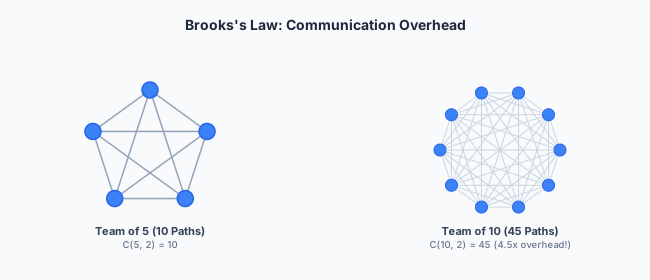
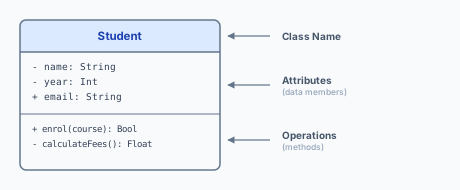
    • Quick Reference: Definitions & Frameworks

      Lecture 1: Mindset & Failure

      TermDefinition
      Brooks’s LawAdding manpower to a late project makes it later. Communication paths =n(n1)2= \frac{n(n-1)}{2}
      80/20 Rule~20% of lifetime cost is initial development; ~80% is maintenance and evolution
      Technical DebtPrincipal (cost to fix properly) + Interest (extra cost of future changes while debt remains unpaid). Quadrant = Reckless/Prudent × Deliberate/Inadvertent
      Iron TriangleFast, Good, Cheap — pick two
      Bit RotSoftware that is never changed becomes obsolete because its environment changes around it (libraries, APIs, security protocols)
      Key case studiesTherac-25 (race condition, no hardware interlock), Mars Climate Orbiter (unit mismatch, no integration testing), London Ambulance Service (socio-technical, no phased rollout), Post Office Horizon (no audit trail, ignored engineers), Boeing 737 MAX (single point of failure, hidden complexity)

      Lecture 2: Requirements

      TermDefinition
      FRAn action the system performs — a verb. “The system shall calculate VAT”
      NFRA quality constraint — an adjective/adverb. The “-ilities”: Scalability, Reliability, Maintainability, Portability, Usability
      Elicitation methodsInterviews (scoping, but users describe solutions) vs Ethnography (reveals invisible workarounds)
      MoSCoWMust / Should / Could / Won’t have — structured prioritisation
      UML relationshipsAssociation (line), Inheritance (hollow triangle, “is-a”), Aggregation (hollow diamond, “has-a”, independent lifecycle), Composition (solid diamond, “has-a”, dependent lifecycle)
      Boehm’s Cost CurveDesign 1×1\times, Coding 5510×10\times, Testing 10×10\times, Production 100×+100\times+ — the cost of fixing a defect rises exponentially by phase

      Lecture 3: Process

      TermDefinition
      Waterfall phasesRequirements → Design → Implementation & Unit Testing → Integration & System Testing → Operation & Maintenance. Strictly sequential; no going back.
      Spiral quadrantsObjectives → Risk Assessment → Development → Planning (repeat). Risk-driven.
      Agile Manifesto(1) Individuals/interactions over processes/tools. (2) Working software over documentation. (3) Customer collaboration over contract negotiation. (4) Responding to change over following a plan.
      Scrum artifactsProduct Backlog (master to-do list), Sprint Backlog (this Sprint’s selected items), Increment (potentially releasable Done work)
      Scrum eventsSprint (timebox, usually 2 weeks), Sprint Planning, Daily Scrum (15 min), Sprint Review, Sprint Retrospective
      Scrum rolesScrum Master (servant-leader, facilitates, removes blockers), Product Owner (owns backlog, prioritises by value), Developers (self-organising, own the “how”)
      KanbanContinuous flow, WIP limits per column, no fixed Sprints. Best for ops/maintenance with continuous incoming work.

      Lecture 4: QA & Delivery

      TermDefinition
      Testing PyramidUnit (many, fast, isolated) → Integration (some, test boundaries) → E2E (few, slow, expensive). Moving up: cost ↑, speed ↓, isolation ↓, confidence ↑
      StubReturns a hardcoded value. “The answer is always ‘success’.”
      MockRecords and verifies interactions. “Was charge() called exactly once with amount 100?”
      Coverage% of lines executed by tests. Does NOT measure correctness. The average([]) trap: 100% coverage, but crashes on empty input.
      Mutation testingInject artificial bugs. Killed mutant = tests caught it (good). Survived mutant = tests missed it (bad). Computationally expensive; typically not run on every CI build.
      TDDRed (write failing test) → Green (minimal code to pass) → Refactor (clean up, tests stay green). 100% test coverage by construction.
      CIMerge to main at least daily. Every merge triggers automated build + full test suite. Fast feedback. Eliminates Merge Hell.
      CD (Delivery)Every green build auto-deploys to staging. A human decides when to push to production.
      CDP (Deployment)Fully automated: passing pipeline → auto-deploy to production. Relies on automated monitoring and rollback.
      Blue-GreenTwo identical environments. Switch all traffic from Blue (old) to Green (new) instantly. Instant rollback: switch back.
      CanaryDeploy new version to a small % of users first; monitor; expand progressively. Better for high-risk changes (smaller blast radius). Not the same as A/B testing (business validation, not technical health).
      Feature FlagsDecouple deployment (code on servers) from release (feature visible). Enables emergency shutoff without code rollback.
      Error Budget=100%SLO= 100\% - \text{SLO}. Exhausted budget → freeze all risky feature releases → redirect to reliability work.
      DevOps”You build it, you run it.” Merge Dev (rewarded for shipping change) and Ops (rewarded for stability) into one team.
      Cloud modelsIaaS (VMs, you manage OS) < PaaS (upload code, provider manages platform) < SaaS (full app, no management). Shared responsibility: provider secures the cloud; you secure your data/apps within it.
      Containers vs VMsContainers share the host OS kernel (light, boot in ms). VMs each run a full guest OS (heavy, boot in minutes). Docker containers; K8s orchestrates fleets of them.
      K8sSelf-healing (restart failed containers), auto-scaling (add replicas under load), load balancing. Control Plane → Worker Nodes → Pods → Containers.

      Lecture 5: Evolution

      TermDefinition
      Maintenance splitPerfective 50%, Adaptive 25%, Corrective 20%, Preventive 5%. Most maintenance is perfective — keeping the system relevant, not fixing bugs.
      SemVerMAJOR.MINOR.PATCH: breaking / new feature (backwards-compatible) / bug fix (backwards-compatible). ^ (caret) allows minor+patch; ~ (tilde) allows patch only.
      Postel’s LawBe conservative in what you send (strict to the spec), liberal in what you accept (ignore unrecognised fields — enables forward compatibility).
      Hyrum’s LawWith enough users, every observable behaviour — including undocumented quirks and bugs — will be depended on by somebody.
      Deprecation pathAnnounce → Deprecate (mark as @Deprecated, both old and new coexist) → Wait (6–12 months) → Remove (in a new MAJOR version).
      Code smellsLong Method, God Object, Feature Envy, Data Clumps. Signals of decaying design, not bugs.
      Characterisation testRecord current output; assert it stays identical after refactoring. Tests for consistency, not correctness. Used when no test suite and no understood specification exist.
      Strangler FigProxy/facade → build new service alongside legacy → route traffic incrementally → decommission legacy. Avoids Big Bang rewrite risk (Netscape).
      SRETreat operations as a software problem. 50% toil rule. Focus on MTTR (recover fast) over MTBF (prevent failure). SLI (what you measure), SLO (the target), SLA (contractual promise to customers).
      Golden SignalsLatency, Traffic, Errors, Saturation. Saturation is harder to measure than latency (requires knowing the true capacity ceiling).
      Chaos EngineeringSteady state → Hypothesis → Experiment → Verify. Chaos Monkey (kills servers), Chaos Gorilla (kills availability zones), Chaos Kong (kills regions).
      Supply chainTransitive dependency (your dependency’s dependency). Left-Pad (11-line npm package deletion broke thousands of projects). Log4Shell (ubiquitous logging library vulnerability). SBOM (machine-readable component inventory). CVE (public vulnerability database).

      Lecture 6: AI Era

      TermDefinition
      Building WITH AIAI is a tool during development; the final product contains no AI logic (e.g. using Copilot to write a standard web app)
      Building FOR AIAn LLM is a core runtime component of the product (e.g. an automated legal assistant that generates advice at runtime)
      Reliability ParadoxTraditional code: f(x)yf(x) \to y, deterministically. AI code: f(x)yf(x) \to y, probabilistically. How do you build a reliable system on a non-deterministic foundation?
      Ground truthCode has a compiler and tests — an objective right/wrong oracle. Medicine and law do not. This is why AI coding advances faster than AI in subjective domains.
      Generator/VerifierA Generator model writes code; a separate Verifier model tries to find bugs. Adversarial pairing reduces hallucinations.
      Reasoning CeilingLLMs lack: long-horizon strategic judgement, accountable ownership of consequences, tacit organisational context.
      Jevons ParadoxEfficiency gains increase total consumption, not reduce it. Cheaper software → 100× more software demanded, not fewer engineers.

      Security Appendix

      TermDefinition
      ACLsColumn-centric: each object lists which subjects may access it. Easy to audit “who can access this file?” Hard to answer “what can this user access?”
      CapabilitiesRow-centric: each subject holds unforgeable tokens per accessible object. Easy delegation; hard revocation.
      STRIDESpoofing, Tampering, Repudiation, Information Disclosure, Denial of Service, Elevation of Privilege
      One-way flowConfidentiality: information flows low → high. Integrity: information flows high → low.
      Password authSecret transmitted over network (via TLS); familiar; easy recovery. Vulnerable to phishing and server-breach offline cracking.
      Public-key authChallenge-response: no secret transmitted; phishing-resistant; no server-side credential database to steal. Harder key management and recovery. Ideal for cross-server signed-content verification in decentralised systems.
    • Tripos Exam Strategy & Common Pitfalls

      Paper Structure

      AspectDetail
      FormatPaper 2; multi-part questions (a)—(c), each part building on the last
      Question styleScenario-based: a fictional company/system is described, then several sub-questions applying course concepts to it
      High-yield topicsCase studies & failure lessons; FR/NFR classification; Agile/Scrum mechanics; testing (pyramid, coverage, mutation, TDD); CI/CD & deployment strategies; SemVer & API evolution; SRE & observability
      Also examinableSecurity concepts (STRIDE, ACLs vs capabilities, password vs public-key authentication); AI-era engineering judgement questions

      General Exam Technique

      1. Read all parts before starting. Later parts often hint at what earlier parts expect. Marks are frequently split evenly across sub-parts — do not over-answer (a) and run out of time for (c).

      2. Ground every abstract principle in a named case study or framework. “Never rely on a single sensor” is weaker than “Never rely on a single sensor — cf. Boeing 737 MAX, where MCAS relied on a single Angle-of-Attack sensor, a single point of failure that directly caused two fatal crashes.”

      3. Answer scenario questions in the scenario’s own terms. If the question describes a decentralised social network, do not just define STRIDE generically — apply each relevant threat category to that system’s specific data flows: “A malicious server could spoof posts claiming to be from a user on another server, since cross-server trust is currently based on the sending server’s word alone.”

      4. For “pros and cons” or “discuss trade-offs” questions, use a clearly labelled two-sided structure. A short table or explicit “Pro:” / “Con:” bullets are easier for an examiner to mark than a single blended paragraph.

      5. Quantify wherever the scenario permits. Communication paths via (n2)\binom{n}{2}, error budgets as 100%SLO100\% - \text{SLO}, SemVer version bumps (MAJOR vs MINOR) — numeric, worked reasoning demonstrates precise understanding beyond prose.

      6. For “is this approach appropriate?” questions, give both supporting and opposing arguments, then a clear, justified conclusion. Do not just pick a side. Examiners reward balanced analysis with a synthesised recommendation.

      7. Do not forget the conclusion / recommendation. Many high-mark parts (e.g. 2025 Q5b, 14 marks) explicitly reward a final, justified synthesis, not just a laundry list of pros and cons.

      8. Keep answers proportional to the marks available. A 6-mark part expects 4–6 distinct, justified points. A 14-mark part expects full structured coverage of every sub-clause in the question (as in the worked 2025 Q5 answer).

      Top 10 Exam Traps

      1. Confusing FR and NFR. An NFR is a quality/constraint, not an action. “The system shall calculate VAT” is an FR — calculating tax sounds like a “quality” but it is a specific action the system performs. “The system shall calculate VAT in under 10 ms” adds an NFR (performance constraint).
      2. Treating Agile as “no planning / no docs.” Agile teams plan more frequently than Waterfall teams (every 2 weeks vs once upfront). Agile values working code over comprehensive documentation — it does not ban documentation.
      3. Confusing A/B Testing (business/product: does a red button increase sales?) with Canary (technical: does the new version have higher error rates?).
      4. Confusing Blue-Green (instant full-traffic switch, instant rollback) with Canary (gradual ramp-up monitored). Know which is appropriate for a high-risk migration.
      5. Assuming 100% code coverage means correct code. Always mention the coverage \neq correctness trap (the empty-list average([])ZeroDivisionError bug) when discussing testing quality.
      6. Getting SemVer bumps wrong. A required new parameter or removed field is MAJOR, not MINOR — even if the change “adds” functionality. A new optional parameter with a default is MINOR.
      7. Forgetting Hyrum’s Law when discussing legacy migration or breaking changes. Undocumented behaviour that consumers depend on is just as real as documented contracts.
      8. Conflating Monitoring (known unknowns — “is the CPU high?”) with Observability (unknown unknowns — “why did the system slow down at 2:37 p.m. when no metric crossed a threshold?”).
      9. Applying Brooks’s Law only qualitatively. For full marks on quantitative parts, show the n(n1)2\frac{n(n-1)}{2} calculation with the specific team sizes from the scenario.
      10. Discussing AI risk questions generically instead of naming the specific failure mode — hallucination, technical debt of ignorance, training-data bias, reasoning ceiling — that the scenario is actually illustrating.

      Final Exam Checklist

      Before submitting your answers, verify:

      • Every abstract principle is grounded in a named case study or framework.
      • Every sub-part of every question is answered, in proportion to its marks.
      • Lookalike concept pairs are correctly distinguished: FR/NFR, Mock/Stub, Monitoring/Observability, Blue-Green/Canary, A/B Testing/Canary, MTBF/MTTR, Backward/Forward compatibility.
      • Quantitative reasoning is used where the scenario allows it (communication paths, SemVer numbers, error budgets).
      • “Discuss” or “evaluate” questions have a balanced pros/cons structure followed by a justified conclusion.
      • Concepts are applied to the scenario’s specific details, not recited generically.
      • Version-bump decisions are correct: breaking change → MAJOR; new feature (backwards-compatible) → MINOR; bug fix → PATCH. When in doubt, bump MAJOR.
      • For security questions: confidentiality, integrity, and availability implications are covered as relevant; access control mechanisms (ACL vs capability) are correctly distinguished if asked.

      This paper rewards concrete, well-grounded reasoning over generic definitions. The case studies — Therac-25, Mars Climate Orbiter, London Ambulance Service, Post Office Horizon, Boeing 737 MAX, Y2K, Netscape, Left-Pad, Log4Shell, Windows 95/SimCity — are not decoration. They are the evidence base examiners expect you to draw on to justify engineering principles. Learn the mechanism behind each one, not just the headline, and you will be able to construct a strong, specific answer to almost any scenario-based question on this paper.

      Good luck in your Tripos.