Version Control and Git
Why Version Control Exists
Agile teams move fast. Without coordination, two developers editing the same file will inevitably overwrite each other’s changes. A Version Control System (VCS) solves this by providing:
- A single source of truth — the canonical, authoritative version of the codebase.
- History — every change ever made, by whom, and why (commit messages). Enables auditing, compliance, rollback, and blame-free investigation of production incidents.
- Branching and merging — developers can work on separate features in parallel and integrate when ready.
- Collaboration — a VCS is the mechanism by which a team agrees on what “the current state of the code” actually is.
Centralised vs Distributed VCS
| Centralised (SVN, CVS) | Distributed (Git, Mercurial) | |
|---|---|---|
| Model | Single central server holds the entire project history and the canonical current version | Every developer has a full local copy of the entire history |
| Pros | Simple mental model; easy access control; single source of truth by construction | Fast (most operations are local); works offline; no single point of failure — if the server dies, any developer’s clone has the full history |
| Cons | Single point of failure (server goes down, team stops working); every operation requires a network round-trip; history is only on the server | Steeper learning curve; local clones can diverge significantly; the “source of truth” is a social convention (the blessed remote), not enforced by the tool |
Git has won the VCS war decisively. Its design — inspired by Linus Torvalds’s need to coordinate thousands of Linux kernel contributors without a single central authority — proved to be the right architecture for the open-source and Agile paradigms.
Git Fundamentals
- Commits: a snapshot of the entire project at a point in time. Each commit is identified by a unique SHA-1 hash (e.g.
a1b2c3d...), which is a content-addressable cryptographic fingerprint of the commit and its entire ancestry. The hash depends on the contents of the files, the commit message, the author, and the parent commit(s) — so any tampering with history is immediately detectable. - Staging area (index): a “loading zone” where you assemble exactly which changes go into the next commit.
git addmoves changes into the staging area;git commitsnapshots the staging area. - Safety: once committed, data is nearly impossible to lose accidentally. You can experiment locally — delete files, rewrite entire modules, break everything — and
git checkoutback to any known-good commit.
Branching and Merging
A branch is a lightweight, movable pointer to a commit. The default branch is usually called main (or master). Branches enable parallel work streams.
A merge integrates the changes from one branch into another. Git performs a three-way merge using the two branch tips and their most recent common ancestor. If both branches modified the same region of the same file, Git cannot determine which version is correct — this is a merge conflict. Git marks the conflicted region in the file and pauses for a human to resolve it.
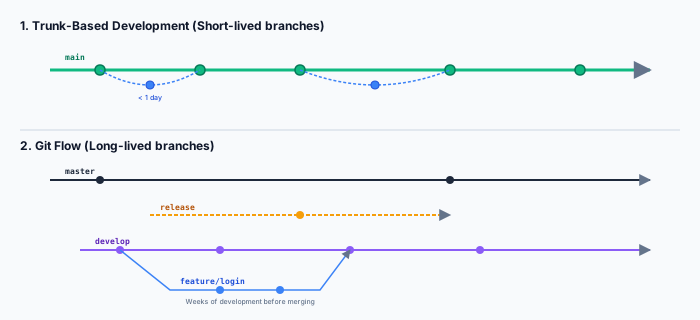
Branching Strategies
| Git Flow | Trunk-Based Development | |
|---|---|---|
| Style | Multiple long-lived branches: main (production), develop (integration), release/*, hotfix/*, and per-feature branches | Everyone works directly on main (trunk). Features live on very short-lived branches (< 1 day). |
| Good for | Traditional versioned software releases (v1.0, v2.0) with scheduled release cycles, where release/2.1 freezes while the team prepares the launch | Agile/CI-heavy teams shipping continuously; any commit to main is deployable |
| Pain point | ”Merge Hell” — long-lived branches that diverge significantly from develop and produce enormous, painful merge conflicts when finally integrated | Requires excellent automated test coverage and a fast CI pipeline to keep main stable; a broken commit on main blocks the entire team |
Pull Requests and Code Review
A Pull Request (PR) is the mechanism for contributing code to a shared branch. The workflow:
- Developer creates a feature branch, makes changes, commits, and pushes it to the remote.
- Developer opens a PR: a request to merge their branch into the target branch (usually
main). - Code review: at least one other developer reviews the changes — line by line — looking for bugs, design issues, style violations, and security concerns. The reviewer may request changes before approving.
- When the review passes and all automated checks (build, tests, linting) are green, the PR is merged.
Code review is not just about catching bugs (though it catches many). It is also about knowledge sharing — ensuring that at least two people understand every change, mitigating the “bus factor” (if the sole author is hit by a bus, the knowledge is lost). It enforces style consistency without a central Design Authority dictating from on high.
Bug Lifecycle and Traceability
A bug’s journey through an issue tracker:
Traceability is maintained by linking commits to issue IDs: a commit message containing Fixes #42 automatically links the code change to the bug report, and the bug report links back to the commit. This connects the Why (the bug report with reproduction steps and priority) to the How (the actual diff that resolves it).
Coding Standards and Linters
Since ~80% of a system’s lifetime cost is maintenance and code is read far more than it is written, uniform code style is an economic necessity. Linters (e.g. ESLint for JavaScript, Pylint for Python, Clippy for Rust) enforce rules automatically: no disputed style in code review (the linter is the authority), reduced cognitive load when switching between files, and safer automated refactoring because the tool can rely on consistent patterns.
Expected Learning
- Contrast centralised and distributed VCS, naming a key advantage of each.
- Explain the Git commit model (snapshot, SHA-1 hash, staging area) and why it enables safe experimentation.
- Describe the PR/code-review workflow and its benefits beyond bug detection.
- Compare Git Flow and Trunk-Based Development, and recommend one for a given scenario.
- Trace the bug lifecycle and explain the value of linking commits to issue-tracker IDs.
Past Paper Questions
Example Sheet 2, Question 1(a-c) tests your understanding of Git merges — what creates a conflict vs what auto-merges cleanly — and asks you to recommend a branching strategy for a team of 30 developers under tight deadlines. Example Sheet 2, Question 1(b) contrasts centralised and distributed VCS behaviour when a conflict does occur.