Processes and Process States
Process vs programme
A programme is a passive entity — an executable file stored on disk (e.g., /bin/ls). A process is an active entity — a programme in execution, with a current program counter, a stack, a heap, and an entry in the kernel’s process table.
A single programme can be executing in multiple processes simultaneously (e.g., several terminal windows each running a shell). Each process has its own independent state.
The five-state model
A process moves through states during its lifetime:
| State | Meaning |
|---|---|
| New | Process is being created (PCB allocated, but not yet ready to run) |
| Ready | Process is loaded in memory and could run, but the CPU is allocated to another process |
| Running | Process is currently executing on a CPU |
| Blocked (Waiting) | Process is waiting for some event (I/O completion, signal, timer) |
| Terminated | Process has finished execution; its PCB and resources await reclamation by the parent or kernel |
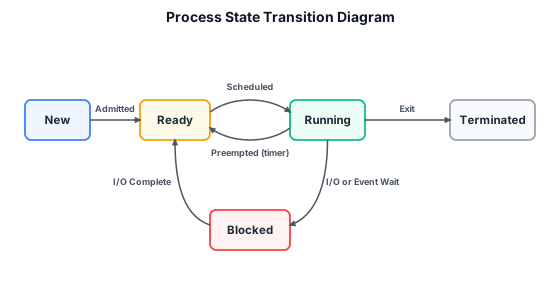
Transitions:
- New → Ready: The kernel admits the process to the scheduling system.
- Ready → Running: The scheduler selects the process and dispatches it.
- Running → Ready: The scheduler pre-empts the process (timer interrupt) to give another process CPU time.
- Running → Blocked: The process makes an I/O request or waits for a signal.
- Blocked → Ready: The awaited event completes.
- Running → Terminated: The process calls
exit()or is killed by a signal.
The Process Control Block (PCB)
The PCB is the kernel’s per-process data structure. It contains everything the kernel needs to manage and suspend/resume the process:
| Field | Contents |
|---|---|
| Process ID (PID) | Unique integer identifier |
| Process state | Ready, running, blocked, etc. |
| Program counter | Address of next instruction to execute |
| Saved registers | General-purpose registers, stack pointer, frame pointer, flags |
| Memory management info | Page table pointer, segment descriptors, or base/limit registers |
| Open file table | Pointers into the kernel’s file-descriptor table |
| UID, GID, EUID, EGID | User and group identifiers for protection |
| Scheduling info | Priority, nice value, recent CPU usage |
| Parent PID | For the process tree |
| Signal masks | Which signals are blocked/ignored |
| Accounting | CPU time used, start time |
The collection of all PCBs (the process table) is a fixed-size kernel array. On Linux, it’s small — a few hundred entries — because each entry is a task_struct (over 1 KB). The process table size limits the maximum number of processes.
Context switch
When the kernel switches the CPU from Process A to Process B:
- A trap or interrupt enters the kernel (e.g., timer interrupt, or A makes a blocking system call).
- The kernel saves A’s registers, program counter, and stack pointer into A’s PCB.
- The kernel selects B as the next process to run (the scheduler’s job).
- The kernel restores B’s registers, program counter, and stack pointer from B’s PCB.
- The kernel returns to user mode, and B resumes where it was suspended.
Context switches are pure overhead: while switching, the CPU does no useful work for any process. Typical context-switch times are on the order of microseconds, but frequent switches degrade throughput.
The process tree
In UNIX, every process (except init/PID 1) is created by fork() from a parent. This forms a tree. When a process terminates, the kernel sends SIGCHLD to its parent and retains the terminated process’s PCB as a zombie until the parent calls wait(). If the parent exits first, the orphan is reparented to init, which reaps zombies.
Summary
- A programme is static; a process is dynamic.
- Processes move through five states; the kernel manages transitions.
- The PCB contains all state needed to suspend and resume a process.
- Context switching saves and restores processor state; it is overhead, not useful work.