Skip to content
Back to Modules
Part IA Michaelmas Term

Object-Oriented Programming

OOP Java Encapsulation Inheritance Polymorphism Abstraction Generics Collections Exceptions Design-Patterns Lambdas Streams Garbage-Collection Memory-Model Immutability JVM Data-Structures Part IA Michaelmas Term Paper 1
  • Introduction to Java

    Why OOP exists and the maintainability wishlist, imperative versus functional languages, the JVM and its two-stage compilation model, javac/java/jshell, and Java class structure with the main method

    • Why Object-Oriented Programming?

      The Real Cost of Software

      The dominant cost in software is not writing it — it is maintaining it. Studies consistently show that 60–80% of a software system’s total lifetime cost goes into maintenance: fixing bugs, adding features, adapting to new requirements, and understanding what the original authors intended. Code is read far more often than it is written. The primary goal of good software design is therefore to maximise maintainability.

      The Maintainability Wishlist

      Well-engineered software should be:

      • Readable: another developer (or your future self) can understand the code quickly without reconstructing intent from implementation details
      • Modular: the system is divided into independent, interchangeable components that can be developed, tested, and understood in isolation
      • Reusable: common functionality is written once and used everywhere, avoiding duplication that leads to inconsistent bug fixes
      • Robust: the system handles unexpected inputs and states gracefully, without crashing or corrupting data
      • Testable: individual components can be verified independently, ideally through automated unit tests

      What OOP Brings

      Object-oriented programming organises programs as collections of interacting objects. Each object bundles together:

      • State (fields, attributes, data members): the values the object knows about itself
      • Behaviour (methods, member functions, operations): the things the object can do

      This bundling — called encapsulation — means that an object’s internal data can only be manipulated through its own methods. The object presents a controlled interface to the outside world while keeping its implementation details private.

      Objects interact by sending messages to each other — in Java, this means calling methods on object references. A program written in OOP style is a society of cooperating objects, each with a clearly defined role.

      Two Important Warnings from the Course

      Few Languages Are Pure OOP

      Java is not a purely object-oriented language. It has:

      • Primitive types (int, double, boolean, etc.) that are not objects and live outside the object model
      • Static methods and fields that belong to classes rather than instances
      • Lambda expressions and functional interfaces (since Java 8) that introduce functional-programming patterns

      This is not a flaw — it is a pragmatic choice. Primitives exist for performance; static methods exist because not every operation naturally belongs to an object instance. Real-world languages hybridise paradigms.

      OOP Is Not Always Appropriate

      OOP is a tool, not a religion. It is not the best fit for every problem:

      • Small scripts (a few hundred lines of procedural logic) gain little from class hierarchies and design patterns
      • Heavily numerical code (scientific computing, signal processing) often expresses more naturally in procedural or array-oriented styles where the focus is on transforming data rather than modelling entities
      • Pure data pipelines (extract, transform, load) may be better served by functional approaches

      The course teaches OOP as one paradigm among several. OCaml is taught in Foundations of Computer Science (FoCS) as the functional counterpart, and the two courses are designed to complement each other.

      Benefits and Costs

      Benefits

      • Models the problem domain more naturally when the domain contains entities with state and behaviour
      • Encapsulation limits the ripple effect of changes
      • Polymorphism lets new behaviour be added without modifying existing code
      • Inheritance enables code reuse through shared interfaces and implementations

      Costs

      • Boilerplate: Java requires explicit class declarations, getters, setters, and constructor code even for simple data carriers
      • Indirection: method calls through interfaces and abstract types add layers that make control flow harder to trace
      • Over-engineering risk: applying design patterns and abstractions before they are needed adds complexity without benefit

      Encapsulation, Inheritance, and Polymorphism

      These three concepts are often presented as the pillars of OOP, but the course frames them differently: they are tools in service of the maintainability goals, not goals in themselves.

      • Encapsulation serves modularity and robustness by hiding internal state behind a stable public interface
      • Inheritance serves reusability by letting classes share implementation code through an “is-a” hierarchy — but used carelessly it creates brittle, tightly coupled designs
      • Polymorphism serves readability and testability by letting code work with any type that satisfies an interface, rather than being hard-coded to specific concrete types

      A well-designed OOP system uses these tools judiciously. A badly designed one uses them because it feels they ought to be used. The measure of success is the maintainability wishlist, not the presence of design pattern vocabulary.

    • Imperative versus Functional Languages

      Two Paradigms

      Programming languages can be broadly classified by the style of computation they encourage. The two paradigms most relevant to the Part IA course are the imperative and functional paradigms.

      Imperative Programming

      In an imperative language, a program is a sequence of statements that mutate the program’s state. Execution order matters because each statement may depend on the state left behind by the previous one.

      Key characteristics:

      • Mutable state: variables hold values that change over time. x = x + 1 is a common expression because x really does take on a new value.
      • Explicit control flow: loops (for, while), conditionals (if/else), and subroutine calls drive computation
      • Side effects: functions can modify global state, perform I/O, or alter their arguments — the function’s effect is not limited to its return value
      • Statement-oriented: computation is structured as “do this, then do that”

      Examples of imperative languages: C, Java, Python, JavaScript (though all have absorbed some functional features).

      Java as an Imperative Language

      Java is fundamentally imperative and object-oriented. Consider:

      int total = 0;
      for (int i = 0; i < numbers.length; i++) {
          total = total + numbers[i];
      }

      The variable total is explicitly mutated through each iteration. The loop counter i changes with every step. The state of the program at any point is the collection of all variable values at that point.

      Functional Programming

      In a functional language, a program is a collection of expressions built from pure functions. Computation proceeds by evaluating expressions rather than executing statements.

      Key characteristics:

      • Immutability: once a value is bound to a name, it does not change. There is no assignment statement that alters an existing variable.
      • Pure functions: a function’s output depends only on its inputs. Calling the same function with the same arguments always produces the same result. There are no side effects.
      • Recursion over loops: instead of mutating a loop counter, functional languages use recursive function calls to process sequences
      • Expression-oriented: everything evaluates to a value. An if expression returns a value; a function body is a single expression.

      Examples of functional languages: OCaml, Haskell, F#, Elm.

      OCaml in the Part IA Course

      OCaml is taught in Foundations of Computer Science (FoCS). It is a statically typed functional language with powerful type inference and pattern matching. A typical OCaml function:

      let rec sum lst =
        match lst with
        | [] -> 0
        | x :: xs -> x + sum xs

      There is no mutable variable being updated. The computation is expressed as a recursive decomposition of the list. The function is pure — its result depends only on its input list.

      Where Java Stands

      Java is fundamentally an imperative, object-oriented language, but it has absorbed functional features since Java 8:

      • Lambda expressions: anonymous functions that can be passed as arguments
      • Streams API: a functional-style pipeline for processing collections without explicit loops
      • Method references: shorthand for lambdas that call a single method
      • Optional: a container type that avoids null and encourages functional-style chaining

      The imperative loop above can be rewritten in a functional style:

      int total = Arrays.stream(numbers).sum();

      No explicit mutation of a running total. No loop counter. The stream pipeline abstracts away the iteration. However, Java lambdas are still ultimately compiled into objects and invoked through interfaces — the functional style is syntactic sugar over an imperative core.

      Trade-offs

      Imperative

      StrengthsWeaknesses
      Fine-grained control over state and memoryUnexpected mutation is a major source of bugs
      Natural fit for inherently stateful problems (GUIs, games, network protocols)Reasoning about program behaviour requires mentally tracking all state changes
      Often maps directly to hardware execution modelConcurrency is hard — shared mutable state must be protected with locks

      Functional

      StrengthsWeaknesses
      Easier to reason about — a function’s behaviour depends only on its inputsAwkward for inherently stateful problems
      Referential transparency enables safe substitution and equational reasoningCan be less intuitive for programmers trained in imperative style
      Trivially parallelisable — pure functions have no shared state to conflictPerformance can suffer from creating many intermediate immutable structures

      Complementarity

      The two courses — OOP (Java) and FoCS (OCaml) — are designed to give you fluency in both paradigms. Each illuminates the other: understanding immutability and pure functions from OCaml helps you write better Java code (fewer mutable fields, prefer immutable objects where possible), and understanding object modelling from Java helps you appreciate OCaml’s module system as an alternative approach to abstraction.

    • The Java Virtual Machine

      Traditional Compilation

      In a traditional compiled language like C, the pipeline is:

      Source code  →  Compiler  →  Platform-specific machine code  →  CPU executes directly
        (.c)           (gcc)             (.exe / ELF / Mach-O)

      The compiler translates the source directly into the native instruction set of the target CPU (x86-64, ARM, etc.). The resulting executable runs at full native speed, but it only works on the platform it was compiled for. To support Windows, macOS, and Linux, you must compile three separate binaries — and that is before considering different CPU architectures.

      The Java Model

      Java uses a two-stage compilation model:

      Source code  →  javac  →  Bytecode  →  JVM interprets/JIT-compiles  →  Native machine code
        (.java)                 (.class)         (at runtime)

      Traditional vs Java compilation pipelines

      Stage 1: Source to Bytecode

      The Java compiler (javac) translates .java source files into .class files containing bytecode. Bytecode is a platform-independent intermediate representation — a kind of portable assembly language. It is not tied to any particular CPU architecture. The bytecode instructions operate on an abstract stack machine rather than physical registers.

      Stage 2: Bytecode to Native Code

      At runtime, the Java Virtual Machine (JVM) loads the bytecode and executes it. Two execution strategies are used, often in combination:

      • Interpretation: the JVM reads each bytecode instruction and carries out the corresponding operation. Slow but starts immediately.
      • Just-In-Time (JIT) compilation: the JVM identifies frequently executed code (hot spots) and compiles those bytecode sequences into native machine code on the fly. Subsequent executions of that code run at near-native speed.

      Modern JVMs (like HotSpot) use tiered compilation: start with interpretation, then apply increasingly aggressive optimisations as code proves itself hot.

      ”Write Once, Run Anywhere”

      Because bytecode is platform-independent, the same .class file can run on any machine that has a JVM installed — whether it is a Windows x86 machine, a macOS ARM laptop, or a Linux server. The JVM abstracts away the underlying operating system and hardware.

      This was a revolutionary idea when Java was released in 1995. At the time, cross-platform development usually meant maintaining separate codebases or wrestling with #ifdef preprocessor directives.

      Pros and Cons

      Advantages

      • Portability: compile once, deploy anywhere with a JVM
      • Memory safety: no raw pointers, no manual memory management, arrays are bounds-checked — entire classes of C/C++ bugs (buffer overflows, use-after-free, double-free) are eliminated
      • Automatic garbage collection: the JVM reclaims memory from objects that are no longer reachable, removing the burden of manual free() and eliminating memory leaks from forgotten deallocations
      • Rich standard library: the JDK provides data structures, networking, I/O, concurrency, and much more out of the box

      Disadvantages

      • Startup overhead: the JVM must initialise itself, load classes, and warm up the JIT compiler before reaching peak performance — a native binary starts instantly
      • Runtime dependency: the target machine must have a JVM installed (though jlink and jpackage can bundle a minimal runtime)
      • Execution overhead: interpreted or not-yet-JITted code runs slower than native code, though heavily optimised JIT code can sometimes outperform ahead-of-time compiled code because JIT optimisation has runtime information available

      The Broader JVM Ecosystem

      The two-stage model has an important consequence: any language that can compile to JVM bytecode can run on the JVM and interoperate with Java code. The JVM has become a polyglot platform:

      • Kotlin: a modern, concise alternative to Java (now Google’s preferred language for Android)
      • Scala: fuses object-oriented and functional programming
      • Clojure: a dynamic, functional Lisp dialect
      • Groovy: a dynamic scripting language with Java-friendly syntax

      All of these languages share the JVM’s garbage collector, threading model, and standard library access. A Kotlin class can extend a Java class; a Scala function can call a Java method. The JVM is the common substrate that makes this possible.

    • Compiling and Running Java Programs

      The Core Commands

      Three commands form the basic Java workflow:

      CommandPurpose
      javacCompile .java source files to .class bytecode files
      javaLaunch the JVM and execute the bytecode in a .class file
      jshellInteractive REPL for trying out Java code snippets

      javac — The Java Compiler

      The javac command reads .java source files and produces .class bytecode files. The filename of a public class must match the filename: HelloWorld.java must define public class HelloWorld.

      javac HelloWorld.java

      This produces HelloWorld.class in the current directory. If the source file contains multiple classes (at most one public), javac produces one .class file per class.

      Useful Flags

      FlagPurpose
      -d <dir>Specify output directory for .class files (default: same directory as source)
      -cp <path> or -classpath <path>Specify where to find other .class files or JARs needed during compilation
      -sourcepath <path>Where to find .java source files (default: current directory)
      -encoding <encoding>Specify source file encoding (e.g. UTF-8)

      If your program depends on external libraries, you must tell javac where to find them. Assuming a library JAR at lib/utils.jar:

      javac -cp lib/utils.jar:. src/MyProgram.java -d out/

      The :. (or ;. on Windows) includes the current directory in the classpath so that previously compiled classes can be found.

      java — The JVM Launcher

      The java command starts the JVM and runs the main method of the specified class. Note: you provide the class name, not the filename — no .class extension.

      java HelloWorld

      The JVM loads the class, verifies the bytecode, and executes public static void main(String[] args).

      Useful Flags

      FlagPurpose
      -cp <path> or -classpath <path>Where to find .class files and JARs at runtime
      -ea or -enableassertionsEnable assertions (off by default)
      -Xmx<size>Set maximum heap size (e.g. -Xmx512m for 512 MB)
      -versionPrint JVM version and exit

      Classpath at runtime works the same as at compile time:

      java -cp lib/utils.jar:out/ MyProgram

      jshell — The Interactive REPL

      jshell, introduced in Java 9, provides a Read-Eval-Print Loop for interactive experimentation. It lets you write Java statements, expressions, and declarations without a full compile-build-run cycle. This is useful for exploring APIs, testing small code snippets, and learning the language.

      jshell> int x = 42;
      x ==> 42
      
      jshell> x * 2
      $2 ==> 84
      
      jshell> String s = "Hello, " + x;
      s ==> "Hello, 42"

      jshell supports tab completion, forward references, and declaration redefinition. It uses a slightly relaxed syntax — semicolons are optional for top-level expressions. To exit, type /exit.

      The Build-Run Cycle

      A typical development workflow:

      javac -d out/ src/HelloWorld.java
      java -cp out/ HelloWorld

      For a multi-file project:

      javac -d out/ src/*.java
      java -cp out/ MainClass

      Or, if you are avoiding explicit compilation during experimentation:

      java src/HelloWorld.java

      Since Java 11, the java command can directly run a single source file — it compiles the file in memory and executes it. This is convenient for small scripts but does not produce persistent .class files.

      Comparison with Python

      Python does something similar under the hood:

      JavaPython (CPython)
      Source.java.py
      Compiled to.class bytecode.pyc bytecode (cached in __pycache__/)
      Execution engineJVMCPython VM (interpreter)
      Compile stepExplicit (javac)Implicit (automatic on import or first run)

      Both languages compile to a platform-independent bytecode and then execute it on a virtual machine. The key difference is that Python hides the compilation step — you rarely see .pyc files unless you look for them — while Java makes it an explicit part of the workflow.

      Common Pitfalls

      • Class name mismatch: public class HelloWorld must be in a file called HelloWorld.java, and the java command expects the class name, not HelloWorld.class or HelloWorld.java
      • Classpath issues: if your classes are in out/, you must include out/ on the classpath when running
      • Forgetting to recompile: after editing a .java file, you must run javac again before running java — the JVM sees the .class file, not the source
      • Case sensitivity: helloworld and HelloWorld are different identifiers on all platforms (unlike Windows filenames)
    • Java Program Structure

      Every Program Lives in a Class

      In Java, all code belongs to a class. There are no standalone functions, no global variables, and no code outside of a class definition. Even the simplest program requires wrapping logic inside a class and a method.

      This is a defining characteristic of Java’s object-oriented design: the class is the fundamental unit of organisation.

      The main Method

      The Java Virtual Machine (JVM) looks for a specific method to start execution. The entry point must have exactly this signature:

      public static void main(String[] args)

      Each keyword serves a specific purpose:

      KeywordMeaning
      publicAccessible to the JVM from outside the class. If it were private, the JVM could not find it.
      staticBelongs to the class, not to an instance. No object of the class exists yet when the program starts, so the JVM must be able to call the method without creating one.
      voidReturns nothing. The JVM does not expect a return value; the program terminates when main returns or when System.exit() is called.
      String[] argsAn array of command-line arguments. The JVM populates this from whatever follows the class name on the command line.

      The name main is conventional and mandatory — the JVM looks specifically for main, not start or run or entryPoint.

      Command-Line Arguments

      java MyProgram hello 42 "some text"

      Inside the program, args will be:

      args[0] = "hello"
      args[1] = "42"
      args[2] = "some text"

      All arguments arrive as String objects regardless of type. If you need numbers, you must parse them:

      int n = Integer.parseInt(args[0]);

      Console Output

      System.out.println() sends text to standard output, followed by a newline. System.out.print() does the same without a newline.

      System.out.println("Hello, World!");
      System.out.print("No newline after this.");

      System.out is a PrintStream object — a static field of the System class. println is overloaded for all primitive types and for objects (calling the object’s toString() method).

      Annotated HelloWorld

      public class HelloWorld {
      
          public static void main(String[] args) {
              System.out.println("Hello, World!");
      
              if (args.length > 0) {
                  System.out.println("First argument: " + args[0]);
              }
          }
      }

      To compile and run:

      javac HelloWorld.java
      java HelloWorld
      java HelloWorld Alice

      Package Declarations

      A package is a namespace that organises classes and prevents name collisions. The package declaration must be the first non-comment line in the file:

      package com.example.myapp;
      
      public class HelloWorld {
          public static void main(String[] args) {
              System.out.println("Hello from a package!");
          }
      }

      Package names follow a reversed-domain convention (com.example.myapp), and the directory structure mirrors the package hierarchy:

      src/
        com/
          example/
            myapp/
              HelloWorld.java

      If no package is declared, the class belongs to the unnamed default package — fine for small programs, but real projects always use packages.

      Import Statements

      The import statement lets you refer to classes from other packages by their short name rather than their fully qualified name:

      import java.util.ArrayList;
      import java.util.List;

      Without the import, you would write java.util.ArrayList every time. A wildcard import (import java.util.*) imports all classes from the package but not subpackages.

      java.lang is imported automatically — classes like String, Math, Integer, and System are always available without an explicit import.

      Java Syntax Rules

      • Case sensitivity: count, Count, and COUNT are three distinct identifiers
      • Semicolons: every statement ends with a semicolon. Forgetting one is a compile error.
      • Braces: code blocks are delimited by { and }. Indentation is for human readers only — the compiler ignores whitespace.
      • One public class per file: a .java file may contain multiple classes, but at most one of them can be public. The public class’s name must match the filename.

      Class Naming Conventions

      • Use PascalCase (also called UpperCamelCase): HelloWorld, BankAccount, ArrayList
      • Class names should be nouns or noun phrases
      • The filename must match the public class name exactly, including capitalisation: HelloWorld.java contains public class HelloWorld

      Summary of File Layout

      package com.example;           /* package declaration (optional) */
      
      import java.util.ArrayList;    /* import statements (optional) */
      import java.util.List;
      
      public class ClassName {       /* class definition — must match filename */
      
          private int field;         /* fields (state) */
      
          public ClassName() {       /* constructors */
              this.field = 0;
          }
      
          public int getField() {    /* methods (behaviour) */
              return this.field;
          }
      
          public static void main(String[] args) {   /* entry point */
              ClassName obj = new ClassName();
              System.out.println(obj.getField());
          }
      }
  • Representing State

    Primitive versus reference types, naming conventions, type conversion (widening vs narrowing), local variable type inference with var, arrays as reference containers, and method overloading resolved by parameter signature

    • Primitive versus Reference Types

      The Two Kinds of Type

      Every type in Java falls into one of two categories: primitive or reference. Understanding the distinction is essential for reasoning about assignment, parameter passing, equality comparison, and null handling.

      Primitive Types

      Primitives represent simple, atomic values. They are:

      • Fixed-size: each primitive type occupies a known number of bytes, specified by the language specification and independent of platform
      • Stored directly by value: a variable of primitive type holds the actual value, not a pointer to it
      • Never null: a primitive variable always contains a value (even if uninitialised, it gets a default zero value as a field)
      • Live on the stack or inline in objects: primitives are not heap-allocated unless they are fields of a heap-allocated object

      The Eight Primitive Types

      TypeSizeRangeDefaultWrapper Class
      byte8 bits128-128 to 1271270Byte
      short16 bits32768-32\,768 to 3276732\,7670Short
      int32 bits231-2^{31} to 23112^{31} - 1 (~ ±2.1\pm 2.1 billion)0Integer
      long64 bits263-2^{63} to 26312^{63} - 10LLong
      float32 bitsIEEE 754 single-precision (~7 significant digits)0.0fFloat
      double64 bitsIEEE 754 double-precision (~15 significant digits)0.0dDouble
      booleannot precisely defined (JVM-dependent)true or falsefalseBoolean
      char16 bitsUnicode characters U+0000 to U+FFFF\u0000Character

      The sizes in the table are fixed by the Java Language Specification. An int is always 32 bits, regardless of whether the JVM runs on a 32-bit or 64-bit platform. This is a key difference from C, where int may be 16, 32, or 64 bits depending on the compiler and target.

      Literals

      • Integer literals (42) are int by default; append L for long (42L)
      • Floating-point literals (3.14) are double by default; append f for float (3.14f)
      • char literals are enclosed in single quotes ('A', '\n', '\u0041')
      • boolean literals are true and false

      Reference Types

      Reference types include classes, arrays, interfaces, enums, and String. A variable of reference type holds a reference — a handle or pointer to an object allocated on the heap. The variable itself does not contain the object’s data; it contains the memory address (abstractly) of where the object lives.

      String s = new String("hello");

      The variable s is a reference. The actual string object lives on the heap. The reference is what gets stored in the variable.

      Key Properties of Reference Types

      • Assignment copies the reference, not the object:
      Point p1 = new Point(3, 4);
      Point p2 = p1;

      p2 now refers to exactly the same object as p1. Modifying p2’s state will be visible through p1. This is called aliasing.

      • Can be null: a reference variable can hold null, meaning “no object.” Attempting to call a method on null throws a NullPointerException at runtime.

      • Equality has two meanings:

        • == compares references — are these the same object in memory?
        • .equals() compares values — do these objects represent the same logical value? (Behaviour depends on whether the class overrides equals.)
      • Live on the heap: the object itself is always heap-allocated. The reference variable may live on the stack (if it is a local variable) or be a field of another heap object.

      Memory Layout

      Stack and heap memory layout

      • Stack: holds local variables (primitives and references) and method call frames. Fast allocation/deallocation (just move the stack pointer). Each thread has its own stack.
      • Heap: holds all objects and arrays. Managed by the garbage collector. Slower allocation, but objects can outlive the method that created them.

      A local variable of type int stores the integer value directly on the stack. A local variable of type Point stores a reference on the stack; the Point object’s fields (x and y, which are primitives) live inside the object on the heap.

      Why the Distinction Matters

      Parameter Passing

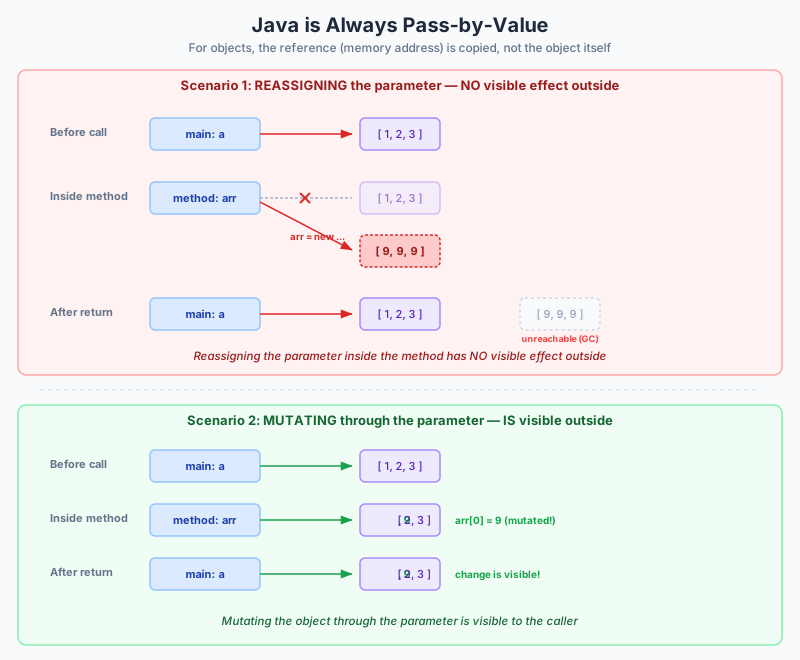
      Java is pass-by-value, always. For primitives, the value is the number itself — the method receives a copy, and mutations to the parameter do not affect the caller’s variable. For references, the value is the reference — the method receives a copy of the reference, so it can mutate the object’s state, but it cannot make the caller’s variable point to a different object.

      void increment(int x) { x = x + 1; } // does nothing to caller's variable
      
      void move(Point p) { p.x = 10; } // mutates the caller's object
      
      void reassign(Point p) { p = new Point(0, 0); } // does nothing to caller's reference

      Null Handling

      Only reference types can be null. Primitives are never null. This means:

      Integer boxed = null;   // OK — Integer is a reference type
      int primitive = null;   // Compile error — int cannot be null

      Auto-unboxing a null Integer to int throws a NullPointerException.

      String: A Special Reference Type

      String is a reference type — it is a class — but it has several special behaviours:

      • Immutability: once created, a String object’s character sequence cannot change. Methods like toUpperCase() and substring() return new strings rather than modifying the original.
      • String pool: string literals (e.g. "hello") are interned — the JVM maintains a pool of unique string literals. String s1 = "hello"; String s2 = "hello"; results in s1 == s2 being true because they reference the same interned object.
      • Concatenation operator: the + operator is overloaded for strings. Any non-string operand concatenated with a string is converted via its toString() method.
      • StringBuilder: for repeated concatenation in loops, use StringBuilder to avoid creating many intermediate String objects.
      String s1 = "hello";
      String s2 = "hello";
      String s3 = new String("hello");
      
      s1 == s2;    // true — same interned object
      s1 == s3;    // false — s3 is a new object, not from the pool
      s1.equals(s3); // true — same character sequence
    • Java Naming Conventions

      Why Conventions Matter

      Java has a strong set of naming conventions that are universally followed in professional code. The Tripos explicitly marks adherence to these conventions — a solution that mixes Python’s snake_case with Java code will lose marks even if the logic is correct. Conventions also serve a deeper purpose: they signal the role of an identifier (class, method, variable, constant) without needing to read its declaration.

      The Four Case Styles

      ConventionApplied ToExample
      PascalCase (UpperCamelCase)Classes, interfaces, enumsBankAccount, ArrayList, Comparable
      camelCase (lowerCamelCase)Variables, parameters, methodsaccountBalance, findById, firstName
      UPPER_SNAKE_CASEConstants (static final fields)MAX_SIZE, DEFAULT_TIMEOUT_SECONDS
      lowercasePackage namesjava.util, com.example.myapp

      PascalCase for Classes and Interfaces

      Every class, interface, and enum name starts with a capital letter and capitalises the first letter of each subsequent word:

      public class BankAccount { ... }
      public interface Comparable<T> { ... }
      public enum DayOfWeek { ... }

      Class names should be nouns or noun phrases — they represent things. An interface often names a capability and may be an adjective: Runnable, Serializable, Comparable.

      camelCase for Variables and Methods

      Variable and method names start with a lowercase letter and capitalise subsequent words:

      int studentCount = 0;
      String firstName = "Ada";
      
      public double calculateArea() { ... }
      public boolean isValid() { ... }

      Method names should be verbs or verb phrases — they represent actions. Common prefixes:

      • get / set: accessor and mutator methods (the JavaBeans convention)
      • is / has / can: boolean-returning methods (isEmpty(), hasNext(), canExecute())
      • to: conversion methods (toString(), toCharArray())
      • create / build / of: factory methods (createAccount(), of())

      UPPER_SNAKE_CASE for Constants

      A static final field whose value is immutable is treated as a constant:

      public static final double PI = 3.141592653589793;
      public static final int MAX_RETRIES = 3;
      public static final String DEFAULT_TITLE = "Untitled";

      The static final combination means the value belongs to the class, exists as a single copy, and cannot be reassigned. By convention, the name shouts its constancy with all-caps and underscores.

      Meaningful Names

      Variable names should describe what the variable stores, not how it is stored:

      int d;                     // terrible — meaningless
      int elapsedTimeInDays;     // clear but verbose
      int daysElapsed;           // good balance of clarity and brevity

      Method names should describe what the method does:

      public void p(int x) { ... }             // terrible
      public void process(int value) { ... }   // better but vague
      public void validateInput(int age) { ... } // clear and specific

      Single-Letter Names

      The only generally accepted single-letter variable names are loop indices:

      for (int i = 0; i < n; i++) { ... }
      for (int j = 0; j < m; j++) { ... }

      The convention is i, then j, then k for nested loops. Avoid using l (lowercase L) because it is easily confused with 1 (digit one).

      Java Is Case-Sensitive

      count, Count, and COUNT are three distinct identifiers. This compiles (but should never be written):

      int count = 1;
      int Count = 2;
      int COUNT = 3;

      Each declaration creates a separate variable. Conflating them in your head because “they’re the same word” is a common source of bugs.

      Common Traps for Tripos

      Mixing Python and Java Conventions

      Python uses snake_case for variables and functions. Java uses camelCase. Writing this in Java is wrong:

      int account_balance = 100;      // Python style — incorrect in Java
      public void calculate_area() {} // Python style — incorrect in Java

      The correct forms:

      int accountBalance = 100;
      public void calculateArea() {}

      Using PascalCase for Variables

      int AccountBalance = 100; // looks like a class name — incorrect

      The compiler does not complain, but a human reader will mistake AccountBalance for a class. This is the kind of error Tripos “spot the mistake” questions test.

      Forgetting That Acronyms Follow the Rules

      String XMLParser;    // correct if it's a class
      String xmlParser;    // correct if it's a variable
      String parseXML();   // correct method name
      int HTTPPort;        // preferred over HttpPort (treat HTTP as a unit)

      Summary Table

      ElementStyleExample
      ClassPascalCaseSavingsAccount
      InterfacePascalCaseSerializable
      MethodcamelCasedepositFunds()
      VariablecamelCasecurrentBalance
      ConstantUPPER_SNAKE_CASEMAX_BALANCE
      Packagelowercasecom.bank.models
      EnumPascalCaseTransactionType
      Enum constantUPPER_SNAKE_CASETransactionType.WIRE_TRANSFER
    • Type Conversion

      Implicit Conversion: Widening

      A widening conversion moves from a smaller (narrower) type to a larger (wider) type. No information is lost, so the compiler performs these conversions automatically — no explicit cast is needed.

      The widening chain for numeric types:

      byte → short → int → long → float → double

      Additionally: char widens to int, and any integer type widens to float or double.

      int i = 42;
      long l = i;       // OK — int fits in long
      double d = i;     // OK — int fits in double precisely (up to 2^53)
      float f = 3.14f;
      double d2 = f;    // OK — float fits in double

      The compiler silently inserts the widening conversion. The assignment long l = i compiles as though you wrote long l = (long) i.

      Watch for Float Widening

      long to float is a widening conversion — float has a larger range than long — but float has only ~7 significant digits of precision. Widening a large long to float preserves the magnitude but may lose low-order bits:

      long big = 123456789123456789L;
      float f = big;   // compiles, but precision loss — f != big

      Explicit Conversion: Narrowing

      A narrowing conversion moves from a larger type to a smaller type. Information may be lost, so the compiler requires an explicit cast — the programmer must acknowledge the risk.

      double d = 3.14159;
      int i = (int) d;       // truncates: i == 3
      
      long l = 300L;
      byte b = (byte) l;     // overflow: 300 mod 256 = 44
      
      float f = 5.7f;
      int j = (int) f;       // truncates: j == 5 (not rounded)

      Narrowing an integer truncates the high-order bits. Narrowing a floating-point value truncates the fractional part — it does not round to nearest (use Math.round() for that).

      Truncation vs Rounding

      double positive = 3.7;
      double negative = -3.7;
      
      int a = (int) positive;   // 3 (truncation toward zero)
      int b = (int) negative;   // -3 (truncation toward zero)
      long c = Math.round(positive); // 4 (rounds to nearest)
      long d = Math.round(negative); // -4

      Integer Division Trap

      When both operands are integers, Java performs integer division — the result is an integer, and any fractional part is discarded. This is a classic source of bugs:

      double result = 5 / 2;     // result is 2.0, not 2.5

      Why? 5 and 2 are both int literals. Integer division yields 2. Only then is that 2 widened to 2.0 for assignment to double.

      To get floating-point division, at least one operand must be a floating-point type:

      double r1 = 5.0 / 2;       // 2.5
      double r2 = 5 / 2.0;       // 2.5
      double r3 = (double) 5 / 2; // 2.5

      String Concatenation with +

      The + operator is overloaded for strings. When one operand is a String, the other operand is converted to a String via toString(), and the two are concatenated:

      String s = "Value: " + 42;          // "Value: 42"
      String t = "Result: " + 3.14;        // "Result: 3.14"
      String u = "Object: " + new Point(); // "Object: Point@1a2b3c" (or custom toString)

      Concatenation is left-associative, which can produce surprising results:

      String s = "Sum: " + 5 + 3;   // "Sum: 53" — ("Sum: 5") then + 3
      String t = "Sum: " + (5 + 3); // "Sum: 8" — parentheses force addition first

      In the first line, "Sum: " + 5 produces "Sum: 5" (a string), then + 3 concatenates again. In the second line, (5 + 3) evaluates to 8 first, then the string concatenation runs.

      Wrapper Class Conversions

      Each primitive type has a corresponding wrapper class that provides utility methods for conversion between strings and primitives.

      String to Primitive

      int i = Integer.parseInt("42");
      double d = Double.parseDouble("3.14");
      boolean b = Boolean.parseBoolean("true");
      long l = Long.parseLong("123456789");

      parseInt and friends throw a NumberFormatException if the string is not a valid representation.

      Primitive to String

      String s1 = Integer.toString(42);        // "42"
      String s2 = Double.toString(3.14159);    // "3.14159"
      String s3 = String.valueOf(42);          // "42" — works for any type
      String s4 = "" + 42;                     // "42" — lazy concatenation trick

      Autoboxing and Unboxing

      Since Java 5, primitives are automatically boxed into their wrapper types and unboxed back:

      Integer boxed = 42;          // autoboxing — Integer.valueOf(42)
      int unboxed = boxed;         // auto-unboxing — boxed.intValue()
      
      List<Integer> list = new ArrayList<>();
      list.add(5);                 // autoboxing int to Integer
      int value = list.get(0);     // auto-unboxing Integer to int

      Autoboxing creates hidden overhead — each boxing allocates an Integer object on the heap. In performance-sensitive loops, prefer primitives.

      Conversion Hierarchy Summary

                Widening (implicit, safe)
                ←←←←←←←←←←←←←←←←←←←
      byte  →  short  →  int  →  long  →  float  →  double
      
                                     char
      
                Narrowing (explicit cast, may lose data)
                →→→→→→→→→→→→→→→→→→→
    • Local Variable Type Inference

      What var Does

      var, introduced in Java 10, performs local variable type inference. The compiler deduces the static type of a local variable from the type of its initialiser. The programmer writes var instead of an explicit type declaration, and the compiler fills in the type at compile time.

      var message = "Hello";          // infers String
      var count = 42;                 // infers int
      var price = 9.99;               // infers double
      var names = new ArrayList<String>(); // infers ArrayList<String>

      The compiled bytecode is identical to what it would be with explicit types. var is purely a convenience for the programmer — it does not introduce dynamic typing.

      This Is Still Static Typing

      This is a crucial point for Tripos: var does not make Java dynamically typed. The type is fixed at compile time, exactly as if you had written the type explicitly. You cannot reassign a var variable to a value of an incompatible type:

      var x = 42;     // x is int
      x = "hello";    // COMPILE ERROR: incompatible types: String cannot be converted to int

      This is entirely different from JavaScript’s var or Python’s untyped variables. In those languages, the variable can hold any type at any time. In Java with var, the type is inferred once and enforced thereafter.

      Where var Works

      var can only be used for local variables with initialisers:

      var s = "text";                          // OK — local variable with initialiser
      for (var item : collection) { ... }      // OK — enhanced for loop
      var result = switch (x) { ... };         // OK — switch expression (Java 14+)

      Where var Does NOT Work

      var cannot be used for:

      • Fields (instance or static variables): the compiler needs the explicit type in the class declaration
      • Method parameters: the method signature must declare parameter types explicitly
      • Method return types: the return type is part of the method’s contract
      • Uninitialised local variables: var x; is a compile error — there is nothing to infer from
      class Example {
          var field = 42;          // COMPILE ERROR: var not allowed for fields
      
          public var compute() {   // COMPILE ERROR: var not allowed for return type
              return 42;
          }
      
          public void method(var x) { // COMPILE ERROR: var not allowed for parameters
              var y;                  // COMPILE ERROR: cannot infer type without initialiser
          }
      }

      When to Use var

      Good Uses

      var shines when the type is obvious from the right-hand side and writing it out adds no value:

      var scanner = new Scanner(System.in);
      var map = new HashMap<String, List<Customer>>();
      var stream = files.stream().filter(f -> f.isFile());

      The new keyword makes the type immediately clear to the reader. Similarly, factory methods with descriptive names (Files.newBufferedReader(...)) are self-documenting.

      Bad Uses

      var hurts readability when the type is not obvious:

      var result = process(data);    // What type is result? Must look up process().
      var x = getSomething();        // Completely opaque.

      A reader should not need to navigate to the method signature to understand what type a variable holds.

      Tripos Relevance

      The exam may test your understanding that:

      1. var is compile-time inference, not runtime dynamic typing
      2. The compiler must be able to determine a unique, concrete type from the initialiser
      3. var cannot be used for fields, parameters, or return types
      4. The inferred type is the static type of the initialiser expression, not the runtime type of the object

      Consider this case:

      Animal pet = new Dog();
      var pet2 = new Dog();

      pet has static type Animal (the declared type of the variable). pet2 has static type Dog (the inferred type from new Dog()). This can affect which overloaded methods are called and which fields are visible.

      Type Inference with Diamond Operator

      Be careful with the diamond operator:

      var list = new ArrayList<>();      // infers ArrayList<Object>, not ArrayList<String>

      Without a type argument, the diamond defaults to Object. If you want a specific generic type with var, provide it:

      var list = new ArrayList<String>();  // infers ArrayList<String>
    • Arrays

      What Arrays Are

      An array in Java is a fixed-size, homogeneous, reference-type container that holds a sequence of elements of a single type, indexed from zero. Arrays are objects — they are allocated on the heap, and the variable holds a reference to the array object.

      Declaration and Allocation

      Arrays are declared by appending [] to the element type:

      int[] numbers;         // preferred style — type[] variable
      String[] names;        // an array of String references
      Point[] points;        // an array of Point references

      The alternative C-style syntax (int a[]) is legal but discouraged — it places the brackets on the variable name, suggesting (misleadingly) that int a[], b declares two arrays, when in fact b is just an int.

      A declaration does not create the array — it only declares a reference. To allocate storage:

      int[] numbers = new int[5];     // array of 5 ints, each defaulting to 0
      String[] names = new String[3]; // array of 3 references, each defaulting to null

      Allocation zeroes or nulls the elements: numeric types get 0 (or 0.0), boolean gets false, char gets '\u0000', and reference types get null.

      Length

      Every array has a length field — note, not a method call, no parentheses:

      int[] data = new int[10];
      int size = data.length;   // 10

      length is final and cannot be changed. Once allocated, an array’s size is fixed for its lifetime. If you need a resizable sequence, use ArrayList.

      Access and Mutation

      Indexing is zero-based and uses square brackets:

      int[] a = new int[3];
      a[0] = 10;
      a[1] = 20;
      a[2] = 30;
      int x = a[0];          // 10
      a[1] = a[2];           // copy element 2 into element 1

      Accessing an index outside [0, length-1] throws an ArrayIndexOutOfBoundsException at runtime. The JVM performs bounds checking on every array access.

      Allocation Options

      Explicit Size with Default Values

      int[] a = new int[5];        // {0, 0, 0, 0, 0}
      String[] s = new String[3];  // {null, null, null}

      Array Initialiser Syntax

      int[] a = {1, 2, 3, 4, 5};
      String[] days = {"Mon", "Tue", "Wed", "Thu", "Fri"};

      This is only valid when declaring a variable (or as part of an anonymous array expression). It cannot be used after the variable is declared:

      int[] a;
      a = {1, 2, 3};     // COMPILE ERROR — initialiser only valid in declaration
      a = new int[]{1, 2, 3}; // OK — anonymous array creation

      Arrays Are Reference Types

      This is one of the most important facts for the Tripos: an array variable holds a reference to the array object on the heap.

      int[] a = {1, 2, 3};
      int[] b = a;

      Now a and b refer to the same array object. Changing b[0] is visible through a[0] — they are aliases.

      b[0] = 99;
      System.out.println(a[0]);  // 99

      Copying an Array

      To get an independent copy, use Arrays.copyOf():

      int[] a = {1, 2, 3};
      int[] b = Arrays.copyOf(a, a.length);  // new array with same values
      b[0] = 99;
      System.out.println(a[0]);  // 1 — a is unaffected

      System.arraycopy() provides low-level bulk copying. clone() creates a shallow copy (for arrays of primitives, this is fine; for arrays of references, the references are copied but the objects themselves are not duplicated).

      Iterating Over Arrays

      Index-Based For Loop

      for (int i = 0; i < a.length; i++) {
          System.out.println(a[i]);
      }

      Enhanced For Loop (For-Each)

      for (int element : a) {
          System.out.println(element);
      }

      The enhanced for loop is cleaner when you do not need the index. But you cannot modify the array contents through the loop variable (assigning to element changes the local copy, not the array element).

      Multi-Dimensional Arrays

      Java has no true multi-dimensional arrays. Instead, an “array of arrays” is used:

      int[][] matrix = new int[3][4];   // 3 rows, each row is an int[4]

      matrix is a reference to an array of int[] references, each of which refers to a row array. This means rows can have different lengths (jagged arrays):

      int[][] triangle = new int[3][];
      triangle[0] = new int[1];
      triangle[1] = new int[2];
      triangle[2] = new int[3];

      Initialiser syntax for multi-dimensional arrays:

      int[][] matrix = {
          {1, 2, 3},
          {4, 5, 6},
          {7, 8, 9}
      };

      Array Covariance

      Java considers Dog[] to be a subtype of Animal[] (if Dog extends Animal). This is called array covariance and is a known design flaw — it permits code that compiles but fails at runtime:

      Dog[] dogs = new Dog[3];
      Animal[] animals = dogs;        // OK — arrays are covariant
      animals[0] = new Cat();         // COMPILES but throws ArrayStoreException at runtime

      The JVM inserts a runtime check when storing into an array of reference type to enforce that the element is actually compatible with the array’s component type. This issue is discussed more thoroughly in the generics notes, but the key takeaway: prefer ArrayList<Dog> over Dog[] when you need collection-style operations.

      Common Tripos Traps

      • Mutating through an alias: if two references point to the same array, a mutation through one is visible through the other — trace carefully in “what does this print” questions
      • length is a field, not a method: a.length() is a compile error; a.length is correct
      • Default values: uninitialised array elements have default values (0, false, null) — do not assume they contain anything meaningful
      • Off-by-one: iterate from 0 to a.length - 1, not to a.length
      • Null array elements: arrays of reference types are initially filled with null, and calling a method on a[i] will throw a NullPointerException if that element was never assigned
    • Method Overloading

      What Overloading Is

      Overloading allows multiple methods in the same class (or a class and its superclass) to share the same name, provided their parameter signatures differ. The compiler resolves which method to call based on the number, types, and order of arguments at the call site.

      public class Calculator {
          public int add(int a, int b) {
              return a + b;
          }
      
          public double add(double a, double b) {
              return a + b;
          }
      
          public int add(int a, int b, int c) {
              return a + b + c;
          }
      }

      All three methods are named add, but they have different parameter lists: two ints, two doubles, and three ints. The compiler knows which one to call from the arguments provided.

      The Rules

      Overload resolution is determined solely by:

      1. The number of parameters (arity)
      2. The types of parameters
      3. The order of parameter types

      The method’s return type is not part of the signature for overload resolution. Neither are parameter names, access modifiers, or thrown exceptions.

      Return Type Is NOT Sufficient

      public int getValue() { return 42; }
      public double getValue() { return 42.0; }

      This is a compile error: getValue() is already defined. The compiler cannot distinguish these two methods because they have identical parameter lists (both have zero parameters). If the return type were part of the signature, the compiler would not know which method you wanted at the call site:

      var x = getValue();  // Which getValue? Ambiguous.

      How the Compiler Resolves Overloads

      When the compiler encounters a method call, it searches for the most specific applicable overload:

      1. Find all methods with the correct name
      2. Discard those whose parameter count does not match
      3. For each remaining candidate, check whether the arguments can be converted to the parameter types
      4. Choose the most specific match — in cases of ambiguity, prefer the overload that does not require a widening conversion
      public void foo(int x) { ... }
      public void foo(double x) { ... }
      
      foo(42);    // calls foo(int) — exact match
      foo(3.14);  // calls foo(double) — exact match
      foo(42L);   // calls foo(double) — long widens to double, not to int

      The long argument 42L cannot narrow to int implicitly, so it widens to double and calls foo(double).

      Constructor Overloading

      Overloading is especially common with constructors. A class can provide multiple ways to create an instance:

      public class Point {
          private double x;
          private double y;
      
          public Point() {
              this(0.0, 0.0);
          }
      
          public Point(double x, double y) {
              this.x = x;
              this.y = y;
          }
      
          public Point(Point other) {
              this(other.x, other.y);
          }
      }

      Three constructors, all named Point, distinguished by their parameters. The first constructor delegates to the second using this(0.0, 0.0) — more on this in the constructor overloading notes.

      Overloading vs Overriding

      This distinction is a frequent Tripos topic:

      OverloadingOverriding
      When resolvedCompile time (static dispatch)Runtime (dynamic dispatch)
      WhereSame class, or class + superclassSubclass replacing superclass method
      SignatureSame name, different parameter typesSame name, same parameter types
      Return typeCan differ, but cannot be the sole differenceMust be same or covariant
      AnnotationNone needed@Override recommended

      Consider:

      class Animal {
          public void speak() { System.out.println("..."); }
      }
      
      class Dog extends Animal {
          @Override
          public void speak() { System.out.println("Woof"); }   // overriding
      
          public void speak(int times) {                          // overloading
              for (int i = 0; i < times; i++) {
                  speak();
              }
          }
      }

      Dog.speak() overrides Animal.speak() — same signature. Dog.speak(int) overloads it — different parameter list.

      No Standalone Functions

      Java has no standalone functions like C or Python. Every method must belong to a class (or interface). Even main is a static method of some class. Utility functions go in classes like Math or Collections as static methods.

      This reinforces the object-oriented principle that behaviour is always associated with a type. In practice, it means you will sometimes create “utility classes” — classes with only static methods that exist solely to hold functions — which is a pragmatic necessity but arguably a departure from pure OOP.

      Common Traps

      Ambiguous Overloads

      public void process(int x, double y) { ... }
      public void process(double x, int y) { ... }
      
      obj.process(5, 10);   // COMPILE ERROR: ambiguous — both 5 and 10 are ints,
                             // and either could widen to double

      Both overloads are equally specific, and neither is unambiguously the best match.

      Autoboxing and Overloading

      public void handle(Integer x) { ... }
      public void handle(int x) { ... }
      
      handle(42);   // calls handle(int) — prefers primitive over boxing

      The compiler prefers the primitive overload when both are applicable, because the exact match (no conversion at all) is more specific.

      Varargs and Overloading

      public void log(String msg) { ... }
      public void log(String... msgs) { ... }
      
      log("hello");   // calls log(String) — prefers non-varargs overload

      The compiler prefers a fixed-arity overload over a varargs overload when both are applicable.

  • Objects and Classes

    Classes as blueprints versus objects as instances, class structure with fields/constructors/methods, constructor overloading and chaining with this, static fields belonging to the class, and static methods without instance state access

    • Objects versus Classes

      The Blueprint and the Instance

      The relationship between a class and an object is analogous to a blueprint and a house:

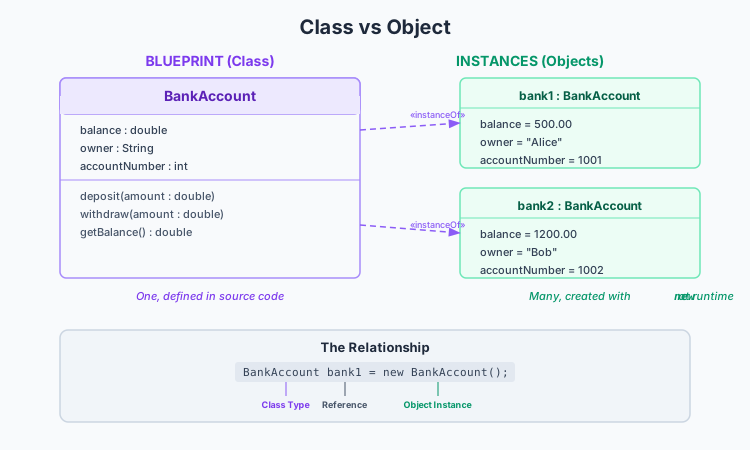
      • A class is the blueprint — it defines the structure (fields) and capabilities (methods) that objects will have, but it is not itself a usable entity. It describes what every instance will look like.
      • An object is a concrete instance — it is built from the blueprint, occupies actual memory, and holds specific values for its fields. There can be many objects built from one class.

      Blueprint vs instance relationship

      In programming terms: a class is a type, and an object is a value of that type. You can declare a variable of type String and assign it the value "hello". String is the class; "hello" is the object.

      Creating Objects with new

      Objects are created at runtime using the new keyword:

      Point p = new Point(3, 4);

      The new operator performs three actions:

      1. Allocates memory on the heap for the object’s fields
      2. Calls the constructor to initialise those fields to the desired values
      3. Returns a reference to the newly created object

      The returned reference is what gets stored in the variable p. The object itself lives on the heap; p is just a handle that lets us reach it.

      Any number of objects can be created from a single class, each with its own copy of the instance fields:

      Point a = new Point(1, 2);
      Point b = new Point(5, 7);
      Point c = new Point(0, 0);

      a, b, and c are three distinct objects, each with its own x and y values. Changing a.x does not affect b.x.

      The Box-and-Arrow Model

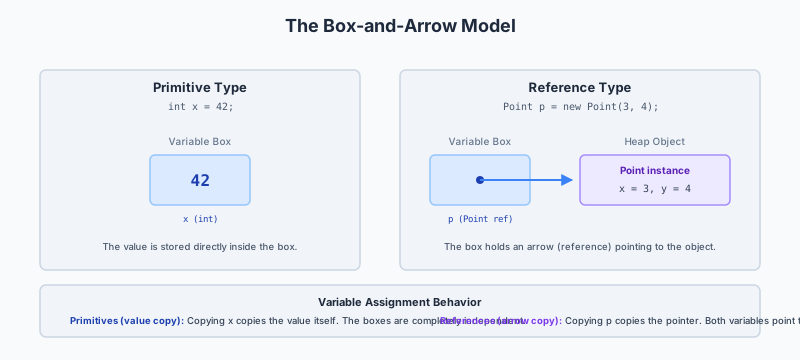
      A useful mental model for reasoning about Java memory:

      • A variable is a box. For a primitive type, the box holds the value itself. For a reference type, the box holds an arrow (reference) pointing to a heap object.
      • The heap object is a separate region of memory containing the object’s fields (which may themselves be boxes with values or arrows).

      Java box and arrow memory model

      When you assign one variable to another:

      • For primitives, the value is copied. The two variables are independent.
      • For references, the arrow is copied. Both variables now point to the same object (aliasing).
      int a = 5;
      int b = a;        // b gets a copy of the value 5
      b = 10;           // a is still 5 — independent
      
      Point p1 = new Point(3, 4);
      Point p2 = p1;    // p2 gets a copy of the reference — same object
      p2.x = 10;        // p1.x is now also 10 — aliased

      Terminology

      The course uses “object” and “instance” interchangeably. Both refer to a concrete entity created by new that belongs to a class. “Object” is the more common term; “instance” emphasises the relationship to the class (“this object is an instance of Point”).

      Similarly, “fields,” “instance variables,” “attributes,” and “member variables” all refer to the variables declared inside a class that hold an object’s state. The course primarily uses “fields.”

      Class vs Object Summary

      ClassObject
      A blueprint, template, or typeA concrete instance or value
      Exists at compile time (and as a Class object at runtime)Created at runtime with new
      Defines fields and methods; has no values for instance fieldsHolds specific values for instance fields
      One class per definitionZero or more objects per class
      Static members belong to the classInstance members belong to an object
      Written once in source codeCreated as needed during execution

      Reflection: The Class as a Runtime Object

      It is worth noting that the JVM represents classes themselves as objects of type Class. When you write obj.getClass(), you get a Class object that describes the class of obj. This is an advanced topic, but it reinforces the idea that even classes are reified in the JVM. For the purposes of the Part IA course, think of the class as the compile-time description and the object as the runtime entity.

    • Java Class Structure

      Anatomy of a Class

      Every Java class is composed of several categories of members. A well-structured class typically contains, in order: fields, constructors, and methods. Here is a complete BankAccount example with full annotation:

      public class BankAccount {
          private final String accountNumber;
          private double balance;
          private final String holderName;
          private static int nextId = 1;
      
          public BankAccount(String holderName) {
              this.accountNumber = "ACC-" + String.format("%04d", nextId);
              nextId = nextId + 1;
              this.holderName = holderName;
              this.balance = 0.0;
          }
      
          public BankAccount(String holderName, double initialDeposit) {
              this(holderName);
              this.balance = initialDeposit;
          }
      
          public void deposit(double amount) {
              if (amount <= 0.0) {
                  throw new IllegalArgumentException("Deposit must be positive");
              }
              this.balance = this.balance + amount;
          }
      
          public boolean withdraw(double amount) {
              if (amount <= 0.0) {
                  return false;
              }
              if (amount > this.balance) {
                  return false;
              }
              this.balance = this.balance - amount;
              return true;
          }
      
          public double getBalance() {
              return this.balance;
          }
      
          public String getAccountNumber() {
              return this.accountNumber;
          }
      
          public String getHolderName() {
              return this.holderName;
          }
      
          public String toString() {
              return "BankAccount[" + this.accountNumber
                  + ", holder=" + this.holderName
                  + ", balance=" + this.balance + "]";
          }
      
          public static int getNextId() {
              return nextId;
          }
      }

      Fields (Instance Variables)

      Fields hold the state of an object. Each instance gets its own copy:

      private final String accountNumber;
      private double balance;
      private final String holderName;
      • private makes them inaccessible from outside the class — a core encapsulation choice
      • final means the reference (or primitive value) cannot be reassigned after the constructor completes
      • Field names follow camelCase convention

      Fields that do not change after construction are marked final to enforce immutability of that aspect of the object’s state.

      Constructors

      Constructors are special methods that initialise a new object. They share the class name, have no return type (not even void), and are invoked with new:

      public BankAccount(String holderName) {
          this.accountNumber = "ACC-" + String.format("%04d", nextId);
          nextId = nextId + 1;
          this.holderName = holderName;
          this.balance = 0.0;
      }

      The constructor’s job is to establish the class invariant — the set of conditions that must hold for every valid object. For a BankAccount, invariants might include: balance >= 0, accountNumber is non-null and unique, holderName is non-null.

      Constructor body pattern: initialise final fields, assign remaining fields, increment any shared static counters. A constructor should leave the object in a consistent, usable state.

      The this Keyword

      this refers to the current instance — the object on which the method was called. Three uses:

      1. Disambiguating parameter names from field names: this.balance = balance; — without this, balance = balance would assign the parameter to itself
      2. Passing the current object: someMethod(this) — handing a reference to yourself to another method
      3. Constructor chaining: this(holderName) — calling another constructor of the same class

      Not every method needs this — you can write balance instead of this.balance when there is no local variable with the same name. However, using this consistently for field access makes the code’s intent clearer.

      Methods (Instance Methods)

      Instance methods define the behaviour of objects. They are called on an object reference using dot notation:

      BankAccount account = new BankAccount("Ada");
      account.deposit(100.0);
      double bal = account.getBalance();

      A method has:

      • An access modifier (public, private, etc.)
      • A return type (or void if nothing is returned)
      • A name (camelCase, typically a verb or verb phrase)
      • A parameter list (enclosed in parentheses)
      • A body (enclosed in braces)

      Inside an instance method, this refers to the object the method was called on.

      Accessors (Getters) and Mutators (Setters)

      public double getBalance() {     // accessor — reads state
          return this.balance;
      }
      
      public void setBalance(double b) { // mutator — writes state
          this.balance = b;
      }

      Accessors retrieve field values without exposing the field directly. Mutators modify state with the opportunity to validate. Not every field needs a setter — accountNumber is final and has only a getter.

      toString()

      toString() returns a human-readable representation of the object. It is called implicitly when an object is concatenated with a string or passed to System.out.println():

      System.out.println(account);

      If you do not override toString(), the default implementation (inherited from Object) returns something like BankAccount@1a2b3c4d — the class name followed by the hash code in hex. Always override toString() for debuggability.

      equals()

      equals(Object other) compares two objects for logical equality. The default implementation from Object uses reference equality (==). Override equals() when you want objects to be compared by their field values rather than by their identity. A proper equals() override must satisfy the contract: reflexive, symmetric, transitive, consistent, and equals(null) returns false. The companion method hashCode() must also be overridden.

      The Class Invariant

      The class invariant is a logical condition that must be true for every valid instance, at all times that the object is accessible from outside the class. In BankAccount:

      • balance >= 0.0
      • accountNumber is non-null and formatted correctly
      • holderName is non-null

      Constructors establish the invariant. Every public method preserves it. Private helper methods may temporarily break it, but the public methods that call them must restore it before returning. A well-designed class never lets an external observer see a broken invariant.

    • Constructor Overloading

      Multiple Ways to Construct

      A class often needs to support different ways of creating an instance. Constructor overloading provides multiple entry points for initialisation, each with a distinct parameter list.

      public class Temperature {
          private final double celsius;
      
          public Temperature(double celsius) {
              this.celsius = celsius;
          }
      
          public Temperature() {
              this(0.0);
          }
      
          public Temperature(Temperature other) {
              this(other.celsius);
          }
      }

      Three constructors: one takes an explicit value, one creates a default (freezing point of water), and one is a copy constructor.

      Constructor Chaining with this(…)

      Constructor overloading is most useful when combined with constructor chaining: one constructor delegates to another using this(...) to avoid duplicating initialisation logic.

      public class BankAccount {
          private final String accountNumber;
          private final String holderName;
          private double balance;
          private static int nextId = 1;
      
          public BankAccount(String holderName, double initialDeposit, String accountNumber) {
              this.holderName = holderName;
              this.balance = initialDeposit;
              this.accountNumber = accountNumber;
              nextId = nextId + 1;
          }
      
          public BankAccount(String holderName, double initialDeposit) {
              this(holderName, initialDeposit, "ACC-" + String.format("%04d", nextId));
          }
      
          public BankAccount(String holderName) {
              this(holderName, 0.0);
          }
      }

      The three-argument constructor is the “full” constructor — it does all the real work. The two-argument constructor delegates to it with a generated account number. The one-argument constructor delegates to the two-argument version with a default deposit of 0.0. The initialisation logic lives in one place.

      The First-Statement Rule

      A call to this(...) — or to super(...) — must be the first statement in a constructor body. You cannot put any other code before it:

      public BankAccount(String holderName) {
          System.out.println("Creating account...");  // COMPILE ERROR
          this(holderName, 0.0);                      // this(...) must be first
      }

      The reason: the JVM must initialise the object’s state through the constructor chain before any instance-specific logic runs. The delegated-to constructor will initialise the fields; code before the delegation might access uninitialised state.

      The Default Constructor

      If you write a class with no constructors at all, the Java compiler automatically provides a default no-argument constructor:

      public class Point {
          private int x;
          private int y;
      
      }
      
      Point p = new Point();   // OK — default constructor exists

      This implicitly supplied constructor is public, takes no arguments, and initialises all fields to their default values (0, false, null).

      However, once you write any constructor, the default constructor disappears:

      public class Point {
          private int x;
          private int y;
      
          public Point(int x, int y) {
              this.x = x;
              this.y = y;
          }
      
      }
      
      Point p1 = new Point(3, 4);  // OK
      Point p2 = new Point();       // COMPILE ERROR — no no-arg constructor

      If you need both a no-arg constructor and a parameterised one, you must write both explicitly.

      Common Constructor Patterns

      The Full Constructor + Convenience Pattern

      Write one constructor that accepts all fields, then define convenience constructors that supply defaults:

      public class Person {
          private String name;
          private int age;
          private String email;
      
          public Person(String name, int age, String email) {
              this.name = name;
              this.age = age;
              this.email = email;
          }
      
          public Person(String name, int age) {
              this(name, age, "[email protected]");
          }
      }

      The Copy Constructor

      A copy constructor creates a new object from an existing one, copying its state:

      public Person(Person other) {
          this(other.name, other.age, other.email);
      }

      This is a shallow copy — the fields are copied directly. For mutable fields (e.g. arrays, collections), a deep copy might be needed to achieve full independence. See the encapsulation and immutability notes for defensive copying.

      The Static Factory Method Alternative

      Sometimes, factory methods are clearer than constructor overloading because they can have descriptive names:

      public static Temperature fromFahrenheit(double fahrenheit) {
          return new Temperature((fahrenheit - 32.0) * 5.0 / 9.0);
      }
      
      public static Temperature fromKelvin(double kelvin) {
          return new Temperature(kelvin - 273.15);
      }

      Constructors must share the class name; factory methods can express intent through their names. This is discussed further in the static methods notes.

      Constructor Invocation Order

      When an object is created, the JVM follows a specific sequence:

      1. Memory is allocated for all fields (instance and inherited)
      2. Fields are initialised to their default values (0, false, null)
      3. Field initialisers (int x = 5;) and initialisation blocks run, in source order
      4. The constructor body executes

      If the constructor calls this(...), step 4 chains to another constructor’s step 4. If it calls super(...) (explicitly or implicitly), the superclass constructor runs first.

      Common Tripos Traps

      • Default constructor disappears: adding any constructor removes the automatic no-arg constructor. If a subclass constructor does not explicitly call super(...), the compiler inserts super() — which fails if the superclass has no no-arg constructor.
      • this(…) not first: placing any statement before this(...) or super(...) is a compile error.
      • Recursive constructor call: public Foo() { this(); } — infinite recursion, compile error (the compiler detects this).
      • Return type on constructor: public void BankAccount() { ... } — this is not a constructor, it is a regular method with the same name as the class (legal but never correct).
    • Static Fields

      Class-Level State

      A static field belongs to the class itself, not to any particular instance. There is exactly one copy of the field, shared by all instances of the class (and accessible even when zero instances exist).

      public class Spaceship {
          private static int shipsCreated = 0;
          private String name;
      
          public Spaceship(String name) {
              this.name = name;
              shipsCreated = shipsCreated + 1;
          }
      
          public static int getShipsCreated() {
              return shipsCreated;
          }
      }

      Every Spaceship constructor increments the same shipsCreated counter. The counter tracks a class-wide property: how many spaceships have been created. No individual spaceship owns it.

      Accessing Static Fields

      Static fields are accessed through the class name, not through an instance reference:

      int count = Spaceship.getShipsCreated();   // preferred

      Java also allows accessing static members through an instance reference (someShip.getShipsCreated()), but this is misleading — it suggests the field belongs to the instance. The compiler silently replaces the reference with the class name. Modern IDEs warn about this.

      From within the class itself, you can use the bare field name (shipsCreated) or qualify with the class name (Spaceship.shipsCreated). Using the class name makes the static nature explicit.

      Static vs Instance Fields

      Instance FieldStatic Field
      Number of copiesOne per objectOne per class
      Where storedInside the heap objectIn the class’s metadata (method area)
      When allocatedWhen new creates an objectWhen the class is loaded by the JVM
      LifetimeLives as long as the object is reachableLives as long as the class is loaded (typically the whole program)
      Accessobject.fieldClassName.field
      this available?YesNo — no instance context

      Static Final Constants

      A static final field with a compile-time constant value is Java’s mechanism for named constants:

      public class Math {
          public static final double PI = 3.141592653589793;
          public static final double E = 2.718281828459045;
      }
      
      public class Configuration {
          public static final int MAX_CONNECTIONS = 100;
          public static final String DEFAULT_LANGUAGE = "en";
      }

      These are public because they are part of the class’s interface — they are intended to be read by external code. They are final because they are constants. They are static because there is no reason for each instance to carry its own copy of a fixed value.

      The naming convention for static final constants is UPPER_SNAKE_CASE.

      Static Counters (Shared Mutable State)

      The shipsCreated example above shows a counter: a static field that changes over time. This is shared mutable state — every part of the program that creates a Spaceship implicitly modifies the counter.

      Shared mutable static state is powerful but dangerous:

      public class IdGenerator {
          private static int nextId = 1;
      
          public static int generateId() {
              int id = nextId;
              nextId = nextId + 1;
              return id;
          }
      }

      This works fine in a single-threaded program, but in a multi-threaded program, two threads calling generateId() simultaneously could read the same nextId value, both increment it to the same number, and return duplicate IDs. The fix involves synchronisation (the synchronized keyword or AtomicInteger) — beyond the scope of the Part IA course, but worth knowing as the motivation for minimising mutable static state.

      Static Initialisation Blocks

      Sometimes static field initialisation requires more than a simple expression. A static initialisation block runs once when the class is first loaded:

      public class Config {
          public static final Map<String, String> defaults;
      
          static {
              defaults = new HashMap<>();
              defaults.put("host", "localhost");
              defaults.put("port", "8080");
              defaults.put("timeout", "30");
          }
      }

      The static { ... } block runs when the class is initialised, before any static field is accessed or any instance is created. Multiple static blocks run in source order.

      Pitfalls and Traps

      The Instance-Accessing-Static Illusion

      Spaceship s = null;
      int count = s.shipsCreated;   // COMPILES and works! Does not throw NullPointerException.

      This is a trap. The compiler sees that shipsCreated is static and replaces s.shipsCreated with Spaceship.shipsCreated. The value of s (even null) is irrelevant. Never write this — it confuses readers.

      Static State Survives Object Creation

      Static fields persist across the program’s lifetime. If a test sets a static flag and does not reset it, subsequent tests may see the stale value. This is why good test frameworks run tests in isolation and why mutable static state is minimised in well-designed systems.

      Shadowing

      A local variable or parameter can shadow a static field:

      public class Example {
          private static int value = 10;
      
          public void method(int value) {
              System.out.println(value);      // parameter, prints argument
              System.out.println(Example.value); // static field, prints 10
          }
      }

      Using the class name to qualify resolves the ambiguity.

    • Static Methods

      What Static Methods Are

      A static method belongs to the class, not to an instance. It is called on the class name and has no implicit this reference. This means a static method cannot directly access instance (non-static) fields or call instance methods — there is no “current object” to operate on.

      public class MathUtils {
          public static double average(double a, double b) {
              return (a + b) / 2.0;
          }
      }
      
      double result = MathUtils.average(10.5, 20.3);

      No MathUtils object is created. The method is called purely through the class.

      The Static Context Rule

      The most important rule about static methods — and a favourite Tripos trap — is:

      From a static context, you can only reference other static members directly. To access instance members, you need an explicit object reference.

      public class Counter {
          private int value = 0;                    // instance field
          private static int totalCount = 0;         // static field
      
          public void increment() {                  // instance method
              this.value = this.value + 1;           // OK — instance context
              totalCount = totalCount + 1;            // OK — static field accessible from instance
          }
      
          public static int getTotalCount() {        // static method
              return totalCount;                      // OK — static field
          }
      
          public static void reset() {               // static method
              value = 0;                              // COMPILE ERROR! Cannot access instance field
              this.value = 0;                         // COMPILE ERROR! No 'this' in static context
              increment();                             // COMPILE ERROR! Cannot call instance method
          }
      }

      The fix is to create an instance and call methods on it, or to make the method non-static:

      public static void reset(Counter c) {
          c.value = 0;   // OK — explicit object reference provided
      }

      Common Uses of Static Methods

      Utility Methods

      Pure functions that operate only on their parameters and have no side effects are natural candidates for static methods. The JDK is full of examples:

      Math.sqrt(16.0);
      Math.max(3, 7);
      Collections.sort(myList);
      Arrays.copyOf(original, newLength);

      These methods do not need object state — they are computational building blocks.

      Factory Methods

      A static method that creates and returns instances of a class is a factory method. This is often cleaner than overloaded constructors because the method name can describe intent:

      public class LocalDate {
          public static LocalDate of(int year, int month, int day) {
              return new LocalDate(year, month, day);
          }
      
          public static LocalDate now() {
              return new LocalDate(/* current system date */);
          }
      
          public static LocalDate parse(String text) {
              return new LocalDate(/* parse from ISO format */);
          }
      }
      
      LocalDate today = LocalDate.now();
      LocalDate birthday = LocalDate.of(2000, 3, 15);
      LocalDate parsed = LocalDate.parse("2025-07-15");

      Factory methods can also return subtypes, cache instances, or enforce invariants in ways that constructors cannot because constructors must always return a new instance of the exact class.

      The main Method

      public static void main(String[] args) must be static because the JVM calls it before any objects exist. There is no instance of the containing class at the moment the program starts — the JVM would have no object to call an instance method on.

      Static Factories for Immutable Value Types

      When a value type is immutable (like String or Integer), static factory methods can offer instance-controlled creation:

      Integer.valueOf(42);    // may return a cached instance
      Integer.parseInt("42"); // returns a primitive, not an Integer object

      Contrast with Instance Methods

      Instance MethodStatic Method
      Called onAn object reference obj.method()The class name Class.method()
      Has this?Yes — refers to the receiver objectNo — no receiver
      Accesses instance fields?YesNo (directly)
      Accesses static fields?YesYes
      Can be overridden?Yes (unless final)No (hidden, not overridden)
      Typical useBehaviour that depends on an object’s stateBehaviour that is independent of any particular object

      Static Import

      The import static statement lets you use static members without qualifying them with the class name:

      import static java.lang.Math.PI;
      import static java.lang.Math.sqrt;
      
      double circumference = 2 * PI * radius;
      double root = sqrt(16.0);

      Use sparingly — it can make code harder to read when the origin of a name is not obvious. import static org.junit.Assert.* is common in test code.

      Common Tripos Traps

      Static Method Overriding (Which Does Not Exist)

      class Parent {
          public static void greet() {
              System.out.println("Hello from Parent");
          }
      }
      
      class Child extends Parent {
          public static void greet() {
              System.out.println("Hello from Child");
          }
      }
      
      Parent p = new Child();
      p.greet();  // Prints "Hello from Parent" — static dispatch, not dynamic!

      Static methods are resolved at compile time based on the declared type of the variable, not the runtime type of the object. The @Override annotation does not compile on static methods. This is called hiding, not overriding.

      Calling Non-Static from Static

      Every exam will test this in some form. If you see a static method attempting to access an instance field or call an instance method without an explicit object reference, it is a compile error.

      The Implicit ‘this’ in Inner Classes

      An inner (non-static nested) class has an implicit reference to the enclosing instance. Its methods can access the enclosing instance’s fields. But a static nested class has no such reference — it behaves like a top-level class and can only access static members of the enclosing class.

  • Class Design and Encapsulation

    The God class anti-pattern, UML class diagrams and has-a association, the Single Responsibility Principle, cohesion, encapsulation with access modifiers, and the immutability recipe with defensive copying

    • The God Class Anti-Pattern

      The Rookie Error

      The God class (also called a “blob” or “monolith”) is a single class that attempts to do everything in the system. It parses input, performs computation, manages state, renders output, logs diagnostics, and handles all edge cases — all in one enormous file. It “works” in the narrow sense that the program produces correct output, but it is low-quality design.

      Signs of a God Class

      A class is likely a God class if:

      • It has many unrelated fields: a BankingSystem class that contains customerName, interestRate, filePath, graphicsContext, and errorLogger is mixing concerns that belong in separate classes
      • The name contains “Manager”, “Utils”, “System”, “Processor”, or “Handler”: these are often signs that the class does not represent a single well-defined concept but rather a grab-bag of operations
      • It exceeds a few hundred lines of code: a well-designed class typically fits on one screen; a God class scrolls through dozens of pages
      • Methods within it do not share state: parseConfig() and renderChart() both live in the same class but operate on entirely different data
      • Changing one feature risks breaking unrelated features: modifying the database code corrupts the UI because everything is tangled together

      Why It Happens

      God classes arise naturally when a developer starts by writing a few lines of procedural code, and then keeps adding to the same class as new requirements arrive. Without deliberate decomposition, the class absorbs responsibility after responsibility until it becomes unmanageable.

      The main method is a common birthplace: a developer puts the control flow logic directly in main, then adds helper methods to the same class, then adds fields that those methods need. The result is a class that is at once the entry point, the business logic, and the I/O layer.

      Why It Is Bad

      Hard to Understand

      A new developer (or the original developer, six months later) must read the entire class to understand any single part of it. The class’s responsibilities are tangled; you cannot reason about parsing logic without also seeing rendering code interleaved.

      Hard to Test

      Testing a God class requires setting up every dependency it touches, even the ones irrelevant to the feature under test. If the class reads a file, writes to a database, and sends emails, then testing the calculation logic forces you to mock files, databases, and email services — or to write fragile integration tests.

      Hard to Reuse

      If you need the parsing logic in another program, you cannot extract it cleanly — it is coupled to rendering and database code through shared fields and helper methods. You must either copy-paste (creating duplication) or pull in the entire God class (bringing all its unrelated dependencies).

      Hard to Modify

      A change to one feature risks breaking others because the code is not separated by concern. The methods share mutable state through fields, and a seemingly innocent addition of a field can have cascading effects through methods that were never meant to see it.

      The Alternative: Decomposition

      Good OOP design distributes responsibility across small, focused, cooperating classes. Each class represents a single concept from the problem domain and communicates with others through well-defined interfaces.

      Instead of one BankingSystem class that does everything:

      ┌─────────────────┐
      │   God Class     │
      │  - parseCSV()   │
      │  - calculate()  │
      │  - renderHTML() │
      │  - logErrors()  │
      │  - sendEmail()  │
      └─────────────────┘

      Decompose into cooperating classes:

      ┌──────────┐     ┌──────────────┐     ┌──────────────┐
      │ CSVParser│────→│ BankAccount  │────→│ HTMLRenderer │
      └──────────┘     └──────────────┘     └──────────────┘
      
                       ┌─────┴──────┐
                       │ ErrorLogger │
                       └────────────┘

      Each class now has:

      • A clear, single purpose
      • Its own set of fields relevant only to its purpose
      • Methods that all operate on those fields
      • Independence from unrelated concerns

      Benefits of Decomposition

      • Easier to understand: you can read and comprehend one small class in isolation
      • Easier to test: you can unit-test CSVParser with a string input, without involving databases or renderers
      • Easier to reuse: CSVParser can be dropped into any project that needs CSV parsing
      • Easier to modify: changing the HTML rendering does not touch the parsing or calculation code

      The Principle

      The antidote to the God class is the Single Responsibility Principle (SRP): a class should have one, and only one, reason to change. If you can identify multiple distinct reasons why a class might need modification, it has multiple responsibilities and should be split.

      A useful heuristic: can you describe what the class does in one sentence without using the word “and”? “This class parses CSV files” — good. “This class parses CSV files, calculates account balances, renders HTML, and logs errors” — God class.

      Is It Ever Acceptable?

      In very small programs (under ~200 lines total), a single class may be pragmatic. The overhead of decomposition — extra files, interface definitions, wiring code — may not justify itself for a script that fits on one screen. But as soon as the program grows beyond a few hundred lines, or as soon as another person needs to read it, the God class becomes a liability.

      The key insight: “works correctly” is not the same as “well-designed.” A God class may pass its tests today, but it creates maintenance debt that will be paid with interest every time the code is touched.

    • UML Class Diagrams

      Why UML?

      Unified Modeling Language (UML) class diagrams are a visual notation for describing the static structure of an object-oriented system. They show classes, their contents, and the relationships between them. For Tripos purposes, you do not need perfect UML syntax, but you must be able to communicate class structure and relationships clearly in diagrammatic form.

      The Class Box

      A UML class is drawn as a rectangle divided into three compartments:

      UML class diagram notation UML Class Diagram: Class Box

      Visibility Markers

      UML SymbolJava KeywordMeaning
      +publicAccessible from anywhere
      -privateAccessible only within the class
      #protectedAccessible within the package and by subclasses
      ~(default/package-private)Accessible within the package

      Field Notation

      visibility name : type

      Examples:

      - balance : double
      + PI : double
      # name : String

      For static members, underline the entry (or use {static} annotation). For abstract members, use italics or {abstract}.

      Method Notation

      visibility name(parameter : type, ...) : returnType

      Examples:

      + deposit(amount : double) : void
      + getBalance() : double
      - validate() : boolean

      Relationship Types

      UML defines several relationship types, each with a distinct notation:

      Association (plain line)

      A general relationship between two classes. Drawn as a solid line. Can be annotated with a label, role names, and multiplicity.

      UML Class Diagram: Association

      Directed Association (arrow)

      Shows that one class knows about another but not necessarily vice versa:

      UML Class Diagram: Directed Association

      Aggregation (hollow diamond)

      A “has-a” relationship where the contained object can exist independently of the container. The hollow diamond is on the container side:

      UML Class Diagram: Aggregation

      Books can exist without the library. If the library is destroyed, the books survive (conceptually).

      Composition (filled diamond)

      A stronger “has-a” relationship where the contained object’s lifecycle is tied to the container. The filled diamond is on the container side:

      UML Class Diagram: Composition

      An engine is part of a car. If the car is destroyed, the engine is destroyed with it (conceptually — in Java, this means the containing object holds the only reference).

      Inheritance / Generalisation (hollow triangle arrow)

      An “is-a” relationship. The arrow points from the subclass to the superclass:

      UML Class Diagram: Inheritance

      Realisation / Implementation (dashed hollow triangle)

      A class implementing an interface:

      UML Class Diagram: Realisation

      Dependency (dashed arrow)

      A “uses” relationship — one class uses another as a parameter, return type, or local variable, but does not hold a lasting reference:

      UML Class Diagram: Dependency

      Multiplicity

      Numbers at the ends of associations indicate how many instances participate:

      NotationMeaning
      1Exactly one
      0..1Zero or one (optional)
      * or 0..*Zero or more
      1..*One or more
      nExactly n
      n..mBetween n and m inclusive
      UML Class Diagram: Multiplicity

      One order contains zero or more items; each item belongs to exactly one order.

      Abstract Classes and Interfaces

      Abstract class names are written in italics. Interface names are written in italics with the «interface» stereotype (guillemets):

      UML Class Diagram: Abstract Classes and Interfaces

      Complete Example

      A banking system in UML:

      UML Class Diagram: Banking System

      A BankAccount has zero or more Transaction objects (aggregation). SavingsAccount is a subclass of BankAccount (inheritance).

      Tripos Advice

      For exam questions that ask you to draw a class diagram:

      1. Start with the class boxes — name and key fields/methods are sufficient; you do not need to list every member
      2. Add relationship lines between classes that interact
      3. Label relationships with multiplicity where it is important to the question
      4. Show inheritance and interface implementation arrows clearly
      5. Use visibility markers for fields that are relevant to the question’s concerns about encapsulation

      You will not lose marks for minor UML syntax variations (solid vs dashed line thickness, exact arrowhead shapes). You will lose marks for missing relationships, wrong multiplicities, or incorrectly showing a “has-a” as an “is-a” (or vice versa).

    • The Has-A Association

      Composition over Inheritance

      Where inheritance models an “is-a” relationship (a Dog is an Animal), composition models a “has-a” relationship (a Car has an Engine). A class holds a reference to another class as a field, and delegates work to it through method calls.

      public class Car {
          private Engine engine;       // Car has-a Engine
          private List<Wheel> wheels;  // Car has-a list of Wheels
      
          public Car(Engine engine) {
              this.engine = engine;
              this.wheels = new ArrayList<>();
          }
      
          public void start() {
              engine.ignite();         // delegation
          }
      }

      Car does not extend Engine — that would be nonsense (a car is not a kind of engine). Instead, Car holds a reference to an Engine and calls its methods.

      Why Prefer Composition?

      The maxim “favour composition over inheritance” comes from the seminal Design Patterns book (Gamma et al., 1994). The reasons:

      Flexibility at Runtime

      With inheritance, the class hierarchy is fixed at compile time. With composition, you can swap the composed object at runtime:

      public class Car {
          private Engine engine;
      
          public void setEngine(Engine newEngine) {
              this.engine = newEngine;
          }
      }

      You can replace the engine without changing the car’s class. Inheritance cannot model this — you cannot change a Dog into a Cat at runtime.

      Avoids Deep, Fragile Hierarchies

      Inheritance creates tight coupling between subclass and superclass. A change to the superclass can silently affect all subclasses. Over time, as the hierarchy deepens, it becomes difficult to understand which class provides which behaviour and which methods are overridden where.

      Composition keeps classes independent. The containing class depends only on the composed class’s public interface, not on its implementation details.

      Better Encapsulation

      Inheritance exposes the superclass’s protected members to subclasses, breaking encapsulation (the “subclassing for implementation” problem). Composition keeps the composed object as a private field — the containing class controls exactly what is exposed and how.

      Multiple Compositions

      A class can compose multiple objects but can only extend one superclass. If you need functionality from two sources, composition lets you hold references to both:

      public class Smartphone {
          private Screen screen;
          private Battery battery;
          private Camera camera;
          private List<Sensor> sensors;
      }

      A Smartphone is not a Screen or a Battery — it has them.

      Aggregation vs Composition

      UML distinguishes two flavours of has-a, which map to different design intentions in Java:

      Aggregation (Weaker)

      The contained object can exist independently of the container. If the container is destroyed, the contained objects may survive:

      public class Library {
          private List<Book> books;
      
          public Library(List<Book> initialBooks) {
              this.books = new ArrayList<>(initialBooks); // books exist outside
          }
      }

      Books are created elsewhere and passed into the library. They have an identity and lifecycle independent of any particular library. A book can be in multiple libraries or in none.

      Composition (Stronger)

      The contained object’s lifecycle is tied to the container. The container creates and destroys the contained object:

      public class House {
          private List<Room> rooms;
      
          public House() {
              this.rooms = new ArrayList<>();
              rooms.add(new Room("Kitchen"));
              rooms.add(new Room("Living Room"));
              rooms.add(new Room("Bedroom"));
          }
      }

      Rooms are created inside the House constructor and are never exposed to external code. When the House becomes unreachable, the Room objects become unreachable too (assuming no external references were leaked). The rooms cannot exist without the house.

      In Java, the distinction is conceptual rather than enforced by language features. Both are implemented as fields holding references. The difference lies in how the references are managed: does the container create the object? Does it expose it externally? Does it accept objects from outside?

      Real-World Example: Stack vs JDK Stack

      The JDK’s java.util.Stack class extends Vector. This is a classic anti-pattern:

      public class Stack<E> extends Vector<E> {
          public E push(E item) { ... }
          public E pop() { ... }
          public E peek() { ... }
      }

      Because Stack extends Vector, it inherits insertElementAt(), removeElementAt(), setElementAt(), and other methods that let you insert, remove, or modify elements at arbitrary positions. These operations silently violate the LIFO invariant of a stack. A stack should only allow pushing and popping from the top; a Vector inherited by Stack lets you insert into the middle.

      The correct design uses composition:

      public class Stack<E> {
          private List<E> elements = new ArrayList<>();
      
          public void push(E item) {
              elements.add(item);
          }
      
          public E pop() {
              if (elements.isEmpty()) {
                  throw new EmptyStackException();
              }
              return elements.remove(elements.size() - 1);
          }
      
          public E peek() {
              if (elements.isEmpty()) {
                  throw new EmptyStackException();
              }
              return elements.get(elements.size() - 1);
          }
      }

      Stack has-a List, rather than is-a Vector. The public interface exposes only push, pop, and peek. The LIFO invariant is now enforced by the API itself — there is no way for a client to insert into the middle because no such method exists.

      When Inheritance Is Appropriate

      Composition is not always the answer. Inheritance is appropriate when:

      • The subclass genuinely is a more specific version of the superclass — a SavingsAccount truly is a BankAccount
      • The subclass obeys the superclass contract — it satisfies the Liskov Substitution Principle (discussed in the inheritance notes)
      • The subclass adds or refines behaviour without removing or contradicting superclass behaviour
      • The class hierarchy is shallow and stable — deep hierarchies are a warning sign

      The decision heuristic: if you find yourself overriding methods to throw UnsupportedOperationException or to make them do nothing, you are fighting the inheritance. Use composition instead.

    • Single Responsibility Principle

      The Principle

      The Single Responsibility Principle (SRP) states:

      A class should have one, and only one, reason to change.

      Formulated by Robert C. Martin (Uncle Bob), this principle captures the idea that a class should be responsible to one — and only one — stakeholder or concern. If a class serves multiple masters, changes demanded by one will risk breaking functionality that the other depends on.

      A “reason to change” corresponds to a distinct axis of change in the system. If the format of input data changes, the class that parses that data must change. If the database schema changes, the persistence class must change. These are separate reasons — they should live in separate classes.

      An SRP Violation

      Consider a class that mixes three unrelated responsibilities:

      public class EmployeeReport {
          public List<Employee> loadFromFile(String path) {
              // parse CSV, handle I/O errors, build Employee objects
          }
      
          public double calculateAverageSalary() {
              // iterate over employees, compute statistics
          }
      
          public String renderAsHTML() {
              // generate HTML markup with inline styles
          }
      }

      This class has at least three reasons to change:

      1. The file format changes (CSV to JSON, or new columns added) — loadFromFile must change
      2. The calculation logic changes (median instead of mean, exclude part-timers) — calculateAverageSalary must change
      3. The presentation format changes (HTML to PDF, or a new CSS framework) — renderAsHTML must change

      Each of these changes could be requested independently. When they live in the same class, a change to the file format carries the risk of accidentally breaking the HTML rendering. A developer making a presentation change must read and understand the file-parsing code to avoid side effects. This is unnecessary cognitive load.

      Applying SRP: The Split

      Separate into three classes, each with one reason to change:

      public class EmployeeLoader {
          public List<Employee> loadFromFile(String path) { ... }
      }
      
      public class SalaryCalculator {
          public double calculateAverageSalary(List<Employee> employees) { ... }
      }
      
      public class ReportRenderer {
          public String renderAsHTML(List<Employee> employees, double avgSalary) { ... }
      }

      Now:

      • A file-format change touches only EmployeeLoader
      • A calculation change touches only SalaryCalculator
      • A presentation change touches only ReportRenderer

      Each class is smaller, simpler, and can be tested in isolation.

      Model-View-Controller (MVC)

      MVC is an architectural pattern that applies SRP at the system level, separating an interactive application into three kinds of component:

      ComponentResponsibilityReason to Change
      ModelBusiness logic, data, rulesBusiness requirements change
      ViewPresentation, rendering, layoutLook and feel changes
      ControllerUser input handling, coordinationInput mechanisms change (keyboard → touch)
      User input ──→ Controller ──→ Model (update state)
                        ↑               │
                        │               ↓
                        └──── View ←────┘ (observe state)

      Each component has a single responsibility. The model does not know how it is displayed. The view does not know how data is computed. The controller does not know how rendering works. This separation makes each part independently modifiable and testable.

      Benefits of SRP

      Easier to Understand

      A class with one responsibility is small and focused. Its name describes its purpose. A developer can read it without needing to mentally filter out unrelated code.

      Easier to Test

      @Test
      public void testAverageSalary() {
          SalaryCalculator calc = new SalaryCalculator();
          List<Employee> testData = List.of(
              new Employee("Alice", 50000),
              new Employee("Bob", 60000)
          );
          assertEquals(55000.0, calc.calculateAverageSalary(testData), 0.001);
      }

      Testing SalaryCalculator requires only employee data — no filesystem, no HTML templating. The test is fast, deterministic, and easy to write.

      Easier to Reuse

      SalaryCalculator can be used in a command-line tool, a web service, and a batch report, without dragging in dependencies on file I/O or HTML libraries.

      Easier to Modify

      When a class has one responsibility, the scope of any change is clear and bounded. You know exactly which class to modify and what the blast radius will be.

      SRP vs God Class

      SRP is the principle that directly opposes the God class anti-pattern. A God class is a class with many responsibilities; SRP says a class should have exactly one. The God class is what you get when SRP is ignored.

      SRP and Cohesion

      SRP and cohesion are closely related but distinct. SRP is about external reasons for change — who might ask for modifications? Cohesion is about internal relatedness — do the class’s members work together toward a single purpose?

      A class can have high cohesion (all methods operate on the same data) but still violate SRP (the data represents multiple unrelated concepts that could change for different reasons). In practice, high cohesion correlates with SRP compliance, but the two concepts are conceptually different. The Tripos may ask you to distinguish them.

      How Many Responsibilities Does a Class Have?

      A practical test: describe the class’s purpose in one sentence. If the sentence contains the word “and” (describing unrelated activities), the class likely has multiple responsibilities.

      • “This class loads employees from a CSV file and calculates salary statistics and renders HTML reports.” — three responsibilities.
      • “This class loads employees from a file.” — one responsibility.

      Another test: list the stakeholders who might request changes to the class. If multiple distinct groups (the DBA team, the UX team, the business analysts) have a stake in the same class, it has multiple responsibilities.

    • Cohesion

      What Cohesion Measures

      Cohesion measures how strongly the responsibilities within a single class belong together. It is a measure of internal consistency — do all the fields and methods of the class work toward a single, well-defined purpose?

      • High cohesion (good): every field and every method contributes to the same goal
      • Low cohesion (bad): the class is a random grab-bag of unrelated functionality, thrown together by convenience rather than by design

      High Cohesion: An Example

      public class BankAccount {
          private String accountNumber;
          private double balance;
          private String holderName;
      
          public void deposit(double amount) { ... }
          public boolean withdraw(double amount) { ... }
          public double getBalance() { ... }
          public String getSummary() { ... }
      }

      Every field is directly used by every method. deposit and withdraw manipulate balance. getSummary uses all three fields to produce a description. All members orbit around the single concept of “bank account.” This is high cohesion.

      Low Cohesion: An Example

      public class Miscellaneous {
          private String accountNumber;    // used by banking methods
          private double balance;
          private int portNumber;          // used by networking methods
          private String hostName;
          private File logFile;            // used by logging methods
      
          public void deposit(double amount) { ... }
          public boolean withdraw(double amount) { ... }
          public void connect() { ... }
          public void disconnect() { ... }
          public void writeLog(String message) { ... }
          public String formatCurrency(double value) { ... }
      }

      The fields and methods form three distinct clusters that do not interact with each other. deposit and withdraw use accountNumber and balance but never touch portNumber or logFile. connect uses portNumber and hostName but never touches accountNumber. writeLog uses logFile but nothing else.

      This is low cohesion — the members do not belong together. The class should be split into BankAccount, NetworkConnector, and Logger.

      Levels of Cohesion (from Strongest to Weakest)

      The course draws on a classic taxonomy of cohesion types:

      Functional Cohesion (Strongest — Best)

      All parts of the class contribute to a single, well-defined function. Every field and method is necessary for the class’s purpose. Removing any member would break the class.

      public class EmailValidator {
          public boolean isValid(String email) {
              return hasAtSymbol(email)
                  && hasValidDomain(email)
                  && hasNoInvalidCharacters(email);
          }
      
          private boolean hasAtSymbol(String email) { ... }
          private boolean hasValidDomain(String email) { ... }
          private boolean hasNoInvalidCharacters(String email) { ... }
      }

      Every private helper is directly used by isValid. There are no stray fields or methods. This is the gold standard.

      Informational Cohesion (Strong)

      The class operates on the same data structure or resource. All methods access the same set of fields.

      public class Rectangle {
          private double width;
          private double height;
      
          public double area() { return width * height; }
          public double perimeter() { return 2 * (width + height); }
          public boolean isSquare() { return width == height; }
      }

      All methods use width and height. The class is bound together by its shared state — informational cohesion.

      Sequential Cohesion (Moderate)

      Methods are grouped because the output of one is the input of the next. Together they form a processing pipeline.

      public class ReportGenerator {
          public List<String> readLines(File file) { ... }
          public List<Record> parseRecords(List<String> lines) { ... }
          public String formatReport(List<Record> records) { ... }
      }

      The methods form a chain, but they do not operate on shared instance state — each takes input and produces output. Sequential cohesion is acceptable but weaker than informational.

      Temporal Cohesion (Weak)

      Methods are grouped because they are all called at the same time — for example, during initialisation or cleanup.

      public class Initializer {
          public void initDatabase() { ... }
          public void initLogger() { ... }
          public void initNetwork() { ... }
          public void initCache() { ... }
      }

      These methods share no data and perform unrelated tasks. They happen to be called together (at startup), but they belong in different classes (Database, Logger, NetworkManager, Cache). Temporal cohesion is a warning sign.

      Logical Cohesion (Weak)

      Methods are grouped because they seem to fall under the same category, even though they do different things:

      public class IOHandler {
          public void readFile(String path) { ... }
          public void writeFile(String path, String content) { ... }
          public void sendHttpRequest(String url) { ... }
          public void queryDatabase(String sql) { ... }
      }

      “Yes, these are all I/O” — but file I/O, HTTP, and database access have nothing in common in terms of code, state, or error handling. This is a God class in the making.

      Coincidental Cohesion (Worst)

      The class is a dumping ground for unrelated utilities with no thematic connection:

      public class Utils {
          public static int stringToInt(String s) { ... }
          public static double celsiusToFahrenheit(double c) { ... }
          public static String formatDate(Date d) { ... }
          public static boolean isPrime(int n) { ... }
      }

      These methods share nothing — no state, no purpose, no relationship. The only thing binding them is the filename Utils.java. This is the lowest form of cohesion.

      SRP vs Cohesion

      Single Responsibility PrincipleCohesion
      FocusExternal: why might this class need to change?Internal: how well do the members fit together?
      Question”How many different stakeholders care about this class?""Do these methods share the same state and purpose?”
      Violation symptomA class is modified for unrelated reasonsA class has clusters of members that never interact

      A class can have low cohesion (methods that do not share state) while technically having one responsibility (if the responsibility is defined broadly enough). Conversely, a class can have high cohesion (all methods work on the same data) while violating SRP (if that data serves multiple unrelated stakeholders).

      In practice, they are deeply correlated: low-cohesion classes almost always violate SRP, and SRP violations almost always manifest as low cohesion. The distinction matters primarily for the Tripos, which may ask you to define each separately.

      Achieving High Cohesion

      Practical strategies:

      1. Define one clear concept per class: if you cannot name the class with a single noun phrase, it is doing too much
      2. Keep methods operating on the same core state: every method should read or write at least one of the class’s fields
      3. Avoid convenience grouping: the fact that methods are called from the same place or at the same time is not a reason to put them in the same class
      4. Extract classes when clusters emerge: if you notice that certain fields are only used by a subset of methods, those members are a candidate for a new class
    • Encapsulation and Access Modifiers

      What Encapsulation Is

      Encapsulation has two related meanings:

      1. Bundling: grouping data (fields) together with the methods that operate on that data, inside a single class
      2. Information hiding: restricting direct access to an object’s internal representation and exposing only a controlled public interface

      The first meaning is structural — it is how classes are designed. The second meaning is protective — it is why fields are private and why accessors exist.

      public class BankAccount {
          private double balance;     // hidden — cannot be accessed directly
      
          public double getBalance() { // controlled access — read via getter
              return balance;
          }
      
          public void deposit(double amount) {  // controlled access — write via method
              if (amount <= 0) {
                  throw new IllegalArgumentException("Amount must be positive");
              }
              this.balance = this.balance + amount;
          }
      }

      External code cannot write account.balance = -1000.0 because balance is private. It must go through deposit(), which validates the input. Encapsulation enforces the class invariant.

      Why Encapsulate?

      Protects Invariants

      A class invariant is a condition that must be true for every valid instance. For a BankAccount, balance >= 0.0 is an invariant. If balance were public, any code could set it to a negative value, breaking the invariant. With a private field and a validating setter, invalid states become unrepresentable — they cannot occur because the only path to modifying balance checks the invariant first.

      Decouples Clients from Representation

      Deciding to store a temperature in Celsius vs Kelvin, or a date as a String vs a LocalDate, should not affect every piece of code that uses the class. If the field is private, you can change the internal representation without changing any client code — so long as the public interface (getters, methods) stays the same.

      public class Temperature {
          private double kelvin; // changed from celsius to kelvin internally
      
          public double getCelsius() {
              return kelvin - 273.15; // clients never knew the representation changed
          }
      
          public void setCelsius(double c) {
              this.kelvin = c + 273.15;
          }
      }

      Centralises Validation

      Validation logic lives in one place — the setter — rather than duplicated everywhere a field might be modified. If the validation rules change, you update one method, not every call site.

      Access Modifiers

      Java provides four levels of access control:

      ModifierClassPackageSubclass (any package)World
      privateYesNoNoNo
      (default)YesYesNoNo
      protectedYesYesYesNo
      publicYesYesYesYes

      private

      Accessible only within the same class. Use for all instance fields unless there is a compelling reason to do otherwise. Also use for helper methods that are implementation details.

      private double balance;
      private boolean validate(double amount) { ... }

      Default (Package-Private)

      No keyword — accessible from any class in the same package. Use when related classes in the same package need access but external code should not. The course will sometimes call this “package access” or “friendly access.”

      class PackageHelper {        // class itself is package-private
          int internalValue;       // field is package-private
      }

      protected

      Accessible from the same package and from subclasses (even in different packages). Use when you design a class for extension and want subclasses to access certain internals without exposing them to all clients.

      protected double getInternalRate() { ... }

      Protected access is a compromise: it allows subclass reuse but weakens encapsulation compared to private. A subclass in a different package can observe and modify protected members, creating coupling between the subclass and superclass implementation.

      public

      Accessible from everywhere. Use for the class’s public interface: constructors, public methods, and public constants. Any public member is a commitment — changing or removing it will break client code.

      public static final int MAX_ATTEMPTS = 3;
      public void processOrder(Order order) { ... }

      Interface Members

      Members declared in an interface are implicitly public. Fields in interfaces are implicitly public static final — they are constants, not instance variables. Methods are implicitly public abstract (unless default or static).

      public interface Drawable {
          int DEFAULT_SIZE = 100;      // implicitly public static final
          void draw();                 // implicitly public abstract
      }

      You cannot make an interface method private (before Java 9), protected, or package-private — it would defeat the purpose of an interface as a public contract.

      A Detailed Encapsulation Example

      public class Temperature {
          private final double kelvin;
          private static final double ABSOLUTE_ZERO_CELSIUS = -273.15;
      
          public Temperature(double kelvin) {
              if (kelvin < 0.0) {
                  throw new IllegalArgumentException(
                      "Temperature cannot be below absolute zero"
                  );
              }
              this.kelvin = kelvin;
          }
      
          public static Temperature fromCelsius(double celsius) {
              return new Temperature(celsius - ABSOLUTE_ZERO_CELSIUS);
          }
      
          public double getKelvin() {
              return this.kelvin;
          }
      
          public double getCelsius() {
              return this.kelvin + ABSOLUTE_ZERO_CELSIUS;
          }
      
          public double getFahrenheit() {
              return this.getCelsius() * 9.0 / 5.0 + 32.0;
          }
      
          public String toString() {
              return String.format("%.1f K (%.1f °C)", this.kelvin, this.getCelsius());
          }
      }

      The internal representation (Kelvin) is entirely private. Clients create temperatures via fromCelsius() or by passing Kelvin values. They read temperatures in any unit through getters. If the internal storage were changed from double to BigDecimal, no client code would need to change. The constructor validates the invariant — no temperature object can represent a value below absolute zero.

      The Immutability Recipe

      An immutable object is one whose state cannot change after construction. Immutability provides thread safety, safe sharing, and simpler reasoning. The recipe for making a class immutable:

      1. Make the class final — prevents subclassing with mutable additions
      2. Make all fields private final — prevents reassignment and external access
      3. Provide no setter methods — no way to mutate state after construction
      4. Defensively copy mutable fields in both the constructor and getters — prevents clients from modifying internal state through shared references

      ImmutablePoint Example

      public final class ImmutablePoint {
          private final double x;
          private final double y;
      
          public ImmutablePoint(double x, double y) {
              this.x = x;
              this.y = y;
          }
      
          public double getX() { return this.x; }
          public double getY() { return this.y; }
      
          public ImmutablePoint translate(double dx, double dy) {
              return new ImmutablePoint(this.x + dx, this.y + dy);
          }
      }

      Notice that translate() does not modify the existing point — it returns a new ImmutablePoint. This is the functional-programming approach applied to objects. The original point is unchanged.

      Defensive Copying for Mutable Fields

      If a field is of a mutable type (e.g. Date, ArrayList, arrays), the immutable class must defensively copy it:

      public final class Period {
          private final Date start;
          private final Date end;
      
          public Period(Date start, Date end) {
              this.start = new Date(start.getTime());  // defensive copy in constructor
              this.end = new Date(end.getTime());
          }
      
          public Date getStart() {
              return new Date(start.getTime());        // defensive copy in getter
          }
      
          public Date getEnd() {
              return new Date(end.getTime());
          }
      }

      Without the copy in the constructor, a caller could retain a reference to the passed-in Date and mutate it after construction, changing the “immutable” Period. Without the copy in the getter, a caller could mutate the returned Date and corrupt the internal state.

      This is why java.util.Date is considered a poorly designed class — it is mutable. Modern Java uses the java.time classes (LocalDate, Instant, etc.) which are immutable and do not need defensive copying.

      Benefits of Immutability

      BenefitExplanation
      Thread-safeNo synchronisation needed — no thread can observe a change because no changes exist
      Safe to share and cacheReferences to immutable objects can be freely passed around; the JVM can reuse them (e.g. string interning, Integer caching)
      Simpler reasoningAn object’s value is fixed at construction — you never need to track when or where it might have been modified
      Good map keys and set elementsImmutable objects have stable hash codes; mutable keys in a HashMap can become “lost” if their hash code changes after insertion

      The JDK uses immutability extensively: String, the primitive wrapper classes (Integer, Double, etc.), BigInteger, BigDecimal, and the java.time classes are all immutable for these reasons.

      Encapsulation and Inheritance

      Inheritance can weaken encapsulation. A protected field is accessible to subclasses, which means changing it can break code in other packages. A private field with a protected getter gives somewhat more control, but the subclass still depends on the field’s existence.

      The safest approach, when designing a class that will be extended: make all fields private and provide protected methods for the specific operations subclasses genuinely need. This keeps the representation hidden while allowing controlled extension.

  • Memory, Pointers and References

    Stack versus heap, the call stack and recursion depth risks, Java references versus C pointers, pass-by-value semantics (reassign vs mutate), and reference equality versus value equality

    • The Stack and the Heap

      The Stack

      The stack is a region of memory that uses LIFO (last-in-first-out) discipline. Each thread in a Java program has its own private stack — stacks are never shared between threads.

      When a method is called, the JVM pushes a stack frame onto the top of the calling thread’s stack. This frame contains:

      • Local variables: primitives (int, double, boolean, etc.) are stored directly in the frame. For reference types, the frame stores the reference (a pointer to a heap object), not the object itself.
      • Return address: where execution should resume when the method returns.
      • Operand stack: intermediate values used during expression evaluation within the method.

      When the method returns (normally or via an exception), its frame is popped off the stack and the memory is immediately reclaimed. No garbage collector is involved — the stack cleans up after itself automatically.

      Key properties of the stack:

      • Fixed size: each thread’s stack has a fixed size set at JVM startup (configurable with -Xss). Because the size is bounded, deep or unbounded recursion leads to a StackOverflowError.
      • Fast: allocation and deallocation are simply pointer arithmetic — moving the stack pointer up to allocate a frame and down to free it. No scanning, no compaction, no free-list management.
      • Thread-confined: data on a stack is only visible to the owning thread.

      The Heap

      The heap is a region of memory shared across all threads in the JVM process. Every object created with the new keyword is allocated on the heap.

      Key properties of the heap:

      • Shared: all threads can access heap objects (subject to reachability through references on their stacks).
      • Managed by garbage collection: unlike the stack, heap objects are not freed when the method that created them returns. An object lives until it becomes unreachable — meaning no live thread holds a reference to it. The garbage collector (GC) periodically identifies and reclaims unreachable objects.
      • Slower allocation: allocating on the heap involves more work than a stack push. The JVM uses sophisticated techniques (thread-local allocation buffers, bump-pointer allocation) to make it fast, but it is still fundamentally more expensive than stack allocation.
      • Configurable size: the maximum heap size is set with -Xmx. The heap can grow up to this limit; if it runs out, OutOfMemoryError is thrown.
      • Not bounded by call depth: objects on the heap persist across method returns, which is why you can return an object from a method and have the caller use it.

      What Goes Where

      ItemLocation
      Local int, double, boolean variablesStack (in the frame)
      Local reference variables (e.g. String s)Stack (in the frame)
      The String object itselfHeap
      Instance fields (inside an object)Heap (inside the object)
      Static fieldsHeap (in a special area called the method area / metaspace)
      Method codeMethod area / metaspace
      Arrays (even of primitives)Heap

      Stack frames pointing to heap objects

      Why This Distinction Matters

      Parameter passing: when you pass an argument to a method, what gets copied into the callee’s stack frame is a primitive value or an object reference — never the object itself. This is fundamental to understanding Java’s pass-by-value semantics.

      Recursion: each recursive call pushes a new frame. If the recursion is deep enough, the stack overflows even if the heap has plenty of space. Iterative solutions (loops) reuse the same frame and avoid this problem.

      Garbage collection: the GC only manages the heap. Stack variables are the roots of reachability — if a reference to a heap object exists only on a popped stack frame, the object becomes eligible for collection (assuming no other references exist).

      Escape analysis: the JVM may optimise short-lived objects by allocating them on the stack instead of the heap if it can prove they don’t “escape” the method. This is a JIT-compiler optimisation, not a language feature.

    • The Call Stack and Recursion

      How the Call Stack Works

      Every Java program starts execution with a main thread, whose stack begins with a frame for main(). Each method invocation pushes a new frame; each return pops that frame. The stack grows and shrinks continuously as the program runs.

      Consider this simple program:

      public class CallStackDemo {
          public static void main(String[] args) {
              int x = 3;
              int y = methodA(x);
              System.out.println(y);
          }
      
          static int methodA(int a) {
              int b = methodB(a * 2);
              return b + 1;
          }
      
          static int methodB(int p) {
              return p + 10;
          }
      }

      Frame snapshots during execution:

      1. After main starts: one frame — main with args, x = 3, y uninitialised.
      2. Calling methodA(3): methodA’s frame is pushed. It holds a = 3 (the parameter receives a copy of x), and b uninitialised. main’s frame waits underneath.
      3. Calling methodB(6): methodB’s frame is pushed. It holds p = 6. main and methodA wait underneath.
      4. methodB returns 16: its frame is popped. Execution resumes in methodA, which assigns b = 16.
      5. methodA returns 17: its frame is popped. Execution resumes in main, which assigns y = 17.
      6. main prints and returns: its frame is popped. The thread’s stack is now empty.

      Recursion and the Stack

      A recursive method calls itself. Each call pushes a new frame with its own copies of parameters and local variables.

      static int factorial(int n) {
          if (n <= 1) return 1;
          return n * factorial(n - 1);
      }

      Calling factorial(5) pushes 5 frames: n=5, n=4, n=3, n=2, n=1. Each frame has its own n. When n=1 hits the base case, the frames unwind — factorial(1) returns 1, factorial(2) returns 2, and so on back up to the original call.

      Every frame on the stack occupies real memory (a few hundred bytes typically). If the recursion goes deep enough, the stack runs out of space:

      factorial(100_000);  // StackOverflowError

      Even though the heap might have gigabytes free, the stack is small (typically 1 MB by default). This is why deep recursion fails while the equivalent loop succeeds:

      static int factorialIterative(int n) {
          int result = 1;
          for (int i = 2; i <= n; i++) {
              result *= i;
          }
          return result;
      }

      factorialIterative(100_000) uses a single stack frame regardless of input size — it just loops, updating local variables in place.

      Tail Recursion

      A recursive call is in tail position if it is the very last operation in the method — nothing remains to be done after the call returns. Tail recursion can be rewritten to use an accumulator:

      // Standard recursive — NOT tail-recursive (the multiplication happens after the call returns)
      static int factorial(int n) {
          if (n <= 1) return 1;
          return n * factorial(n - 1);
      }
      
      // Tail-recursive version — the recursive call is the last thing
      static int factorialTail(int n, int acc) {
          if (n <= 1) return acc;
          return factorialTail(n - 1, acc * n);
      }

      In factorialTail, after the recursive call returns, there is nothing left to compute — the returned value is immediately returned to the next frame up.

      THE CRITICAL TRAP: Java Does NOT Guarantee Tail-Call Optimisation

      In languages like OCaml and Scheme, tail calls are optimised by the compiler: the current frame is replaced by the callee’s frame, so tail recursion consumes constant stack space regardless of depth. This is called tail-call elimination (TCE) or tail-call optimisation (TCO).

      Java does not mandate TCO. The JVM specification does not require it, and the standard HotSpot JVM does not implement it for Java code. This means:

      // This WILL overflow for large n, even though it is tail-recursive
      factorialTail(10_000, 1);  // StackOverflowError

      Rewriting a recursive method to be tail-recursive in Java does not prevent StackOverflowError. It is a useful exercise for understanding the shape of recursion, but it does not change the runtime behaviour regarding stack consumption.

      If a Tripos question asks you to “make this recursive method tail-recursive”, do so — but be prepared to note that this does not solve the stack overflow problem in Java.

      Recursion vs Iteration: Choosing

      FactorRecursionIteration
      Stack frames per callOne new frameOne frame reused
      Overflow riskYes, for deep inputNo
      Code clarityExcellent for tree/graph traversal, divide-and-conquerExcellent for simple loops
      Space complexityO(depth) on the stackO(1) for local variables

      Use recursion when the natural structure of the problem is recursive (tree traversal, backtracking) and the depth is bounded. Use iteration when the recursion would be deep and unbounded, or when a simple loop suffices.

    • Pointers versus References

      What Is a Pointer?

      In languages like C and C++, a pointer is a variable that holds a raw memory address — a numeric index into the process’s virtual address space. Pointers give the programmer direct, unmediated control over memory:

      int x = 42;
      int* p = &x;       // p holds the address of x
      *p = 99;           // dereference: write through the pointer
      p++;               // pointer arithmetic: now p points elsewhere
      int* q = (int*)0;  // null pointer — raw zero

      Because a pointer is essentially an integer, you can:

      • Increment and decrement it (move to the next/previous object in memory)
      • Subtract two pointers to find the distance between addresses
      • Cast a pointer to a different type (telling the compiler to reinterpret the memory)
      • Cast an integer to a pointer (or vice versa)
      • Point into the middle of an object or array
      • Free the memory and keep the pointer (a dangling pointer)

      These operations are powerful but dangerous. They enable buffer overruns, use-after-free bugs, double-free bugs, type confusion, and arbitrary memory reads and writes — the root causes of most critical security vulnerabilities in C/C++ software.

      What Is a Java Reference?

      A Java reference is a managed, restricted handle to a heap object. It is implemented as a memory address under the hood, but the language and JVM enforce strict rules that prevent unsafe operations:

      • No arithmetic: you cannot add to or subtract from a reference. It points at the start of an object and only at the start.
      • No integer casting: you cannot cast a reference to int or long to obtain the underlying address.
      • No arbitrary dereferencing: you cannot “follow” a reference to an arbitrary address. The only operation is field access and method invocation on a known type.
      • No pointer into middle of object: a reference always designates an entire object, never a byte offset within it.
      • No manual deallocation: you cannot free an object. The JVM’s garbage collector determines when an object is truly unreachable and reclaims it automatically.

      The Box-and-Arrow Model

      When reasoning about Java references, use the box-and-arrow model:

      • A box is a variable (the space in a stack frame or inside an object on the heap).
      • An arrow points from the box to an object on the heap.
          box                   heap object
        ┌───────┐            ┌──────────────┐
        │   s   │──────────→│   "hello"    │
        └───────┘            └──────────────┘

      The variable s does not contain the string; it contains an arrow (reference) to the string object. Assignment, parameter passing, and comparison all operate on the arrow, not on the object.

      This model is essential for understanding:

      • Why s1 == s2 compares arrows (do they point at the same object?), not string contents
      • Why a = b makes a point at the same object as b
      • Why passing an object reference to a method does not copy the object

      Why Java Banished Pointer Arithmetic

      Pointer arithmetic is the root enabler of many memory-safety bugs. By removing it entirely, Java eliminates at the language level:

      VulnerabilityHow Java Prevents It
      Buffer overrunArray access is bounds-checked at runtime; no pointer arithmetic to bypass bounds
      Dangling pointer (use-after-free)No manual free; GC only reclaims unreachable objects
      Double freeNo manual deallocation
      Type confusion via castCasts are checked at runtime; no reinterpretation of raw memory
      Arbitrary memory read/writeNo integer-to-pointer casts; no pointer arithmetic

      This is the core of Java’s claim to being a “safe” language. The trade-off is loss of fine-grained control over memory layout and allocation — you cannot implement a custom memory allocator or data structure that relies on pointer arithmetic directly in Java (though you can use sun.misc.Unsafe or JNI for low-level work, bypassing the safety guarantees).

      Reference Types vs Primitive Types

      In Java, variables of reference types (class types, interface types, array types, String) hold references. Variables of primitive types (int, double, boolean, char, byte, short, long, float) hold the actual values directly.

      int a = 5;        // a holds 5
      int b = a;        // b gets a copy of 5 — independent
      String s = "hi";  // s holds a reference to the String object
      String t = s;     // t gets a copy of the reference — both point to the same String

      Primitives live in the stack frame (or inside an object on the heap as a field). References live in the stack frame (or inside an object), but the objects they refer to always live on the heap.

      Null

      A reference that points at no object is written null. In the box-and-arrow model, null is an arrow that points at nothing. Attempting to call a method or access a field through null throws NullPointerException. This is the most common runtime exception in Java, and it signals a bug — the programmer expected a reference to be non-null when it was not.

    • Pass-by-Value, Always

      The Fundamental Rule

      Java is always pass-by-value. There are no exceptions.

      This is the single most important rule about Java’s memory model and one of the most frequently examined points on the Tripos paper. Misunderstanding it leads to incorrect predictions about program behaviour.

      Passing Primitives

      When a primitive is passed as an argument, its value is copied into the parameter. The callee cannot affect the caller’s variable:

      static void increment(int x) {
          x = x + 1;
      }
      
      public static void main(String[] args) {
          int n = 5;
          increment(n);
          System.out.println(n);  // prints 5, not 6
      }

      n in main and x in increment are separate variables. x starts as a copy of the value 5, is incremented to 6, and is then discarded when increment returns. n was never touched.

      Passing Object References

      When an object reference is passed, the reference itself is copied — not the object. Both caller and callee now hold separate copies of the reference, but both copies point at the same single object on the heap.

      Reference copying: reassign vs mutate

      Mutation Is Visible

      If the callee mutates the object through its copy of the reference, the caller sees the change — because there is only one object:

      static void mutate(int[] arr) {
          arr[0] = 999;
      }
      
      public static void main(String[] args) {
          int[] data = {1, 2, 3};
          mutate(data);
          System.out.println(data[0]);  // prints 999
      }

      Both data and arr point at the same array. Modifying through arr modifies that one array.

      Reassignment Is NOT Visible

      If the callee reassigns its own parameter to point at a different object, the caller is unaffected — the callee only changed its own local copy of the reference:

      static void reassign(int[] arr) {
          arr = new int[]{4, 5, 6};
          arr[0] = 888;
      }
      
      public static void main(String[] args) {
          int[] data = {1, 2, 3};
          reassign(data);
          System.out.println(data[0]);  // prints 1
      }

      Step by step:

      1. Before the call: data points at {1, 2, 3} on the heap.
      2. reassign is called: arr receives a copy of data’s reference. Both point at {1, 2, 3}.
      3. arr = new int[]{4, 5, 6}: arr is now reassigned to point at a new array {4, 5, 6}. data still points at {1, 2, 3}.
      4. arr[0] = 888: modifies the new array {888, 5, 6}.
      5. reassign returns: arr is discarded. data still points at {1, 2, 3}.

      THE TRAP: “Java Is Pass-by-Reference for Objects” Is FALSE

      A common misconception — and a favourite Tripos trick statement — is: “Java passes primitives by value but objects by reference.”

      This statement is wrong. What is actually being passed for objects is a reference by value. The distinction matters:

      • Pass-by-reference means the callee receives an alias for the caller’s variable — assigning to the parameter would change the caller’s variable. Java does not do this.
      • Pass-by-value of a reference means the callee receives a copy of the reference — it can follow the reference to mutate the object, but it cannot change which object the caller’s variable points to.

      If Java were truly pass-by-reference for objects, reassign above would change data in main. It does not.

      A useful analogy: writing an address on a slip of paper and handing it to someone. They can use the address to visit the house and rearrange the furniture (mutate). They can also cross out the address on their own slip and write a different address (reassign). Neither action affects the address on your slip. Your slip and their slip are independent copies of the same address.

      Wrapper Types Are Immutable

      Integer, Double, String, and other wrapper/immutable types cannot be mutated. Combined with pass-by-value, this means you cannot write a method that “changes” an Integer parameter:

      static void addOne(Integer x) {
          x = x + 1;  // auto-unboxing, addition, auto-boxing — creates a NEW Integer
      }
      
      public static void main(String[] args) {
          Integer n = 5;
          addOne(n);
          System.out.println(n);  // prints 5
      }

      x = x + 1 creates a new Integer(6) and reassigns x to point at it. The caller’s n still points at Integer(5).

      Summary Table

      What is passedWhat the callee can doVisible outside?
      PrimitiveModify the parameterNo (copy)
      Object referenceMutate the objectYes (same object)
      Object referenceReassign the parameterNo (copy of reference)
    • Assignment, Aliasing and Equality

      Assignment Copies the Value

      For primitives, assignment copies the numeric value. The two variables are independent:

      int a = 10;
      int b = a;
      b = 20;
      System.out.println(a);  // 10 — unaffected

      For reference types, assignment copies the reference. Both variables now point at the same object:

      int[] x = {1, 2, 3};
      int[] y = x;
      y[0] = 99;
      System.out.println(x[0]);  // 99 — affected because x and y point at the same array

      This is the box-and-arrow model in action: x and y are two boxes, each containing an arrow, and both arrows point to the same heap object.

      Aliasing

      When two references point at the same object, they are aliases — different names for the same entity. Aliasing means:

      • Mutating through one reference is visible through the other.
      • Reassigning one reference does not affect the other (it only changes which object that one arrow points to).
      List<String> list1 = new ArrayList<>();
      List<String> list2 = list1;        // alias
      list1.add("hello");
      System.out.println(list2.size());  // 1 — mutation visible through alias
      list2 = new ArrayList<>();         // list2 now points elsewhere
      System.out.println(list1.size());  // still 1 — list1 unaffected

      Aliasing can be a source of bugs when a developer does not realise that multiple parts of the program share a reference to the same mutable object. Defensive copying is one mitigation: if you are passed a mutable object and do not want the caller to be able to modify it, copy it:

      public MyClass(List<String> items) {
          this.items = new ArrayList<>(items);  // defensive copy
      }

      Identity vs Equality: == and .equals()

      The == operator on reference types compares identity — do these two references point at the exact same object in memory?

      The .equals() method compares logical equality — do these two objects represent the same value?

      String a = new String("hello");
      String b = new String("hello");
      System.out.println(a == b);       // false — different objects
      System.out.println(a.equals(b));  // true — same content

      For reference types, == should almost never be used unless you genuinely want to check if two references are to the same object. Use .equals() for value comparison.

      Classes that override .equals() must also override .hashCode() to maintain the general contract: equal objects must have equal hash codes. Failing to do this causes subtle bugs when objects are used in hash-based collections (HashSet, HashMap).

      The Integer Cache Trap

      Java caches Integer objects for values in the range [128,127][-128, 127]. This means Integer.valueOf(n) (and autoboxing, which uses valueOf) returns a cached instance for small values:

      Integer a = 100;    // autoboxing: Integer.valueOf(100)
      Integer b = 100;
      System.out.println(a == b);  // true — same cached object
      
      Integer x = 200;    // outside cache range
      Integer y = 200;
      System.out.println(x == y);  // false — different Integer objects
      System.out.println(x.equals(y));  // true — same value

      The trap: == happens to work for small Integer values, which can give a false sense of correctness during testing. Always use .equals() for wrapper and String comparison. The cache range is implementation-dependent but [128,127][-128, 127] is required by the JLS.

      The same caching logic applies to Short, Byte, Long, and Character for values in [128,127][-128, 127]. Boolean caches both TRUE and FALSE.

      String Interning

      String literals in Java are automatically interned — the JVM maintains a pool of unique string constants. All string literals with the same character sequence refer to the same String object:

      String a = "hello";
      String b = "hello";
      System.out.println(a == b);  // true — same interned String
      
      String c = new String("hello");
      System.out.println(a == c);  // false — c is a different object
      System.out.println(a.equals(c));  // true — same content

      You can manually intern a string with String.intern(), which returns a canonical representation from the pool. However, overusing intern() in performance-sensitive code can bloat the string pool and degrade performance.

      The takeaway: always use .equals() for String content comparison, regardless of how the strings were created.

      Default .equals() in Object

      The Object class provides a default implementation of .equals() that behaves identically to == — it compares object identity (memory addresses). Every class you write that needs value-based equality must override .equals() (and .hashCode()):

      class Point {
          private final int x, y;
      
          public Point(int x, int y) { this.x = x; this.y = y; }
      
          @Override
          public boolean equals(Object other) {
              if (this == other) return true;
              if (!(other instanceof Point p)) return false;
              return this.x == p.x && this.y == p.y;
          }
      
          @Override
          public int hashCode() {
              return Objects.hash(x, y);
          }
      }

      The general contract of .equals() (from Object’s Javadoc) specifies that the method must be:

      1. Reflexive: x.equals(x) is true.
      2. Symmetric: x.equals(y) iff y.equals(x).
      3. Transitive: if x.equals(y) and y.equals(z), then x.equals(z).
      4. Consistent: multiple calls return the same result unless the objects are mutated.
      5. Null-safe: x.equals(null) is false for any non-null x.

      This contract is famously tricky to satisfy when inheritance is involved — a point explored in the OCP/LSP notes.

  • Inheritance

    Is-a relationships via extends, what gets inherited and constructor chaining with super(), widening and narrowing casts, field shadowing versus method overriding, abstract classes, and interfaces with default methods

    • What is Inheritance?

      The “Is-A” Relationship

      Inheritance models a hierarchical “is-a” relationship between classes. A subclass is-a kind of its superclass — it can do everything the superclass can do, plus potentially more.

      class Animal {
          void eat() { System.out.println("Eating"); }
      }
      
      class Dog extends Animal {
          void bark() { System.out.println("Woof"); }
      }

      Here, a Dog is-a Animal. Every Dog can eat() (inherited behaviour) and also bark() (specialised behaviour). You can use a Dog anywhere an Animal is expected.

      Is-a relationship tree showing inheritance hierarchy

      Single Class Inheritance

      Java uses single class inheritance: each class extends exactly one superclass via the extends keyword. Java does not permit inheriting from multiple classes (see the Multiple Inheritance and Diamond Problem notes for why).

      Every class that does not explicitly name a superclass implicitly extends Object:

      class Foo { }  // implicitly: class Foo extends Object { }

      This means every Java object — regardless of how it is defined — inherits the methods of Object:

      MethodPurpose
      toString()Returns a string representation of the object
      equals(Object)Tests logical equality (default: identity)
      hashCode()Returns a hash code for use in hash-based collections
      getClass()Returns the runtime Class object for the object’s type
      clone()Creates and returns a copy (protected, rarely used directly)
      finalize()Called by GC before reclamation (deprecated since Java 9)

      Transitivity

      The “is-a” relationship is transitive: if Dog extends Animal and Animal extends Object, then Dog is-a Animal and Dog is-a Object. A Dog reference can be passed to any method expecting an Animal or an Object.

      What Inheritance Provides

      Code Reuse

      Common behaviour lives in the superclass and is automatically available to all subclasses. The eat() method in Animal is written once and shared by Dog, Cat, Bird, and any future animal subclass. This avoids code duplication and ensures that changes to shared behaviour are made in one place.

      Polymorphic Substitution

      A single variable of the superclass type can hold objects of any subclass:

      Animal a = new Dog();
      a.eat();  // calls Dog's eat() if overridden, or Animal's if not

      This is the foundation of the Open-Closed Principle — code written against Animal works with any new subclass without modification.

      Interface Inheritance

      A subclass inherits the superclass’s type — it is a subtype. A method declared to accept Animal will accept Dog, Cat, etc. This lets you write general code:

      void feed(Animal a) {
          a.eat();
      }

      The feed method works with any current or future animal subtype.

      The Costs of Inheritance

      Inheritance is powerful but introduces tight coupling between the subclass and its superclass. This coupling can create problems:

      Fragile Base Class Problem

      Changing the superclass can inadvertently break subclasses. If you add a new method to Animal that happens to match the signature of a new method in Dog, the Dog method unintentionally overrides the superclass method (or vice versa). If you change the implementation of an inherited method, all subclasses are affected — possibly in ways the subclass author did not anticipate.

      Deep Hierarchies

      A shallow hierarchy (2–3 levels) is manageable. A deep hierarchy (Vehicle → Car → Sedan → LuxurySedan → ...) becomes hard to understand, test, and modify. The behaviour of a class at the bottom of a deep hierarchy is spread across many superclasses.

      The “Is-A” Trap

      Not every conceptual “is-a” should be modelled as inheritance. A Square is-a Rectangle geometrically, but making Square extends Rectangle breaks the Liskov Substitution Principle (see the Square-Rectangle notes). The question is not “does X seem like a kind of Y?” but “does X honour Y’s behavioural contract in every respect?”

      When to Use Inheritance

      Inheritance is appropriate when:

      • A genuine, stable “is-a” relationship exists that will not change over time.
      • The superclass defines a contract that subclasses are expected to fulfil (the template-method pattern, abstract classes).
      • You need polymorphic substitution — code must work with a family of related types through a common interface.

      When these conditions do not hold, composition (holding a reference to an object of another class as a field) is often a better choice. “Favour composition over inheritance” is a well-known design guideline for a reason.

    • What Gets Inherited and Constructor Chaining

      What a Subclass Inherits

      A subclass inherits:

      • All public members (methods and fields) from the superclass
      • All protected members from the superclass
      • Package-private (default access) members — if and only if the subclass is in the same package

      A subclass does not inherit:

      • Private members — these exist in the superclass for the superclass’s own implementation and are invisible to the subclass. If a subclass needs access, the superclass must expose protected or public accessor methods.
      • Constructors — constructors are never inherited. A subclass must define its own constructors.

      Constructor Chaining

      Every subclass constructor must — directly or indirectly — invoke a superclass constructor. This ensures that the superclass’s state is properly initialised before the subclass adds its own state.

      The first line of any constructor is either:

      1. An explicit call to super(args), invoking a specific superclass constructor.
      2. An implicit call to super() (the no-argument superclass constructor), inserted by the compiler if you do not write one yourself.
      3. An explicit call to this(args), which delegates to another constructor in the same class — this constructor will then eventually chain to super(...).
      class Animal {
          private String name;
      
          public Animal(String name) {
              this.name = name;
          }
      }
      
      class Dog extends Animal {
          private String breed;
      
          public Dog(String name, String breed) {
              super(name);              // must be first — chaining to Animal(name)
              this.breed = breed;
          }
      }

      If the superclass has no no-argument constructor, the subclass must explicitly call some super(args) — otherwise the compiler tries to insert super() and fails:

      class Animal {
          private String name;
          public Animal(String name) { this.name = name; }
          // No no-arg constructor!
      }
      
      class Dog extends Animal {
          public Dog() {
              // compile error: cannot find Animal()
          }
      }

      The Full Construction Order

      When a subclass object is created with new, initialisation proceeds in this strict order:

      1. Superclass static initialisers and static fields (run once when the class is first loaded)
      2. Subclass static initialisers and static fields (run once when the class is first loaded)
      3. Superclass instance fields (initialised to their declared values or defaults)
      4. Superclass constructor body executes
      5. Subclass instance fields are initialised
      6. Subclass constructor body executes

      Here is a concrete walkthrough:

      class Animal {
          private String name = "Unnamed";
          private int id;
      
          static { System.out.println("Animal static init"); }
      
          public Animal() {
              System.out.println("Animal constructor: name=" + name);
          }
      }
      
      class Dog extends Animal {
          private String breed = "Unknown";
      
          static { System.out.println("Dog static init"); }
      
          public Dog(String breed) {
              System.out.println("Dog constructor start: breed=" + this.breed);
              this.breed = breed;
              System.out.println("Dog constructor end: breed=" + this.breed);
          }
      }
      
      public class Main {
          public static void main(String[] args) {
              Dog d = new Dog("Labrador");
          }
      }

      Output:

      Animal static init
      Dog static init
      Animal constructor: name=Unnamed
      Dog constructor start: breed=Unknown
      Dog constructor end: breed=Labrador

      Notice:

      • Static initialisers run first, superclass before subclass, only once when the class is loaded.
      • Animal’s instance field name is initialised to "Unnamed" before Animal’s constructor body runs.
      • Dog’s instance field breed is initialised to "Unknown" before Dog’s constructor body runs.
      • Even though breed is set to "Labrador" in the constructor, if we had tried to use breed in Animal’s constructor (via an overridden method), it would have been null because the Dog fields have not been initialised yet. This is a known trap: calling overridable methods from a constructor.

      The Trap: Calling Overridable Methods from Constructors

      Consider:

      class Animal {
          public Animal() {
              speak();  // calls Dog.speak() if this is a Dog — but Dog fields not yet initialised
          }
          void speak() { System.out.println("..."); }
      }
      
      class Dog extends Animal {
          private String sound = "Woof";
          @Override
          void speak() { System.out.println(sound.toUpperCase()); }
      }
      
      public static void main(String[] args) {
          new Dog();  // NullPointerException — sound is null when speak() is called from Animal()
      }

      When new Dog() is invoked, Animal’s constructor runs first. It calls speak(), which — due to dynamic dispatch — resolves to Dog.speak(). But Dog’s fields have not been initialised yet, so sound is still null. Calling sound.toUpperCase() throws NullPointerException.

      The rule: never call overridable methods from constructors. Either call only private or final methods, or document clearly that subclasses must not rely on their own fields in overridden methods called during construction.

      super for Method Invocation

      Within a subclass method, super.methodName() calls the superclass’s version of the method, bypassing the subclass’s override:

      class Dog extends Animal {
          @Override
          void eat() {
              super.eat();  // call Animal's eat() first
              System.out.println("Dog finishes eating");
          }
      }

      This is commonly used to extend behaviour — do the superclass thing, then add subclass-specific logic. It cannot be used to skip multiple levels; super.super.eat() is not valid.

    • Casting: Widening and Narrowing

      Class Casting: Upcasting vs Downcasting

      Widening (Upcasting)

      Widening or upcasting means treating an object through a reference of a superclass type. It is always safe — because the object genuinely is-a instance of the superclass — and it is often implicit (the compiler inserts it for you):

      class Animal { }
      class Dog extends Animal { }
      
      Dog dog = new Dog();
      Animal a = dog;         // widening — implicit, always safe
      Object o = dog;         // implicit cast to Object, also widening

      Even though the reference a has compile-time type Animal, the object on the heap is still a Dog. The runtime type never changes — only the type of the reference through which you access it changes.

      Widening is the mechanism that enables polymorphism: if a method expects an Animal, you can pass any subtype:

      void feed(Animal a) { a.eat(); }
      
      feed(new Dog());
      feed(new Cat());
      feed(new Bird());

      Narrowing (Downcasting)

      Narrowing or downcasting means treating an object through a reference of a subclass type — going from a more general type to a more specific one. This is explicit and can fail at runtime:

      Animal a = new Dog();
      Dog d = (Dog) a;     // narrowing — explicit cast, succeeds because a is actually a Dog
      d.bark();            // now we can call Dog-specific methods

      The cast tells the compiler “trust me, I know this is really a Dog”. The JVM checks at runtime that the object is indeed an instance of that type. If it is not, ClassCastException is thrown:

      Animal a = new Cat();
      Dog d = (Dog) a;     // ClassCastException at runtime — a Cat cannot be cast to Dog

      The instanceof Guard

      Before downcasting, check the type with instanceof. Java 16+ supports pattern-matching instanceof, which combines the test and declaration:

      if (a instanceof Dog d) {
          d.bark();  // d is in scope and already typed as Dog
      }

      The pre-Java-16 form (still valid and examinable):

      if (a instanceof Dog) {
          Dog d = (Dog) a;
          d.bark();
      }

      The pattern-matching form avoids the redundant type name and the separate cast, reducing the chance of error.

      Why the Compiler Won’t Let You Call Subclass Methods

      Even if you know an Animal reference points at a Dog object, the compiler enforces the declared type:

      Animal a = new Dog();
      a.bark();  // compile error: bark() is not defined on Animal

      The compiler only knows about methods on Animal. You must downcast to Dog to call bark. This is a deliberate safety feature — it forces you to be explicit about assumptions regarding runtime type.

      Common Tripos Scenario

      A classic Tripos tracing question involves code like:

      class A {
          void m() { System.out.println("A.m"); }
      }
      class B extends A {
          void m() { System.out.println("B.m"); }
          void n() { System.out.println("B.n"); }
      }
      class C extends B {
          void m() { System.out.println("C.m"); }
      }
      
      public static void main(String[] args) {
          A x = new C();
          B y = (B) x;
          A z = new B();
      
          x.m();            // "C.m" — dynamic dispatch, x's runtime type is C
          ((C) x).n();      // "B.n" — cast succeeds, n() inherited from B
          z.m();            // "B.m" — dynamic dispatch, z's runtime type is B
          ((B) z).n();      // "B.n" — cast succeeds, z is a B
          B w = (B) new A();  // ClassCastException at runtime
      }

      The key skill is tracking the declared type (what the compiler allows) and the runtime type (what the JVM dispatches to) for each variable at each point in the execution.

      The getClass() Method

      Every object inherits getClass() from Object. It returns the object’s runtime class:

      Animal a = new Dog();
      System.out.println(a.getClass().getName());  // prints "Dog", not "Animal"

      getClass() returns the runtime type, regardless of the reference type. It is frequently used in .equals() implementations and for debugging.

      Casting with Interfaces

      The same rules apply to interfaces:

      List<String> list = new ArrayList<>();
      ArrayList<String> al = (ArrayList<String>) list;  // downcast to concrete type

      An interface reference can be cast to any class that implements it, or to any sub-interface. The runtime check ensures the object actually implements the target type.

    • Field Shadowing

      Shadowing ≠ Overriding

      If a subclass declares a field with the same name as a field in its superclass, the subclass field shadows (hides) the superclass field. This is fundamentally different from method overriding.

      Field shadowing vs method overriding in Java

      The critical rule:

      Field access is resolved statically by the compile-time (declared) type of the reference, not by the runtime type of the object.

      This is one of the most frequently examined concepts on the Tripos paper because it produces counterintuitive results that differ sharply from method dispatch.

      A Concrete Example

      class A {
          int x = 1;
      }
      
      class B extends A {
          int x = 2;
      }
      
      public class Main {
          public static void main(String[] args) {
              A a = new B();
              System.out.println(a.x);          // prints 1
              System.out.println(((B) a).x);    // prints 2
      
              B b = new B();
              System.out.println(b.x);          // prints 2
              System.out.println(((A) b).x);    // prints 1
          }
      }

      Even though the object on the heap is a B, a.x prints 1 because:

      • The variable a has declared type A.
      • Field access uses the declared type — the compiler resolves a.x to A.x at compile time.
      • The object’s runtime type (B) is irrelevant for field access.

      This is not a bug — it is by design. The Java Language Specification (JLS) explicitly states that field access expressions are resolved using the compile-time type.

      Contrast with Method Overriding

      Methods behave differently. Method calls use dynamic dispatch based on runtime type:

      class A {
          int x = 1;
          int getX() { return x; }        // returns A.x
      }
      
      class B extends A {
          int x = 2;
          @Override
          int getX() { return x; }        // returns B.x
      }
      
      A a = new B();
      System.out.println(a.x);            // 1 — field access, declared type A
      System.out.println(a.getX());       // 2 — method call, dynamic dispatch to B.getX()

      The same object, accessed through the same reference, gives different values depending on whether you access the field directly or call a method. This is the classic Tripos trap.

      Another Subtle Example

      class A {
          int x = 10;
          void show() { System.out.println(x); }
      }
      
      class B extends A {
          int x = 20;
      }
      
      B b = new B();
      b.show();  // prints 10 — show() is defined in A, and inside A, 'x' means A.x

      When show() executes, this refers to the B object. But x inside a method of A always means A.x because field references are lexically scoped — the compiler binds x to A.x when compiling A.show(). The presence of B.x does not affect the code in A.

      More Layers

      With three classes, the same rule applies:

      class A { int x = 1; }
      class B extends A { int x = 2; }
      class C extends B { int x = 3; }
      
      C c = new C();
      System.out.println(c.x);           // 3 — C's x
      System.out.println(((B) c).x);     // 2 — B's x
      System.out.println(((A) c).x);     // 1 — A's x
      A a = c;
      System.out.println(a.x);           // 1 — declared type A

      Using super to Access Shadowed Fields

      Within a subclass, super.x accesses the superclass’s version:

      class B extends A {
          int x = 2;
          void printBoth() {
              System.out.println("B.x = " + x);        // 2
              System.out.println("A.x = " + super.x);  // 1
          }
      }

      But super.x only goes up one level — you cannot chain super.super.x.

      Why Shadow Fields?

      Shadowing fields is almost always a mistake. It causes confusion and bugs. In well-written code, subclasses should not redeclare fields with the same name as superclass fields. If a subclass needs additional state, use a different field name.

      The JLS permits shadowing because forbidding it would cause problems when independently developed libraries have classes in the same hierarchy with coincidental field name clashes.

      The Exam Strategy

      When tracing code that involves field access and method calls on objects in a class hierarchy:

      1. Is it a field access? → Use the declared type of the reference. Go to that class and find the field.
      2. Is it a method call? → Use the runtime type of the object. Start at that class and look for a matching override, working up the hierarchy if not found.

      This distinction — static resolution for fields, dynamic dispatch for methods — is tested year after year.

    • Method Overriding

      What Is Overriding?

      A subclass overrides an inherited method by declaring a method with the same signature (name plus parameter types) and a covariant or identical return type. The overriding method replaces the superclass implementation for all instances of the subclass.

      class Animal {
          String speak() { return "..."; }
      }
      
      class Dog extends Animal {
          @Override
          String speak() { return "Woof"; }
      }

      Key requirements for a valid override:

      • Same method name
      • Same parameter types (number, order, and types must match exactly)
      • Return type must be the same, or a subtype of the original return type (covariant return)
      • Access modifier must be at least as permissive (cannot narrow visibility)
      • throws clause: the overriding method cannot throw broader checked exceptions than the overridden method

      @Override Annotation

      The @Override annotation tells the compiler “I intend this method to override a superclass method.” If the signature does not actually match any inherited method, the compiler emits an error.

      class Dog extends Animal {
          @Override
          String speek() { ... }  // compile error: no speek() in superclass
      }

      Without @Override, the misspelled method would silently become a new, unrelated method — no override, no error, just incorrect behaviour. Always use @Override.

      Dynamic (Runtime) Dispatch

      Method calls are resolved dynamically by the JVM at runtime, using the object’s actual runtime class:

      class A {
          void speak() { System.out.println("A"); }
      }
      
      class B extends A {
          @Override
          void speak() { System.out.println("B"); }
      }
      
      A a = new B();
      a.speak();  // prints "B" — dynamic dispatch uses runtime type (B)

      Even though a’s declared type is A, the JVM looks up speak() on the object’s actual class (B) and calls B.speak(). This is the foundation of polymorphism.

      Access Modifier Rules

      An overriding method can make the method more visible but not less:

      SuperclassValid overridesInvalid overrides
      publicpublic onlyprotected, package-private, private
      protectedpublic, protectedpackage-private, private
      package-privatepublic, protected, package-privateprivate
      privateCannot be overridden at all (private methods are not inherited)N/A

      A private method in the superclass is invisible to the subclass. If the subclass declares a method with the same signature, it is a completely separate method — not an override.

      final Methods

      A method declared final cannot be overridden by any subclass:

      class Animal {
          final void vitalFunction() { ... }
      }
      
      class Dog extends Animal {
          @Override
          void vitalFunction() { ... }  // compile error
      }

      Marking a method final communicates that this behaviour is essential to the class’s contract and must not be changed by subclasses. It also allows the JIT compiler to optimise method calls more aggressively.

      static Methods Are Hidden, Not Overridden

      static methods belong to the class, not instances. If a subclass declares a static method with the same signature, it hides the superclass’s static method — similar to field shadowing:

      class A {
          static void m() { System.out.println("A.m"); }
      }
      
      class B extends A {
          static void m() { System.out.println("B.m"); }
      }
      
      A a = new B();
      a.m();  // prints "A.m" — resolved by declared type (like field access)

      Static methods use static (compile-time) resolution, not dynamic dispatch. This is another common Tripos trap.

      Covariant Return Types

      Since Java 5, the overriding method’s return type can be a subtype of the overridden method’s return type:

      class Animal {
          Animal reproduce() { return new Animal(); }
      }
      
      class Dog extends Animal {
          @Override
          Dog reproduce() { return new Dog(); }  // covariant: Dog is a subtype of Animal
      }

      This is useful for implementing the prototype pattern or builder-like methods where the caller expects a more specific type.

      super.method() — Calling the Overridden Version

      Within a subclass, super.methodName(args) calls the superclass’s implementation, bypassing the subclass’s override:

      class Dog extends Animal {
          @Override
          void eat() {
              super.eat();  // do the Animal thing
              wagTail();    // then do the Dog thing
          }
      }

      This lets you extend behaviour rather than completely replace it.

      Overriding vs Overloading

      OverridingOverloading
      WhereSubclass (same hierarchy)Same class or subclass
      SignatureSame name, same parameter typesSame name, different parameter types
      Return typeSame or covariantCan be different
      ResolutionRuntime (dynamic dispatch)Compile time (static resolution)
      Annotation@OverrideNo special annotation
      Access modifierCannot narrowNo restriction

      Overloading a method that is also overridden can create confusing resolution. The compiler picks the overload based on argument types; the JVM picks the overriding implementation based on the runtime object type. Both mechanisms are involved in a single call.

    • Abstract Classes and Interfaces

      Abstract Classes

      An abstract class is declared with the abstract keyword. It cannot be instantiated directly — the expression new AbstractClass() is a compile error.

      An abstract class may include:

      • Concrete methods — methods with a body, providing implementation shared by all subclasses.
      • Abstract methods — methods declared with a signature but no body (ending with a semicolon). Subclasses must provide implementations of all abstract methods in order to become concrete (instantiable) classes.
      abstract class Shape {
          protected String colour;
      
          public Shape(String colour) {
              this.colour = colour;
          }
      
          public String getColour() {        // concrete — shared implementation
              return colour;
          }
      
          public abstract double area();     // abstract — each shape calculates differently
          public abstract double perimeter();
      }

      A subclass that does not implement all inherited abstract methods must itself be declared abstract:

      abstract class Quadrilateral extends Shape {
          public Quadrilateral(String colour) { super(colour); }
      
          @Override
          public double perimeter() { return 0; }  // implement one...
      
          // area() still abstract — so Quadrilateral is still abstract
      }
      
      class Rectangle extends Quadrilateral {
          private double width, height;
      
          public Rectangle(String colour, double w, double h) {
              super(colour);
              this.width = w;
              this.height = h;
          }
      
          @Override
          public double area() { return width * height; }
      
          @Override
          public double perimeter() { return 2 * (width + height); }
      }

      Why Abstract Classes?

      Abstract classes are the right tool when:

      • Subclasses share common state (fields) — the abstract class can hold those fields and provide constructor logic.
      • Subclasses share common behaviour (concrete methods) — these live in the abstract class.
      • But each subclass must provide its own version of some specific behaviour — these are the abstract methods.

      This is the template method pattern at the class-design level: the abstract class defines the structure and the subclasses fill in the details.

      Interfaces

      An interface declares a contract — a set of method signatures that implementing classes must provide. A class uses the implements keyword (not extends) to adopt an interface:

      interface Drawable {
          void draw(Graphics g);
          boolean contains(Point p);
      }
      
      class Circle extends Shape implements Drawable {
          @Override
          public void draw(Graphics g) { /* rendering code */ }
      
          @Override
          public boolean contains(Point p) { /* hit-test code */ }
      
          @Override
          public double area() { return Math.PI * radius * radius; }
      
          @Override
          public double perimeter() { return 2 * Math.PI * radius; }
      }

      A class can implement any number of interfaces — multiple interface inheritance is allowed, unlike multiple class inheritance.

      Interface Members

      By default, all methods in an interface are:

      • public (you cannot have a non-public method in an interface, except private helper methods since Java 9)
      • abstract (unless marked default or static)

      Fields in an interface are implicitly public static final — they are constants, not instance variables:

      interface Constants {
          double PI = 3.14159;    // implicitly public static final
          int MAX_SIZE = 100;
      }

      Interfaces have no constructors, no instance fields, and no private state. They are purely behavioural contracts.

      Default Methods (Java 8+)

      Since Java 8, interfaces can include default methods — methods with a body, providing a default implementation that implementing classes inherit. A class can override the default if it needs different behaviour:

      interface Logger {
          void log(String message);
      
          default void logError(String message) {
              log("ERROR: " + message);  // delegates to abstract log()
          }
      }

      Default methods were introduced primarily to allow evolution of existing interfaces without breaking existing implementations. If you add a new abstract method to a widely-used interface, every implementing class would need updating. Adding it as a default method avoids this.

      Static Methods in Interfaces (Java 8+)

      Interfaces can also contain static methods, which are called on the interface itself:

      interface MathUtils {
          static double clamp(double value, double min, double max) {
              return Math.max(min, Math.min(value, max));
          }
      }
      
      double c = MathUtils.clamp(3.7, 0.0, 1.0);  // 1.0

      These replace the common pattern of companion utility classes.

      Private Methods in Interfaces (Java 9+)

      Interfaces can have private methods (both instance and static) to share code between default methods without exposing it:

      interface Logger {
          void log(String message);
      
          default void logWarning(String message) {
              log(formatMessage("WARN", message));
          }
      
          default void logError(String message) {
              log(formatMessage("ERROR", message));
          }
      
          private String formatMessage(String level, String message) {
              return "[" + level + "] " + message;
          }
      }

      Choosing: Abstract Class or Interface?

      CriterionAbstract ClassInterface
      Shared state (fields)YesNo (only constants)
      ConstructorsYesNo
      Access modifiers on methodsAnyImplicitly public
      Single vs multiple inheritanceOne only (extends)Many (implements)
      Default implementationsYes (concrete methods)Yes (default methods, Java 8+)
      Semantic relationshipIs-aCan-do / is-capable-of

      Use an abstract class when the subtypes form a tight family that shares state and implementation. Think of it as providing a partial implementation that subclasses complete.

      Use an interface when you are defining a capability that can be adopted by unrelated classes — a Comparable can be any type of object that knows how to compare itself to another; a Runnable can be any object that can be executed. These concepts cut across class hierarchies.

      The Key Insight

      A memorable way to think about the distinction from the course:

      • extends is for a hierarchy you understand fully — you control or deeply understand the superclass. You are committing to inheriting its implementation and being tightly coupled to it.
      • implements is for a contract that many unrelated classes might need to fulfil. You are not inheriting code (or only via default methods); you are promising to provide specific methods.

      This distinction guides large-scale design: prefer interfaces for public APIs and inter-component boundaries; use abstract classes for shared implementation within a component.

  • Polymorphism and Multiple Inheritance

    Subtype polymorphism with dynamic dispatch, static versus dynamic polymorphism, the diamond problem, Java's single class inheritance rule, and resolution rules for conflicting default methods

    • Subtype Polymorphism

      What Is Subtype Polymorphism?

      Subtype polymorphism (also called inclusion polymorphism or dynamic polymorphism) is the ability for code written against a supertype to operate uniformly over any of its subtypes, with the actual behaviour determined by the object’s true runtime type.

      The word “polymorphism” comes from Greek: poly (many) + morph (form). A variable of type T can take on many forms — any object whose class is a subtype of T.

      The Mechanism

      Two things must happen for subtype polymorphism to work:

      1. Compile-time check: the compiler verifies that the method being called exists on the declared type of the reference. If it does not, the code does not compile.
      2. Runtime dispatch: the JVM finds the correct implementation to execute by looking at the runtime type of the object, using its virtual method table (vtable).

      This is why you can write:

      List<Shape> shapes = Arrays.asList(new Circle(5), new Square(3), new Triangle(4, 6));
      for (Shape s : shapes) {
          System.out.println(s.area());
      }

      The loop body is written against Shape. The compiler checks that area() exists on Shape (it does). At runtime, s.area() dispatches to Circle.area(), Square.area(), and Triangle.area() respectively — each shape computes its own area.

      Reference Type vs Object Type

      Every expression in Java has two types:

      TypeDeterminesSet by
      Declared type (compile-time type, static type)Which methods can be calledThe type written in the variable declaration
      Runtime type (dynamic type, actual type)Which implementation runsThe class passed to new when the object was created
      Object o = new String("hello");
      o.toString();   // OK — toString() is on Object (declared type allows it)
      o.length();     // Compile error — length() is on String, not Object (declared type forbids it)

      The declared type is an over-approximation of the possible runtime types. The runtime type is always a subtype (same or more specific) of the declared type.

      The Open-Closed Principle Connection

      Subtype polymorphism is the primary mechanism OOP provides for satisfying the Open-Closed Principle (OCP). OCP states that code should be open for extension but closed for modification. With subtype polymorphism:

      • A method written against a supertype (Shape) is closed for modification — you do not need to edit it when new shapes are added.
      • But it is open for extension — you can add a new Hexagon class and pass it to the same method, and it works without changing the method.
      void printAreas(Shape[] shapes) {
          for (Shape s : shapes) {
              System.out.println(s.area());
          }
      }

      This method will work with any new Shape subclass — present or future — as long as it correctly implements area(). No instanceof checks, no switch statements, no modification required.

      The Violation Pattern

      The OCP violation that polymorphism fixes:

      void printAreas(Object[] shapes) {
          for (Object o : shapes) {
              if (o instanceof Circle c) {
                  System.out.println(Math.PI * c.radius * c.radius);
              } else if (o instanceof Square s) {
                  System.out.println(s.side * s.side);
              } else if (o instanceof Triangle t) {
                  System.out.println(0.5 * t.base * t.height);
              }
              // MUST BE EDITED every time a new shape is added
          }
      }

      Every new shape requires finding and editing this method (and every similar method). This is a maintenance disaster and a bug magnet.

      Polymorphism Through Arrays and Collections

      Polymorphism works with arrays and generics. The key point: an array of a supertype can hold objects of any subtype:

      Animal[] zoo = new Animal[3];
      zoo[0] = new Dog();
      zoo[1] = new Cat();
      zoo[2] = new Bird();
      
      for (Animal a : zoo) {
          a.speak();  // dynamic dispatch: each animal speaks in its own way
      }

      With generics, use the bounded wildcard or interface type:

      List<Animal> zoo = new ArrayList<>();
      zoo.add(new Dog());
      zoo.add(new Cat());

      Polymorphism and Method Parameters

      A method parameter typed to a supertype accepts any subtype:

      void feed(Animal a) {
          a.eat();
      }
      
      feed(new Dog());
      feed(new Cat());
      feed(new Bird());

      This is the fundamental technique for writing generic, extensible code. The feed method does not know or care what specific animal it receives — it only cares that the animal can eat().

      The Cost: Runtime Overhead

      Dynamic dispatch adds a small runtime overhead compared to a direct function call. The JVM must:

      1. Follow the reference to the object.
      2. Read the object’s class pointer.
      3. Look up the method in the class’s vtable.
      4. Jump to the method implementation.

      Modern JVMs mitigate this cost with inline caching (remembering the most recent target type and inlining the common case) and speculative optimisation. In practice, the overhead is negligible for most applications, and the design benefits of polymorphism far outweigh the cost.

    • Static versus Dynamic Polymorphism

      Two Kinds of Polymorphism

      Java provides two distinct forms of polymorphism, operating at different times and by different mechanisms. Confusing them is a common source of bugs and a frequent Tripos pitfall.

      Static Polymorphism: Method Overloading

      Overloading is resolved at compile time by the compiler, using the declared (static) types of the arguments. Multiple methods in the same class share a name but have different parameter lists (different number, types, or order of parameters).

      class Printer {
          void print(int x)       { System.out.println("int: " + x); }
          void print(double x)    { System.out.println("double: " + x); }
          void print(String x)    { System.out.println("String: " + x); }
          void print(int x, int y){ System.out.println("two ints: " + x + ", " + y); }
      }
      
      Printer p = new Printer();
      p.print(42);           // "int: 42" — compiler picks print(int)
      p.print(3.14);         // "double: 3.14" — compiler picks print(double)
      p.print("hello");      // "String: hello"
      p.print(1, 2);         // "two ints: 1, 2"

      The compiler decides which overload to call based purely on the argument types at the call site. This decision is baked into the bytecode — the runtime type of the arguments is irrelevant.

      Overloading Resolution with Subtypes

      The compiler picks the most specific applicable method:

      class Animal { }
      class Dog extends Animal { }
      
      void handle(Animal a) { System.out.println("Animal handler"); }
      void handle(Dog d)    { System.out.println("Dog handler"); }
      
      Animal a = new Dog();
      Dog d = new Dog();
      
      handle(a);  // "Animal handler" — declared type of a is Animal
      handle(d);  // "Dog handler" — declared type of d is Dog

      Even though a holds a Dog object at runtime, the overloaded method is chosen based on a’s declared type (Animal). The runtime type does not enter into overloading resolution.

      Ambiguous Overloads

      If the compiler cannot determine a single most specific overload, it reports a compile error:

      void m(int x, double y) { }
      void m(double x, int y) { }
      
      m(1, 2);  // compile error: ambiguous — both are equally applicable

      Dynamic Polymorphism: Method Overriding

      Overriding is resolved at runtime by the JVM using the object’s runtime type. A subclass provides a new implementation for an inherited method with the same signature.

      class Animal {
          String sound() { return "..."; }
      }
      
      class Dog extends Animal {
          @Override
          String sound() { return "Woof"; }
      }
      
      class Cat extends Animal {
          @Override
          String sound() { return "Meow"; }
      }
      
      Animal a1 = new Dog();
      Animal a2 = new Cat();
      
      System.out.println(a1.sound());  // "Woof" — runtime type Dog
      System.out.println(a2.sound());  // "Meow" — runtime type Cat

      Both a1 and a2 have declared type Animal. But the JVM dispatches sound() based on the actual object’s class.

      The Virtual Method Table (Vtable)

      Dynamic dispatch is implemented using a virtual method table (vtable), also known as a dispatch table.

      Vtable mechanism for runtime method resolution

      Each class has a vtable — an array of function pointers, one entry per virtual method. When a method is overridden in a subclass, the relevant entry in the subclass’s vtable points to the new implementation. When the JVM executes obj.method(), it:

      1. Follows the object reference to the heap object.
      2. Reads the object’s hidden class pointer (a reference to the Class metadata).
      3. Indexes into that class’s vtable at the known offset for method.
      4. Jumps to the function pointer stored there.

      This adds one level of indirection per virtual method call. It is a small cost, and modern JVMs aggressively optimise it away with inline caching and devirtualisation.

      Key Differences: Summary Table

      Overloading (Static)Overriding (Dynamic)
      ResolvedCompile timeRuntime
      MechanismCompiler selects the most specific method based on argument typesJVM looks up the vtable based on the object’s runtime class
      Depends onDeclared types of argumentsRuntime type of the receiver object
      WhereSame class or subclass (methods with same name, different params)Class hierarchy (methods with same signature)
      Return typeCan be differentMust be same or covariant
      static methodsCan be overloadedCannot be overridden (hidden instead)
      final methodsCan be overloadedCannot be overridden

      Both Mechanisms in One Call

      A single method call can involve both overloading resolution and overriding dispatch:

      class Parent {
          void m(Animal a) { System.out.println("Parent.m(Animal)"); }
      }
      
      class Child extends Parent {
          @Override
          void m(Animal a) { System.out.println("Child.m(Animal)"); }
          void m(Dog d)    { System.out.println("Child.m(Dog)"); }  // overload, not override
      }
      
      Parent p = new Child();
      Animal a = new Dog();
      Dog d = new Dog();
      
      p.m(a);  // "Child.m(Animal)"
               // Overloading: declared type of a is Animal → m(Animal)
               // Overriding: runtime type of p is Child → Child.m(Animal)
      p.m(d);  // "Child.m(Animal)"
               // Overloading: declared type of p is Parent → only m(Animal) visible
               // Overriding: runtime type of p is Child → Child.m(Animal)

      Even though d is a Dog and Child has an m(Dog) overload, p’s declared type is Parent, which only knows about m(Animal). Overloading resolution uses the declared type of the reference the method is called on; overriding dispatch uses the runtime type of the object.

    • Dynamic Dispatch in Detail

      The Canonical Animal Example

      class Animal {
          String sound() { return "..."; }
      }
      
      class Cat extends Animal {
          @Override
          String sound() { return "Meow"; }
      }
      
      class Dog extends Animal {
          @Override
          String sound() { return "Woof"; }
      }
      
      class SilentFish extends Animal {
          // does NOT override sound() — inherits Animal's "..."
      }

      Now iterate over a polymorphic array:

      Animal[] zoo = { new Cat(), new Dog(), new SilentFish() };
      
      for (Animal a : zoo) {
          System.out.println(a.sound());
      }

      Output:

      Meow
      Woof
      ...

      Even though the declared type of every element is Animal, the printed strings differ. This is dynamic dispatch in action.

      Step-by-Step Walkthrough

      Let us trace what happens when a.sound() executes for a = the first element:

      Compile Time

      The compiler sees the expression a.sound():

      • Declared type of a is Animal.
      • Does Animal have a method sound() with no parameters? Yes → compilation succeeds.
      • The compiler emits a bytecode instruction: invokevirtual Animal.sound().

      The compiler does not know or care that a will be a Cat at runtime. It only checks that the method exists on the declared type.

      Runtime

      The JVM executes invokevirtual:

      1. Dereferences a to find the heap object (a Cat instance).
      2. From the object header, reads the class pointer → Cat.class.
      3. Indexes into Cat’s vtable at the offset for sound().
      4. Finds a pointer to Cat.sound() code.
      5. Jumps to and executes Cat.sound(), which returns "Meow".

      The JVM never consults the declared type (Animal) during dispatch. The declared type was only used to verify the call was legal; the actual dispatch is entirely runtime-type-driven.

      What If the Method Only Exists on the Subclass?

      class Dog extends Animal {
          void fetch() { System.out.println("Fetching ball"); }
      }
      
      Animal a = new Dog();
      a.fetch();  // COMPILE ERROR: fetch() is not on Animal

      The compiler rejects the call because fetch() is not in Animal’s interface. Even though we know the object is a Dog, the compiler enforces the declared type. To call fetch(), we must downcast:

      if (a instanceof Dog d) {
          d.fetch();  // OK
      }

      This is a key design principle: the declared type acts as a static contract. Any method not on the declared type is invisible to code using that reference, regardless of the runtime type. This forces the programmer to acknowledge when they are relying on subtype-specific behaviour.

      Non-Overridden Methods

      When a method is not overridden, dynamic dispatch still works — it just finds the inherited implementation:

      class Animal {
          String breathe() { return "Breathing..."; }
      }
      
      class Dog extends Animal {
          @Override
          String sound() { return "Woof"; }
          // breathe() is not overridden
      }
      
      Dog d = new Dog();
      d.breathe();   // calls Animal.breathe() — found by walking up the class hierarchy

      The JVM starts at Dog’s vtable. If breathe() has not been overridden, the vtable entry for Dog still points to Animal.breathe() (or is inherited by copying the pointer). The JVM does not need to “search” at runtime — the vtable is constructed at class-loading time so that every virtual method has a direct entry.

      The Invoke Instructions

      Different JVM bytecode instructions handle method calls:

      InstructionUsed forResolution
      invokevirtualInstance methods (non-private, non-static)Dynamic dispatch via vtable
      invokespecialConstructors, super calls, private methodsStatic — exact method known at compile time
      invokestaticStatic methodsStatic — exact method known at compile time
      invokeinterfaceInterface methodsDynamic dispatch (similar to invokevirtual but with interface-specific lookup)
      invokedynamicLambda expressions, string concatenation (Java 8+)Deferred — resolved by a bootstrap method at first call

      Method Resolution Order (MRO)

      When the JVM needs to find an implementation for a virtual method, it conceptually walks up the class hierarchy from the object’s runtime class. In practice this walk is compiled into the vtable, but the algorithmic description is:

      1. Start at the object’s runtime class.
      2. If this class defines (or overrides) the method with a matching signature, use it.
      3. Otherwise, look in the superclass.
      4. Repeat until Object.
      5. If still not found, throw an AbstractMethodError (should never happen for correctly compiled code).

      Inheritance Depth Does Not Affect Dispatch Speed

      Because the vtable provides a flat array indexed by method offset, looking up sound() takes the same constant time whether the class hierarchy is 2 levels deep or 20 levels deep. Deep hierarchies do not make virtual calls slower. The only cost of a deep hierarchy is code comprehension.

      The final Optimisation

      When a method is declared final, the compiler and JVM know it cannot be overridden. The JIT compiler can therefore devirtualise the call — replacing the vtable lookup with a direct jump, or even inlining the method body into the call site. This eliminates the dispatch overhead entirely. Classes declared final can similarly enable devirtualisation of all their methods.

    • Multiple Inheritance and the Diamond Problem

      What Is Multiple Inheritance?

      Multiple inheritance means a class inherits directly from more than one parent class. It seems natural: a FlyingCar is both a Vehicle and an Aircraft, so perhaps it should inherit from both. In the abstract, multiple inheritance lets a class combine capabilities from multiple independent sources.

      The diamond problem — multiple inheritance ambiguity

      The Diamond Problem

      The diamond problem (also called the “deadly diamond of death”) is the central difficulty with multiple class inheritance. It arises when:

      • Class A defines a method m().
      • Classes B and C both extend A and both override m() differently.
      • Class D extends both B and C.
             A
            / \
           B   C
            \ /
             D

      The diamond has two distinct problems:

      State Ambiguity

      If A has a field int x, does D inherit one copy of x or two? If B and C each have their own copy of A’s state (two copies of x), which one does D see? If there is only one copy, how do B and C’s methods — which were written expecting their own copy — behave correctly?

      Behaviour Ambiguity

      Both B and C override A.m(). When code calls d.m() (where d is a D instance), which implementation runs? B’s? C’s? Both? Neither? There is no universally “correct” answer — different languages make different choices, and all have edge cases.

      Why This Is Hard

      The diamond problem is not merely an implementation challenge — it is a semantic one. The fundamental issue is that B and C were each written against the contract of A, possibly with conflicting assumptions about how m() should work. Combining their implementations in D forces a resolution that may violate one or both of those assumptions.

      How Different Languages Handle It

      LanguageApproach
      C++Allows multiple class inheritance. “Virtual inheritance” (the virtual keyword on the base class) ensures a single shared copy of A’s state. Without virtual, each path contributes a separate A subobject. The programmer must explicitly resolve method ambiguity.
      PythonAllows multiple class inheritance. Uses the C3 linearisation algorithm (Method Resolution Order, MRO) to produce a deterministic, monotonic ordering of base classes. When D extends B, C, the MRO is [D, B, C, A], and B.m() wins if both B and C define m().
      JavaBans multiple class inheritance entirely. A class may extend exactly one superclass. Multiple inheritance of type (interfaces) is allowed, and since Java 8, multiple inheritance of behaviour (default methods) is also allowed, but with explicit compile-time resolution rules.
      ScalaAllows mixin composition via traits. Traits can have state and concrete methods. Conflicts are resolved by linearisation similar to Python’s MRO.
      EiffelAllows multiple inheritance with explicit renaming and redefinition — the subclass must specify how to resolve each inherited feature.

      Why State Is the Hard Part

      The truly difficult problem is state (fields), not behaviour (methods). For methods, there is always a resolution rule (even if it is “the programmer must specify”). But when two parent classes each carry their own copy of a grandparent’s state, the meaning of “initialising that state” and “mutating that state” becomes incoherent.

      Consider: B’s constructor sets A.x = 5, C’s constructor sets A.x = 10. If D shares a single A copy, what is the value of x after construction? It depends on constructor execution order, which is fragile and non-obvious.

      Java’s designers observed that the state-diamond problem had no clean resolution and chose to forbid the scenario entirely by restricting class inheritance to a single parent.

      Multiple Inheritance of Type (Interfaces)

      The diamond problem is much simpler for pure interfaces — interfaces that declare only abstract methods (no state, no default implementations). Consider:

      interface A { void m(); }
      interface B extends A { }
      interface C extends A { }
      class D implements B, C {
          @Override
          public void m() { System.out.println("D.m"); }
      }

      There is no ambiguity: D must implement m(), and does so once. There is no state to duplicate, no competing implementation to choose between. Both B and C inherit the abstract declaration of m() from A; D provides the single concrete implementation.

      This is why Java has always allowed multiple interface inheritance — it creates no semantic problem. The challenge re-emerges only with default methods (Java 8+), which introduce behaviour (though still no state) to interfaces.

      The Lesson

      The diamond problem teaches a deeper design lesson: inheritance couples a class to its superclass’s implementation. Multiple inheritance multiplies that coupling. The problem is not just about “which method wins” — it is about the fragility that arises when a class depends on the internal structure of multiple independent class hierarchies. Java’s single-inheritance rule is a deliberate trade-off: less expressiveness in exchange for simpler semantics and less coupling.

    • Java's Approach to Multiple Inheritance

      The Core Rule

      Java disallows multiple class inheritance — the extends keyword takes exactly one class name. This eliminates the diamond problem for state entirely.

      Java does allow:

      • Implementing multiple interfaces (unlimited multiple inheritance of type)
      • Since Java 8, inheriting default methods from multiple interfaces (multiple inheritance of behaviour, with explicit conflict resolution rules)

      Interface Default Method Inheritance

      Since Java 8, interfaces can provide default method implementations. A class that implements two interfaces with conflicting default methods for the same signature must deal with the ambiguity.

      Rule 1: Class Wins Over Interface

      If a class (or its superclass) defines a concrete method, it always wins over any default method from an interface, regardless of how many interfaces provide defaults:

      interface A {
          default void m() { System.out.println("A.m"); }
      }
      
      interface B {
          default void m() { System.out.println("B.m"); }
      }
      
      class Parent {
          public void m() { System.out.println("Parent.m"); }
      }
      
      class Child extends Parent implements A, B {
          // inherits Parent.m() — no conflict, class wins
      }
      
      Child c = new Child();
      c.m();  // "Parent.m"

      The class implementation (whether declared in the class itself or inherited from a superclass) always takes precedence. This rule preserves the invariant that adding a default method to an existing interface cannot silently change the behaviour of existing classes.

      Rule 2: More Specific Interface Wins

      If two interfaces provide defaults and one extends the other, the more specific interface’s default wins:

      interface A {
          default void m() { System.out.println("A.m"); }
      }
      
      interface B extends A {
          @Override
          default void m() { System.out.println("B.m"); }
      }
      
      class C implements B, A {  // B is more specific than A
          // inherits B.m()
      }
      
      C c = new C();
      c.m();  // "B.m"

      B is more specific than A because B extends A. The more specific override takes precedence.

      Rule 3: Unresolvable Conflict → Compile Error

      If two unrelated interfaces provide conflicting defaults and neither is more specific than the other, the implementing class must explicitly override the method — otherwise it is a compile error:

      interface A {
          default void m() { System.out.println("A.m"); }
      }
      
      interface B {
          default void m() { System.out.println("B.m"); }
      }
      
      class C implements A, B {
          @Override
          public void m() {             // MUST override
              A.super.m();              // can call one explicitly
              B.super.m();              // or both
              System.out.println("C.m");
          }
      }

      The syntax InterfaceName.super.method() is the mechanism for calling a specific interface’s default implementation. This is distinct from super.method() (which calls the superclass version) and is only available within a class that implements the interface.

      Comprehensive Conflict Example

      interface Printer {
          default String format() { return "text"; }
      }
      
      interface Logger {
          default String format() { return "log"; }
      }
      
      interface FancyPrinter extends Printer {
          @Override
          default String format() { return "fancy: " + Printer.super.format(); }
      }
      
      class Console implements FancyPrinter, Logger {
          @Override
          public String format() {
              return "[" + FancyPrinter.super.format() + "][" + Logger.super.format() + "]";
          }
      }
      
      // Console().format() → "[fancy: text][log]"

      Here FancyPrinter wins over Printer (more specific), but FancyPrinter and Logger are unrelated, so Console must override.

      Abstract Class + Interface Conflict

      An abstract class can partially resolve conflicts, leaving some for concrete subclasses:

      interface A {
          default void m() { System.out.println("A.m"); }
      }
      
      interface B {
          default void m() { System.out.println("B.m"); }
      }
      
      abstract class AbstractC implements A, B {
          // must either: resolve m(), or redeclare it abstract
          @Override
          public abstract void m();  // push the resolution to concrete subclasses
      }
      
      class ConcreteC extends AbstractC {
          @Override
          public void m() { System.out.println("ConcreteC.m"); }
      }

      Declaring the conflicting method as abstract in the abstract class defers the conflict to the concrete subclass.

      Why No Multiple State Inheritance?

      Java’s designers made a conscious decision to exclude multiple class inheritance for state. The rationale:

      1. Simplicity: single inheritance is easy to understand, implement, and optimise. C++‘s experience with virtual inheritance showed that the feature introduces significant complexity (virtual base pointers, changes to object layout, constructor forwarding rules).

      2. Few genuine use cases: observed practice showed that most legitimate uses of multiple inheritance could be expressed through single inheritance plus interfaces, or through composition (holding a reference to another object as a field).

      3. The diamond problem for state has no clean resolution: should a TeachingAssistant that inherits from both Student and Employee (which both inherit from Person) have one copy of Person’s name and ID, or two? If one, which path’s constructor initialises it? If two, which one is the “real” one? The ambiguity is semantic, not just syntactic.

      4. Interfaces solve the type problem: the main practical need for multiple inheritance is for a class to satisfy multiple type contracts — and interfaces handle this perfectly.

      Default Methods: Pragmatic Compromise

      Default methods were added in Java 8 primarily to enable API evolution. Consider java.util.Collection, which is implemented by thousands of third-party classes. Before Java 8, adding a new abstract method to Collection would break every existing implementation. With default methods, a new method stream() can be added to Collection with a sensible default implementation, and all existing code continues to compile and work.

      The clash-resolution rules (class wins; more specific interface wins; otherwise override) were carefully designed so that adding a default method to an existing interface never silently changes the behaviour of existing code — the worst case is a compile error in an implementing class that already had ambiguity.

  • OOP Design Principles

    The Open-Closed Principle, the Liskov Substitution Principle, the Square-Rectangle violation, and how OCP and LSP work together for safe polymorphic extension

    • The Open-Closed Principle

      The Principle

      Bertrand Meyer introduced the Open-Closed Principle (OCP) in 1988:

      Software entities (classes, modules, functions, etc.) should be open for extension, but closed for modification.

      This means you should be able to add new behaviour to a system without editing existing, working, tested code. Every modification to existing code risks introducing bugs — the fewer lines you touch, the fewer opportunities for breakage.

      OCP was popularised as part of the SOLID principles by Robert C. Martin.

      The Violation: instanceof Chains

      The classic OCP violation is branching on type with instanceof:

      class AreaCalculator {
          double totalArea(Object[] shapes) {
              double total = 0;
              for (Object o : shapes) {
                  if (o instanceof Circle c) {
                      total += Math.PI * c.radius * c.radius;
                  } else if (o instanceof Square s) {
                      total += s.side * s.side;
                  } else if (o instanceof Triangle t) {
                      total += 0.5 * t.base * t.height;
                  }
                  // MUST be edited for every new shape
              }
              return total;
          }
      }

      Adding a new shape (Hexagon, Ellipse, etc.) requires finding and editing AreaCalculator.totalArea() — and every other method in the codebase that branches on shape type. In a large system, it is easy to miss one of these branches, leading to bugs or silent incorrect behaviour.

      This is also known as the expression problem: how do you add both new operations and new types to a system without modifying existing code? OCP solves the “new types” direction.

      The Solution: Polymorphism

      The OCP solution is to define an abstraction — an abstract class or interface — that declares the operation, and let each concrete type provide its own implementation:

      interface Shape {
          double area();
      }
      
      record Circle(double radius) implements Shape {
          @Override
          public double area() { return Math.PI * radius * radius; }
      }
      
      record Square(double side) implements Shape {
          @Override
          public double area() { return side * side; }
      }
      
      record Triangle(double base, double height) implements Shape {
          @Override
          public double area() { return 0.5 * base * height; }
      }

      Now the calculator is closed for modification:

      class AreaCalculator {
          double totalArea(Shape[] shapes) {
              double total = 0;
              for (Shape s : shapes) {
                  total += s.area();  // no instanceof, no branching
              }
              return total;
          }
      }

      Adding a new shape — say, record Hexagon(double side) implements Shape — requires zero changes to AreaCalculator. The new class just needs to implement area(). The system is open for adding new shapes and closed for modifying the calculator.

      What Makes the Solution Work?

      1. Abstraction: Shape defines a contract (area()) that all shapes must fulfil. New shape types implement this contract.
      2. Polymorphism: code written against Shape works with any current or future implementation. The dispatch to the correct area() method is automatic and runtime-resolved.
      3. Inheritance/Interfaces: the relationship between the abstraction and its implementations is declared explicitly via implements Shape.

      OCP at Different Scales

      OCP applies at many levels of granularity:

      LevelExample
      MethodOverride a method to extend behaviour without editing the superclass
      ClassImplement an interface to plug into existing polymorphic code
      Module/PackageExpose interfaces in a public API; new implementations plug in without changing the module
      SystemPlugin architectures (Eclipse, IntelliJ, VS Code) where extensions contribute behaviour via well-defined extension points

      Strategic Closure

      In practice, you cannot make every part of a system closed against all possible future changes — that way lies over-engineering. You make strategic choices about the most likely axes of change and design abstractions to accommodate those.

      If your system manipulates shapes and the most common change is adding new shape types, you design an abstraction (Shape) that makes adding shapes easy (OCP). If the most common change is adding new operations on shapes (render, serialise, validate), you might instead use the Visitor pattern, which optimises for adding operations at the cost of making it harder to add types.

      Robert C. Martin calls this “strategic closure”: close the system against the changes that are most likely and most costly.

      OCP and Testing

      OCP has a direct benefit for testing: because existing code is not modified when new behaviour is added, existing tests continue to pass. You only need to write tests for the new code. If instead you edited a central branching method to add a new shape, you would need to re-test that entire method — and retest every method that calls it indirectly.

      When OCP Is Inappropriate

      Applying OCP too early leads to over-designed, over-abstracted code. Adding an interface and multiple implementations when only one concrete class is needed is premature abstraction — it adds complexity without immediate benefit. The guideline is:

      1. Write the simplest thing that works, likely with a single concrete class.
      2. When a second implementation is needed, then refactor to extract the abstraction.
      3. The third implementation validates the abstraction’s design.

      This is sometimes called the “Rule of Three”: the first time you do something, just do it. The second time, copy and suffer the duplication. The third time, refactor and abstract.

      But — in a course context, you will be shown the refactored design from the start. Understand that the abstraction is added in anticipation of variation; in real projects, the timing of that abstraction is a judgement call.

    • The Liskov Substitution Principle

      The Principle

      Barbara Liskov introduced the principle in 1987 (in a paper on data abstraction and hierarchy). In its original, formal formulation:

      If for each object o1o_1 of type SS there is an object o2o_2 of type TT such that for all programs PP defined in terms of TT, the behaviour of PP is unchanged when o1o_1 is substituted for o2o_2, then SS is a subtype of TT.

      The practical version used in OOP design:

      Objects of a subclass should be substitutable for objects of the superclass without altering the correctness of the program.

      If S is a subtype of T, any code that works correctly with T instances must continue to work correctly when given S instances. The subclass must not surprise its callers.

      The Contract View of LSP

      LSP is fundamentally about contracts. A method’s contract includes:

      • Preconditions: what must be true before the method is called (what the caller must guarantee)
      • Postconditions: what the method guarantees will be true after it returns (what the caller can rely on)
      • Invariants: conditions that always hold for instances of the class

      LSP says that a subclass:

      • Must not strengthen preconditions — it cannot demand more from the caller than the superclass did. A method that accepted any int in the superclass cannot throw IllegalArgumentException for negative inputs in the subclass.
      • Must not weaken postconditions — it cannot deliver less than the superclass promised. A method that guaranteed a non-null return in the superclass cannot return null in the subclass.
      • Must preserve invariants — any condition that always held for superclass instances must also hold for subclass instances.

      Why LSP Is Not Just About Compilation

      A subclass can compile perfectly, compile all type checks, and still violate LSP. The Java type system enforces signature compatibility — but it does not enforce behavioural compatibility. LSP is a behavioural requirement that goes beyond what the compiler checks.

      Consider:

      class Stack {
          int pop() { /* ... */ }   // contract: removes and returns top element
          void push(int x) { /* ... */ }
      }
      
      class BuggyStack extends Stack {
          @Override
          int pop() {
              super.push(0);  // silently adds an element before popping
              return super.pop();
          }
      }

      BuggyStack compiles, satisfies all type constraints, overrides pop() with the correct signature — but it violates LSP. Code written against Stack that expects pop() not to add elements will break when given a BuggyStack. The postcondition “the stack size decreases by 1” is violated.

      The Formal Contract of Object.equals()

      The Object.equals() Javadoc specifies a contract that includes:

      1. Reflexivity: x.equals(x) is true.
      2. Symmetry: x.equals(y) iff y.equals(x).
      3. Transitivity: if x.equals(y) and y.equals(z), then x.equals(z).
      4. Consistency: multiple calls return the same result (unless objects are mutated).
      5. Non-nullity: x.equals(null) is false for any non-null x.

      Any override of equals() that violates one of these properties breaks LSP — code that relies on these properties (e.g. HashSet, HashMap, ArrayList.contains()) will malfunction.

      A common violation: using instanceof in equals() in a subclass that adds fields:

      class Point {
          private final int x, y;
          // equals() uses instanceof Point
      }
      
      class ColouredPoint extends Point {
          private final String colour;
          // equals() must now account for colour
          // But: p.equals(cp) might be true while cp.equals(p) is false → broken symmetry
      }

      The fix: use getClass() comparison instead of instanceof, or (better) favour composition over inheritance for value-like classes that need to add fields.

      LSP Violation in the JDK: Properties

      java.util.Properties extends Hashtable<Object, Object> — a classic LSP violation shipped in the JDK itself.

      • Hashtable.put(key, value) accepts any Object as key and value.
      • Properties.setProperty(key, value) accepts only String key and value.
      • But because Properties extends Hashtable, you can call properties.put(nonStringKey, nonStringValue) — violating the Properties contract.

      The Javadoc for Properties warns: “Because Properties inherits from Hashtable, the put and putAll methods can be applied to a Properties object. Their use is strongly discouraged as they allow the caller to insert entries whose keys or values are not Strings. The setProperty method should be used instead.”

      This is a design flaw that exists for historical reasons — Properties was created before the Java Collections Framework and before the LSP was widely understood.

      Testing for LSP

      How to check whether your subclass respects LSP:

      1. Write tests for the superclass’s behaviour (the contract).
      2. Run those same tests against the subclass.
      3. If any test fails, the subclass violates LSP.

      This technique — running superclass tests on subclass instances — is a simple, practical way to catch LSP violations early.

    • The Square-Rectangle Problem

      The Classic LSP Violation

      The Square-Rectangle problem is the canonical illustration of a Liskov Substitution Principle violation. It demonstrates why a geometrically intuitive “is-a” relationship does not guarantee behavioural substitutability.

      The Setup

      A Rectangle class with independently settable width and height:

      class Rectangle {
          protected int width;
          protected int height;
      
          public Rectangle(int width, int height) {
              this.width = width;
              this.height = height;
          }
      
          public void setWidth(int w) {
              this.width = w;
          }
      
          public void setHeight(int h) {
              this.height = h;
          }
      
          public int getWidth()  { return width; }
          public int getHeight() { return height; }
      
          public int area() {
              return width * height;
          }
      }

      A Square is-a Rectangle geometrically — a square is a rectangle whose width equals its height. So we might model it as a subclass:

      class Square extends Rectangle {
          public Square(int side) {
              super(side, side);
          }
      
          @Override
          public void setWidth(int w) {
              super.setWidth(w);
              super.setHeight(w);    // keep width == height
          }
      
          @Override
          public void setHeight(int h) {
              super.setHeight(h);
              super.setWidth(h);     // keep width == height
          }
      }

      This compiles. All types check out. But it violates LSP.

      The Violation

      Consider client code written against the Rectangle contract:

      void testRectangle(Rectangle r) {
          r.setWidth(5);
          r.setHeight(4);
          assert r.area() == 20
              : "Expected area 20 but got " + r.area();
      }

      For any well-behaved Rectangle, setting width to 5 and height to 4 should give area 20. This is an implicit postcondition of setWidth and setHeight: they change one dimension without affecting the other.

      Now pass a Square:

      Square s = new Square(3);
      testRectangle(s);  // AssertionError: Expected area 20 but got 16

      What happened?

      1. setWidth(5) sets width = 5, height = 5 (square invariant maintained).
      2. setHeight(4) sets height = 4, width = 4 (square invariant maintained).
      3. area() returns 4×4=164 \times 4 = 16, not 5×4=205 \times 4 = 20.

      The Square silently violates the contract that setWidth and setHeight operate independently. Client code that depends on this postcondition is broken.

      Why the Model Is Wrong

      The error is modelling Square as a subclass of a mutable Rectangle. A square’s defining invariant — width equals height — conflicts with Rectangle’s API, which provides independent setters. The subclass tries to enforce its invariant by overriding setters, but this changes the semantics of the setters in ways the superclass’s contract does not permit.

      The problem is specifically with mutable rectangles. If Rectangle were immutable (no setters), then Square extends Rectangle would be fine — a square would simply be a rectangle where width equals height, and there would be no setter contracts to violate.

      The Better Design

      Option 1: Do not make Square extend Rectangle. Both implement a common Shape interface:

      interface Shape {
          int area();
      }
      
      class Rectangle implements Shape {
          private int width, height;
      
          public Rectangle(int width, int height) {
              this.width = width;
              this.height = height;
          }
      
          @Override
          public int area() { return width * height; }
      
          public void setWidth(int w)  { this.width = w; }
          public void setHeight(int h) { this.height = h; }
      }
      
      class Square implements Shape {
          private int side;
      
          public Square(int side) { this.side = side; }
      
          @Override
          public int area() { return side * side; }
      
          public void setSide(int s) { this.side = s; }
      }

      Square and Rectangle both are Shape, but neither inherits from the other. There is no illusion of substitutability where it does not hold.

      Option 2: Make Rectangle immutable. If width and height are set at construction and never change, Square extends Rectangle is safe — the width-equals-height constraint is established at construction and never challenged:

      class Rectangle {
          private final int width, height;
      
          public Rectangle(int width, int height) {
              this.width = width;
              this.height = height;
          }
      
          public int area() { return width * height; }
          // no setters
      }
      
      class Square extends Rectangle {
          public Square(int side) {
              super(side, side);
          }
      }

      No LSP violation — the contract of a Rectangle is simply “width and height are whatever was passed to the constructor.”

      The Deeper Lesson

      The Square-Rectangle problem teaches something fundamental about OOP modelling:

      Geometric “is-a” does not imply behavioural substitutability.

      When deciding whether B should extend A, the question is not “is a B a kind of A in the real world?” but “does B honour every behavioural contract that A promises to its clients?”

      This is why the course emphasises LSP as a design constraint on inheritance, not an afterthought. A hierarchy designed without LSP in mind will produce subtle bugs that the type system cannot catch.

      Other Classic Violations

      The pattern recurs with other geometrically “obvious” hierarchies:

      • Ellipse extends Circle — same problem with independent control of two radii vs one.
      • IntegerSet extends IntegerList — sets do not allow duplicates; lists do. Overriding add to reject duplicates violates the list contract.
      • ImmutableList extends List — overrides add to throw UnsupportedOperationException, strengthening preconditions and violating LSP.

      The consistent lesson: favour composition over inheritance when the subclass cannot faithfully honour the superclass contract.

    • How OCP and LSP Work Together

      The Relationship

      OCP and LSP are two sides of the same coin:

      • OCP is the goal: design systems so that adding new behaviour does not require modifying existing code.
      • LSP is the precondition: polymorphism-based extension (the OCP mechanism) only works if subtypes honestly satisfy their supertype’s contract. Without LSP, OCP fails silently at runtime.

      You design a system with an abstract type (interface or abstract class) that is closed for modification (OCP). You then extend the system by writing new classes that implement that type. But that extension only works correctly if the new classes truly satisfy the type’s contract — that is LSP. If a subclass violates LSP, the polymorphic code written against the abstract type will misbehave.

      The Dependency

      OCP depends on LSP. Here is the chain:

      1. OCP says: write client code against an abstract type T, not concrete types.
      2. Polmorphism says: at runtime, any subtype of T can be substituted.
      3. But this substitution is only safe if every subtype of T behaves consistently with T’s contract.
      4. LSP defines “behaves consistently” — the subtype must not strengthen preconditions or weaken postconditions.

      If step 3 fails, the OCP-compliant client code is silently broken. The system compiles, runs, and produces wrong results.

      Concrete Example: Sorting and Comparable

      The standard Collections.sort(List<T> list) method works with any Comparable<T>:

      public static <T extends Comparable<? super T>> void sort(List<T> list) {
          // relies on compareTo implementing a total order:
          //  - Antisymmetry: sign(a.compareTo(b)) == -sign(b.compareTo(a))
          //  - Transitivity: if a.compareTo(b) > 0 && b.compareTo(c) > 0, then a.compareTo(c) > 0
          //  - Consistency with equals: a.compareTo(b) == 0 should imply a.equals(b)
      }

      The sorting algorithm (OCP-compliant — works with any Comparable implementation) depends on compareTo satisfying the Comparable contract (LSP). If a subclass’s compareTo violates transitivity, the sorting algorithm may crash, produce incorrectly sorted output, or enter an infinite loop.

      Consider a deliberately broken subclass:

      class BrokenComparable implements Comparable<BrokenComparable> {
          private final int value;
      
          BrokenComparable(int value) { this.value = value; }
      
          @Override
          public int compareTo(BrokenComparable other) {
              if (this.value == other.value) return 0;
              // violates antisymmetry: always returns 1 for unequal values
              return 1;
          }
      }

      Pass a list of BrokenComparable instances to Collections.sort(). The TimSort algorithm (used by the JDK) contains internal assertions that detect inconsistent comparison results and throws IllegalArgumentException: Comparison method violates its general contract!.

      The system compiled. The types were correct. But it failed at runtime because an LSP-violating implementation was plugged into OCP-compliant code.

      Another Example: HashSet and hashCode

      HashSet uses hashCode() and equals(). Its correctness depends on the contract:

      • Equal objects must have equal hash codes.
      • Hash codes should be consistent (same object, same hash code as long as it is not mutated).

      If a class overrides equals() but not hashCode(), or mutates fields that affect hashCode() after insertion, HashSet operations break:

      class MutablePoint {
          int x, y;
      
          @Override
          public boolean equals(Object o) {
              if (!(o instanceof MutablePoint p)) return false;
              return x == p.x && y == p.y;
          }
      
          @Override
          public int hashCode() {
              return Objects.hash(x, y);
          }
      }
      
      Set<MutablePoint> set = new HashSet<>();
      MutablePoint p = new MutablePoint();
      p.x = 1; p.y = 2;
      set.add(p);
      p.x = 99;  // mutation after insertion — breaks hash code consistency
      System.out.println(set.contains(p));  // false — can't find it, wrong bucket

      The HashSet is OCP-compliant — it works with any Object type. But it depends on the hashCode/equals contract being honoured (LSP). When it is violated, the collection silently produces wrong results.

      The JDK equals() LSP Violation

      A subtler LSP violation that breaks OCP-compliant collections:

      class Point {
          final int x, y;
          @Override
          public boolean equals(Object o) {
              if (!(o instanceof Point p)) return false;
              return x == p.x && y == p.y;
          }
      }
      
      class ColouredPoint extends Point {
          final String colour;
          @Override
          public boolean equals(Object o) {
              if (!(o instanceof ColouredPoint cp)) return false;
              return super.equals(cp) && colour.equals(cp.colour);
          }
      }
      
      Point p = new Point(1, 2);
      ColouredPoint cp = new ColouredPoint(1, 2, "red");
      System.out.println(p.equals(cp));   // true — Point.equals uses instanceof, matches
      System.out.println(cp.equals(p));   // false — ColouredPoint.equals requires ColouredPoint

      Symmetry is broken. A Set<Point> containing both p and cp has undefined behaviour depending on which object’s equals() is called. The OCP-compliant collection is silently corrupted by an LSP-violating subclass.

      Fixing the equals() Contract

      To maintain LSP with equals() in a hierarchy, use one of these approaches:

      1. Use getClass() instead of instanceof — objects of different classes are never equal:
      @Override
      public boolean equals(Object o) {
          if (this == o) return true;
          if (o == null || getClass() != o.getClass()) return false;
          Point p = (Point) o;
          return x == p.x && y == p.y;
      }
      1. Favour composition over inheritanceColouredPoint holds a Point field rather than extending it. Then ColouredPoint.equals() delegates to point.equals() for position equality.

      The Practical Takeaway

      When you design a system:

      1. Identify the abstraction points (interfaces, abstract classes) that will enable OCP.
      2. Document the contract of each abstraction — not just the method signatures, but the behavioural expectations (preconditions, postconditions, invariants).
      3. Every new implementation of an abstraction must be verified against that contract — this is LSP checking.
      4. If a proposed subclass cannot satisfy the contract, it should not be a subclass. Use composition, a different interface, or a different hierarchy.

      OCP without LSP is a trap: code that compiles but breaks silently. LSP without OCP is a design pattern without a use case. Together, they form the foundation of robust, extensible OOP design.

  • Object Lifecycle and Garbage Collection

    Object creation with new, mark-and-sweep garbage collection, finalize and try-with-resources, shallow versus deep copies, copy constructors and clone(), and covariant return types

    • Object Creation and Initialisation

      new allocates memory on the heap, zero-initialises fields, runs field initialisers in declaration order, then runs the constructor body after any super(...) call. The full initialisation sequence:

      1. Superclass fields are zero-initialised, then initialisers run, then the superclass constructor body executes. This continues up the chain to Object.
      2. Then this class’s fields are zero-initialised, initialisers run, then the constructor body executes.

      This ordering ensures invariants are always maintained — a superclass’s constructor never sees subclass fields (they are still zero at that point).

      Worked Example

      class Grandparent {
          int x = 10;
          Grandparent() {
              print();
          }
          void print() { System.out.println("Grandparent.x = " + x); }
      }
      
      class Parent extends Grandparent {
          int y = 20;
          Parent() {
              print();
          }
          @Override void print() { System.out.println("Parent: x=" + x + ", y=" + y); }
      }
      
      class Child extends Parent {
          int z = 30;
          Child() {
              super();
              print();
              z = 40;
          }
          @Override void print() { System.out.println("Child: x=" + x + ", y=" + y + ", z=" + z); }
      }
      
      public class Test {
          public static void main(String[] args) {
              new Child();
          }
      }

      When new Child() executes, the sequence is:

      1. Memory for Child allocated on the heap; all fields zeroed (x=0, y=0, z=0)
      2. Child() constructor body begins with an implicit super() call
      3. Parent() constructor body begins with an implicit super() call
      4. Grandparent() constructor runs:
        • x initialiser sets x = 10
        • Constructor body calls this.print() — but this is a Child (dynamic dispatch), so Child.print() runs, printing x=10, y=0, z=0
      5. Parent() constructor continues:
        • y initialiser sets y = 20
        • Constructor body calls this.print() — again dispatches to Child.print(), printing x=10, y=20, z=0
      6. Child() constructor continues:
        • z initialiser sets z = 30
        • Constructor body calls this.print(), printing x=10, y=20, z=30
        • Then z = 40 executes

      This demonstrates why calling overridable methods from constructors is dangerous — z was 0 when the grandparent’s constructor ran because it hadn’t been initialised yet.

      The Stages of new

      StageWhat Happens
      1. AllocationMemory for the new object is allocated on the heap
      2. ZeroingAll fields are set to default values (0, false, null, \u0000)
      3. super()The superclass constructor is invoked, recursively
      4. Instance initialisersField initialisers and instance initialiser blocks run in declaration order
      5. Constructor bodyThe remainder of the constructor’s own code executes

      Initialiser Blocks

      Instance initialisers run before the constructor body. They are declared as a bare { ... } block directly inside a class body:

      class Example {
          int a;
          {
              a = 5;
              System.out.println("Instance initialiser: a = " + a);
          }
      
          Example() {
              System.out.println("Constructor: a = " + a);
          }
      }

      Static initialisers run once when the class is first loaded by the JVM — before any instance is created and before any static method or field is accessed:

      class Example {
          static int count;
          static {
              count = 42;
              System.out.println("Static initialiser: count = " + count);
          }
      }

      Static initialisers run in declaration order and are useful for initialising static fields that cannot be expressed in a single expression.

      Object Lifetime

      An object exists from construction until it becomes unreachable — meaning no live reference chain from a GC root reaches it. At that point the object becomes eligible for collection.

      An object is not destroyed immediately when it becomes unreachable. Garbage collection happens at the JVM’s discretion — the collector may run minutes later, or never, depending on memory pressure and JVM implementation. You cannot force the GC to run; System.gc() is merely a suggestion.

      GC roots include:

      • Local variables on active stack frames
      • Static fields of loaded classes
      • Active thread references
      • JNI (native interface) references
      • Objects kept alive by finalisers or reference queues

      An object that is unreachable but whose finalize() method has not yet been called may briefly become reachable again if finalize() stores the this reference somewhere — this is called object resurrection and is one reason finalize() is deprecated.

    • Mark-and-Sweep Garbage Collection

      Mark-and-sweep garbage collection phases

      The Three Phases

      1. Mark Phase

      Starting from a set of GC roots (local variables on active stack frames, static fields, active thread references, JNI references), the collector traverses the object graph — typically depth-first or breadth-first — and marks every object it can reach as “live”.

      The traversal follows every reference out of each marked object transitively. If there is any path from a root to an object, that object is live and will survive this collection cycle.

      2. Sweep Phase

      The collector scans the entire heap sequentially. Any object that was not marked as live during the mark phase is unreachable garbage, and its memory is reclaimed. The sweep phase frees the memory blocks and may coalesce adjacent free blocks into larger free regions using a free list.

      3. Compaction Phase (Optional)

      After sweeping, the heap may be fragmented — live objects are scattered with small gaps of freed memory in between. The compaction phase moves all surviving objects together into a contiguous block, eliminating the gaps. All references to moved objects must be updated to point to the new locations.

      This is a key reason why Java references are not raw memory addresses. The JVM manages references through an indirection layer that allows it to relocate objects without breaking every existing pointer — unlike C/C++ where raw pointers would dangle after such a move.

      Why Mark-and-Sweep Correctly Handles Cycles

      Consider two objects that reference each other but are otherwise unreachable:

      class Node {
          Node other;
      }
      
      Node a = new Node();
      Node b = new Node();
      a.other = b;
      b.other = a;
      a = null;  // drop the root reference
      b = null;

      A reference-counting collector would see both objects with count 1 (each is referenced by the other) and would never collect them — a memory leak. Naive reference-counting GC cannot reclaim cyclic structures.

      Mark-and-sweep side-steps this completely: it does not count references. It starts from GC roots and traces reachability. Since neither a nor b can be reached from any live root after the variables are nulled, neither is marked, and both are swept. The mutual references are irrelevant — reachability from roots, not reference counts, determines liveness.

      The Cost of Garbage Collection

      Mark-and-sweep is not free:

      • CPU time: tracing the entire live object graph takes time proportional to the number of live objects. The more live data a program has, the longer the mark phase takes.
      • Stop-the-world pauses: during the mark phase (and often the sweep/compact phases), application threads must be paused to prevent the object graph from mutating under the collector’s feet. These pauses can be perceptible in interactive applications.

      Generational Collection

      The JVM mitigates the cost through generational collection, exploiting the empirical observation that most objects die young (the “weak generational hypothesis”).

      The heap is divided into:

      GenerationSizeCollection MechanismFrequency
      Young (Eden)SmallCopying collectionVery frequent
      Survivor spaces (S0, S1)Very smallCopying between spacesEach young collection
      Old (Tenured)LargeMark-and-sweep-compactRare (Major GC)

      How Young-Generation Collection Works

      1. New objects are allocated in Eden (like the Garden of Eden — where objects are born).
      2. When Eden fills up, a minor collection triggers: live objects from Eden are copied to the first survivor space (S0). Live objects from the other survivor space (if any) are also copied to S0. Both Eden and the vacated survivor space are then cleared.
      3. Objects that survive a certain number of minor collections (the tenuring threshold) are promoted to the old generation.
      4. Survivor spaces alternate roles on each collection (one is always empty).

      Copying collection is fast because it only touches live objects — it ignores garbage entirely. Combined with the fact that most objects in Eden are dead by the time of collection, each minor GC does very little work.

      Old-Generation Collection

      The old generation is collected much less frequently via a major (or full) garbage collection, which typically uses mark-and-sweep with compaction. Because the old generation is large and most of its objects are likely still live, a full GC is expensive and causes longer pause times.

      The Practical Upshot

      Java programmers do not need to manually free memory — there is no free() or delete as in C/C++. This eliminates entire categories of bugs: use-after-free, double-free, and memory leaks caused by forgetting to deallocate. However, GC does not eliminate all memory issues — you can still leak memory by holding onto references you no longer need (e.g., adding objects to a static collection and never removing them). Such “logical leaks” prevent GC from collecting objects that are technically reachable but semantically garbage.

    • Destructors and finalize()

      Java has no deterministic destructor — unlike C++‘s RAII (Resource Acquisition Is Initialisation), where a destructor runs the moment an object goes out of scope.

      The finalize() Anti-Pattern

      Object.finalize() was intended as a cleanup hook that the garbage collector would call before reclaiming an object. It is deprecated in Java 9+ and removed in Java 18. The problems are fundamental:

      1. Unpredictable Timing

      The GC may never run, or may run long after the resource is no longer needed. A file handle held open until finalize() could keep the file locked indefinitely. There is no guarantee when or even if finalize() will execute.

      class BadResource {
          @Override
          protected void finalize() throws Throwable {
              // This might never run. Or it might run after the file is already stale.
              closeFile();
          }
      }

      2. Object Resurrection

      Inside finalize(), an object can re-store its this reference into a static field or collection, making itself reachable again:

      class Zombie {
          static Zombie resurrected;
      
          @Override
          protected void finalize() {
              resurrected = this;  // the object comes back to life
          }
      }

      The JVM detects resurrection and declines to finalise the object a second time — but the object evades collection until it becomes unreachable again. This undermines the guarantee that GC reclaims all garbage eventually.

      3. Silent Exception Swallowing

      If finalize() throws an exception, the JVM silently swallows it — no stack trace, no catch block, no indication that anything went wrong. The finalisation process for that object is simply terminated, and the bit of cleanup that was supposed to happen does not.

      The Correct Approach: Try-With-Resources and AutoCloseable

      For deterministic cleanup of resources (file handles, network connections, database resources, locks), Java provides the try-with-resources construct:

      try (FileReader fr = new FileReader("data.txt");
           BufferedReader br = new BufferedReader(fr)) {
      
          String line = br.readLine();
          System.out.println(line);
      
      }  // fr.close() and br.close() called automatically here

      Key properties:

      • Resources are closed in reverse order of declaration (br before fr).
      • Resources are closed even if an exception occurs in the try body.
      • Resources must implement AutoCloseable (the modern interface) or the older Closeable (which extends AutoCloseable).
      • The close methods are called in a finally-like block after the try body completes normally or exceptionally.

      The AutoCloseable Interface

      public interface AutoCloseable {
          void close() throws Exception;
      }

      A typical implementation:

      class ManagedConnection implements AutoCloseable {
          private boolean open = true;
      
          void send(String data) {
              if (!open) throw new IllegalStateException("Connection closed");
          }
      
          @Override
          public void close() {
              open = false;
              // release the real resource
          }
      }

      Suppressed Exceptions

      If both the try body and a close() call throw exceptions, the close exception is suppressed and attached to the try body’s exception. You can retrieve suppressed exceptions via Throwable.getSuppressed(). This ensures that a secondary failure during cleanup does not hide the primary failure.

      Multiple Resources

      try (FileInputStream fis = new FileInputStream("in.bin");
           BufferedInputStream bis = new BufferedInputStream(fis);
           DataInputStream dis = new DataInputStream(bis)) {
      
          int value = dis.readInt();
      
      }  // dis, bis, fis closed in that order

      Contrast with C++

      PropertyC++ (RAII)Java
      Destruction timingDeterministic — when object goes out of scopeNon-deterministic — GC decides
      MechanismDestructor ~T()AutoCloseable.close() via try-with-resources
      For stack-allocated objectsAutomaticNot applicable (all objects are heap-allocated)
      For heap objectsdelete must be called (or smart pointers manage it)GC handles memory; resources need manual management
      GuaranteeDestructor always runs for stack objectsclose() runs only if you use try-with-resources

      C++‘s approach is more powerful for resource management — you can wrap any resource in a class whose destructor releases it, and the language guarantees the destructor runs. Java requires discipline: you must use try-with-resources or manually call close() in a finally block. The trade-off is that Java eliminates the entire class of bugs around memory management (double-free, use-after-free, dangling pointers) that C++ must handle, at the cost of less deterministic resource cleanup.

    • Shallow versus Deep Copies

      Shallow vs deep copy comparison

      Definitions

      A shallow copy duplicates an object’s fields, but for any reference-type field, it copies only the reference — so the original and the copy still share the same nested objects.

      A deep copy recursively copies every nested reachable object too, so the copy shares nothing mutable with the original.

      The Car and Tyre Problem

      This is a classic Tripos bug (2010 Q7 — cloning cars with shared tyres):

      class Tyre {
          int pressure;
          Tyre(int p) { this.pressure = p; }
      }
      
      class Car {
          Tyre[] tyres = new Tyre[4];
      
          Car() {
              for (int i = 0; i < 4; i++) tyres[i] = new Tyre(30);
          }
      
          Car shallowCopy() {
              Car c = new Car();
              c.tyres = this.tyres;   // copies the REFERENCE to the array
              return c;
          }
      }
      
      Car original = new Car();
      Car copy = original.shallowCopy();
      copy.tyres[0].pressure = 40;
      System.out.println(original.tyres[0].pressure);  // 40 — the original changed!

      With a shallow copy, both original.tyres and copy.tyres point to the same Tyre[] array. Inflating one car’s tyres “magically” inflates the other’s. The two Car objects are distinct, but they share the same Tyre objects — and mutation through either reference affects both.

      Deep Copy

      A deep copy must recursively clone every mutable field:

      Car deepCopy() {
          Car c = new Car();
          for (int i = 0; i < 4; i++) {
              c.tyres[i] = new Tyre(this.tyres[i].pressure);
          }
          return c;
      }

      Now each Car has its own Tyre[] array containing its own Tyre objects. Mutations to one car’s tyres do not affect the other.

      Immutability and Sharing

      For immutable objects (String, Integer, LocalDate, etc.), you do not need to deep-copy because they cannot be mutated — sharing is safe:

      class Person {
          String name;           // immutable — sharing is fine
          LocalDate birthDate;   // immutable — sharing is fine
          Address homeAddress;   // mutable — must deep-copy!
          List<String> tags;     // List is mutable — must deep-copy!
      }

      Deep-copying an immutable field is wasted work and memory. A reference to the same String is perfectly safe because no code can change the string’s contents.

      Purity versus Practicality

      A fully deep copy recursively copies all reachable objects, producing a completely independent clone. In theory this is clean; in practice it is often impractical:

      • Objects may reference shared caches or singletons that should not be duplicated.
      • An object graph may have cycles, requiring cycle detection during copying.
      • Copying every field may be expensive and unnecessary if the copied fields are not going to be mutated.

      In practice, hybrid approaches are common — deep-copy mutable fields, share immutable ones.

      Summary Table

      PropertyShallow CopyDeep Copy
      PrimitivesCopied by valueCopied by value
      Immutable references (String, Integer, …)Reference copied (safe to share)Reference copied (safe to share)
      Mutable references (arrays, collections, custom objects)Reference copied (shared — dangerous)New object created recursively
      IndependencePartial — shared mutable stateFull — no shared mutable state
      PerformanceFastSlower, more memory
    • Copy Constructors and the clone() Pitfall

      Copy Constructors — The Idiomatic Approach

      A copy constructor takes another instance of the same class and copies its state deeply where needed. This is the simplest, safest, most explicit way to copy in Java:

      class Team {
          private List<String> members;
      
          Team(Team other) {
              this.members = new ArrayList<>(other.members);
          }
      }

      Advantages of copy constructors:

      • Explicit: the caller knows exactly what kind of copy is being made.
      • Type-safe: the return type is always the right class — no casting.
      • No interface requirement: no need to implement Cloneable.
      • Control: you decide field-by-field how to copy (shallow, deep, or a mix).

      Object.clone() — The Problematic Alternative

      Object.clone() is a native method that does a shallow field-for-field copy by default. Using it correctly requires a precise (and error-prone) ritual:

      1. Implement the Cloneable marker interface (empty — no methods).
      2. Override clone() as public.
      3. Call super.clone() to get the shallow copy.
      4. Manually deep-copy every mutable reference field.
      5. Return the clone.

      If you forget step 4, the clone shares mutable internals with the original — the Car/Tyre bug.

      Full Car/Tyre Example with clone()

      class Tyre implements Cloneable {
          private int pressure;
      
          Tyre(int pressure) { this.pressure = pressure; }
          void inflate(int amount) { this.pressure += amount; }
          int getPressure() { return pressure; }
      
          @Override
          public Tyre clone() {
              try {
                  return (Tyre) super.clone();
              } catch (CloneNotSupportedException e) {
                  throw new AssertionError("Cloneable guarantees this won't happen");
              }
          }
      }
      
      class Car implements Cloneable {
          private Tyre[] tyres;
      
          Car() {
              tyres = new Tyre[] {
                  new Tyre(30), new Tyre(30), new Tyre(30), new Tyre(30)
              };
          }
      
          Tyre getTyre(int i) { return tyres[i]; }
      
          @Override
          public Car clone() {
              try {
                  Car cloned = (Car) super.clone();         // (1) shallow copy
                  cloned.tyres = new Tyre[tyres.length];     // (2) new array
                  for (int i = 0; i < tyres.length; i++) {   // (3) clone each tyre
                      cloned.tyres[i] = tyres[i].clone();
                  }
                  return cloned;                              // (4) return
              } catch (CloneNotSupportedException e) {
                  throw new AssertionError();
              }
          }
      }

      The catch (CloneNotSupportedException e) block is boilerplate required by the checked exception in Object.clone()’s signature — despite the fact that implementing Cloneable guarantees the exception will never be thrown.

      Array Cloning

      array.clone() always produces a shallow copy:

      int[] nums = {1, 2, 3};
      int[] copy = nums.clone();
      copy[0] = 99;
      // nums[0] is still 1 — safe for primitives
      
      Tyre[] tyres = { new Tyre(30), new Tyre(30) };
      Tyre[] shallow = tyres.clone();
      shallow[0].inflate(10);
      // tyres[0] also inflated — shared Tyre objects

      For arrays of primitives, clone() is safe because primitives are copied by value. For arrays of references, clone() shares the referents — you must manually clone each element for a deep copy.

      Arrays of arrays require two levels of cloning:

      int[][] matrix = new int[3][3];
      int[][] shallow = matrix.clone();      // shares the inner arrays
      int[][] deep = new int[3][];
      for (int i = 0; i < 3; i++) {
          deep[i] = matrix[i].clone();        // clone each inner array
      }

      Why Many Style Guides Reject clone()

      • The shallow-default behaviour is a trap for the unwary.
      • Cloneable is a magic marker interface with no methods — confusing and non-idiomatic.
      • The checked CloneNotSupportedException is pure ceremony.
      • clone() returns Object, requiring casts at every call site.
      • The contract is vague about depth — callers cannot tell from the signature whether they are getting a deep or shallow clone.

      Copy constructors and copy factory methods avoid all these issues. The clone() mechanism is widely considered a design mistake in the Java platform — it exists, it works, but you should prefer copy constructors unless you have a specific reason to use it.

    • Covariant Return Types and Marker Interfaces

      Covariant Return Types

      Since Java 5, an overriding method may narrow its return type provided the narrowed type is a subtype of the original return type. This is called a covariant return type.

      Before Java 5, clone() had to return Object, and every call site needed a cast:

      Car copy = (Car) originalCar.clone();  // cast required

      With covariant returns:

      @Override
      public Car clone() { ... }    // returns Car, not Object
      Car copy = originalCar.clone();  // no cast needed

      How Covariance Works

      class Animal {
          Animal reproduce() {
              return new Animal();
          }
      }
      
      class Dog extends Animal {
          @Override
          Dog reproduce() {          // Dog is a subtype of Animal — covariant
              return new Dog();
          }
      }

      The override is valid because Dog is-a Animal. Any caller expecting an Animal from reproduce() will receive a Dog and be perfectly satisfied — the Liskov substitution principle holds.

      The compiler generates a bridge method behind the scenes: a synthetic method with the original signature (Animal reproduce()) that delegates to the narrowing override (Dog reproduce()). This ensures virtual method dispatch works correctly whether the caller has a compile-time type of Animal or Dog.

      Where Covariant Returns Matter

      Most commonly seen with:

      • clone() — narrowing return from Object to the specific class
      • Factory methods — createCopy(), getInstance(), builder-style methods
      • Self-referential generic types — class Node { Node next() { ... } }

      Marker Interfaces

      A marker interface declares no methods at all. Its sole purpose is to tag a class so that other code can check instanceof at runtime and change behaviour accordingly.

      Cloneable

      public interface Cloneable {
          // completely empty — no methods
      }

      Object.clone() checks at runtime whether the object’s class implements Cloneable. If not, it throws CloneNotSupportedException. The marker communicates: “this class has opted in to being cloned, and its author has considered the implications.”

      Serializable

      public interface Serializable {
          // also completely empty
      }

      The serialisation framework checks instanceof Serializable before writing an object to a stream. A class that does not implement Serializable cannot be serialised — attempting to do so throws NotSerializableException.

      How Marker Interfaces Communicate Intent

      Marker interfaces serve as a lightweight form of runtime capability tagging:

      • The compiler cannot enforce that a Cloneable class actually overrides clone() correctly — but the marker signals intent to other developers.
      • Frameworks can introspect: “does this object support serialisation?” by checking a single instanceof rather than relying on convention or annotation scanning.
      • They function as documentation: seeing implements Serializable in a class declaration immediately tells a maintainer that this class is intended to travel across JVM boundaries.

      Marker Interfaces versus Annotations

      In modern Java, annotations have largely superseded marker interfaces for many use cases:

      AspectMarker InterfaceAnnotation
      Type relationshipEstablishes an is-a relationship (the class is Cloneable)Metadata — no type relationship
      Compile-time checkinginstanceof checks at compile timeRequires annotation processing or runtime reflection
      InheritanceAutomatically inherited (if parent is Cloneable, child is too)Must be explicitly marked @Inherited
      Use with genericsCan be used as a type bound: <T extends Cloneable>Cannot appear in type bounds
      Common examplesCloneable, Serializable, RandomAccess@Override, @Deprecated, @FunctionalInterface

      Marker interfaces are not wrong — they are a valid, if somewhat dated, pattern in Java’s design. Annotations provide more flexibility (parameters, retention policies, target restrictions), which is why newer APIs tend to prefer them. However, marker interfaces remain pervasive in the standard library and are examinable material.

  • Collections and Comparisons

    The Java Collections Framework hierarchy, ArrayList versus LinkedList, HashMap/HashSet versus TreeMap/TreeSet, iteration and Iterator.remove(), the equals/hashCode contract, and Comparable versus Comparator

    • The Java Collections Framework

      Java Collections Framework hierarchy

      The Two Hierarchies

      The Collections Framework is divided into two distinct interface trees:

      1. Collection<E> — the root interface for most collections (groups of elements).
      2. Map<K, V> — a separate, parallel hierarchy for key–value mappings. Map is not a Collection.

      The Collection<E> Sub-Interfaces

      List<E>

      An ordered collection (sequence). Elements have a positional index. Duplicates are allowed. The user controls where each element is inserted.

      List<String> names = new ArrayList<>();
      names.add("Alice");            // index 0
      names.add("Bob");              // index 1
      names.add("Alice");            // index 2 — duplicate is fine
      String second = names.get(1);  // "Bob"

      Set<E>

      A collection with no duplicates (as defined by equals()). May or may not be ordered depending on implementation.

      Set<String> unique = new HashSet<>();
      unique.add("Alice");
      unique.add("Bob");
      unique.add("Alice");           // ignored — already present

      Queue<E>

      A collection designed for holding elements prior to processing. Typically FIFO (first-in-first-out) but can also be priority-ordered. Provides insertion, extraction, and inspection operations, each in two forms: one that throws an exception on failure, and one that returns a special value.

      Deque<E> (Double-Ended Queue)

      Extends Queue<E>. Supports element insertion and removal at both ends. Can be used as a stack (LIFO) or a queue (FIFO).

      The Map<K, V> Hierarchy

      Maps keys to values. Each key can map to at most one value. No duplicate keys. Replacing a mapping for an existing key overwrites the old value.

      Map<String, Integer> scores = new HashMap<>();
      scores.put("Alice", 85);
      scores.put("Bob", 92);
      int aliceScore = scores.get("Alice");  // 85

      Common Implementations

      InterfaceImplementationsCharacteristics
      ListArrayListResizable array, O(1)O(1) random access, O(n)O(n) mid-list insert
      ListLinkedListDoubly-linked, O(1)O(1) insert/remove at known position, O(n)O(n) random access
      SetHashSetHash table, O(1)O(1) operations, no ordering
      SetTreeSetRed-black tree, O(logn)O(\log n) operations, sorted order
      SetLinkedHashSetHash table + linked list, insertion order
      Queue / DequeArrayDequeResizable array, faster than Stack and LinkedList for queue/stack use
      MapHashMapHash table, O(1)O(1) operations, no ordering
      MapTreeMapRed-black tree, O(logn)O(\log n) operations, sorted keys
      MapLinkedHashMapHash table + linked list, insertion or access order

      Generic Usage and the Diamond Operator

      List<String> strings = new ArrayList<>();          // diamond <> infers String
      Set<Integer> numbers = new HashSet<>();
      Map<String, List<Integer>> nested = new HashMap<>();

      The diamond operator (<>) was introduced in Java 7. It avoids repeating type arguments and keeps declarations concise.

      The Collections Utility Class

      java.util.Collections provides static utility methods that operate on or return collections:

      Collections.sort(list);                          // in-place sort (natural order)
      Collections.sort(list, comparator);              // in-place sort (custom order)
      Collections.binarySearch(list, key);             // binary search (list must be sorted)
      Collections.shuffle(list);                       // random permutation
      Collections.reverse(list);                       // reverse in-place
      Collections.min(collection);                     // minimum element
      Collections.max(collection);                     // maximum element
      Collections.unmodifiableList(list);              // read-only wrapper
      Collections.synchronizedList(list);              // thread-safe wrapper
      Collections.frequency(collection, element);      // count occurrences

      Programming to Interfaces

      List<String> list = new ArrayList<>();
      list = new LinkedList<>();  // change implementation, rest of code unchanged

      By declaring variables and parameters using the most general interface type that meets your needs, you isolate the rest of the code from implementation details. If you later decide LinkedList is better than ArrayList for your access pattern, you change one line — the constructor call — and all other code continues to work.

      This is a direct application of the Dependency Inversion Principle and enables both the Open/Closed Principle and testability with mock implementations.

    • ArrayList versus LinkedList

      Data Structures

      ArrayList<E> — Resizable Array

      Internally, an ArrayList stores elements in a contiguous array. When the array fills up, a new, larger array is allocated and all existing elements are copied across. The growth policy typically doubles the capacity, giving amortised O(1)O(1) insertion at the end.

      Access to any element by index is direct array indexing — O(1)O(1).

      Insertion or removal from the middle requires shifting all elements after the insertion/deletion point — O(n)O(n).

      Cache performance is excellent because elements are packed contiguously in memory.

      LinkedList<E> — Doubly-Linked Nodes

      Internally, a LinkedList stores elements in node objects, each containing an element reference, a prev pointer, and a next pointer. The list also maintains references to the head and tail nodes, plus a size counter.

      Access to a specific index is sequential — get(i) must walk from whichever end is closer, following next (or prev) pointers ii times. This is O(n)O(n).

      Insertion or removal at a known position — specifically, once you have a reference to the target node (e.g., via an Iterator or ListIterator) — is O(1)O(1): you just rewire the prev/next pointers.

      Cache performance is poor because nodes are scattered across the heap with no spatial locality.

      Complexity Comparison

      OperationArrayListLinkedList
      get(i)O(1)O(1)O(n)O(n)
      set(i, element)O(1)O(1)O(n)O(n) (must find the node first)
      add(element) at endO(1)O(1) amortisedO(1)O(1)
      add(i, element)O(n)O(n) (shift elements)O(n)O(n) (find the node first, then O(1)O(1) to insert)
      add(i, element) via ListIteratorO(n)O(n) (still must shift)O(1)O(1) — the iterator already points at the node
      remove(i)O(n)O(n)O(n)O(n) (find node) or O(1)O(1) via Iterator.remove()
      contains(element)O(n)O(n)O(n)O(n)
      Memory per elementReference only (packed array)Reference + 2 pointers + node object overhead
      Cache localityExcellent (contiguous)Poor (scattered nodes)

      The key insight: LinkedList’s advertised O(1)O(1) insertion/removal requires already having a reference to the node. If you are working from an index, you pay O(n)O(n) to find it. If you are traversing with an iterator and want to insert or remove at the current position, the iterator has the node reference and the operation is truly O(1)O(1).

      Cache Locality

      Modern CPUs depend heavily on caches. Accessing adjacent memory locations (as ArrayList does) is vastly faster than chasing pointers through scattered heap memory (as LinkedList does). A sequential scan of an ArrayList can be 10–50× faster than the same logical scan of a LinkedList, even though both are theoretically O(n)O(n).

      This means ArrayList often outperforms LinkedList even for workloads that theoretically favour LinkedList — like insertion in the middle at small-to-medium sizes — because the constant factor of array copying is smaller than the pointer-chasing overhead.

      LinkedList as a Deque

      LinkedList implements both List and Deque, so it can be used as a double-ended queue:

      Deque<String> deque = new LinkedList<>();
      deque.addFirst("alpha");
      deque.addLast("omega");
      String first = deque.removeFirst();
      String last = deque.removeLast();

      For pure queue/deque use, however, ArrayDeque is generally preferred over LinkedList — it avoids node allocation overhead and benefits from cache locality.

      When to Choose Which

      Choose ArrayList when:

      • Random access by index is common
      • Elements are mostly appended at the end
      • Iteration is the predominant operation
      • You want predictable, low memory overhead

      Choose LinkedList when:

      • You need frequent insertion/removal at arbitrary positions found during iteration (e.g., implementing an LRU cache manually, or a music playlist where items are inserted mid-list while traversing)
      • You are implementing a data structure where ListIterator.add()/remove() at the cursor is the natural pattern
      • You need to poll from both ends and also need positional access (though ArrayDeque + a separate index might be cleaner)

      Rule of thumb: default to ArrayList. The case for LinkedList is narrower than many assume, largely because O(n)O(n) array shifting with cache-friendly memory often beats O(n)O(n) pointer-chasing to find the insertion point.

      Tripos Advice

      Be prepared to justify your choice based on the operations the scenario requires:

      • Random reads favour ArrayList
      • Frequent mid-list insertions during traversal with a list iterator favour LinkedList
      • FIFO queues work with either (ArrayDeque is actually preferred to both for this)
      • Be explicit about the role of cache locality and constant factors — they are legitimate design considerations
    • HashMap and HashSet versus TreeMap and TreeSet

      Hash-Based: HashMap and HashSet

      HashMap and HashSet store elements using a hash table. When you insert a key (or an element in the case of HashSet), its hashCode() method is called to compute an integer hash value. The table maps this hash to a bucket — a position in an internal array. The element is placed in that bucket.

      How Hashing Works

      1. hashCode() returns an int for the key.
      2. The map applies a supplemental hash function to reduce collisions from poor-quality hash codes.
      3. The result is mapped to an array index: index = supplementalHash & (table.length - 1) (fast because table.length is always a power of 2).
      4. If multiple keys map to the same bucket (a collision), the bucket stores a linked list or a balanced tree (since Java 8, when a bucket’s chain exceeds a threshold, it is converted to a red-black tree for O(logn)O(\log n) worst-case lookup).

      Load Factor and Rehashing

      The load factor (default 0.75) determines when the hash table resizes. When the number of entries exceeds capacity × load factor, the table is rehashed: a new array roughly double the size is allocated, and every entry is re-inserted into the new table (because the index mapping depends on the array length).

      A load factor of 0.75 balances space and time — lower values reduce collisions at the cost of memory; higher values save memory but increase collision probability.

      Performance

      OperationAverageWorst-Case
      put / addO(1)O(1)O(n)O(n) (all keys collide)
      get / containsO(1)O(1)O(n)O(n)
      removeO(1)O(1)O(n)O(n)

      With a well-distributed hash function, operations are practically constant-time. The worst case occurs when all keys hash to the same bucket — degenerating to a linked list scan (or O(logn)O(\log n) if treeified).

      Ordering

      None. The iteration order of HashMap/HashSet is unspecified and may change when the table is resized. Do not rely on it.

      Tree-Based: TreeMap and TreeSet

      TreeMap and TreeSet are backed by a red-black tree — a self-balancing binary search tree. All operations maintain the tree balanced, guaranteeing O(logn)O(\log n) time.

      How Red-Black Trees Work (Conceptual)

      A red-black tree is a binary search tree with extra colouring constraints (each node is red or black) that ensure the tree remains approximately balanced. The longest path from root to leaf is at most twice the shortest path. After every insertion and deletion, the tree performs local rotations and recolourings to restore balance.

      The practical result: the tree never degenerates into a linked list, so search, insertion, and deletion are always O(logn)O(\log n).

      Ordering Guarantee

      This is the defining difference. TreeMap and TreeSet keep keys/elements in sorted order. The sorting key is determined by:

      • The natural ordering of the elements (via the Comparable interface), or
      • A Comparator supplied at construction time.
      TreeSet<String> sorted = new TreeSet<>();
      sorted.add("zebra");
      sorted.add("aardvark");
      sorted.add("monkey");
      System.out.println(sorted);  // [aardvark, monkey, zebra]

      Because the tree is ordered, TreeSet/TreeMap support operations that hash-based collections cannot efficiently provide:

      • first() / last() — smallest and largest elements
      • headSet(toElement) — elements strictly less than a bound
      • tailSet(fromElement) — elements greater than or equal to a bound
      • subSet(from, to) — elements in a range
      • floor(e) / ceiling(e) / lower(e) / higher(e) — nearest neighbours

      These are all O(logn)O(\log n) on a tree but would require O(n)O(n) scan on a hash table.

      LinkedHashMap and LinkedHashSet

      These combine the O(1)O(1) performance of hashing with predictable iteration order. A doubly-linked list threads through all entries in either insertion order or access order (useful for LRU caches).

      Map<String, Integer> ordered = new LinkedHashMap<>();
      ordered.put("first", 1);
      ordered.put("second", 2);
      ordered.put("third", 3);
      for (String key : ordered.keySet()) {
          System.out.println(key);  // first, second, third — insertion order
      }

      LinkedHashMap inherits all O(1)O(1) hash operations from HashMap plus the predictable ordering from the linked list.

      Comparison

      PropertyHashMap / HashSetTreeMap / TreeSetLinkedHashMap / LinkedHashSet
      ImplementationHash tableRed-black treeHash table + linked list
      Average timeO(1)O(1)O(logn)O(\log n)O(1)O(1)
      Worst-case timeO(n)O(n) (collisions)O(logn)O(\log n)O(n)O(n)
      OrderingNone (unspecified)Sorted (natural or comparator)Insertion order
      null keysOne null key allowedNot allowed (can’t be compared)One null key allowed
      null valuesAllowedAllowedAllowed
      Ordered operationsNot supportedfirst(), last(), subSet(), etc.Not supported
      Memory overheadModerate (array + entries)Higher (tree nodes with parent/child pointers + colour)Higher than HashMap (extra linked list pointers)

      The Legacy Hashtable

      Hashtable is a synchronised hash table from Java 1.0. It is generally superseded by HashMap (or ConcurrentHashMap for concurrent use). Key differences: Hashtable allows neither null keys nor null values; HashMap allows one null key and many null values.

      Choosing Between Them

      • Use HashMap/HashSet for raw speed when ordering does not matter.
      • Use TreeMap/TreeSet when you need sorted keys/elements and range queries.
      • Use LinkedHashMap/LinkedHashSet when you need predictable iteration order (insertion or access) at near-HashMap speed.
    • Iteration and Iterators

      The Enhanced For-Loop

      The enhanced for-loop (also called the for-each loop) is syntactic sugar over the Iterable/Iterator interfaces:

      for (String s : collection) {
          System.out.println(s);
      }

      The compiler translates this to:

      for (Iterator<String> it = collection.iterator(); it.hasNext(); ) {
          String s = it.next();
          System.out.println(s);
      }

      Any class that implements Iterable<T> can be used in a for-each loop.

      The Iterator<E> Interface

      public interface Iterator<E> {
          boolean hasNext();  // are there more elements?
          E next();           // return the next element and advance
          void remove();      // remove the last element returned by next()
      }

      The Contract

      • next() must be called before remove(). Calling remove() without a preceding next() throws IllegalStateException.
      • remove() can only be called once per call to next(). Calling it twice without an intervening next() also throws IllegalStateException.
      • remove() is an optional operation — some iterators throw UnsupportedOperationException (e.g., iterators over unmodifiable collections).

      Safe Removal During Iteration

      Mutating a collection directly (not through the iterator) while iterating throws ConcurrentModificationException:

      for (String s : list) {
          if (s.startsWith("remove")) {
              list.remove(s);  // ConcurrentModificationException!
          }
      }

      The correct way:

      Iterator<String> it = list.iterator();
      while (it.hasNext()) {
          String s = it.next();
          if (s.startsWith("remove")) {
              it.remove();  // safe — removes through the iterator
          }
      }

      Since Java 8, there is also Collection.removeIf():

      list.removeIf(s -> s.startsWith("remove"));

      The Iterable<E> Interface

      public interface Iterable<T> {
          Iterator<T> iterator();
      }

      Collection<E> extends Iterable<E>, making every collection usable in a for-each loop. You can also implement Iterable on your own classes to support for-each iteration:

      class Range implements Iterable<Integer> {
          private final int start, end;
      
          Range(int start, int end) { this.start = start; this.end = end; }
      
          @Override
          public Iterator<Integer> iterator() {
              return new Iterator<Integer>() {
                  private int current = start;
      
                  @Override
                  public boolean hasNext() { return current < end; }
      
                  @Override
                  public Integer next() { return current++; }
              };
          }
      }
      
      for (int i : new Range(0, 10)) {
          System.out.println(i);  // 0 1 2 ... 9
      }

      ListIterator<E>

      ListIterator<E> extends Iterator<E> and adds bidirectional traversal:

      public interface ListIterator<E> extends Iterator<E> {
          boolean hasPrevious();
          E previous();
          int nextIndex();
          int previousIndex();
      
          void set(E e);   // replaces the last element returned by next() / previous()
          void add(E e);   // inserts BEFORE the element that would be returned by next()
      
          boolean hasNext();
          E next();
          void remove();
      }

      Usage example:

      List<String> list = new ArrayList<>(List.of("a", "b", "c"));
      ListIterator<String> lit = list.listIterator();
      
      while (lit.hasNext()) {
          String s = lit.next();
          System.out.print(s);  // a, b, c
      }
      
      while (lit.hasPrevious()) {
          String s = lit.previous();
          System.out.print(s);  // c, b, a
      }

      Index-Based Iteration Pitfalls

      Using a traditional for loop with get(i) is O(n2)O(n^2) on a LinkedList:

      LinkedList<String> list = new LinkedList<>();
      for (int i = 0; i < list.size(); i++) {
          String s = list.get(i);  // each get(i) walks from the nearest end — O(n) per call
      }

      This is a quadratic disaster. The enhanced for-loop always uses an iterator, giving O(n)O(n) traversal regardless of list implementation:

      for (String s : list) {
          // O(n) total — iterator walks the links once
      }

      If you need the index during iteration on a LinkedList, use a counter alongside an iterator rather than get(i).

      The For-Each Loop Requirements

      For a class to work with the for-each loop, all of the following must hold:

      1. The expression after the colon must implement Iterable<T> (or be an array, which is a special case handled by the compiler).
      2. The declared loop variable type must be assignment-compatible with the element type T.
      3. The compiler-generated iterator calls must not be interfered with by concurrent structural modification to the underlying collection.

      Internal versus External Iteration

      The traditional Iterator pattern is external iteration — the client code controls the traversal explicitly.

      Java 8 introduced internal iteration via streams, where the collection itself controls the traversal and the client provides a callback:

      list.stream()
          .filter(s -> s.length() > 3)
          .map(String::toUpperCase)
          .forEach(System.out::println);

      For most Tripos questions, however, external iteration with Iterator/ListIterator is the relevant model.

    • The equals() and hashCode() Contract

      == versus .equals()

      For reference types, == checks whether two variables point at the same object on the heap — identity comparison. It does not compare content.

      String a = new String("hello");
      String b = new String("hello");
      System.out.println(a == b);       // false — different objects
      System.out.println(a.equals(b));  // true — same content

      Two distinct Integer objects with the same numeric value, or two distinct String objects with the same characters, can be ==-unequal but .equals()-equal.

      For primitives (int, double, boolean, etc.), == is the correct comparison — there are no objects and no equals().

      The confusion is amplified by the Integer cache. Integer.valueOf() caches values from 128-128 to 127127, so == “happens” to work for small numbers:

      Integer x = 100;  // autoboxed to Integer.valueOf(100), which is cached
      Integer y = 100;
      System.out.println(x == y);  // true — same cached object
      
      Integer p = 200;  // outside the cache range
      Integer q = 200;
      System.out.println(p == q);  // false — different objects

      This is a trap. Always use .equals() for wrapper objects.

      The equals() Contract

      When overriding equals(), you must satisfy five properties (from the Object.equals() specification):

      1. Reflexive: x.equals(x) must return true.
      2. Symmetric: x.equals(y) must return the same as y.equals(x).
      3. Transitive: if x.equals(y) and y.equals(z) are true, then x.equals(z) must be true.
      4. Consistent: multiple invocations of x.equals(y) must consistently return the same value, provided no information used in the comparison is modified.
      5. Non-null: x.equals(null) must return false (not throw NullPointerException).

      The hashCode() Contract

      If you override equals(), you must also override hashCode():

      • If a.equals(b) is true, then a.hashCode() must equal b.hashCode().
      • The reverse is not required: two unequal objects may (by coincidence) have the same hash code — this is a collision and is expected.

      If you break this contract, hash-based collections (HashMap, HashSet) silently malfunction:

      class BrokenPoint {
          int x, y;
          BrokenPoint(int x, int y) { this.x = x; this.y = y; }
      
          @Override
          public boolean equals(Object o) {
              if (!(o instanceof BrokenPoint)) return false;
              BrokenPoint p = (BrokenPoint) o;
              return x == p.x && y == p.y;
          }
          // no hashCode() override — uses Object's identity-based hashCode
      }
      
      HashSet<BrokenPoint> set = new HashSet<>();
      set.add(new BrokenPoint(1, 2));
      System.out.println(set.contains(new BrokenPoint(1, 2)));  // false!

      The contains call fails. The lookup computes the (inherited identity-based) hash of the query object, checks that bucket, and finds nothing — the inserted object is in a different bucket because it had a different (identity-based) hash. The objects are .equals()-equal but have different hash codes, so the hash table cannot find one given the other.

      A Proper Point Class

      import java.util.Objects;
      
      class Point {
          private final int x, y;
      
          Point(int x, int y) { this.x = x; this.y = y; }
      
          @Override
          public boolean equals(Object o) {
              if (this == o) return true;                    // fast path: same reference
              if (!(o instanceof Point)) return false;        // null or wrong type
              Point other = (Point) o;
              return x == other.x && y == other.y;
          }
      
          @Override
          public int hashCode() {
              return Objects.hash(x, y);
          }
      }

      Objects.equals(a, b) handles null-safety for individual field comparisons. Objects.hash(...) generates a well-distributed hash from multiple fields — it is equivalent to Arrays.hashCode(new Object[]{x, y}).

      instanceof versus getClass()

      There are two schools of thought for the type check in equals():

      instanceof (permits subclasses)

      if (!(o instanceof Point)) return false;

      A ColouredPoint subclass of Point can be .equals()-equal to a plain Point if their coordinates match. This is more flexible but can break symmetry — ColouredPoint.equals(Point) might return true while Point.equals(ColouredPoint) returns false unless both classes are carefully coordinated.

      getClass() (forbids subclasses)

      if (this.getClass() != o.getClass()) return false;

      Only objects of the exact same class can be equal. This preserves symmetry automatically but prevents subclass instances from ever being equal to superclass instances.

      The Tripos may expect you to identify this trade-off and justify your choice depending on the domain semantics. For most practical purposes, instanceof is more common, combined with making the class final if subclass equality is a concern.

      Default Behaviour

      Object.equals() is identity-based (equivalent to ==). Object.hashCode() typically returns a value derived from the object’s memory address (implementation-dependent). If you do not override them, every object is equal only to itself and has a unique hash — which is fine for classes where identity is the correct notion of equality (e.g., mutable stateful objects, threads, locks).

      Override equals() and hashCode() when your class represents a value — something whose identity is determined by its data, not by which particular object in memory holds that data.

    • Comparable versus Comparator

      Two Interfaces, One Purpose

      Java provides two separate interfaces for defining ordering:

      Comparable<T>

      Implemented by the class itself. Defines the class’s single “natural ordering”.

      public interface Comparable<T> {
          int compareTo(T o);
      }

      The method returns:

      • A negative integer if this is less than o
      • Zero if this is equal to o
      • A positive integer if this is greater than o
      class Person implements Comparable<Person> {
          private String name;
          private int age;
      
          Person(String name, int age) { this.name = name; this.age = age; }
      
          @Override
          public int compareTo(Person other) {
              return name.compareTo(other.name);  // natural order: by name
          }
      }

      Usage: Collections.sort(list) — no comparator needed; the list elements’ natural ordering is used.

      Comparator<T>

      A separate object that implements comparison logic. Allows any number of orderings external to the class.

      public interface Comparator<T> {
          int compare(T a, T b);
      }
      class PersonAgeComparator implements Comparator<Person> {
          @Override
          public int compare(Person a, Person b) {
              return Integer.compare(a.getAge(), b.getAge());
          }
      }

      Usage: list.sort(new PersonAgeComparator()) or Collections.sort(list, new PersonAgeComparator()).

      When to Use Which

      Use ComparableUse Comparator
      The class has one obvious natural orderingYou need multiple orderings (by name, by age, by postcode)
      You control the class’s source codeYou cannot modify the class (library class, third-party)
      The ordering is intrinsic to the class’s identityThe ordering is context-dependent

      Examples of natural ordering:

      • Integer by numeric value
      • String lexicographically (dictionary order)
      • LocalDate chronologically
      • BigDecimal by numeric value

      Comparator Static Factory Methods

      Since Java 8, Comparator provides static methods for building comparators declaratively, avoiding verbose anonymous classes:

      Comparator<Person> byName = Comparator.comparing(Person::getName);
      Comparator<Person> byAge = Comparator.comparingInt(Person::getAge);
      
      list.sort(byName);                        // sort by name
      list.sort(byAge);                         // sort by age
      list.sort(byName.thenComparing(byAge));   // sort by name, then by age for ties
      list.sort(byAge.reversed());              // sort by age descending

      Chaining comparators:

      Comparator<Person> byNameThenAge = Comparator
          .comparing(Person::getLastName)
          .thenComparing(Person::getFirstName)
          .thenComparingInt(Person::getAge);

      Null handling:

      Comparator<String> nullSafe = Comparator.nullsFirst(String::compareTo);
      // null values come before all non-null values
      
      Comparator<String> nullSafeLast = Comparator.nullsLast(String::compareTo);
      // null values come after all non-null values

      The Consistency Rule

      The compareTo() / compare() results should be consistent with equals(): a.equals(b)    a.compareTo(b)=0a.\text{equals}(b) \implies a.\text{compareTo}(b) = 0

      This is a recommendation, not enforced by the compiler. Violating it causes subtle bugs:

      class BadDecimal {
          BigDecimal value;
      
          @Override
          public boolean equals(Object o) {
              return o instanceof BadDecimal
                  && value.compareTo(((BadDecimal) o).value) == 0;
          }
      
          @Override
          public int compareTo(BadDecimal o) {
              return value.compareTo(o.value);
          }
      }

      BigDecimal is the canonical example: new BigDecimal("1.0") and new BigDecimal("1.00") are .equals()-unequal (different precision) but .compareTo()-equal (same numeric value). If you use a TreeSet (which relies on compareTo), only one of them can be stored — which one survives depends on insertion order. A HashSet (which relies on equals) stores both.

      The SortedSet and SortedMap contracts explicitly state that ordering must be consistent with equals unless the implementation’s documentation says otherwise.

      Comparison Contract

      Both compareTo() and compare() must satisfy:

      1. Sign consistency: sign(x.compareTo(y)) == -sign(y.compareTo(x)) — antisymmetry.
      2. Transitivity: if x.compareTo(y) > 0 and y.compareTo(z) > 0, then x.compareTo(z) > 0.
      3. Equivalence: if x.compareTo(y) == 0, then sign(x.compareTo(z)) == sign(y.compareTo(z)) for all z.
      4. Recommended but not required: x.compareTo(y) == 0 if and only if x.equals(y).

      TreeSet and TreeMap Behaviour

      TreeSet and TreeMap use compareTo() (or the supplied Comparator) for ALL ordering — they never call equals():

      Set<BigDecimal> set = new TreeSet<>();
      set.add(new BigDecimal("1.0"));
      set.add(new BigDecimal("1.00"));
      System.out.println(set.size());  // 1 — compareTo considers them equal

      This is correct behaviour per the SortedSet contract. If your comparator is inconsistent with equals, the set may not obey the general Set contract (which is defined in terms of equals), but it obeys the SortedSet contract.

      Implementing compareTo with Primitives

      Use the static wrapper methods rather than subtraction (which can overflow):

      @Override
      public int compareTo(Person other) {
          int nameCmp = name.compareTo(other.name);
          if (nameCmp != 0) return nameCmp;
      
          return Integer.compare(age, other.age);  // safe — no overflow
      }

      Subtraction (return age - other.age) can overflow for large magnitude differences, producing incorrect sign results. Integer.compare(a, b) handles this correctly under all values.

  • Generics

    Compile-time type safety with generics, type erasure and its consequences, array covariance versus generic invariance, and wildcards with PECS

    • Why Generics?

      The Pre-Generics World

      Before Java 5 (2004), collections stored Object, requiring casts on retrieval and deferring type errors to runtime:

      List list = new ArrayList();
      list.add("hello");
      list.add(42);                       // perfectly legal — List<Object>
      
      String s = (String) list.get(0);    // works, but requires a cast
      String t = (String) list.get(1);    // compiles, but ClassCastException at RUNTIME

      The compiler had no way to know that list was intended to hold String objects. Every retrieval required a cast, and every cast was a potential ClassCastException waiting to happen — at runtime, when it is too late to fix the code before shipping.

      This was not merely inconvenient. It moved type errors from compile time (when the developer is at their desk) to runtime (when the user is staring at a crash). In large codebases, tracking down which of a thousand add() calls inserted the wrong type was a nightmare.

      The Generic Solution

      Generics allow a class or method to be parameterised by a type:

      List<String> safeList = new ArrayList<>();
      safeList.add("hello");
      safeList.add(42);  // COMPILE ERROR — cannot add Integer to List<String>
      
      String s = safeList.get(0);  // no cast needed — compiler knows it's String

      The compiler now enforces that only String objects enter this list. The cast on retrieval is generated by the compiler rather than written by the programmer — invisible and guaranteed correct.

      Four Benefits

      1. Compile-Time Type Checking

      Type errors are caught before the program ever runs. If the code compiles without warnings, there will be no ClassCastException from the generic code (assuming no raw-type contamination).

      2. Elimination of Explicit Casts

      List<String> names = new ArrayList<>();
      names.add("Alice");
      String first = names.get(0);  // no (String) cast — the compiler inserts it silently

      The code is more concise and less error-prone. There is no chance of omitting or mistyping a cast.

      3. Cleaner, More Readable Code

      The type parameter documents intent:

      Map<String, List<Integer>> studentScores = new HashMap<>();

      A reader immediately knows this maps student names to lists of integer scores. Without generics, this would be Map — and the reader would need to trace through the code to discover what types the keys and values actually are.

      4. Enables Generic Algorithms

      A single method can operate on many types while maintaining type safety:

      public static <T> boolean contains(T[] array, T target) {
          for (T element : array) {
              if (element.equals(target)) return true;
          }
          return false;
      }

      This works for String[], Integer[], Person[], etc. — compiled once, safe for all. Without generics, you would write one version per type (duplication), write one version using Object[] (losing type safety), or lean on runtime reflection (slow, fragile).

      The Primary Motivator: Collections

      While generics apply broadly, collections are the primary motivator. The java.util collections framework was retrofitted with generics in Java 5. Every collection type (List, Set, Map, Queue, etc.) gained type parameters. Today, using a raw (non-generic) collection type generates a compiler warning and should be avoided except when interacting with legacy pre-Java-5 code.

      What Generics Are Not

      Generics in Java are a compile-time mechanism. At runtime, the type parameters are erased (see type erasure). This is fundamentally different from C++ templates, which generate specialised code for each type argument at compile time. Java’s design choice prioritises backward compatibility with pre-generics bytecode.

    • Declaring Generic Classes and Methods

      Generic Classes

      A generic class declares one or more type parameters (conventionally single uppercase letters) in angle brackets after the class name:

      class Box<T> {
          private T value;
      
          void set(T value) { this.value = value; }
          T get() { return value; }
      }

      T is a type parameter — a placeholder for a concrete type supplied at the point of use. Inside the class body, T can be used as a type wherever a concrete type would appear: field types, method parameter types, return types, local variable types.

      Instantiation

      Box<String> stringBox = new Box<>();
      stringBox.set("hello");
      String s = stringBox.get();  // no cast needed

      The diamond operator <> was introduced in Java 7. It infers the type argument from the left-hand side, avoiding the verbose new Box<String>().

      Multiple Type Parameters

      class Pair<K, V> {
          private K key;
          private V value;
      
          Pair(K key, V value) {
              this.key = key;
              this.value = value;
          }
      
          K getKey() { return key; }
          V getValue() { return value; }
      }
      
      Pair<String, Integer> entry = new Pair<>("Alice", 25);

      Convention for type parameter names:

      • E — Element (used by collections)
      • K — Key
      • V — Value
      • N — Number
      • T, S, U, V — arbitrary types (in order)

      Generic Methods

      A method can declare its own type parameters, independent of any class-level parameters:

      public class Utils {
          public static <T> void printArray(T[] arr) {
              for (T item : arr) {
                  System.out.print(item + " ");
              }
              System.out.println();
          }
      }

      The <T> before the return type declares the type parameter for this method. The method can now be called with any array type:

      String[] names = {"Alice", "Bob"};
      Integer[] numbers = {1, 2, 3};
      
      Utils.printArray(names);    // T inferred as String
      Utils.printArray(numbers);  // T inferred as Integer

      The compiler infers T from the argument types. You can also explicitly specify it: Utils.<String>printArray(names), though this is rarely necessary.

      Bounded Type Parameters

      Sometimes you want to restrict which types can be supplied as arguments. Use the extends keyword:

      class NumericBox<T extends Number> {
          private T value;
      
          NumericBox(T value) { this.value = value; }
      
          double getDouble() {
              return value.doubleValue();  // valid because T extends Number
          }
      }

      T extends Number means T must be Number or any subclass of Number (e.g., Integer, Double, BigDecimal). The bounding gives the generic code access to Number’s methods — you can call .doubleValue(), .intValue(), etc. on a T variable.

      Bounding by an Interface

      Despite the extends keyword, the bound can be an interface:

      class SortedBox<T extends Comparable<T>> {
          private T value;
      
          int compare(T other) {
              return value.compareTo(other);  // valid — T implements Comparable
          }
      }

      Multiple Bounds

      A type parameter can have multiple bounds separated by &:

      class DataProcessor<T extends Number & Comparable<T> & Serializable> {
          // T must be a Number, Comparable, and Serializable
      }

      If a class bound appears, it must come first (before any interface bounds). At most one class bound is allowed (Java has single inheritance).

      Generic Constructors

      Constructors can also be generic, even if the class is not:

      class Pair {
          <T, U> Pair(T first, U second) {
              System.out.println(first + " / " + second);
          }
      }
      
      new Pair("hello", 42);       // T=String, U=Integer
      new Pair(3.14, new Date());  // T=Double, U=Date

      Inheritance and Generics

      A class can extend a generic class, providing concrete type arguments:

      class StringBox extends Box<String> {
          // StringBox inherits set(String) and String get()
      }

      Or it can remain generic and pass the parameter through:

      class EnhancedBox<T> extends Box<T> {
          boolean isEmpty() { return get() == null; }
      }

      A generic class can also introduce additional type parameters:

      class LabelledBox<T, L> extends Box<T> {
          private L label;
      
          L getLabel() { return label; }
          void setLabel(L label) { this.label = label; }
      }

      Static Context

      Static fields and methods in a generic class cannot use the class’s type parameter — because they are shared across all instantiations of the class:

      class Container<T> {
          static T defaultElement;  // COMPILE ERROR — which T would this be?
      
          static <U> U identity(U value) {
              return value;  // fine — U is declared on this method, not the class
          }
      }

      The class type parameter T is associated with an instance of Container. A static method belongs to the class itself, not any particular instance, so T has no meaning in that context.

    • Type Erasure: Java's Implementation

      Compile-time vs runtime generic types

      Two Approaches to Generics

      C++ Templates (Code Generation)

      The compiler generates a separate specialised class for each distinct set of type arguments. If your code uses Box<String>, Box<Integer>, and Box<Person>, the compiler produces three independent classes — Box_String, Box_Integer, Box_Person — each with the type parameter replaced by the concrete type.

      Advantages: maximal runtime efficiency (no casts, no boxing, the generated code is as if you had hand-written a StringBox class). Each instantiation can be independently optimised.

      Disadvantages: code bloat (the object code grows with each unique instantiation). The source code of the template must be available at every point of instantiation (header-only libraries in C++). Compilation is slower.

      Java Type Erasure (Compile-Time Only)

      The compiler uses generic type information for static type checking only. After checking, it erases the type parameters:

      • T without a bound is replaced by Object.
      • T extends Number is replaced by Number.
      • The compiler inserts casts automatically at every point where a generic value is retrieved.

      At runtime, List<String> and List<Integer> are the identical class — List:

      List<String> strings = new ArrayList<>();
      List<Integer> numbers = new ArrayList<>();
      System.out.println(strings.getClass() == numbers.getClass());  // true

      There is no way to recover T at runtime via reflection — the String and Integer type arguments have been erased from the class.

      How Erasure Works Step by Step

      Consider this generic class:

      class Box<T> {
          private T value;
      
          void set(T value) { this.value = value; }
          T get() { return value; }
      }

      After erasure, the JVM sees:

      class Box {
          private Object value;
      
          void set(Object value) { this.value = value; }
          Object get() { return value; }
      }

      And the call site:

      Box<String> box = new Box<>();
      box.set("hello");
      String s = box.get();

      After erasure, the compiler inserts a cast:

      Box box = new Box();
      box.set("hello");
      String s = (String) box.get();  // cast inserted by compiler

      The cast is guaranteed safe because the compiler has already verified that only String objects can enter this box.

      Why Java Chose Erasure

      The decision was driven by backward compatibility. Java 5 generics had to work with:

      1. Existing bytecode — libraries compiled before Java 5 (with raw types) must interoperate with new generic code, and vice versa.
      2. The existing JVM — the JVM specification should not need to change to support generics. No new bytecodes were added.
      3. Billions of lines of existing Java code — all that code should still compile and run correctly.

      Type erasure achieves all three goals: generic code compiles to standard JVM bytecode indistinguishable from pre-generics code. A List<String> is a List at the bytecode level, and a method compiled with raw List can be called from generic code (with a warning) and vice versa.

      Raw Types

      A raw type is a generic class used without type parameters:

      List rawList = new ArrayList();   // raw type — no type argument
      rawList.add("hello");
      rawList.add(42);                   // no compile error — raw types are unchecked

      Raw types exist solely for backward compatibility with pre-generics code. The compiler issues an unchecked warning when you use them. All generic type checks are disabled for raw types — they behave exactly as pre-generics code did.

      The instanceof Limitation

      Because type parameters are erased, you cannot check them at runtime:

      if (obj instanceof List<String>) { ... }   // COMPILE ERROR
      if (obj instanceof List) { ... }            // OK — the raw List is checkable

      The JVM has no record of the String parameter — it only knows whether obj is some kind of List.

      Summary: Trade-off

      Type erasure was a pragmatic engineering decision. It got generics into the Java ecosystem without breaking the existing world — every line of pre-5 Java code, every compiled .class file, every JVM installation — at the cost of some runtime expressiveness. C++ took the opposite approach (code generation), gaining runtime expressiveness at the cost of backward compatibility and binary complexity.

    • Consequences of Type Erasure

      Type erasure is a design choice with concrete consequences — all of which are frequent Tripos topics.

      1. Cannot Use Primitive Type Arguments

      Generics work with reference types only. T is erased to Object (or its bound), and primitives are not objects:

      List<int> numbers = new ArrayList<>();  // COMPILE ERROR

      You must use the wrapper class instead, relying on autoboxing:

      List<Integer> numbers = new ArrayList<>();
      numbers.add(42);  // autoboxed to Integer
      int x = numbers.get(0);  // auto-unboxed to int

      Autoboxing has a performance cost — each primitive becomes a heap-allocated wrapper object, and each access boxes or unboxes. For performance-sensitive code with many elements, this overhead can be significant. Specialised primitive collections (e.g., Trove, FastUtil, or the IntStream API) exist to work around this limitation.

      2. Creation of Generic Type Instances Is Forbidden

      Inside a generic class, you cannot create objects or arrays of the type parameter:

      class Factory<T> {
          T create() {
              return new T();   // COMPILE ERROR — T does not exist at runtime
          }
      
          T[] createArray(int n) {
              return new T[n];  // COMPILE ERROR — same reason
          }
      }

      At runtime, T has been erased to Object — the JVM has no idea what concrete class to instantiate.

      Workaround 1: Pass a Class<T> object

      class Factory<T> {
          private Class<T> type;
      
          Factory(Class<T> type) { this.type = type; }
      
          T create() throws ReflectiveOperationException {
              return type.getDeclaredConstructor().newInstance();
          }
      }
      
      Factory<String> f = new Factory<>(String.class);

      Workaround 2: Pass a Supplier<T>

      class Factory<T> {
          private Supplier<? extends T> supplier;
      
          Factory(Supplier<? extends T> supplier) { this.supplier = supplier; }
      
          T create() { return supplier.get(); }
      }
      
      Factory<String> f = new Factory<>(() -> new String("default"));

      This is cleaner, avoids reflection, and is compile-time safe.

      Workaround 3: For arrays, accept an existing array

      T[] toArray(T[] a) { ... }  // pattern used by Collection.toArray(T[])

      The caller provides the array, and the method fills it. The caller’s array already has a concrete runtime type.

      3. Overloading on Generic Parameters Is Impossible

      Two methods whose signatures differ only in a generic type parameter have the same erased signature:

      class Overloaded {
          void process(List<String> list) { ... }
          void process(List<Integer> list) { ... }  // COMPILE ERROR
      }

      After erasure, both become void process(List list) — a duplicate method. The compiler rejects this.

      This is why the standard library uses method naming conventions instead: Collections.sort(List<T>) uses Comparable for natural ordering and a separate Comparator for custom ordering, rather than overloading based on the type parameter.

      4. No Runtime Type Check of Generic Parameters

      if (collection instanceof List<String>) { ... }  // COMPILE ERROR
      if (collection instanceof List<?>) { ... }        // OK — wildcard
      if (collection instanceof List) { ... }           // OK — raw type (with warning)

      Only the raw type or an unbounded wildcard is checkable. List<String> is illegal because the JVM cannot distinguish List<String> from List<Integer> — they are the same class.

      Similarly, you cannot catch a parameterised exception type:

      try { ... }
      catch (MyException<String> e) { ... }  // COMPILE ERROR

      The JVM’s exception-handling mechanism has no way to determine the erased type of the caught exception.

      5. Arrays of Generic Types Are Problematic

      List<String>[] array = new List<String>[10];  // COMPILE ERROR with generic array creation

      This produces an unchecked warning because arrays are reified — they remember their component type at runtime — but generic type parameters are erased, creating an irreconcilable mismatch.

      To understand why this is unsafe:

      List<String>[] array = new List[10];  // unchecked — but let's say it's allowed
      Object[] objects = array;             // array covariance — List<String>[] is Object[]
      objects[0] = new ArrayList<Integer>(); // ArrayStoreException? No — at runtime it's List[]
      array[0].get(0);                      // ClassCastException — Integer is not a String

      The array’s runtime type is List[] — it cannot distinguish List<String> from List<Integer>. The ArrayStoreException that normally protects against storing the wrong type in an array cannot help here, because at runtime both are just List.

      Rule: prefer collections over arrays for generic types:

      List<List<String>> listOfLists = new ArrayList<>();  // type-safe

      This compiles cleanly, is fully type-safe, and avoids all the array-variance issues.

    • Covariance and Invariance

      Array covariance vs generic invariance

      Arrays Are Covariant

      In Java, if Dog is a subtype of Animal, then Dog[] is treated as a subtype of Animal[]:

      Dog[] dogs = { new Dog(), new Dog() };
      Animal[] animals = dogs;  // compiles — Dog[] is an Animal[]

      This is called covariance: the array type varies in the same direction as its element type.

      The Array Covariance Trap

      Covariance is convenient but unsound:

      Animal[] animals = new Dog[3];
      animals[0] = new Cat();  // compiles (Cat is an Animal) but throws ArrayStoreException at RUNTIME

      The compiler allows this because Cat is an Animal — the static type of animals[0] is Animal, and assigning a Cat to an Animal variable is legal. But at runtime, the JVM knows that animals actually references a Dog[], and storing a Cat into a Dog[] is illegal. The JVM throws ArrayStoreException.

      This works because Java arrays are reified — they remember their component type at runtime. Every array store includes a runtime check of the component type. The check catches the error, but only at runtime, not at compile time.

      Generics Are Invariant

      Generics take the opposite approach: List<Dog> is not a subtype of List<Animal>, even though Dog is a subtype of Animal:

      List<Dog> dogs = new ArrayList<>();
      List<Animal> animals = dogs;  // COMPILE ERROR — incompatible types

      This is called invariance. The generic type does not vary with its type parameter at all.

      Why Invariance Is Safer

      If generics were covariant, we would have the same unsoundness that arrays suffer from:

      List<Dog> dogs = new ArrayList<>();
      List<Animal> animals = dogs;     // hypothetical — if generics were covariant
      animals.add(new Cat());          // adding Cat to what is actually List<Dog>
      Dog d = dogs.get(0);             // ClassCastException — the element is actually Cat

      By making generics invariant, the compiler catches the error at the first line — List<Animal> animals = dogs simply does not compile. There is no way to sneak a Cat into a List<Dog> through an Animal-typed variable.

      Why Two Different Design Choices?

      Arrays and generics were designed at different times with different goals:

      AspectArraysGenerics
      IntroducedJava 1.0 (1995)Java 5 (2004)
      Design priorityFlexibilityType safety
      Runtime representationReified — component type known at runtimeErased — type parameter absent at runtime
      VarianceCovariant (with runtime checks)Invariant (with wildcards for controlled variance)
      Type errors caughtAt runtime (ArrayStoreException)At compile time

      The Java designers have acknowledged that array covariance was a mistake that they could not fix without breaking backward compatibility. Generics were the opportunity to do it right.

      The Trade-Off

      Array covariance lets you write flexible code that operates on arrays of any subtype:

      void printAnimals(Animal[] animals) {
          for (Animal a : animals) {
              System.out.println(a.sound());
          }
      }
      
      printAnimals(new Dog[3]);  // works — covariance

      But the flexibility comes at the cost of deferred type checking — the ArrayStoreException lurking at runtime.

      Generic invariance forces you to be explicit about variance through wildcards, which restore flexibility safely:

      void printAnimals(List<? extends Animal> animals) {
          for (Animal a : animals) {
              System.out.println(a.sound());
          }
      }
      
      printAnimals(new ArrayList<Dog>());  // works — wildcard accepts subtypes

      The wildcard approach is more verbose but gives the compiler enough information to prevent improper stores — animals.add(new Cat()) would be rejected because the compiler knows the list could be List<Dog> or List<Cat> and adding a Cat would be unsafe.

      Practical Rule

      • Use arrays when the element type is known and fixed, and you accept the runtime-check trade-off.
      • Use generic collections by default for type safety.
      • When you need to accept a range of generic types in a method, use wildcards (? extends T for reading, ? super T for writing) rather than raw types or unchecked casts.
    • Wildcards and PECS

      Generic invariance is safe but restrictive. A method accepting List<Animal> cannot receive a List<Dog>, even if it only reads from the list. Wildcards restore controlled flexibility without sacrificing type safety.

      Generics Bounded Wildcards & PECS

      Three Wildcard Forms

      1. Upper-Bounded Wildcard: List<? extends T>

      “An unknown type that is T or a subtype of T.”

      void printAnimals(List<? extends Animal> animals) {
          for (Animal a : animals) {
              System.out.println(a);  // safe to READ — every element is at least an Animal
          }
          animals.add(new Dog());     // COMPILE ERROR — cannot add (except null)
      }

      You can safely read T (or any supertype of T) from the list, because every element is known to be some subtype of T.

      You cannot add elements (except null) because the actual element type is unknown — it could be Dog, Cat, or anything else extending Animal. Adding a Dog would be unsafe if the list is actually a List<Cat>.

      2. Lower-Bounded Wildcard: List<? super T>

      “An unknown type that is T or a supertype of T.”

      void addDogs(List<? super Dog> animals) {
          animals.add(new Dog());     // safe to WRITE — a Dog is always a valid element
          animals.add(new Puppy());   // also safe — Puppy extends Dog
          Animal a = animals.get(0);  // COMPILE ERROR — get() returns Object (or lower-bound capture)
      }

      You can safely write T (or any subtype of T) into the list, because the actual type is some supertype of Dog that can hold any Dog.

      You cannot read Animal or Dog back out — the compiler only guarantees Object (the common supertype of all reference types). The actual type could be Object, Animal, Mammal, or Dog — the compiler conservatively returns Object.

      3. Unbounded Wildcard: List<?>

      “A list of some completely unknown type.”

      int countElements(List<?> list) {
          return list.size();    // safe — size() does not depend on element type
      }

      You can call methods that do not depend on the type parameter: size(), clear(), contains(Object), remove(Object), iterator(). You cannot add elements (except null). Reads return Object.

      This is useful when you genuinely do not care about the element type — your code only uses collection-agnostic operations.

      PECS: Producer Extends, Consumer Super

      This mnemonic, from Josh Bloch’s Effective Java, helps determine which wildcard to use:

      Producer Extends, Consumer Super.

      A producer is something that gives values to you — you read from it. Use ? extends T.

      A consumer is something that receives values from you — you write to it. Use ? super T.

      If something is both a producer and a consumer, use the exact type (T) — no wildcard.

      Canonical Example: Collections.copy()

      public static <T> void copy(List<? super T> dest, List<? extends T> src) {
          for (int i = 0; i < src.size(); i++) {
              dest.set(i, src.get(i));
          }
      }
      • src is a producer — we read T from it. Bounded ? extends T.
      • dest is a consumer — we write T into it. Bounded ? super T.

      This signature allows copying a List<Integer> into a List<Number>, or a List<Dog> into a List<Animal>, while maintaining type safety:

      List<Integer> ints = List.of(1, 2, 3);
      List<Number> nums = new ArrayList<>(Arrays.asList(0.0, 0.0, 0.0));
      Collections.copy(nums, ints);  // dest: List<Number>, src: List<Integer> — valid

      Wildcard Capture

      When you access a wildcard-typed variable, the compiler performs capture — it invents a fresh, anonymous type variable to represent the unknown type:

      void swapFirstTwo(List<?> list) {
          Object first = list.get(0);
          list.set(0, list.get(1));  // COMPILE ERROR — set requires the captured type
          list.set(1, first);        // COMPILE ERROR — same reason
      }

      Even though pulling an element out and putting it back seems type-safe, the compiler cannot prove it. The capture type from get(1) is a different fresh type than the capture type required by set(0, ...), and the compiler conservatively rejects the mismatch.

      The fix is a helper method that names the type:

      void swapFirstTwo(List<?> list) {
          swapHelper(list);
      }
      
      private <T> void swapHelper(List<T> list) {
          T first = list.get(0);
          list.set(0, list.get(1));
          list.set(1, first);
      }

      Once T is a named type parameter, the compiler can verify that get(0) and set(1, ...) operate on the same type.

      Wildcards Are for Method Parameters, Not Return Types

      Returning a wildcard type from a method forces the caller to deal with an unknown type — avoid this:

      List<? extends Animal> getAnimals() { ... }  // avoid — caller cannot add elements

      The caller cannot add to the returned list or access elements at a useful type. Prefer returning the exact type (List<Animal>) or parameterising the method so the caller’s type flows through naturally (List<T> on a generic class).

      Common Tripos Question Patterns

      1. Trace wildcard code: given method signatures with wildcards and a sequence of calls, determine which lines compile and which produce type errors. Trace the capture reasoning.

      2. Apply PECS: given a description of how a parameter is used, choose the correct wildcard declaration from a set of options.

      3. Wildcard capture errors: identify why a particular use of ? is too restrictive and how a helper method with a named type parameter resolves it.

      4. Compare with arrays: given equivalent array and generic code, explain why the array version compiles but fails at runtime while the generic version fails at compile time.

  • Coupling, Errors and Exceptions

    Tight versus loose coupling, autoboxing and auto-unboxing, return codes versus exceptions, the try-catch-finally mechanism, Java's exception hierarchy with checked and unchecked types, and usage guidelines

    • Coupling

      Coupling measures how much one class depends on the internal details of another.

      Tight Coupling — The Problem

      Tight coupling means class A reaches directly into B’s internals or depends on a concrete implementation class rather than an interface. A change to B risks breaking A.

      class ReportGenerator {
          private MySQLDatabase db = new MySQLDatabase();  // tightly coupled to MySQL
      
          void generate() {
              ResultSet rs = db.executeQuery("SELECT * FROM sales");
              // ...
          }
      }

      If you switch to PostgreSQL, or want to test ReportGenerator without a real database, you must modify ReportGenerator’s source code. The class is tightly coupled to MySQLDatabase.

      Signs of Tight Coupling

      • Using new on concrete classes deep inside methods (hard-coded dependencies).
      • Accessing another class’s fields directly (obj.field rather than obj.getField()).
      • Long method chains: a.getB().getC().doSomething() — the caller knows about and depends on the entire structure of the object graph (a Law of Demeter violation).
      • Methods that take or return concrete implementation types rather than interfaces.

      Loose Coupling — The Goal

      Loose coupling means classes communicate through small, stable interfaces. Concrete implementations can be swapped freely.

      class ReportGenerator {
          private Database db;  // depends on the interface, not a concrete class
      
          ReportGenerator(Database db) { this.db = db; }
      
          void generate() {
              ResultSet rs = db.executeQuery("SELECT * FROM sales");
              // ...
          }
      }
      
      interface Database {
          ResultSet executeQuery(String sql);
      }

      Now ReportGenerator works with any Database implementation — MySQLDatabase, PostgresDatabase, or a mock FakeDatabase for testing. Changing the database technology requires zero changes to ReportGenerator.

      Benefits of Loose Coupling

      1. Open/Closed Principle: the system is open for extension (new Database implementations) but closed for modification (no changes to ReportGenerator).
      2. Testability: you can inject mock objects for unit testing (new ReportGenerator(new MockDatabase())).
      3. Reusability: ReportGenerator can be reused in a different context with a different database implementation.
      4. Parallel development: one team works on ReportGenerator, another on PostgresDatabase — they only need to agree on the Database interface.

      Reducing Coupling — Techniques

      1. Depend on Interfaces, Not Implementations

      List<String> list = new ArrayList<>();  // good — declared as List, not ArrayList

      2. Dependency Injection

      Pass dependencies in through the constructor (as in the ReportGenerator example above). Avoid creating dependencies inside methods with new. There are frameworks (Spring, Guice, Dagger) that automate dependency injection, but the principle is independent of any framework.

      3. Keep Method Parameter Types as General as Possible

      void process(Collection<String> items) { ... }  // accepts any Collection

      not

      void process(ArrayList<String> items) { ... }  // unnecessarily specific

      4. Avoid Exposing Internal Data Structures

      Use getters that return unmodifiable views or copies, not the raw internal collection:

      class Team {
          private List<String> members = new ArrayList<>();
      
          List<String> getMembers() {
              return members;  // bad — caller can modify the internal list
          }
      
          List<String> getMembers() {
              return Collections.unmodifiableList(members);  // good — safe read-only view
          }
      
          List<String> getMembers() {
              return new ArrayList<>(members);  // good — defensive copy
          }
      }

      Coupling versus Cohesion

      These two concepts are complementary:

      • High cohesion: a class has a single, well-defined responsibility. All its fields and methods work together towards that purpose. A class with high cohesion is easier to understand, maintain, and reuse.
      • Low coupling: a class depends on few other classes, and those dependencies are through stable interfaces. Low coupling isolates the effects of changes.

      A well-designed system has high cohesion within classes and low coupling between classes. They reinforce each other: when each class has a clear, focused responsibility, it naturally has fewer reasons to depend on other classes.

      The Law of Demeter (Principle of Least Knowledge)

      A method m of class C should only call methods of:

      • C itself
      • Objects created by m
      • Objects passed as parameters to m
      • Objects held in instance variables of C

      It should not call methods on objects obtained by chaining through intermediate objects:

      account.getOwner().getAddress().getPostcode();  // Demeter violation

      Each dot after the first peels back a layer of implementation detail that the calling code has no business knowing. If the structure of Account or Owner changes, this line breaks. Instead, expose a focused method:

      account.getOwnerPostcode();  // encapsulates the chain internally

      Coupling as a Spectrum

      Coupling is not binary — it exists on a spectrum. Zero coupling is impossible (classes must interact to form a working program). The goal is to keep coupling as low as practical, and to ensure that whatever coupling exists is through stable abstractions (interfaces, abstract classes) rather than volatile concretions (concrete classes whose details change frequently).

    • Autoboxing and Auto-Unboxing

      Primitives and Their Wrappers

      Java has eight primitive types. Each has a corresponding wrapper class in java.lang:

      PrimitiveWrapper
      byteByte
      shortShort
      intInteger
      longLong
      floatFloat
      doubleDouble
      charCharacter
      booleanBoolean

      Wrapper objects are needed wherever an Object or generic type is required — collections, generic method arguments, reflection, etc. Primitive values cannot be stored directly in a List — you must wrap them:

      List<Integer> numbers = new ArrayList<>();
      numbers.add(42);         // autoboxing: int → Integer
      int x = numbers.get(0);  // auto-unboxing: Integer → int

      How Autoboxing/Unboxing Works

      The compiler silently inserts calls to the wrapper’s conversion methods:

      Integer boxed = Integer.valueOf(42);   // manual boxing
      int unboxed = boxed.intValue();        // manual unboxing

      The same conversions happen implicitly in the compiled bytecode for autoboxing:

      Integer boxed = 42;      // compiler emits: Integer.valueOf(42)
      int unboxed = boxed;     // compiler emits: boxed.intValue()

      The Null Trap

      Auto-unboxing a null wrapper throws NullPointerException:

      Integer count = null;
      int x = count;  // NullPointerException — compiler emits count.intValue() on null

      This is a surprisingly common bug. A method returning Integer may return null to indicate “no value”, and calling code that assigns the result to int blows up. Always check for null before unboxing, or use Optional<Integer> to make the absence explicit.

      The Integer Cache

      Integer.valueOf(int) caches values from 128-128 to 127127 (by default). Autoboxing uses valueOf(), so small integers reuse cached objects:

      Integer a = 100;  // Integer.valueOf(100) → cached object
      Integer b = 100;  // Integer.valueOf(100) → same cached object
      System.out.println(a == b);  // true — same object from cache
      
      Integer x = 200;  // Integer.valueOf(200) → new object (outside cache range)
      Integer y = 200;  // Integer.valueOf(200) → different new object
      System.out.println(x == y);  // false — different objects

      This is a trap. == appears to work for small numbers but fails for large ones. Always use .equals() for wrapper comparison. The cache is an implementation optimisation, not a semantic guarantee.

      Performance Implications

      Autoboxing creates temporary wrapper objects. In tight loops, this can cause significant GC pressure:

      Integer sum = 0;
      for (int i = 0; i < 1_000_000; i++) {
          sum += i;  // unbox sum, add i, box result — 3 operations per iteration
      }

      Each iteration unboxes sum, adds a primitive i, and boxes the result — creating up to a million temporary Integer objects that the GC must collect. The int version is dramatically faster:

      int sum = 0;
      for (int i = 0; i < 1_000_000; i++) {
          sum += i;  // simple integer addition — no object allocation
      }

      In numeric-heavy code, prefer primitives and primitive arrays over boxed collections.

      Wrapper Utility Methods

      The wrapper classes also provide static utility methods:

      int x = Integer.parseInt("42");           // string → int
      String s = Integer.toString(42);          // int → string
      Integer i = Integer.valueOf("42");        // string → Integer (boxed)
      boolean isNaN = Double.isNaN(0.0 / 0.0);  // check for NaN
      boolean isDigit = Character.isDigit('5'); // character classification
      int cmp = Integer.compare(a, b);          // safe comparison (no overflow)

      For parsing, prefer Integer.parseInt(s) over Integer.valueOf(s).intValue() to avoid unnecessary boxing.

      Wrapper Immutability

      All wrapper objects are immutable. Once an Integer is created with a particular value, that value can never change. This is why sum += i creates a new Integer each time — the operator produces a new object rather than mutating the existing one. Immutability makes wrappers safe to share (like String), but it also contributes to the allocation overhead in loops.

    • Return Codes versus Exceptions

      The C-Style Error-Handling Pattern

      In languages without exceptions (C, early C++, Go), functions signal errors by returning a sentinel value or setting a global error variable:

      int fd = open("data.txt", O_RDONLY);
      if (fd == -1) {
          fprintf(stderr, "Cannot open file: %s\n", strerror(errno));
          return 1;
      }
      
      ssize_t bytes = read(fd, buffer, sizeof(buffer));
      if (bytes == -1) {
          fprintf(stderr, "Read error: %s\n", strerror(errno));
          close(fd);
          return 1;
      }
      
      for (ssize_t i = 0; i < bytes; i++) {
          if (process(buffer[i]) != 0) {
              fprintf(stderr, "Processing failed\n");
              close(fd);
              return 1;
          }
      }
      
      close(fd);

      The two lines of actual logic (open, read, process, close) are buried in a tangle of error checks, resource cleanup, and early returns. The normal flow and the error flow are interleaved, making the code hard to read and reason about.

      Three Problems with Return Codes

      1. Callers Can Silently Ignore Errors

      Nothing forces the caller to check the return value:

      open("data.txt", O_RDONLY);  // return value discarded — error goes undetected

      The compiler offers no help. The program silently continues with an invalid file descriptor, potentially corrupting data or crashing later at a point far from the root cause.

      2. Normal Logic Is Obscured

      The error-handling code and the normal-case logic are interleaved. A reader must mentally subtract the error-checking boilerplate to see what the function actually does. In the C example above, the function’s purpose — “open a file, read it, process each byte” — is lost in the noise of if (x == -1) checks and close(fd) calls.

      3. Valid Returns Can Be Confused with Error Sentinels

      If a function returns -1 for both “error” and “valid negative result”, the calling code cannot distinguish them. In C, fgetc() returns int rather than char precisely because it needs the 1-1 sentinel for EOF/error — the return type expands to accommodate an error value that is otherwise meaningless.

      The Exception Model

      Java separates error detection from error handling:

      try {
          FileInputStream fis = new FileInputStream("data.txt");
          BufferedInputStream bis = new BufferedInputStream(fis);
          int b;
          while ((b = bis.read()) != -1) {
              process((byte) b);
          }
      } catch (IOException e) {
          System.err.println("I/O error: " + e.getMessage());
      }

      The normal-path code is clean — it describes what the program does in the success case. The error-handling code is segregated in the catch block, where it does not obscure the main logic. Multiple operations that might fail can share a single catch block, rather than requiring an individual check after each statement.

      Crucially, for checked exceptions, the compiler forces acknowledgement — the caller must either handle the exception or declare that it throws the exception upward. You cannot silently ignore the possibility of failure.

      Comparison

      AspectReturn CodesExceptions
      Separation of concernsError handling mixed with normal logicError handling in separate catch blocks
      Can caller ignore?Yes — compiler does not enforce checkingChecked exceptions: no (compiler enforces). Unchecked: yes
      PropagationCaller must manually propagate errors up the stackExceptions propagate automatically through any number of callers
      Performance (success case)Fast (no stack trace)Fast (zero cost on success path in modern JVMs)
      Performance (failure case)FastRelatively expensive — stack trace capture
      Type safetyError values may conflict with valid return valuesExceptions are objects with their own type hierarchy

      When Exceptions Are the Wrong Tool

      Exceptions should not be used for ordinary control flow. Throwing and catching an exception is relatively expensive because the JVM must capture a stack trace (walking the call stack, creating StackTraceElement objects). Using exceptions to exit a loop or signal a “not found” condition that is actually a normal, expected outcome is both semantically misleading and slow:

      try {
          while (true) {
              process(iterator.next());
          }
      } catch (NoSuchElementException e) {
          // using an exception to detect end-of-iteration — bad practice
      }

      Instead, use the standard iteration pattern:

      while (iterator.hasNext()) {
          process(iterator.next());
      }

      Exceptions are for exceptional conditions — things that should not normally happen and from which the immediate caller is not expected to recover.

    • Throwing, Catching and Try-With-Resources

      The throw Statement

      throw creates and throws an exception object:

      throw new IllegalArgumentException("age must be non-negative, got: " + age);

      The exception object is allocated on the heap like any other Java object. The JVM captures a stack trace at the point of the throw, recording the current call stack — which methods were active, at which line numbers. This trace is stored in the exception and is invaluable for debugging.

      Once thrown, the JVM begins unwinding the stack: it exits the current method (and every caller, in succession) until it finds a matching catch block. If no catch block is found in any stack frame, the thread terminates and the uncaught exception is printed to System.err.

      The try-catch Block

      try {
          String text = Files.readString(Path.of("data.txt"));
          process(text);
      } catch (NoSuchFileException e) {
          System.err.println("File not found: " + e.getFile());
      } catch (IOException e) {
          System.err.println("I/O error: " + e.getMessage());
      }

      Key rules:

      • catch blocks are checked in order. The first matching type handles the exception.
      • More specific types must come before more general ones. catch (IOException e) before catch (Exception e) — otherwise the specific catch is unreachable and the compiler rejects the code.
      • The variable e in the catch block receives a reference to the thrown exception object. You can inspect its message, cause, and stack trace.

      Multi-Catch (Union Catch)

      Since Java 7, you can catch multiple unrelated exception types with a single handler:

      try {
          doSomething();
      } catch (IOException | SQLException e) {
          System.err.println("Operation failed: " + e.getMessage());
      }

      The variable e is implicitly final in a multi-catch block — you cannot assign to it. The exception types in the union must be disjoint (no type in the list is a subtype of another in the list).

      The finally Block

      The finally block always runs — regardless of whether:

      • The try block completes normally.
      • The try block throws an exception (caught or uncaught).
      • The try block executes a return, break, or continue.
      FileInputStream fis = null;
      try {
          fis = new FileInputStream("data.txt");
          int b;
          while ((b = fis.read()) != -1) {
              process((byte) b);
          }
      } catch (IOException e) {
          System.err.println("Error: " + e.getMessage());
      } finally {
          if (fis != null) {
              try {
                  fis.close();
              } catch (IOException e) {
                  System.err.println("Failed to close file");
              }
          }
      }

      The finally block is used for cleanup that must happen regardless — closing files, releasing locks, freeing native resources.

      Important edge case: if the try block throws an exception and the finally block also throws an exception, the finally exception replaces the try exception — the original exception is lost. This is one reason try-with-resources (below) is preferred: it preserves the original exception and attaches the close exception as a suppressed exception.

      Try-With-Resources (Java 7+)

      Try-with-resources eliminates the verbose finally-close pattern:

      try (FileReader fr = new FileReader("data.txt");
           BufferedReader br = new BufferedReader(fr)) {
      
          String line = br.readLine();
          System.out.println(line);
      
      }

      Resources are closed automatically when the try block exits — even if an exception occurs. Key properties:

      • Resources must implement AutoCloseable (or the older Closeable).
      • Multiple resources separated by semicolons are closed in reverse order of declaration (br then fr).
      • If the try body throws and close() also throws, the close exception is suppressed and attached to the main exception via getSuppressed():
      try (FailingResource r = new FailingResource()) {
          throw new Exception("try body failed");
      } catch (Exception e) {
          System.err.println("Main: " + e.getMessage());
          for (Throwable suppressed : e.getSuppressed()) {
              System.err.println("Suppressed: " + suppressed.getMessage());
          }
      }

      AutoCloseable versus Closeable

      • AutoCloseable.close() may throw Exception.
      • Closeable extends AutoCloseable, narrowing close() to throw IOException instead — specifically for I/O resources.

      In practice, use AutoCloseable for general-purpose resources and Closeable for I/O.

      The try-only Block (No catch or finally)

      A try block with resources but without catch or finally is valid:

      try (BufferedReader br = Files.newBufferedReader(Path.of("data.txt"))) {
          String line = br.readLine();
          System.out.println(line);
      }
      // br.close() is called automatically; if it throws, the exception propagates

      This is the cleanest form when you have nothing useful to do with the checked exceptions — you simply declare them in your method’s throws clause and let them propagate.

      The throws Declaration

      A method declares the checked exceptions it might propagate:

      void readFile(String path) throws IOException {
          String text = Files.readString(Path.of(path));
          process(text);
      }

      The throws clause is a contract with callers: “if you call this method, you must either handle IOException or propagate it yourself.” The compiler enforces this for checked exceptions only. Unchecked exceptions (subclasses of RuntimeException and Error) can be thrown without being declared.

    • Java's Exception Hierarchy

      Java's Throwable hierarchy

      The Root: Throwable

      java.lang.Throwable is the common superclass of everything that can be thrown with a throw statement. It provides:

      • getMessage() — the detail message string
      • getCause() — the “causing” throwable (for exception chaining)
      • getStackTrace() — an array of StackTraceElement representing the call stack at the point of throw
      • printStackTrace() — prints the stack trace to System.err
      • getSuppressed() — suppressed exceptions from try-with-resources

      Branch 1: Error

      Error and its subclasses represent serious, generally unrecoverable JVM-level problems:

      Error SubclassMeaning
      OutOfMemoryErrorThe JVM cannot allocate more heap memory
      StackOverflowErrorA thread’s stack has overflowed (usually unbounded recursion)
      InternalErrorAn unexpected internal error in the JVM itself
      NoClassDefFoundErrorA class that was present at compile time is not available at runtime
      AssertionErrorAn assert statement evaluated to false

      Errors are unchecked — the compiler does not require you to declare or catch them. Application code should generally not catch Error — if the JVM is out of memory, there is little your code can do about it, and attempting complex recovery in that state may make things worse.

      Branch 2: Exception

      Exception is the class for conditions that application code might reasonably want to handle. It splits into two categories.

      Checked Exceptions

      Subclasses of Exception that are not subclasses of RuntimeException. The compiler forces every caller to either catch them or declare them in a throws clause.

      Checked exceptions are used for recoverable failure conditions — things that can go wrong even in a correctly written program:

      Checked ExceptionMeaning
      IOExceptionGeneral I/O failure
      FileNotFoundExceptionA file does not exist (subclass of IOException)
      SQLExceptionDatabase error
      ParseExceptionString parsing failure
      ClassNotFoundExceptionA class name was not found by Class.forName()
      InterruptedExceptionA thread’s sleep() or wait() was interrupted

      The design philosophy: “this could go wrong, and you need a plan.” The compiler ensures you have one.

      Unchecked Exceptions

      RuntimeException and its subclasses. No compiler enforcement — the caller is not required to catch or declare them.

      Unchecked exceptions are used for programming errors — bugs that should be fixed in the code, not handled at runtime:

      Unchecked ExceptionMeaning
      NullPointerExceptionDereferencing a null reference
      IllegalArgumentExceptionA method received an illegal argument
      IndexOutOfBoundsExceptionArray or list index is out of range
      ConcurrentModificationExceptionCollection was structurally modified during iteration
      ArithmeticExceptionInteger division by zero
      ClassCastExceptionInvalid cast at runtime
      NumberFormatExceptionInvalid string-to-number conversion

      The design philosophy: “you wrote a bug.” The compiler assumes these should not happen in correctly written code, so it does not burden every caller with handling them. If they do happen, they propagate upward, usually terminating the affected thread and producing a stack trace that helps the developer find the bug.

      The Philosophy: Checked versus Unchecked

      CategoryWhen to UseCompiler Enforcement
      Checked ExceptionRecoverable, expected failure (file not found, network timeout)Caller must catch or declare
      Unchecked ExceptionProgramming error (null pointer, invalid argument)No enforcement
      ErrorJVM failure (out of memory, stack overflow)No enforcement — generally should not be caught

      The distinction is a matter of fault versus failure: a fault is a defect in the code (unchecked exception), while a failure is an external condition that correct code must cope with (checked exception).

      Creating Custom Exceptions

      public class InsufficientFundsException extends Exception {
          private final double balance;
          private final double requested;
      
          public InsufficientFundsException(double balance, double requested) {
              super("Insufficient funds: balance=" + balance + ", requested=" + requested);
              this.balance = balance;
              this.requested = requested;
          }
      
          public double getBalance() { return balance; }
          public double getRequested() { return requested; }
      }

      Extend Exception for a checked custom exception, or RuntimeException for an unchecked one. Always provide a meaningful message and, where useful, additional fields that capture the context of the error. Provide constructors that accept a message and optionally a cause (for exception chaining: super(message, cause)).

      Exception Chaining

      When wrapping a low-level exception in a domain-specific one, pass the original as the cause:

      try {
          dbConnection.execute(sql);
      } catch (SQLException e) {
          throw new DataAccessException("Failed to execute query", e);
      }

      The caller can inspect getCause() to see the original SQLException, maintaining the full diagnostic chain while presenting a clean API.

    • Exception Guidelines and Assertions

      Five Exception Guidelines

      1. Never Swallow Exceptions Silently

      An empty catch block hides bugs and makes failures untraceable:

      try {
          processFile("data.txt");
      } catch (IOException e) {
          // silently swallowed — the file might be unreadable and nobody knows
      }

      At minimum, log the exception. If the program cannot reasonably continue, let the exception propagate or throw a domain-appropriate exception:

      try {
          processFile("data.txt");
      } catch (IOException e) {
          logger.log(Level.WARNING, "Failed to process file", e);
          throw new UncheckedIOException("Could not process data.txt", e);
      }

      2. Catch the Most Specific Type You Can Handle

      Broad catch (Exception e) masks unrelated bugs and may catch RuntimeException instances that indicate programming errors you should not silence:

      try {
          doManyThings();
      } catch (Exception e) {  // too broad
          // catches NullPointerException, ClassCastException, etc. — hiding bugs
      }

      Catch exactly the exception types your code knows how to recover from:

      try {
          doManyThings();
      } catch (FileNotFoundException e) {
          createDefaultFile();
      } catch (IOException e) {
          logger.warning("I/O error: " + e.getMessage());
      }

      Never catch Throwable — it catches Error instances (OutOfMemoryError, StackOverflowError) that you almost certainly cannot handle correctly.

      3. Document Exceptions with @throws

      Javadoc @throws tags tell callers what can go wrong without forcing them to read your implementation:

      /**
       * Reads and returns all lines from the specified file.
       *
       * @param path the file to read
       * @return the file contents as a list of lines
       * @throws IOException if an I/O error occurs reading the file
       * @throws SecurityException if a security manager denies read access
       */
      public List<String> readAllLines(Path path) throws IOException {
          return Files.readAllLines(path);
      }

      Include both checked and unchecked exceptions that a reasonable caller might want to handle. The Javadoc is the API contract — if your method throws an undocumented exception, callers cannot prepare for it.

      4. Avoid Leaking Implementation Exceptions

      A repository interface backed by SQL should not force callers to catch SQLException:

      interface UserRepository {
          User findById(String id) throws SQLException;  // bad — leaks implementation
      }

      Callers are now coupled to the fact that the repository uses SQL. If you later switch to a file-based or in-memory store, every caller breaks. Wrap implementation-specific exceptions in domain-appropriate ones:

      interface UserRepository {
          User findById(String id) throws DataAccessException;  // good — abstracted
      }
      
      User findById(String id) throws DataAccessException {
          try {
              return jdbcTemplate.query(...);
          } catch (SQLException e) {
              throw new DataAccessException("Cannot find user: " + id, e);
          }
      }

      This is an example of maintaining loose coupling at the exception level — the abstraction boundary should extend to error types.

      5. Never Use Exceptions for Ordinary Control Flow

      Exceptions are expensive (stack trace capture allocates objects and walks the entire call stack). They also obscure intent — a new developer will assume an exception means something went wrong, not that this is a normal code path:

      try {
          return Integer.parseInt(input);
      } catch (NumberFormatException e) {
          return 0;  // using an exception to implement "default to 0" — bad
      }

      Prefer condition-checking for expected conditions:

      if (input == null || input.isEmpty()) {
          return 0;
      }
      try {
          return Integer.parseInt(input);
      } catch (NumberFormatException e) {
          // genuinely unexpected — the input should have been validated upstream
          throw new IllegalArgumentException("Invalid number: " + input, e);
      }

      The rule of thumb: if a condition is expected to occur in normal operation (user typed something non-numeric, file might not exist, network might time out), handle it with control flow; use exceptions for conditions that should not occur in a correct program operating in a correct environment.

      Assertions

      An assertion is a boolean expression that the programmer believes must always be true at a given point in the program:

      assert age >= 0 : "age must be non-negative, got: " + age;

      If the assertion fails, the JVM throws AssertionError with the provided message. Assertions are disabled by default at runtime. Enable them with the -ea (enable assertions) JVM flag.

      Proper Uses of Assertions

      • Internal invariants: conditions that must hold based on your code’s logic — “this list should never be empty at this point.”
      • Postconditions: after a private method runs, verify that its result satisfies the documented contract.
      • Control-flow invariants: assert false in a code path that should be unreachable — “the default case of an exhaustive switch over an enum.”

      Improper Uses of Assertions

      • Validating external/user input: if the user provides an invalid value, that is not a bug in your code — it is a validation failure. Use exceptions (e.g., IllegalArgumentException), which are always enabled.
      • Checking environmental facts: assert dbConnection.isOpen() — the database connection might genuinely be closed due to a network issue, which is not a programming error.
      • Logic that must always run in production: assertions can be disabled. The following is wrong because the side effect (data.processed = true) is lost when assertions are off:
      assert data.setProcessed(true);  // WRONG — side effect in assertion

      Assertions versus Exceptions

      AspectAssertionsExceptions
      PurposeCatch programming errors during development and testingHandle runtime conditions in production
      Enabled by default?No (use -ea)Yes
      Can be recovered?No — throws AssertionError (an Error)Yes — catch block can handle
      Use forInternal invariants, postconditionsExternal conditions, user input validation

      Assertions are a debugging and documentation aid. They make implicit assumptions explicit in the code. They catch bugs early during development but impose zero runtime cost in production (when disabled). Do not rely on them for any logic that must execute in production.

  • Design Patterns

    Composite, Decorator, State, Strategy, Singleton, Observer, and Optional<T> as proven solutions to recurring design problems

    • What are Design Patterns?

      A design pattern is a general, reusable solution to a commonly occurring software design problem — a named vocabulary for a proven structural idea, not literal code you copy in. They were originally catalogued (23 patterns) by the “Gang of Four” (Gamma, Helm, Johnson, and Vlissides) in their 1994 book Design Patterns: Elements of Reusable Object-Oriented Software.

      Design patterns overview showing Composite, Decorator, State, Strategy, Observer, and Singleton structures

      What the Tripos expects

      For each pattern the Tripos covers, you should be able to:

      1. Name the abstract problem it solves.
      2. Sketch the structure (roles, relationships, participants).
      3. Connect it back to OCP or another design principle.
      4. Apply it to a specific scenario, writing concrete code for the scenario’s classes and methods.

      Critical tip for Tripos answers: Always tie the pattern back to the SPECIFIC classes and methods in the scenario, not just quote a generic description. The examiner wants to see you can apply the pattern, not just recite it.

      What patterns are NOT

      Not algorithms

      Patterns are about design structure (how classes relate and collaborate). Algorithms are about computation steps (how to sort, search, or compute). An algorithm is often used inside a pattern’s methods, but the pattern itself describes the scaffolding.

      Not libraries

      Libraries are concrete, reusable code you import and call. Patterns are conceptual templates you adapt and implement in your own context. You cannot import a Singleton — you write it tailored to your specific class.

      Why patterns matter

      1. Shared vocabulary — “Just use Observer here” communicates the entire design intent in two words. No need to explain the whole notification mechanism every time.
      2. Proven solutions — Patterns encode decades of object-oriented design experience. You do not have to reinvent the wheel for each project.
      3. Teaching tool — Patterns distil design knowledge into named, digestible chunks. Learning patterns teaches you to recognise design problems and their standard solutions.

      Patterns the Tripos focuses on

      PatternEssencePrinciple connection
      CompositeTreat one object and a group of objects uniformly through a shared interfaceOCP — new leaf types slot in
      DecoratorAdd behaviour to an individual object dynamically by wrappingOCP — new decorators without changing existing classes
      StateObject changes its behaviour when its internal state changesSRP — each state’s behaviour in its own class
      StrategySelect between interchangeable algorithms at runtimeOCP — new strategies without modifying client
      SingletonEnsure exactly one instance with global access(Often criticised for violating SRP)
      ObserverNotify many dependents automatically when state changesLoose coupling — subject knows only the Observer interface

      How to answer pattern questions

      1. Identify the problem in the scenario the question describes.
      2. Name the pattern that addresses it (be explicit: “The Composite pattern”).
      3. Sketch the structure — which interfaces, which concrete classes, what the relationships are.
      4. Write the code — adapt the pattern template to the scenario’s specific domain classes.
      5. Justify — explain what problem would arise without the pattern, and how the pattern resolves it. Connect to OCP, loose coupling, or whichever principle is relevant.
    • Composite and Decorator Patterns

      Design patterns overview showing Composite and Decorator structures

      The Composite Pattern

      Intent: Treat single objects and groups of objects uniformly through one shared interface. The client does not need to know whether it is dealing with a leaf (individual object) or a composite (group).

      The problem

      Imagine a DVD shop that sells individual films and box sets. You want a single price() method that works on both — without duplicating the pricing logic or writing if (item instanceof BoxSet) checks everywhere.

      The solution

      Define an interface that both the individual and the group implement:

      interface PriceableItem {
          double price();
      }

      The individual (leaf) implements it directly:

      class Film implements PriceableItem {
          private String title;
          private double price;
      
          Film(String title, double price) {
              this.title = title;
              this.price = price;
          }
      
          public double price() {
              return price;
          }
      }

      The group (composite) also implements it, delegating to its children:

      class BoxSet implements PriceableItem {
          private List<PriceableItem> items = new ArrayList<>();
      
          void add(PriceableItem item) {
              items.add(item);
          }
      
          public double price() {
              return items.stream()
                  .mapToDouble(PriceableItem::price)
                  .sum() * 0.9;
          }
      }

      Why this works

      Client code calls .price() identically whether it holds a Film or a BoxSet. The composite’s price() internally iterates over its children and aggregates — the recursion handles arbitrarily deep nesting (a box set containing another box set containing films).

      It satisfies the Open-Closed Principle: new item types (e.g., RentalFilm) can be added by implementing PriceableItem, without touching any existing code.

      Composite structure

      Composite pattern class diagram

      The Decorator Pattern

      Intent: Attach additional responsibilities to an individual object dynamically at runtime, without subclassing every possible combination.

      The problem

      Imagine a bookshop that sells plain books, signed copies, and gift-wrapped copies. You could subclass: GiftWrappedBook, SignedBook, GiftWrappedSignedBook, SignedGiftWrappedBook, and so on — combinatorial explosion. Each new feature doubles the number of subclasses you might need.

      The solution

      Define a common interface, a plain implementation, and wrapper classes that each add one behaviour:

      interface Book {
          double cost();
      }
      class PlainBook implements Book {
          private double baseCost;
      
          PlainBook(double baseCost) {
              this.baseCost = baseCost;
          }
      
          public double cost() {
              return baseCost;
          }
      }
      class GiftWrapped implements Book {
          private final Book inner;
      
          GiftWrapped(Book inner) {
              this.inner = inner;
          }
      
          public double cost() {
              return inner.cost() + 2.0;
          }
      }
      class SignedCopy implements Book {
          private final Book inner;
      
          SignedCopy(Book inner) {
              this.inner = inner;
          }
      
          public double cost() {
              return inner.cost() + 5.0;
          }
      }

      Decorators can be stacked arbitrarily:

      Book myBook = new GiftWrapped(new SignedCopy(new PlainBook(10.0)));
      System.out.println(myBook.cost()); // 10.0 + 5.0 + 2.0 = 17.0

      Why this works

      Each decorator wraps another Book instance (the “inner”), delegates the core work to it, and adds its own behaviour. The decorator is-a Book (implements the interface) and has-a Book (holds the inner reference). This is sometimes called the “is-a and has-a” structure.

      Key differences: Composite vs Decorator

      AspectCompositeDecorator
      PurposeTreat one and group uniformlyAdd behaviour to one object dynamically
      StructureTree (parent → many children)Chain (one wrapper → one inner)
      Client intentClient does not care if leaf or groupClient explicitly wraps to add behaviour
      AggregationOne-to-many (a BoxSet holds a List)One-to-one (a GiftWrapped holds one Book)
      RecursionComposite.price() calls child.price() on manyDecorator.cost() calls inner.cost() on one
      ExampleGUI: a Button and a Panel containing Buttons both have a render() methodI/O: BufferedReader wraps a Reader to add buffering

      Both satisfy OCP

      • Composite: Add a new leaf type by implementing the interface. Existing composites and client code are unchanged.
      • Decorator: Add a new decoration by writing a new wrapper class. Existing wrappers and plain implementations are unchanged.

      Tripos traps

      1. Conflating the two — A question may describe a scenario and ask you to name the pattern. If it is about groups and individuals acting uniformly, it is Composite. If it is about wrapping one object to add behaviour, it is Decorator. Argue from intent, not from structure alone.

      2. Forgetting the interface — Both patterns depend on a shared interface that both the leaf/base and the composite/decorator implement. Without the interface, neither pattern works.

      3. Decorator without delegation — A decorator must delegate to the inner object. If it replaces behaviour entirely rather than augmenting it, it is not a true Decorator.

    • State and Strategy Patterns

      Design patterns overview showing State and Strategy structures

      The State Pattern

      Intent: Let an object change its behaviour cleanly when its internal state changes, without a sprawling if/switch on a status field. The object appears to change class.

      The problem

      An academic’s duties change as they progress through career stages. Without the State pattern, you would write:

      class Academic {
          private String rank;
      
          String duties() {
              if (rank.equals("Lecturer")) {
                  return "Teaching and research";
              } else if (rank.equals("SeniorLecturer")) {
                  return "Teaching, research, and administration";
              } else if (rank.equals("Professor")) {
                  return "Research leadership and mentoring";
              }
              return "Unknown";
          }
      }

      This is brittle: adding a new rank means modifying the duties() method (violating OCP). The logic for each rank is scattered across every method that depends on rank.

      The solution

      Encapsulate state-dependent behaviour in separate state classes:

      interface AcademicState {
          String duties();
      }
      class LecturerState implements AcademicState {
          public String duties() {
              return "Teaching and research";
          }
      }
      
      class SeniorLecturerState implements AcademicState {
          public String duties() {
              return "Teaching, research, and administration";
          }
      }
      
      class ProfessorState implements AcademicState {
          public String duties() {
              return "Research leadership and mentoring";
          }
      }
      class Academic {
          private AcademicState state;
      
          Academic() {
              this.state = new LecturerState();
          }
      
          void promote(AcademicState next) {
              this.state = next;
          }
      
          String duties() {
              return state.duties();
          }
      }

      The Academic object delegates duties() to its current state object. When the academic is promoted, the state reference is swapped to a different implementation — the object’s behaviour changes without changing the object’s class.

      Key characteristics of State

      • The object itself changes its state (or has it changed by an internal trigger).
      • The state transitions are part of the object’s lifecycle.
      • The client does not typically choose the state — it is a consequence of the object’s history.

      The Strategy Pattern

      Intent: Define a family of interchangeable algorithms, encapsulate each one, and make them interchangeable at runtime. The strategy is chosen externally by the client.

      The problem

      A till needs to make change using different algorithms: a greedy approach or a dynamic programming approach for optimal coin usage. Without Strategy, you would embed the algorithm choice in the Till class with conditional logic.

      The solution

      interface ChangeStrategy {
          List<Integer> makeChange(int amount);
      }
      class GreedyChange implements ChangeStrategy {
          public List<Integer> makeChange(int amount) {
              List<Integer> coins = new ArrayList<>();
              int[] denominations = {50, 20, 10, 5, 2, 1};
              for (int d : denominations) {
                  while (amount >= d) {
                      coins.add(d);
                      amount -= d;
                  }
              }
              return coins;
          }
      }
      
      class DPChange implements ChangeStrategy {
          public List<Integer> makeChange(int amount) {
              // dynamic programming implementation for optimal change
              // ...
          }
      }
      class Till {
          private ChangeStrategy strategy;
      
          Till(ChangeStrategy s) {
              this.strategy = s;
          }
      
          void setStrategy(ChangeStrategy s) {
              this.strategy = s;
          }
      
          List<Integer> giveChange(int amount) {
              return strategy.makeChange(amount);
          }
      }

      The client decides which strategy to use:

      Till till = new Till(new GreedyChange());
      till.giveChange(67);  // uses greedy
      
      till.setStrategy(new DPChange());
      till.giveChange(67);  // uses DP for optimal change

      Key characteristics of Strategy

      • The strategy is chosen by the client, not by the object itself.
      • The object usually holds one strategy for its lifetime (or until the client explicitly changes it).
      • Strategies are typically about how to compute something, not about the object’s own lifecycle.

      The critical Tripos distinction

      State and Strategy are structurally near-identical: both delegate to an interchangeable interface, both have a context class holding a reference to a behaviour object, both allow swapping the behaviour at runtime. The difference is entirely in intent:

      AspectStateStrategy
      Who decides the change?The object itself (internally, in response to its lifecycle)The client (externally, chooses the algorithm)
      How many changes?Multiple transitions through a lifecycleTypically set once and used for the lifetime
      What drives the change?The object’s internal stateExternal requirements
      ExampleTCP connection: LISTEN → ESTABLISHED → CLOSEDSorting: quicksort vs mergesort chosen by caller
      AnalogyA light switch toggling between on/offChoosing which screwdriver to use for the job

      Tripos tip: If a question asks you to justify which pattern fits a scenario, argue from intent, not from structure. Write something like: “Although both patterns could structurally model this, the Strategy pattern is more appropriate because the algorithm choice is made externally by the client, not driven by the object’s own lifecycle transitions.”

      Patterns and design principles

      • Both patterns satisfy OCP: you can add new states or new strategies without modifying the context class.
      • Both promote SRP: each state/strategy class has a single reason to change.
      • Both demonstrate composition over inheritance: the context has-a state/strategy rather than subclassing for each behaviour variant.

      Tripos traps

      1. Naming the wrong pattern — A question describes an object whose behaviour depends on its internal state (e.g., a vending machine that behaves differently when idle, selecting, or dispensing). This is State, but students sometimes call it Strategy because both involve delegation. Check who changes the behaviour.
      2. Missing the lifecycle — State makes sense when there is a finite state machine with transitions. If there are no transitions and the client just picks a behaviour, it is Strategy.
      3. Over-engineering — Both patterns add indirection. If the behaviour is simple and unlikely to change, a basic conditional may be more readable. The Tripos wants you to know when a pattern is justified.
    • The Singleton Pattern

      Design patterns overview showing Singleton structure

      Intent: Ensure a class has exactly one instance and provide a global point of access to it.

      The problem

      Some resources should truly exist only once in an application: a database connection pool, a logging service, a hardware interface, or a configuration manager. Creating multiple instances could waste resources, cause inconsistent state, or break the intended behaviour.

      Without Singleton, any part of the code could call new DatabasePool() — there is no enforcement of uniqueness.

      Lazy initialisation (naive)

      public class DatabasePool {
          private static DatabasePool instance;
      
          private DatabasePool() {
              // private constructor prevents external instantiation
          }
      
          public static DatabasePool getInstance() {
              if (instance == null) {
                  instance = new DatabasePool();
              }
              return instance;
          }
      }

      This is not thread-safe. Two threads can both see instance == null and both construct a DatabasePool, producing two instances.

      Thread-safe implementations

      1. Synchronised method

      public static synchronized DatabasePool getInstance() {
          if (instance == null) {
              instance = new DatabasePool();
          }
          return instance;
      }

      Simple and correct, but the synchronized incurs a performance penalty on every call to getInstance(), even after the instance is created. Only the first call needs synchronisation.

      2. Eager initialisation

      public class DatabasePool {
          private static final DatabasePool INSTANCE = new DatabasePool();
      
          private DatabasePool() {}
      
          public static DatabasePool getInstance() {
              return INSTANCE;
          }
      }

      Thread-safe via Java’s class-loading guarantees (the JVM ensures the static field is initialised exactly once, and class initialisation locks prevent concurrent access). The drawback: the instance is created even if it is never used.

      3. Double-checked locking with volatile (canonical thread-safe lazy)

      public class DatabasePool {
          private static volatile DatabasePool instance;
      
          private DatabasePool() {}
      
          public static DatabasePool getInstance() {
              if (instance == null) {                     // first check (no lock)
                  synchronized (DatabasePool.class) {
                      if (instance == null) {             // second check (with lock)
                          instance = new DatabasePool();
                      }
                  }
              }
              return instance;
          }
      }

      The volatile keyword prevents instruction reordering that could cause a partially constructed object to be visible to another thread. After the instance is created, all subsequent calls skip the synchronized block entirely.

      public enum DatabasePool {
          INSTANCE;
      
          public void connect() {
              // ...
          }
      }

      Usage: DatabasePool.INSTANCE.connect()

      This approach is thread-safe (guaranteed by the JVM), safe against deserialisation attacks (which can otherwise create a second instance), and safe against reflection-based attacks. It is the approach recommended by Joshua Bloch in Effective Java.

      When Singleton makes sense

      • Truly one-of-a-kind resources: hardware interfaces, device drivers, application-wide configuration.
      • Coordination points: a central logging service, a thread pool manager.
      • Caches: a single cache instance shared across the application.

      Criticisms of Singleton

      The Tripos likes to ask you to evaluate Singleton — know both sides.

      1. Global mutable state

      A Singleton effectively introduces a global variable. Any part of the code can access and mutate it, making the program harder to reason about — changes in one module can silently affect another.

      2. Hidden dependencies

      A class that calls DatabasePool.getInstance() has a dependency that is not visible in its constructor parameters. You cannot tell by looking at a class’s public API what it depends on. Compare:

      // Hidden dependency — invisible to the caller
      class ReportGenerator {
          void generate() {
              DatabasePool.getInstance().query(...);
          }
      }
      
      // Explicit dependency — visible and injectable
      class ReportGenerator {
          private final DatabasePool pool;
          ReportGenerator(DatabasePool pool) {
              this.pool = pool;
          }
      }

      3. Testing difficulty

      Because the Singleton is accessed globally, you cannot easily substitute a mock or test double in unit tests. The test is forced to use the real Singleton, which may have side effects (talking to a real database, writing to a real file).

      4. God class tendency

      Over time, the Singleton tends to attract unrelated responsibilities because it is so easy to access — “I’ll just add this method to the Singleton.” It becomes a dumping ground for miscellaneous functionality, violating SRP.

      5. Violates SRP

      The Singleton class has two responsibilities: (a) whatever business logic it performs, and (b) managing its own instantiation (ensuring exactly one instance exists).

      Tripos approach to Singleton questions

      A typical Tripos question presents a scenario and asks something like: “A developer proposes using the Singleton pattern for the database connection. Evaluate this decision.”

      Your answer should:

      1. Identify what Singleton provides: exactly one instance, global access point.
      2. Assess whether this is needed: Does creating multiple connection pools really cause problems, or could one just create a single instance and pass it via dependency injection?
      3. Name the concrete drawbacks in the scenario’s context: testing, hidden dependencies, global mutable state.
      4. Suggest alternatives if appropriate: dependency injection, a factory that always returns the same instance, or simply creating one instance at startup and passing it where needed.

      Summary table for Tripos

      ApproachThread-safeLazySerialisation-safeComplexity
      Naive null-checkNoYesNoLow
      Synchronised methodYesYesNoLow
      Eager initialisationYesNoNoLow
      Double-checked lockingYesYesNoMedium
      EnumYesNoYesLow
    • The Observer Pattern

      Design patterns overview showing Observer structure

      Intent: Define a one-to-many dependency between objects so that when one object (the subject) changes state, all its dependents (the observers) are notified and updated automatically — without the subject knowing the concrete types of its observers.

      The problem

      A phone’s accelerometer reading changes continuously. Multiple UI components — a compass display, a tilt indicator, a step counter — need to react to each new reading. Without Observer, the accelerometer would need to know about and directly call each display component, coupling the sensor code to every consumer.

      The solution

      interface Observer {
          void onChange(double value);
      }
      
      class Accelerometer {
          private List<Observer> observers = new ArrayList<>();
      
          void subscribe(Observer o) {
              observers.add(o);
          }
      
          void unsubscribe(Observer o) {
              observers.remove(o);
          }
      
          void update(double reading) {
              for (Observer o : observers) {
                  o.onChange(reading);
              }
          }
      }

      Observers implement the interface and register themselves:

      class CompassDisplay implements Observer {
          public void onChange(double value) {
              System.out.println("Compass adjusted: " + value);
          }
      }
      
      class StepCounter implements Observer {
          private int steps = 0;
          public void onChange(double value) {
              if (value > THRESHOLD) steps++;
          }
      }

      Usage:

      Accelerometer sensor = new Accelerometer();
      sensor.subscribe(new CompassDisplay());
      sensor.subscribe(new StepCounter());
      
      sensor.update(0.85);  // both observers receive the notification

      Why Observer works

      The subject (Accelerometer) knows only about the Observer interface — never about concrete display classes. New observers can be added without modifying the subject. This is loose coupling: the subject and observers can vary independently.

      It satisfies OCP: the subject is open for extension (new observers can register) but closed for modification (the subject’s code does not change).

      Push vs Pull

      Push model: The subject sends the data with the notification (as in the example above — onChange(double value)). Observers get all the data they might need, whether they use it or not.

      Pull model: The subject notifies observers that something changed, and observers request the specific data they need from the subject.

      // Pull model
      interface Observer {
          void update(Subject s);  // observer calls s.getData() itself
      }

      The push model is simpler; the pull model is more flexible when observers need different subsets of the subject’s data.

      Observer in the Java ecosystem

      The Java event model is Observer. For example, ActionListener is the Observer interface, and a JButton is the Subject:

      button.addActionListener(new ActionListener() {
          public void actionPerformed(ActionEvent e) {
              System.out.println("Button clicked!");
          }
      });

      The publish-subscribe messaging pattern is also Observer at a larger scale: publishers (subjects) publish messages to topics, and subscribers (observers) receive messages from topics they have subscribed to. Reactive programming frameworks (RxJava, Project Reactor) generalise the Observer pattern with functional composition.

      Observer with lambdas

      In modern Java, since Observer is a functional interface (one abstract method), you can register observers with lambdas:

      sensor.subscribe(value -> compassDisplay.adjust(value));
      sensor.subscribe(value -> stepCounter.record(value));

      Or with method references if the observer’s method signature matches:

      sensor.subscribe(compassDisplay::adjust);
      sensor.subscribe(stepCounter::record);

      This eliminates the need to write explicit observer classes for simple cases.

      Tripos approach to Observer questions

      A typical Tripos question: “A stock trading application needs to notify users of price changes, with users choosing how they are notified. Design a solution.”

      Your answer should:

      1. Name the pattern: Observer.
      2. Sketch the participants: Subject (Stock) with subscribe/unsubscribe/notify, Observer interface, concrete observers for different notification channels.
      3. Write skeleton code for the specific domain classes.
      4. Address the notification strategy: If users choose how they are notified, this is Strategy inside Observer — each observer uses a NotificationStrategy (email, SMS) to deliver the notification.
      5. Justify: Without Observer, the Stock class would need to know about every notification channel; with Observer, new channels can be added without modifying Stock. This satisfies OCP and promotes loose coupling.

      Tripos traps

      1. Forgetting to unregister — Observers that are no longer needed should be removed from the subject’s list. If an observer is garbage-collected while still registered, it is fine (it will not be called), but if the subject holds the only reference, the observer will never be GC’d — a memory leak.
      2. Concurrent modification — If an observer, in its onChange method, tries to unsubscribe itself or subscribe another observer, this modifies the list being iterated. Use a copy-on-write list (CopyOnWriteArrayList) or iterate over a snapshot.
      3. Notification order — The order in which observers are notified is typically unspecified. Do not write code that depends on a particular notification order unless you explicitly document it.
    • Optional and Pattern Summary

      java.util.Optional<T> is a container object that either holds a non-null value or is empty — an explicit, type-checked alternative to using null to mean “no value”.

      The problems with null

      Error-prone: It is easy to forget a null-check, leading to NullPointerException at runtime. The compiler does not help — any reference can be null at any time.

      Verbose: Defensive code is littered with null-checks:

      if (x != null) {
          if (x.getY() != null) {
              return x.getY().getZ();
          }
      }
      return null;

      No semantic meaning: A null String could mean “absent”, “not yet loaded”, “an error occurred”, or “the developer forgot to initialise it”. The null itself does not tell you why it is null.

      How Optional solves these

      Optional forces the caller to actively acknowledge the possibility of absence and handle it:

      Optional<String> maybeName = findName(id);
      
      // Old style (check-then-act — still possible, but the Optional signals absence)
      if (maybeName.isPresent()) {
          System.out.println(maybeName.get());
      }
      
      // Functional style (preferred — declarative, no if-checks)
      maybeName.ifPresent(name -> System.out.println(name));
      
      // Provide a default
      String name = maybeName.orElse("Unknown");
      
      // Lazy default (Supplier — only evaluated if needed)
      String name = maybeName.orElseGet(() -> computeFallbackName());
      
      // Throw if absent
      String name = maybeName.orElseThrow(() -> new NotFoundException("No name for " + id));

      Optional’s functional API

      // Transform the value if present, producing a new Optional
      Optional<String> upper = maybeName.map(String::toUpperCase);
      
      // Transform and flatten (when the mapping function returns Optional)
      Optional<Integer> length = maybeName.flatMap(n -> Optional.of(n.length()));
      
      // Filter by predicate — empty if present but does not match
      Optional<String> longName = maybeName.filter(n -> n.length() > 5);

      When to use Optional (and when NOT to)

      Designed for: Method return values that may legitimately be absent. For example, finding an entity by ID in a database — the entity might not exist.

      NOT intended for:

      MisuseWhy it is wrong
      FieldsOptional is not Serializable; adds boxing overhead; the absence signal should be in the method return
      Method parametersForces callers to wrap values; awkward at call sites
      Collection contentsAn empty collection already means “no elements”; do not wrap List<Optional<T>>
      Replacing all nullsNull still has performance advantages for internal code; Optional is for public API boundaries

      Optional was introduced primarily to make API contracts explicit — when a method returns Optional<T>, the caller knows the value may be absent and the type system enforces handling that case.

      Pattern summary table

      PatternIntentKey structurePrinciple
      CompositeTreat one object and a group of objects uniformlyInterface → Leaf & Composite both implement it; Composite holds List<Interface>OCP
      DecoratorAdd behaviour to an individual object dynamicallyInterface → Base impl & Wrapper both implement it; Wrapper holds one Interface (inner)OCP
      StateObject changes behaviour when its internal state changesContext holds State reference; state transitions from within the objectSRP, OCP
      StrategyClient swaps algorithm externally at runtimeContext holds Strategy reference; strategy chosen by clientOCP
      SingletonExactly one instance with global accessPrivate constructor + static factory method(Often criticised)
      ObserverNotify many dependents automatically on state changeSubject holds List<Observer>; Observer interface with update() methodLoose coupling, OCP

      How to tell patterns apart in a Tripos scenario

      1. “Treat one and group uniformly” → Composite.
      2. “Add behaviour to one object, wrap/decorate it” → Decorator.
      3. “Behaviour changes based on internal state / lifecycle” → State.
      4. “Choose between interchangeable algorithms / ways of doing something” → Strategy.
      5. “Exactly one instance of this must exist” → Singleton.
      6. “Notify many things when something changes” → Observer.

      Critical Tripos answer structure

      For any pattern question:

      1. State the problem the scenario faces (what would go wrong without the pattern).
      2. Name the pattern explicitly.
      3. Sketch the participants — which interfaces, which concrete classes, what relationships exist between them.
      4. Write the code — adapt the pattern to the scenario’s specific domain, using the scenario’s actual class and method names.
      5. Justify the choice — tie it to OCP, loose coupling, or SRP. Explain what would have to change if a new requirement arrived and why the pattern makes that change trivial.

      Never just describe a pattern in abstract terms — always ground it in the specific classes and methods from the question.

  • Lambdas, Method References and Streams

    Lambdas as anonymous functions for functional interfaces, built-in functional interfaces and method references, external versus internal iteration, and stream pipelines with intermediate and terminal operations

    • Lambdas and Functional Interfaces

      The motivating problem

      Before Java 8, passing behaviour as a parameter required heavyweight constructs. Suppose you want to sort a list of strings by length. You had two options, both verbose:

      Option 1: Named class (full Strategy pattern)

      class LengthComparator implements Comparator<String> {
          public int compare(String a, String b) {
              return a.length() - b.length();
          }
      }
      Collections.sort(list, new LengthComparator());

      Option 2: Anonymous class

      Collections.sort(list, new Comparator<String>() {
          public int compare(String a, String b) {
              return a.length() - b.length();
          }
      });

      Both work, but for a one-off, short piece of logic — a single expression — the ceremony of declaring a class or anonymous class is excessive. The intent (“sort by length”) is buried in syntactic boilerplate.

      Lambdas: the solution

      A lambda expression is an anonymous function — syntax sugar for creating an instance of a functional interface concisely:

      Collections.sort(list, (a, b) -> a.length() - b.length());

      The compiler infers that (a, b) are String parameters (from the Comparator<String> context) and that the body returns an int. The lambda is compiled into an instance of Comparator<String> — it is still OOP underneath (the lambda becomes an object that implements the interface), but the syntax is dramatically shorter.

      Functional interfaces

      A functional interface is an interface with exactly one abstract method — a “SAM” type (Single Abstract Method). Lambdas can only be used where a functional interface is expected.

      Examples of functional interfaces:

      // Built-in
      Comparator<T>      // int compare(T o1, T o2)
      Runnable           // void run()
      Callable<V>        // V call()
      
      // Custom
      @FunctionalInterface
      interface StringProcessor {
          String process(String input);
      }

      The @FunctionalInterface annotation is optional but recommended: it marks the intent, documents the interface’s purpose, and lets the compiler error if you accidentally add a second abstract method.

      A functional interface can have default and static methods — these do not count toward the single abstract method requirement.

      Lambda syntax

      (parameters) -> expression
      (parameters) -> { statements; }
      FormExample
      No parameters() -> System.out.println("Hello")
      Single parameter (no type)x -> x * x
      Single parameter (with type)(int x) -> x * x
      Multiple parameters(a, b) -> a + b
      Block body(a, b) -> { int sum = a + b; return sum; }
      Expression body(a, b) -> a + b (implicit return)

      Rules:

      • Parameter types can be omitted if the compiler can infer them from context.
      • Parentheses around a single parameter can be omitted.
      • An expression body is implicitly returned — no return keyword.
      • A block body must use explicit return for non-void return types.

      Target type inference

      The compiler determines which functional interface a lambda targets from context. This means the same lambda expression can implement different interfaces depending on where it appears:

      // Same lambda, different functional interfaces
      Predicate<String> p = s -> s.isEmpty();        // boolean test(String)
      Function<String, Boolean> f = s -> s.isEmpty(); // Boolean apply(String)
      
      // Assignment context — the variable's type determines the target
      Comparator<String> byLength = (a, b) -> a.length() - b.length();
      
      // Method parameter context — the parameter type determines the target
      list.sort((a, b) -> a.length() - b.length());
      
      // Cast context — explicit cast disambiguates
      Object o = (Comparator<String>) (a, b) -> a.length() - b.length();

      How lambdas work under the hood

      The lambda (a, b) -> a.length() - b.length() is NOT compiled into an anonymous class. Instead, the compiler generates an invokedynamic instruction. At runtime, the JVM links this to a factory method that produces an instance of the functional interface. The implementation strategy is JVM-dependent but typically uses method handles — it is more efficient than anonymous inner classes (no separate .class file, lazy initialisation).

      Variable capture

      Lambdas can access variables from the enclosing scope, subject to the same “effectively final” rule as anonymous classes:

      String prefix = "Item: ";
      // prefix must be effectively final — not reassigned after initialisation
      list.forEach(item -> System.out.println(prefix + item));

      The variable does not need to be declared final, but it must not be reassigned (the compiler checks this). This is because the lambda may execute after the enclosing method returns, so it captures the variable’s value, not a reference to a changing variable.

      Why lambdas matter for OOP

      Lambdas reduce the syntactic overhead of the Strategy pattern. When a strategy is a single expression, a lambda replaces the need for a named strategy class. This encourages developers to use patterns like Observer, Strategy, and Command more freely, since the setup cost is lower.

      // Pre-Java 8: Observer with anonymous class
      button.addActionListener(new ActionListener() {
          public void actionPerformed(ActionEvent e) {
              System.out.println("Clicked");
          }
      });
      
      // Java 8+: Observer with lambda
      button.addActionListener(e -> System.out.println("Clicked"));
    • Built-in Functional Interfaces and Method References

      Java provides a standard library of functional interfaces in java.util.function. When writing lambdas, prefer these built-in interfaces over creating your own — they are well-known, well-documented, and compose well together.

      Key built-in functional interfaces

      Function<T, R>

      Represents a function that accepts one argument and produces a result.

      Function<String, Integer> lengthFn = s -> s.length();
      int len = lengthFn.apply("hello");   // 5
      
      // Compose functions
      Function<Integer, String> intToStr = i -> "Length: " + i;
      Function<String, String> describeLength = lengthFn.andThen(intToStr);
      describeLength.apply("hello");       // "Length: 5"

      Predicate

      Represents a boolean-valued function of one argument.

      Predicate<String> isLong = s -> s.length() > 5;
      isLong.test("hello");                 // false
      isLong.test("hello world");           // true
      
      // Combine predicates
      Predicate<String> startsWithA = s -> s.startsWith("A");
      Predicate<String> longAndStartsWithA = isLong.and(startsWithA);

      Consumer

      Represents an operation that accepts a single input and returns no result (side-effecting).

      Consumer<String> printer = s -> System.out.println(s);
      printer.accept("Hello");             // prints "Hello"
      
      // Chain consumers
      Consumer<String> logger = s -> log.debug(s);
      Consumer<String> printAndLog = printer.andThen(logger);

      Supplier

      Represents a supplier of results — no input, produces a value. Used for lazy evaluation.

      Supplier<Double> randomSupplier = () -> Math.random();
      double value = randomSupplier.get(); // new random number each call
      
      // Lazy default with Optional
      String name = maybeName.orElseGet(() -> computeExpensiveFallback());

      BiFunction<T, U, R>

      Represents a function that accepts two arguments and produces a result.

      BiFunction<Integer, Integer, Integer> add = (a, b) -> a + b;
      int sum = add.apply(3, 5);           // 8

      UnaryOperator and BinaryOperator

      Specialised forms of Function and BiFunction where all types are the same:

      UnaryOperator<String> upper = s -> s.toUpperCase();
      BinaryOperator<Integer> multiply = (a, b) -> a * b;

      Primitive specialisations

      To avoid boxing overhead, there are specialised interfaces for primitives:

      GenericInt versionLong versionDouble version
      Predicate<T>IntPredicateLongPredicateDoublePredicate
      Consumer<T>IntConsumerLongConsumerDoubleConsumer
      Supplier<T>IntSupplierLongSupplierDoubleSupplier
      Function<T,R>IntFunction<R>LongFunction<R>DoubleFunction<R>
      IntToLongFunctionLongToIntFunctionDoubleToIntFunction
      ToIntFunction<T>ToLongFunction<T>ToDoubleFunction<T>
      IntPredicate isEven = i -> i % 2 == 0;
      IntUnaryOperator square = i -> i * i;          // int → int
      ToIntFunction<String> length = s -> s.length(); // T → int

      Method references

      When a lambda’s body is simply “call this existing method with the same arguments”, a method reference is a shorter, often more readable equivalent.

      Four forms

      FormSyntaxEquivalent lambdaExample
      Static methodClass::staticMethod(x) -> Class.staticMethod(x)Math::sqrt
      Instance method on specific objectinstance::instanceMethod(x) -> instance.instanceMethod(x)System.out::println
      Instance method on arbitrary object of typeClass::instanceMethod(obj, x) -> obj.instanceMethod(x)String::toUpperCase
      ConstructorClass::new() -> new Class()ArrayList::new

      Examples

      // Static method
      Function<Double, Double> sqrtFn = Math::sqrt;
      // equivalent: d -> Math.sqrt(d)
      
      // Instance method on specific object
      Consumer<String> printer = System.out::println;
      // equivalent: s -> System.out.println(s)
      
      // Instance method on first argument (the first param becomes the receiver)
      Function<String, String> toUpper = String::toUpperCase;
      // equivalent: s -> s.toUpperCase()
      
      UnaryOperator<String> toUpperOp = String::toUpperCase;
      // same as above but uses UnaryOperator
      
      // Constructor reference
      Supplier<List<String>> listFactory = ArrayList::new;
      List<String> list = listFactory.get();
      
      // Constructor with arguments
      Function<Integer, ArrayList<String>> sizedFactory = ArrayList::new;
      ArrayList<String> sizedList = sizedFactory.apply(50);

      Method references vs lambdas

      Method references are NOT the same as lambda expressions syntactically, but they produce equivalent functional interface instances. The choice is stylistic:

      // All three are equivalent
      list.forEach(x -> System.out.println(x));
      list.forEach(y -> { System.out.println(y); });
      list.forEach(System.out::println);
      
      // Stream pipeline with both
      names.stream()
          .map(s -> s.toUpperCase())     // lambda
          .map(String::toUpperCase)      // method reference — equivalent
          .forEach(System.out::println); // method reference — equivalent

      The Tripos may ask you to rewrite code in different styles — make sure you can go in both directions.

      Comparing functional interfaces to custom interfaces

      Before java.util.function, every lambda use required a custom functional interface. Now you can use the standard ones wherever they fit the semantic intent:

      // Old style: custom interface
      interface StringChecker { boolean check(String s); }
      
      // New style: use standard Predicate
      Predicate<String> checker = s -> s.length() > 0;

      When to create a custom interface: If the method signature is complex, the parameter names carry important semantic meaning, or the @FunctionalInterface annotation documents the interface’s intended role in your API.

      Tripos relevance

      Understand the common functional interfaces and method references — they appear in stream pipeline questions and in questions asking you to refactor anonymous classes to lambdas. Be able to identify the target functional interface from context and to rewrite a lambda as a method reference (and vice versa).

    • External versus Internal Iteration

      External iteration

      In traditional Java (pre-streams), iteration is external: the caller explicitly drives each step — “get the next element, process it, repeat.” The caller interleaves what to do with how to iterate.

      List<String> names = List.of("Alice", "Bob", "Charlie", "Diana");
      List<String> result = new ArrayList<>();
      for (String name : names) {
          if (name.length() > 3) {
              result.add(name.toUpperCase());
          }
      }

      The caller manages:

      • The iteration variable (name)
      • The loop mechanics (enhanced for-each)
      • The accumulator (result)
      • The ordering of operations
      • The flow control (if-check inside loop)

      Problems with external iteration:

      1. What and how are intertwined — the filtering logic (length > 3) and the transformation logic (toUpperCase()) are mixed with the iteration mechanics (for, add).
      2. No optimisation opportunity — the loop runs sequentially, element by element. The library cannot fuse operations or parallelise.
      3. Mutable accumulator — the result list must be created and mutated. This can be error-prone and is not thread-safe.
      4. Sequential by nature — switching to parallel execution requires rewriting the entire block.

      Internal iteration

      With streams, the caller declares what transformation or aggregation they want; the library drives iteration internally.

      List<String> result = names.stream()
          .filter(name -> name.length() > 3)
          .map(String::toUpperCase)
          .collect(Collectors.toList());

      The caller specifies:

      • What to keep (filter with a predicate)
      • What to transform (map with a function)
      • What to produce (collect into a list)

      The library handles:

      • Iteration order
      • Element-by-element traversal
      • Accumulator management
      • Potential optimisation

      Key benefits of internal iteration

      1. Laziness

      Streams are lazy — intermediate operations like filter and map do not execute immediately. They build a pipeline plan. No data flows until a terminal operation (collect, forEach, count) triggers execution. This enables optimisation across the whole pipeline.

      2. Potential parallelism

      The same stream pipeline can run in parallel with a single method change:

      // Sequential
      List<String> result = names.stream()
          .filter(...).map(...).collect(...);
      
      // Parallel — same pipeline, different execution
      List<String> result = names.parallelStream()
          .filter(...).map(...).collect(...);

      The library splits the source collection into substreams, processes them in the fork-join pool, and merges results. This works because the pipeline is a declarative description of what to do, not how to iterate.

      3. Operation fusion

      The stream library can optimise the pipeline as a whole:

      • Combine filtermap into a single pass over the data.
      • Short-circuit early: findFirst() after filter stops as soon as a match is found.

      With external iteration, these optimisations would need to be manually coded into each loop.

      What is a Stream?

      A Stream<T> represents a lazy, single-use pipeline of data from a source. It is NOT a data structure — it does not store elements; it carries elements from a source through a pipeline of operations.

      Key properties:

      • Lazy — nothing happens until a terminal operation.
      • Single-use — after a terminal operation, the stream is exhausted and cannot be reused.
      • Non-mutating — stream operations do not modify the source collection.
      • Potentially infinite — streams can be unbounded (Stream.iterate(), Stream.generate()), relying on short-circuiting operations to terminate.

      Stream sources

      // Collections
      list.stream()
      set.stream()
      
      // Arrays
      Arrays.stream(array)
      IntStream.of(1, 2, 3)
      
      // Ranges (primitive streams)
      IntStream.range(0, 100)           // 0 to 99
      IntStream.rangeClosed(1, 100)     // 1 to 100
      
      // Files (lines as a stream)
      Files.lines(Path.of("file.txt"))
      
      // Infinite generators
      Stream.iterate(0, n -> n + 1)             // 0, 1, 2, 3, ...
      Stream.generate(Math::random)              // infinite random numbers
      Stream.iterate(0, n -> n < 100, n -> n + 2) // finite with predicate (Java 9+)
      
      // From values
      Stream.of("a", "b", "c")

      Sequential vs parallel streams

      collection.stream()         // sequential (default)
      collection.parallelStream() // parallel
      stream.sequential()         // switch to sequential (only last call before terminal wins)
      stream.parallel()           // switch to parallel

      You should generally prefer sequential streams unless you have:

      • A CPU-intensive pipeline
      • Stateless, non-interfering operations
      • A sufficiently large dataset (parallelism overhead is significant for small data)
      • No synchronisation or shared mutable state inside operations

      Tripos traps

      1. Stream is not a collection — A stream is a pipeline, not a data store. You cannot index into it, get its size without consuming it, or reuse it after a terminal operation.
      2. Source not mutated — Stream operations produce new streams; they do not modify the source. If you need to modify the source, use an explicit loop or a Collection method.
      3. Stateful lambdas — Avoid mutable state in stream operations. A lambda like s -> { counter++; return s; } is not pure and breaks the functional model. It also makes parallelisation unsafe.
    • Stream Operations: Intermediate and Terminal

      Stream pipeline showing intermediate and terminal operations

      Stream operations are divided into two categories: intermediate (lazy, return a new stream) and terminal (eager, trigger execution and produce a result or side-effect). Nothing runs until a terminal operation is invoked. This laziness allows the pipeline to be optimised as a whole.

      Intermediate operations (lazy)

      Each intermediate operation returns a new Stream and does NOT trigger any data processing.

      OperationSignatureDescription
      filterStream<T> filter(Predicate<T>)Keep elements matching the predicate
      mapStream<R> map(Function<T,R>)Transform each element (one-to-one)
      flatMapStream<R> flatMap(Function<T,Stream<R>>)Transform each element to a stream and flatten (one-to-many)
      sorted()Stream<T> sorted()Natural order sort (stateful — needs all elements)
      sorted(Comparator)Stream<T> sorted(Comparator<T>)Custom order sort (stateful)
      distinct()Stream<T> distinct()Remove duplicates (stateful)
      limit(n)Stream<T> limit(long n)Truncate to first n elements (short-circuiting)
      skip(n)Stream<T> skip(long n)Discard first n elements
      peekStream<T> peek(Consumer<T>)Perform action on each element without consuming (mainly for debugging)
      takeWhileStream<T> takeWhile(Predicate<T>)Take elements while predicate is true, then stop (Java 9+)
      dropWhileStream<T> dropWhile(Predicate<T>)Drop elements while predicate is true, then take the rest (Java 9+)

      Stateful vs stateless intermediate operations

      Stateless: Each element is processed independently — filter, map, flatMap, peek, takeWhile.

      Stateful: The operation needs to see the entire stream (or a window of it) to compute its result — sorted, distinct, skip, limit, dropWhile. These require buffering and can degrade parallel performance.

      map vs flatMap

      // map: one-to-one
      List<String> words = List.of("Hello", "World");
      words.stream()
          .map(w -> w.split(""))          // Stream<String[]>
          .collect(Collectors.toList());  // [[H,e,l,l,o], [W,o,r,l,d]]
      
      // flatMap: one-to-many, flattened
      words.stream()
          .flatMap(w -> Arrays.stream(w.split("")))  // Stream<String>
          .collect(Collectors.toList());             // [H,e,l,l,o,W,o,r,l,d]

      Terminal operations (eager)

      Each terminal operation triggers the pipeline execution and produces a result or side-effect. After a terminal operation, the stream is consumed and cannot be reused.

      OperationReturn typeDescription
      forEachvoidApply action to each element (not guaranteed ordered for parallel)
      forEachOrderedvoidApply action in encounter order (even for parallel streams)
      collectR (from Collector)Mutable reduction into a collection, string, or summary
      toList()List<T>Collect into an unmodifiable list (Java 16+)
      reduceOptional<T> / TCombine elements into a single result
      countlongNumber of elements
      min / maxOptional<T>Minimum/maximum by comparator
      anyMatchbooleanTrue if any element matches predicate (short-circuiting)
      allMatchbooleanTrue if all elements match predicate (short-circuiting)
      noneMatchbooleanTrue if no elements match predicate (short-circuiting)
      findFirstOptional<T>First element (short-circuiting)
      findAnyOptional<T>Any element, useful for parallel (short-circuiting)
      toArrayObject[] / T[]Collect into array

      Short-circuiting terminal operations

      These may terminate the pipeline before processing all elements:

      • anyMatch, allMatch, noneMatch — stop when the boolean outcome is determined.
      • findFirst, findAny — stop when an element is found.
      • limit(n) — this is an intermediate operation, but it short-circuits the upstream source.

      collect and Collectors

      collect is the most general terminal operation. It uses a Collector to accumulate elements into a mutable result container.

      // To collection
      .collect(Collectors.toList())
      .collect(Collectors.toSet())
      .collect(Collectors.toCollection(LinkedList::new))
      
      // To map
      .collect(Collectors.toMap(Person::getId, Function.identity()))
      .collect(Collectors.toMap(Person::getId, p -> p, (a, b) -> a))  // merge on duplicate keys
      
      // Grouping
      .collect(Collectors.groupingBy(Person::getCity))
      .collect(Collectors.groupingBy(Person::getCity, Collectors.counting()))
      
      // Partitioning (true/false split)
      .collect(Collectors.partitioningBy(p -> p.getAge() >= 18))
      
      // Joining strings
      .collect(Collectors.joining(", "))
      
      // Summarising numbers
      .collect(Collectors.summarizingInt(Person::getAge))  // IntSummaryStatistics

      Full pipeline example

      List<String> names = List.of("Alice", "Bob", "Charlie", "Diana", "Eve", "Frank");
      
      List<String> result = names.stream()            // source
          .filter(n -> n.length() > 4)                // intermediate: keep long names
          .map(String::toUpperCase)                   // intermediate: uppercase
          .sorted()                                   // intermediate: sort
          .collect(Collectors.toList());              // terminal: collect to list
      
      // result = ["ALICE", "CHARLIE", "DIANA", "FRANK"]

      Step-by-step pipeline decomposition:

      1. names.stream() — Create a stream from the list.
      2. .filter(n -> n.length() > 4) — Build a plan: keep “Alice”, “Charlie”, “Diana”, “Frank” (drop “Bob”, “Eve”).
      3. .map(String::toUpperCase) — Build a plan: uppercase each.
      4. .sorted() — Build a plan: sort alphabetically. This is stateful — needs to buffer all elements before sorting.
      5. .collect(Collectors.toList())Execute the pipeline. Trigger the filter, then the map, then the sort, then collect into a new ArrayList.

      Tripos traps

      1. Intermediate operation without terminalnames.stream().filter(...); does nothing. The stream is never executed. This is a common beginner mistake and a Tripos code-reading trap.
      2. Reusing a streamStream<String> s = list.stream(); s.count(); s.collect(...); — the second call throws IllegalStateException because the stream is already consumed.
      3. forEach vs collect — Do not use forEach to accumulate into an external collection. Use collect. forEach is for side-effects (printing, logging), not for building results.
      4. Type inference with lambdasnames.stream().map(n -> n.length()).sorted() — the sorted() call expects Stream<Integer> to have a natural order, which it does. But sorted(Comparator) on a Stream<Object> would fail.
    • Stream Pipelines, Laziness and Parallelism

      Stream pipeline showing intermediate and terminal operations

      Laziness in depth

      Laziness means intermediate operations merely build a plan — no data flows until a terminal operation triggers execution. This is not just a performance detail; it fundamentally changes what is possible.

      Benefit 1: Short-circuiting

      Operations like limit(n) or findFirst() can stop the pipeline early, avoiding unnecessary work:

      List<String> names = List.of("Alice", "Bob", "Charlie", /* ... million more ... */);
      
      Optional<String> firstLongName = names.stream()
          .filter(n -> n.length() > 10)
          .findFirst();

      With lazy execution, the pipeline checks each element: “Alice” (no), “Bob” (no), and so on until the first match is found. It does not filter all million names. With eager (external) iteration, you would need to manually break out of the loop.

      // Infinite stream — only possible because of laziness
      Stream.iterate(0, x -> x + 1)       // 0, 1, 2, 3, ... infinite
          .filter(x -> x % 2 == 0)        // keep evens
          .map(x -> x * x)                // square them
          .limit(10)                      // take first 10 results
          .forEach(System.out::println);  // print: 0, 4, 16, 36, 64, 100, 144, 196, 256, 324

      Without laziness, Stream.iterate(0, x -> x + 1) would try to generate all integers — impossible. Laziness means elements are generated on demand, and limit(10) stops the pipeline after 10 results.

      Benefit 2: Operation fusion

      The stream library can combine multiple operations into a single pass over the data:

      names.stream()
          .filter(n -> n.startsWith("A"))
          .map(String::toUpperCase)
          .collect(Collectors.toList());

      In external iteration, you would filter in one loop, collect, then map in another loop — two passes. The stream library can fuse filter and map into a single traversal: for each element, check the predicate; if it passes, apply the mapping function; then pass the result downstream.

      Benefit 3: No intermediate storage

      Stream operations create intermediate results lazily and pass them downstream. There is no list of filtered results, then a list of mapped results — each element flows through the entire pipeline before the next element is processed (for sequential streams). This avoids unnecessary memory allocation.

      How laziness affects execution order

      For sequential streams, elements are processed one at a time through the entire pipeline:

      List.of("Alice", "Bob", "Charlie").stream()
          .peek(n -> System.out.println("Filtering: " + n))
          .filter(n -> n.length() > 3)
          .peek(n -> System.out.println("  Mapping: " + n))
          .map(String::toUpperCase)
          .forEach(n -> System.out.println("    Result: " + n));

      Output (element-by-element, not phase-by-phase):

      Filtering: Alice
        Mapping: Alice
          Result: ALICE
      Filtering: Bob
      Filtering: Charlie
        Mapping: Charlie
          Result: CHARLIE

      Note: “Bob” is filtered out and never mapped. Elements do NOT all go through filter, then all go through map.

      Exception: Stateful operations like sorted() force all upstream elements to be buffered before any element passes downstream. sorted() is a barrier in the pipeline.

      Parallel streams

      Parallel streams split the source into substreams, process them concurrently in the common fork-join pool, and merge results:

      // Sequential
      long count = words.stream()
          .filter(w -> w.length() > 10)
          .count();
      
      // Parallel — same pipeline
      long count = words.parallelStream()
          .filter(w -> w.length() > 10)
          .count();

      Requirements for correct parallelisation

      For a parallel stream to be correct, the operations must be:

      1. Stateless — Each element’s processing does not depend on other elements or on mutable state outside the lambda.

      2. Non-interfering — The operations do not modify the source collection during processing.

      3. Associative (for reductions) — For reduce, the combining operation must be associative, because the order of combining substream results is not guaranteed.

      // UNSAFE: mutable state in lambda
      List<String> results = new ArrayList<>();
      names.parallelStream()
          .filter(n -> n.length() > 3)
          .forEach(n -> results.add(n));  // concurrent modification of ArrayList!
      
      // SAFE: use collect
      List<String> results = names.parallelStream()
          .filter(n -> n.length() > 3)
          .collect(Collectors.toList());  // thread-safe collector

      When to use parallel streams

      • The pipeline is CPU-intensive (not I/O-bound).
      • The source is large (thousands of elements — parallelism overhead is significant for small collections).
      • Operations are stateless and non-interfering.
      • You are using a thread-safe collector (like Collectors.toList()).

      When NOT to use parallel streams:

      • Small collections (overhead dominates).
      • I/O-bound operations (parallelism on CPU cores does not help).
      • Operations with side effects.
      • Operations that rely on encounter order (e.g., findFirst() on a parallel stream still respects encounter order, but the cost may outweigh the benefit).

      stream() vs parallelStream()

      Prefer stream() by default. Only use parallelStream() when you can measure a benefit. The Tripos expects you to understand when parallelism is appropriate, not to default to it.

      Streams and immutability

      Stream operations never mutate the source collection. Each step produces a conceptual new stream or result. This dovetails with functional programming principles:

      List<String> original = new ArrayList<>(List.of("a", "b", "c"));
      List<String> result = original.stream()
          .map(String::toUpperCase)
          .collect(Collectors.toList());
      
      // original is still ["a", "b", "c"]
      // result is ["A", "B", "C"]

      This immutability makes reasoning about code easier (no surprises from side effects) and enables safe parallelisation (no data races on the source).

      Common Tripos comparison

      A typical Tripos question asks you to show a sequential loop version, then refactor to a stream pipeline, and then discuss whether parallelisation is appropriate.

      External iteration version:

      int count = 0;
      for (String s : words) {
          if (s.length() > 5 && s.startsWith("A")) {
              count++;
          }
      }

      Stream pipeline refactoring:

      long count = words.stream()
          .filter(s -> s.length() > 5)
          .filter(s -> s.startsWith("A"))
          .count();

      Parallelisation discussion:

      • This pipeline is stateless and non-interfering — it is safe to parallelise.
      • But count() is cheap and the source may be small — the parallelism overhead may outweigh the benefit.
      • parallelStream() would be justified if words had millions of elements and the predicates were expensive.

      Tripos traps

      1. Assuming streams are always faster — Streams have overhead. For small collections, a simple for-loop is often faster. Streams are about readability and composability, not raw performance.
      2. Stateful lambdas in parallel streams — A peek that increments a counter, a filter that reads a shared variable. These are bugs waiting to happen in parallel pipelines.
      3. Ordering assumptionsforEach does not guarantee order for parallel streams. Use forEachOrdered if encounter order matters.
      4. Infinite stream without short-circuitingStream.iterate(0, x -> x + 1).collect(Collectors.toList()) runs forever. Always ensure an infinite stream has a limit, findFirst, or other short-circuiting operation.
  • Examinable Material and Tripos Revision

    Examinable syllabus checklist and full worked solutions for available past paper questions (2021–2025)

    • OOP Syllabus Checklist

      A comprehensive checklist of everything examinable in the Part IA Object-Oriented Programming paper.

      Java Language Basics

      • Primitive types (int, double, boolean, char, byte, short, long, float)
      • Reference types (everything else — objects, arrays, strings)
      • Variable declaration and initialisation
      • Arrays (declaration, initialisation, length, for-each loop)
      • Method overloading (same name, different parameter lists — NOT return type)
      • Classes and objects (class as blueprint, new for instantiation)
      • Constructors (default, parameterised, this(), no-arg constructor lost if any constructor is defined)
      • static members (class-level, not instance-level — static fields shared across all instances, static methods cannot access this)
      • Access modifiers (public, protected, default/package-private, private)
      • Encapsulation (private fields + public getters/setters)
      • Immutability (final fields, no setters, defensive copying of mutable fields, class final or constructor private)

      Tripos traps

      • static methods cannot be overridden — they can only be hidden/shadowed. Resolution is at compile time based on the reference type, not the object type.
      • Method overloading is compile-time; method overriding is runtime.
      • An array of primitives contains values; an array of objects contains references.

      Memory Model

      • Stack vs heap (stack: local variables, method frames, primitive values, references; heap: objects, arrays)
      • References vs pointers (references are abstract handles — no arithmetic, no direct address manipulation)
      • Pass-by-value in Java (the value is passed — for primitives, the value itself; for references, the reference value is copied, so the method cannot change which object the caller’s variable points to, but can mutate the object)
      • Garbage collection (automatic, unreachable objects are collected; System.gc() is a hint only)

      Tripos traps

      • Java is always pass-by-value. For objects, the reference is passed by value. This means you cannot make a method swap two object references, but you can mutate the object’s state.

      Inheritance

      • extends keyword (single inheritance of implementation)
      • super (call superclass constructor — must be first line; access superclass methods/fields)
      • Method overriding (same name, same parameters, same return type or covariant — @Override annotation)
      • Overriding vs shadowing (methods override by instance type; fields and static methods shadow by reference type)
      • abstract classes (cannot be instantiated; may have abstract methods; may have concrete methods)
      • abstract methods (no body; must be overridden in concrete subclass)
      • final classes (cannot be subclassed)
      • final methods (cannot be overridden)
      • Inheritance of implementation vs inheritance of interface
      • Interfaces (implements; all methods implicitly public abstract before Java 8)
      • Single vs multiple inheritance (Java: single inheritance of implementation, multiple inheritance of interface)
      • The diamond problem (two paths to the same base — Java resolves with single implementation inheritance + default methods with explicit override required)
      • default methods in interfaces (Java 8+; provide method body; can be overridden; resolve ambiguity with Interface.super.method())

      Tripos traps

      • Fields are never overridden — they are shadowed. super.field accesses the superclass field; this.field accesses the subclass field.
      • A static method with the same signature in a subclass hides the superclass version. Which one runs depends on the reference type, not the object type.

      Polymorphism

      • Static (compile-time) polymorphism: method overloading
      • Dynamic (runtime) polymorphism: method overriding, dynamic dispatch
      • Dynamic dispatch mechanism (vtable: each object has a reference to its class’s vtable; the JVM looks up the actual method to call at runtime based on the object’s concrete class)
      • Upcasting (implicit — treating a subclass object as superclass type)
      • Downcasting (explicit — (Subclass) superRef; may throw ClassCastException)
      • instanceof check before downcasting

      Tripos traps

      • Dynamic dispatch applies only to instance methods, not to fields, static methods, or private methods.
      • Animal a = new Dog(); a.makeSound(); — the runtime type Dog determines which makeSound() runs. But a.name (if name is a field) uses the compile-time type Animal.

      Dynamic dispatch: vtable lookup at runtime

      OOP Principles

      • Single Responsibility Principle (SRP): A class should have exactly one reason to change. Each class does one well-defined thing.
      • Open-Closed Principle (OCP): Classes should be open for extension but closed for modification. Add new behaviour by adding new code, not by changing existing code.
      • Liskov Substitution Principle (LSP): Subtypes must be substitutable for their base types without altering correctness. A subclass should not strengthen preconditions or weaken postconditions.
      • Cohesion: how closely related the responsibilities of a class are. High cohesion (good) — all methods and fields serve a single, well-defined purpose. Low cohesion (bad) — a class does many unrelated things.
      • Coupling: the degree of interdependence between classes. Loose/low coupling (good) — classes know little about each other, interact through interfaces. High/tight coupling (bad) — changing one class forces changes in many others.

      Tripos traps

      • LSP violations often come from strengthening preconditions (e.g., a subclass requires a parameter that the superclass does not) or weakening postconditions.
      • SRP violations often come from mixing business logic with persistence, or mixing computation with display.

      Object Lifecycle

      • Object creation: new allocates memory on the heap, calls the constructor chain (subclass → superclass all the way to Object)
      • Garbage collection: automatic; objects become eligible when no live references point to them
      • Mark-and-sweep algorithm: (1) Mark phase — trace all reachable objects from root set (stack, static fields). (2) Sweep phase — reclaim unmarked objects.
      • finalize() — deprecated; called by GC before object is reclaimed; unpredictable timing; not for resource cleanup
      • Shallow copy vs deep copy (shallow: copy references, not objects; deep: recursively copy referenced objects)
      • clone()Object.clone() does shallow copy; must implement Cloneable; override clone() for deep copy
      • Copy constructors — public MyClass(MyClass other) — preferred over clone()

      Tripos traps

      • finalize() is deprecated in Java 9+ and should not be relied upon. Use try-with-resources for resource cleanup.
      • clone() is fragile — use a copy constructor instead.

      Collections and Comparisons

      • Collection interfaces: List (ordered, allows duplicates), Set (no duplicates), Map (key-value pairs), Queue (FIFO)
      • Common implementations: ArrayList (dynamic array, O(1)O(1) random access, O(n)O(n) insertion/removal from middle), LinkedList (doubly-linked, O(1)O(1) insertion/removal at ends, O(n)O(n) random access), HashSet/HashMap (O(1)O(1) average operations, unordered), TreeSet/TreeMap (O(logn)O(\log n), sorted)
      • == vs .equals() (== compares references/identity; .equals() compares logical equality — must override for custom classes)
      • hashCode contract: if a.equals(b), then a.hashCode() == b.hashCode(). The converse is not required. Both must be overridden together.
      • Comparable<T>int compareTo(T other) — defines natural ordering (one ordering per class)
      • Comparator<T>int compare(T a, T b) — defines external ordering (multiple comparators per class)

      Tripos traps

      • If you override equals() but not hashCode(), HashSet and HashMap will misbehave — two equal objects can end up in different buckets.
      • Comparable is implemented by the class being compared; Comparator is a separate class that compares other objects.

      Generics

      • Type parameters: class Box<T> { T value; }
      • Type erasure: at runtime, type parameters are erased to their bounds (e.g., <T>Object, <T extends Number>Number). The JVM never sees the type parameter.
      • Why erasure? Backward compatibility — Java 5 generics had to work with pre-generics bytecode.
      • Covariance: Integer[] is a subtype of Number[] (arrays are covariant — a runtime type check prevents storing the wrong type).
      • Invariance: List<Integer> is NOT a subtype of List<Number> (generics are invariant — prevents the array covariance problem at the type level).
      • Wildcards:
        • ? — unbounded wildcard; read-only (except null)
        • ? extends T — upper-bounded; producer (you can read T from it, cannot write)
        • ? super T — lower-bounded; consumer (you can write T to it, can only read Object)
      • PECS: Producer Extends, Consumer Super
      • Type bounds: <T extends Comparable<T>> — T must implement Comparable<T>

      Tripos traps

      • List<String> and List<Integer> have the same runtime type (List). Overloading on different generic parameters does not work because they erase to the same signature.
      • Generic type information is not available at runtime. You cannot do if (obj instanceof List<String>).

      Exceptions

      • Exception hierarchy: ThrowableError (unrecoverable — OutOfMemoryError, StackOverflowError) and ExceptionRuntimeException (unchecked — NullPointerException, IndexOutOfBoundsException) and checked exceptions (IOException, SQLException)
      • Checked vs unchecked: checked exceptions must be caught or declared in throws clause; unchecked exceptions do not need to be
      • try-catch-finally: finally always executes (even after return, even after exception) — except for System.exit() or JVM crash
      • try-with-resources: try (Resource r = new Resource()) { ... } — automatically calls close() when the block exits; resource must implement AutoCloseable
      • Exception guidelines: catch specific exceptions, not Exception; never swallow exceptions silently; exceptions are for exceptional conditions, not flow control
      • Assertions: assert condition : "message"; — disabled at runtime by default (enable with -ea); for debugging invariants, not for production error handling

      Java exception hierarchy — Throwable tree

      Tripos traps

      • Using exceptions for control flow (e.g., catching ClassCastException instead of using instanceof) is an anti-pattern. Exceptions are for exceptional situations.
      • A finally block that throws an exception will mask any exception thrown in the try block.

      Design Patterns

      • Composite: Treat one object and group of objects uniformly through a shared interface
      • Decorator: Add responsibilities to individual objects dynamically by wrapping
      • State: Object changes behaviour when its internal state changes (delegates to state objects)
      • Strategy: Interchangeable algorithms selected externally by the client
      • Singleton: Exactly one instance with global access (private constructor + static factory)
      • Observer: Notify many dependents automatically when subject’s state changes
      • Optional<T>: Container for possibly-absent value; avoids null; designed for method return types

      Design patterns overview

      Tripos traps

      • State and Strategy are structurally identical — distinguish by intent (internal state change vs external algorithm choice).
      • Always tie patterns to OCP or another principle. A pattern without justification is only half an answer.

      Lambdas and Streams

      • Lambda expressions: (params) -> expression or (params) -> { statements; }
      • Functional interfaces: interfaces with exactly one abstract method (SAM type)
      • @FunctionalInterface annotation
      • Built-in functional interfaces: Function<T,R>, Predicate<T>, Consumer<T>, Supplier<T>, BiFunction<T,U,R>, UnaryOperator<T>, BinaryOperator<T>
      • Method references: Class::staticMethod, instance::method, Class::instanceMethod, Class::new
      • External vs internal iteration
      • Streams: lazy, single-use pipelines (not data structures)
      • Intermediate operations: filter, map, flatMap, sorted, distinct, limit, skip, peek
      • Terminal operations: forEach, collect, reduce, count, anyMatch/allMatch/noneMatch, findFirst/findAny
      • Laziness: nothing runs until a terminal operation
      • Short-circuiting: limit, findFirst, anyMatch
      • Parallel streams: parallelStream() for CPU-intensive, stateless, large-dataset operations
      • Collectors: toList(), toSet(), toMap(), groupingBy(), joining()

      Stream pipeline: intermediate and terminal operations

      Tripos traps

      • An intermediate operation without a terminal operation does nothing.
      • Streams are single-use — cannot reuse after a terminal operation.
      • forEach on a parallel stream does not guarantee order. Use forEachOrdered.

      UML

      • Class diagrams: class name, fields (name: type), methods (name(params): return)
      • Relationships: association (solid line), inheritance/extends (solid line with hollow triangle), implements (dashed line with hollow triangle), aggregation (hollow diamond), composition (filled diamond)
      • Visibility: + public, - private, # protected
      • Abstract classes and methods in italics

      UML class diagram notation

      How to use this checklist

      For each topic, you should be able to:

      1. Define the concept in one sentence.
      2. Write a short code example.
      3. Identify the common Tripos traps and explain why they happen.
      4. Connect the concept to at least one design principle (OCP, LSP, SRP, loose coupling, high cohesion).
    • 2021 Paper 1 Question 3 — Emulating Static Fields without Inheritance

      Question

      A programmer is using a cut-down version of Java that does not support static fields or inheritance (neither extends nor implements). Static methods and static inner classes are still supported.

      (a) What are the implications of this for static methods in terms of:

      • (i) access to static fields; [1 mark]
      • (ii) access modifiers. [1 mark]

      (b) Describe how a programmer might use a shared instance of an environment object to emulate static fields. Consider:

      • (i) sharing state between all instances of a class; [4 marks]
      • (ii) access-modifiers; and [6 marks]
      • (iii) initialisation. [4 marks]

      (c) What are the drawbacks and benefits of your scheme compared to static fields? [4 marks]


      Worked Solution

      (a)(i) Access to static fields — 1 mark

      Model answer: Static methods cannot access static fields because static fields do not exist in this cut-down language. A static method can only access its own local variables, its method parameters, and any static fields of other classes that happen to be available (but the point is that static fields as a language feature are absent). More fundamentally, there is no shared per-class state that all instances and static methods can reference — the mechanism that normally underpins static int count being shared across all instances is gone.

      Reasoning: This is testing whether you understand that static methods and static fields are separate concepts. A static method can exist without static fields (e.g., Math.sqrt() is a static method that only uses its parameters). The implication is that static methods are purely functional — they compute from their arguments, never from shared class state.

      (a)(ii) Access modifiers — 1 mark

      Model answer: Access modifiers on static methods work exactly as they do on instance methods. The absence of static fields does not affect the visibility rules: public, private, protected, and default access all function normally. A private static method is still only visible within its declaring class; a public static method is still visible everywhere.

      However, there is an indirect implication: private static fields are often used to encapsulate state visible only to private static methods (a common pattern for caching or lazy initialisation). Without static fields, this use case disappears — private static methods become utility methods that only depend on their arguments, which is arguably better design anyway.

      Reasoning: The question is checking you understand that access modifiers are orthogonal to the static/instance distinction.

      (b)(i) Sharing state between all instances — 4 marks

      Model answer: Create an environment object (or context object) that holds the shared state. This object is a regular instance of a regular class — it has instance fields that hold what would normally be static fields. All instances of the target class receive a reference to the same environment object (typically through their constructor), and access shared state through that reference.

      class Counter {
          private final Environment env;   // reference to shared environment
      
          Counter(Environment env) {
              this.env = env;
          }
      
          void increment() {
              env.totalCount++;            // mutate shared state via env
          }
      
          int getCount() {
              return env.totalCount;       // read shared state via env
          }
      }
      
      class Environment {
          int totalCount = 0;              // emulated "static field"
      }
      
      // Usage
      Environment env = new Environment();
      Counter c1 = new Counter(env);
      Counter c2 = new Counter(env);
      c1.increment();                      // both see totalCount = 1
      c2.increment();                      // both see totalCount = 2

      The key insight: instead of every instance magically sharing a static int totalCount, every instance holds a reference to the same Environment object, and reads/writes shared state through it. This is essentially dependency injection — the shared state is made explicit rather than implicit.

      Why this is a good answer for 4 marks: It demonstrates understanding that “shared state” is about aliasing (multiple references to the same object), not about language keywords. It shows concrete code. It correctly addresses the requirement that all instances must see the same state without using static fields.

      (b)(ii) Access-modifiers — 6 marks

      Model answer: The emulated model gives us more fine-grained control over access than standard static fields do. There are several levels to consider:

      1. Public shared state (equivalent to public static):

      class Environment {
          public int totalCount;            // any class can read/write
      }

      All code that has a reference to the Environment can access totalCount directly.

      2. Package-private shared state (equivalent to default-access static):

      class Environment {
          int totalCount;                   // same package only
      }

      3. Read-only shared state (no static equivalent in standard Java):

      class Environment {
          private int totalCount;
      
          public int getTotalCount() {      // public getter, no public setter
              return totalCount;
          }
      
          void increment() {                // only Environment's own methods mutate
              totalCount++;
          }
      }

      This is more restrictive than public static — callers can read the value but cannot arbitrarily mutate it.

      4. Controlled access through specific methods: By exposing the Environment only through an interface, we can restrict what different parts of the code can do:

      interface ReadOnlyCount {
          int getTotalCount();
      }
      
      interface MutableCount extends ReadOnlyCount {
          void increment();
      }
      
      class Environment implements MutableCount {
          private int totalCount;
      
          public int getTotalCount() { return totalCount; }
          public void increment() { totalCount++; }
      }

      Now, a Counter class receives a MutableCount reference and can increment, but if we pass only a ReadOnlyCount to a reporting class, it cannot modify the count. This is interface-based access control — far more flexible than Java’s public/private binary.

      5. Instance-level vs class-level distinction: Standard private static is visible to all instances of the class. The environment-object approach could restrict the environment to be accessible only from instances that are explicitly granted it (by only passing the reference to specific constructors), giving per-instance access control.

      // Only AdminCounter gets a mutable reference
      class AdminCounter {
          AdminCounter(MutableCount env) { ... }
          void reset() { env.reset(); }
      }
      
      // Regular Counter only gets read-only
      class Counter {
          Counter(ReadOnlyCount env) { ... }
      }

      Why 6 marks: This part expects detailed consideration of the access-modifier spectrum — public, package-private, read-only, interface-based, and instance-level. Show that the emulated model gives more control, not less, than standard static fields.

      (b)(iii) Initialisation — 4 marks

      Model answer: Initialisation of static fields in standard Java happens once, when the class is loaded, by the JVM. The environment-object approach gives us explicit, controllable initialisation:

      1. Constructor initialisation:

      Environment env = new Environment();
      env.totalCount = 0;

      Simple and explicit. The programmer controls exactly when and how the shared state is created.

      2. Lazy initialisation (like a lazy Singleton):

      class EnvironmentFactory {
          private static Environment instance;
      
          public static Environment getEnvironment() {
              if (instance == null) {
                  instance = new Environment();
              }
              return instance;
          }
      }

      The factory method creates the environment on first use — similar to how static fields are initialised when the class is first loaded.

      3. Multiple environments (no static equivalent):

      Environment testEnv = new Environment();
      Environment prodEnv = new Environment();

      Standard static fields are truly global — there is one value for the entire JVM. The environment-object approach lets us create separate environments for different contexts (e.g., testing vs production, or different configurations). This is a major benefit.

      4. Dependency injection at application startup:

      Environment env = new Environment();
      Counter c1 = new Counter(env);
      Counter c2 = new Counter(env);
      // c1 and c2 share env, but a different set of Counters could share a different env

      Initialisation is moved from “magical class-loading time” to “explicit application startup code”. This is more predictable and testable.

      Why 4 marks: Cover the explicit constructor approach, the lazy/factory approach, and the benefit of multiple environments. Show that emulated initialisation is more flexible and explicit than JVM-managed static field initialisation.

      (c) Drawbacks and benefits — 4 marks

      Benefits:

      1. Explicit dependencies — The shared state is passed through constructors, visible in the API. Unlike static fields (which are invisible global state), any reader can see that Counter depends on an Environment.

      2. Testability — You can create a mock or test-specific Environment and pass it to the objects under test. With static fields, tests would share the same global state across test cases, causing test interference.

      3. Multiple configurations — You can have different environments for different subsystems. Standard static is JVM-global — one value for everyone.

      4. Fine-grained access control — Interface-based access (read-only, mutable, admin) gives more control than public/private alone.

      Drawbacks:

      1. Boilerplate — Every class that needs shared state must accept an Environment in its constructor and store a reference. With static, you just write static int count; — one line, no plumbing.

      2. Constructor pollution — The Environment parameter appears in constructors even when it is an implementation detail. This can clutter the API. (Mitigated by factory methods or dependency injection frameworks.)

      3. Thread safety becomes the programmer’s problem — Standard static field access is not thread-safe, but the static keyword at least signals “shared mutable state”. With the environment pattern, the sharing is implicit — the programmer must remember to make Environment thread-safe (e.g., AtomicInteger, synchronized methods).

      4. No class-loading guarantees — The JVM guarantees static fields are initialised exactly once, thread-safely, during class loading. The environment pattern must implement its own thread-safe initialisation if lazy creation is needed.

      Why 4 marks: Give a balanced assessment — 2 benefits and 2 drawbacks with concrete examples. Frame it as a trade-off: the environment approach is more explicit, flexible, and testable, but more verbose and requires more discipline.

    • 2021 Paper 1 Question 4 — OOP Principles and the Decorator Pattern

      Question

      A program which decrypts files under the Swap Encryption Scheme by swapping pairs of characters is given below. Some code has been omitted and you do not need to understand the operation of the algorithm.

      class Swapper extends Reader {
          private final PushbackReader pushBack;
          Swapper(PushbackReader p) { pushBack = p; }
          @Override
          public int read(char[] cbuf, int off, int len) {
              int r = wrap.read(cbuf, off, len);
              if (r % 2 == 1) { pushBack.unread(cbuf, off + --r, 1); }
              for (int i = 0; i < r; i += 2) { swap(cbuf, i, i + 1); }
              return r;
          }
      }
      
      class Decryptor {
          static List<String> read(String fileName) {
              try (BufferedReader r = new BufferedReader(new Swapper(
                  new PushbackReader(new FileReader(fileName))))) {
                  return readLines(r);
              }
          }
      }

      (a) The four principles of object-oriented programming are encapsulation, abstraction, inheritance of code and polymorphism. Explain how the program above makes use of each of them, with reference to specific lines in the code. [2 marks each]

      (b) The program attempts to use Swapper as part of the Decorator pattern. What changes would you make to improve the design? [2 marks]

      (c) Explain how this program demonstrates the open-closed principle. [2 marks]

      (d) How would you change this implementation to allow users to specify an arbitrary operation to apply to pairs of characters (rather than just swapping them)? [4 marks]

      (e) Explain why this design does not satisfy the open/closed principle with respect to adding support for decrypting images. What are the implications of this for object-oriented program design? [4 marks]


      Worked Solution

      (a) Four principles — 2 marks each (8 marks total)

      (i) Encapsulation

      Model answer: The Swapper class encapsulates the swapping algorithm. The field pushBack is declared private, preventing external code from directly manipulating the pushback buffer (line 2). The Decryptor class encapsulates the file-reading logic — its read method hides the complexity of constructing the reader chain. The client calls Decryptor.read(fileName) without knowing about BufferedReader, PushbackReader, or Swapper (lines 15–18).

      The internal state (pushBack) and the implementation details of how decryption works are hidden behind a clean public API (read(char[], int, int)).

      Tripos trap: Encapsulation is not just “using private” — it is about hiding implementation details behind a stable interface. Make sure to reference the specific lines where this happens.

      (ii) Abstraction

      Model answer: Swapper extends Reader (line 1), which is an abstract class that provides a general contract for reading character streams. The Decryptor.read method line 16 wraps the concrete Swapper as a BufferedReader — the code works with the Reader abstraction, not the specific Swapper type. The readLines helper presumably works with a BufferedReader, never knowing it contains a Swapper inside.

      The client code Decryptor.read("file.txt") works at a high level of abstraction — “decrypt this file” — without knowing about character arrays, offsets, lengths, or pushback buffers.

      Tripos trap: Abstraction in the OOP “four principles” sense means inheritance of interface — using a general type (Reader) to refer to a specific implementation (Swapper). Do not confuse it with abstract classes specifically (though Reader happens to be abstract here).

      (iii) Inheritance of code

      Model answer: Swapper extends Reader (line 1) and inherits its concrete methods (e.g., read() single-character variant, skip(), ready(), close()). Swapper only overrides the read(char[], int, int) method (line 6) — all other Reader methods work out of the box without reimplementation. The @Override annotation confirms this is code reuse through inheritance.

      Similarly, PushbackReader extends FilterReader which extends Reader, inheriting all the stream management machinery. The program builds on this inheritance hierarchy to reuse existing I/O infrastructure.

      Tripos trap: This is “inheritance of code” (implementation), not “inheritance of interface”. The question deliberately lists them as separate principles. Swapper gets both: inherits code from Reader and inherits the Reader interface (which is an abstraction).

      (iv) Polymorphism

      Model answer: The BufferedReader wraps a Reader reference (line 15 — the constructor BufferedReader(Reader in) accepts any Reader). At runtime, when BufferedReader calls read() on its wrapped Reader, dynamic dispatch ensures the Swapper’s overridden read method executes (not the default Reader.read). This is runtime polymorphism — the same BufferedReader.read() call behaves differently depending on which concrete Reader subclass is wrapped inside.

      The try-with-resources block (line 15) calls close() on BufferedReader, which calls close() on the wrapped Reader — again, dynamic dispatch routes to the correct implementation.

      Tripos trap: For inheritance-based polymorphism, you must reference dynamic dispatch — the specific method that runs depends on the runtime type, not the compile-time type of the reference. The BufferedReader holds a Reader reference but the Swapper.read() method runs.

      (b) Decorator pattern improvements — 2 marks

      Model answer: The Swapper is set up to decorate a PushbackReader, which is not the standard Decorator approach. A proper Decorator should:

      1. Implement the same interface as the component it decoratesSwapper should extend Reader and wrap any Reader, not specifically a PushbackReader. Currently, the constructor takes PushbackReader p (line 3) — this couples Swapper to one specific concrete type, defeating the Decorator’s flexibility.

      2. Store a reference to the abstract component type — Change the constructor to Swapper(Reader r) and store a Reader reference. This way, Swapper can decorate any Reader (a FileReader, a StringReader, another Swapper, etc.).

      class Swapper extends Reader {
          private final Reader inner;        // was: PushbackReader pushBack;
      
          Swapper(Reader inner) {            // was: Swapper(PushbackReader p)
              this.inner = inner;
          }
      
          @Override
          public int read(char[] cbuf, int off, int len) {
              int r = inner.read(cbuf, off, len);
              // ... swapping logic remains the same
          }
      }

      Tripos trap: The Decorator pattern’s defining feature is that decorators and the decorated component share the same interface/abstract class. The constructor should accept the interface type, not a concrete type. If Swapper only works with PushbackReader, it is not a true Decorator — it is just a subclass.

      (c) Open-closed principle — 2 marks

      Model answer: The program demonstrates OCP because new decryption algorithms can be added by creating new Reader subclasses without modifying existing code. Swapper extends Reader — you could write Shifter extends Reader, XORDecryptor extends Reader, etc. The Decryptor.read() method builds a chain of Reader decorators (line 15–16) — you can insert new processing steps into the chain by wrapping a new decorator around the existing chain, without modifying Swapper, Decryptor, or BufferedReader.

      The key OCP insight: the class hierarchy is open for extension (new Reader subclasses) but closed for modification (the existing classes do not change when new functionality is added).

      (d) Arbitrary operation on character pairs — 4 marks

      Model answer: Use the Strategy pattern to parameterise the pair-wise operation:

      interface PairOperation {
          void apply(char[] buf, int i, int j);
      }
      
      class Swapper extends Reader {
          private final Reader inner;
          private final PairOperation operation;
      
          Swapper(Reader inner, PairOperation operation) {
              this.inner = inner;
              this.operation = operation;
          }
      
          @Override
          public int read(char[] cbuf, int off, int len) {
              int r = inner.read(cbuf, off, len);
              for (int i = 0; i < r - 1; i += 2) {
                  operation.apply(cbuf, off + i, off + i + 1);
              }
              return r;
          }
      }
      
      // Built-in swapping operation
      class SwapOperation implements PairOperation {
          public void apply(char[] buf, int i, int j) {
              char tmp = buf[i];
              buf[i] = buf[j];
              buf[j] = tmp;
          }
      }
      
      // Alternative: XOR operation
      class XOROperation implements PairOperation {
          public void apply(char[] buf, int i, int j) {
              buf[i] ^= buf[j];
              buf[j] ^= buf[i];
          }
      }

      Usage:

      Reader decryptor = new Swapper(new FileReader("file.txt"), new SwapOperation());
      Reader encryptor = new Swapper(new FileReader("file.txt"), new XOROperation());

      Why this works: The PairOperation interface defines the variable behaviour. The Swapper is no longer coupled to swapping — it applies whatever operation it is given. New operations can be added by implementing PairOperation without touching Swapper (satisfying OCP). The Swapper class itself should be renamed to something like PairwiseTransformer to reflect its more general role.

      Alternative approach (Strategy via lambda / functional interface):

      class PairwiseTransformer extends Reader {
          private final Reader inner;
          private final BiConsumer<char[], Integer> strategy;
      
          PairwiseTransformer(Reader inner, BiConsumer<char[], Integer> strategy) {
              this.inner = inner;
              this.strategy = strategy;
          }
      
          @Override
          public int read(char[] cbuf, int off, int len) {
              int r = inner.read(cbuf, off, len);
              for (int i = 0; i < r - 1; i += 2) {
                  strategy.accept(cbuf, off + i);
              }
              return r;
          }
      }

      Why 4 marks: You need to (1) identify Strategy as the right pattern, (2) define the interface, (3) show how Swapper is parameterised by it, (4) show at least one alternative operation. Bonus: discuss how this satisfies OCP.

      (e) OCP violation for images and implications — 4 marks

      Model answer: The design is not open for extension with respect to data types. The entire pipeline — Reader, Swapper, BufferedReader, Decryptor — is built on the Reader abstraction, which operates on character streams (char[]). Images are binary data (bytes), not characters. To decrypt images, you would need to duplicate the entire architecture using InputStream instead of Reader:

      // Would need a completely parallel hierarchy:
      class ImageSwapper extends InputStream { ... }
      class ImageDecryptor {
          static byte[] read(String fileName) {
              try (BufferedInputStream bis = new BufferedInputStream(
                  new ImageSwapper(new PushbackInputStream(
                      new FileInputStream(fileName))))) {
                  return readBytes(bis);
              }
          }
      }

      This is a type-level coupling problem: the algorithm (Swapper) is coupled to the Reader/char data type. Despite using inheritance of interface (polymorphism through Reader), the design only works for character data.

      Implications for OOP design:

      1. Inheritance hierarchies are tied to a specific abstraction — When you build a system around Reader, you have made a bet that all future uses involve characters. If a new requirement involves bytes, you must rebuild the hierarchy.

      2. The Strategy pattern alone does not solve this — Parameterising the operation (part d) lets you vary what happens to a pair, but does not let you vary what type of data the pipeline processes. The Swapper still extends Reader, so it is still fundamentally character-oriented.

      3. A more general solution would use generics or composition — You could design a generic Transformer<T> that works on Stream<T> for any type T, with PairOperation<T> parameterised by type. This would be open for extension for any data type.

      4. Design for the most general abstraction you can reasonably support — The lesson is that tying a design to a specific type hierarchy (Reader/char) limits extensibility in ways you may not anticipate. The OCP works within a given abstraction level but breaks when you need to cross abstraction boundaries.

      Tripos trap: Many students answer this by saying “just use Strategy pattern” (from part d), but the Strategy pattern only addresses behaviour variation, not data type variation. The question is testing whether you understand that OCP has limits based on the abstractions you choose.

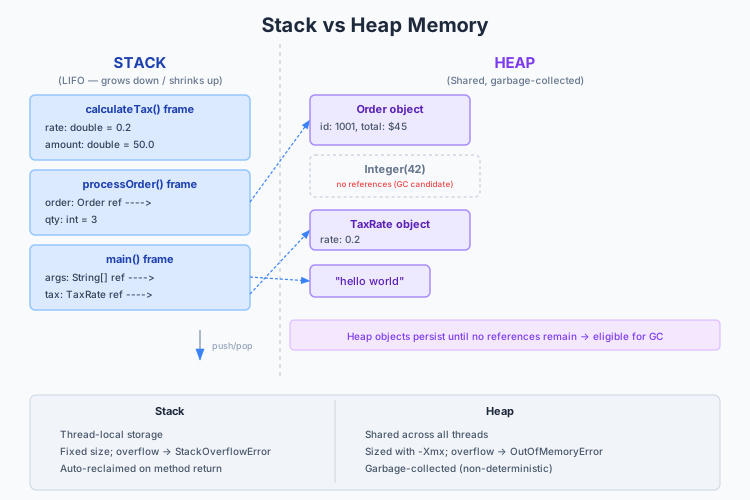
    • 2022 Paper 1 Question 3 — Immutability and AssetLocation Design

      Question

      (a) Give three advantages and one disadvantage of immutable classes. [4 marks]

      (b) A programmer has created an AssetLocation class to represent the location of company assets. Some assets are mobile and their location must be updated regularly (e.g. vehicles); others are static and will never be updated (e.g. warehouses). The class contains a String describing the asset, an int recording a unique identifier, and two double values to represent valid latitude (90ϕ90-90^\circ \leq \phi \leq 90^\circ) and longitude (180<θ180-180^\circ < \theta \leq 180^\circ) values, respectively. All fields are initially mutable and set by the constructor.

      Write Java code that implements AssetLocation as described. [5 marks]

      (c) The programmer wishes to make the objects representing static assets immutable. They make the class optionally immutable using a parameter passed into the constructor.

      • (i) Write a modified AssetLocation class that implements the behaviour as described. [3 marks]
      • (ii) Explain why this is not a good solution. [3 marks]
      • (iii) Propose a better structure for the class, and explain your design choices. [5 marks]

      Worked Solution

      (a) Three advantages and one disadvantage of immutable classes — 4 marks

      Model answer:

      Advantages:

      1. Thread safety — Immutable objects are inherently thread-safe. Since their state never changes after construction, multiple threads can access them concurrently without synchronisation, locks, or data races. This eliminates a whole class of concurrency bugs.

      2. Simpler reasoning — You can rely on an immutable object’s state never changing. Once constructed, you can pass it anywhere, store it in collections, or use it as a map key without worrying that some other part of the code will mutate it out from under you. The object’s invariants are established once in the constructor and never need to be re-verified.

      3. Safe sharing and caching — Immutable objects can be freely shared (no defensive copying needed) and cached (a single instance can serve all callers, since no caller can corrupt it for others). The JVM can also perform optimisations (e.g., String interning for string literals).

      Disadvantage:

      1. Performance overhead for frequent state changes — If an object’s state needs to change frequently (e.g., a counter, a moving vehicle’s position), immutability requires creating a new object on every “change.” This produces allocation pressure and GC overhead. A mutable object that is updated in place would be more efficient. (However, this is often overstated — modern JVMs handle short-lived objects efficiently.)

      Why 4 marks: Three distinct advantages (thread safety, simpler reasoning, safe sharing) and one concrete disadvantage (allocation overhead). The question asks for “one disadvantage,” so give one strong one — not a vague “sometimes it is inconvenient.”

      (b) Mutable AssetLocation — 5 marks

      Model answer:

      public class AssetLocation {
          private String description;
          private final int id;            // unique identifier — should never change
          private double latitude;
          private double longitude;
      
          public AssetLocation(String description, int id,
                               double latitude, double longitude) {
              this.description = description;
              this.id = id;
              setLatitude(latitude);
              setLongitude(longitude);
          }
      
          public String getDescription() { return description; }
          public int getId() { return id; }
          public double getLatitude() { return latitude; }
          public double getLongitude() { return longitude; }
      
          public void setDescription(String description) {
              this.description = description;
          }
      
          public void setLatitude(double latitude) {
              if (latitude < -90.0 || latitude > 90.0) {
                  throw new IllegalArgumentException(
                      "Latitude must be between -90 and 90 degrees, got: " + latitude);
              }
              this.latitude = latitude;
          }
      
          public void setLongitude(double longitude) {
              if (longitude <= -180.0 || longitude > 180.0) {
                  throw new IllegalArgumentException(
                      "Longitude must be > -180 and <= 180 degrees, got: " + longitude);
              }
              this.longitude = longitude;
          }
      }

      Key design decisions for the 5 marks:

      1. id is final — A unique identifier should never change. Making it final enforces this invariant. The question says “all fields are initially mutable,” but id as a unique identifier makes no sense as mutable — making it final shows design judgement.

      2. Validation in the constructor and setters — The valid ranges for latitude and longitude are specified (90ϕ90-90 \leq \phi \leq 90, 180<θ180-180 < \theta \leq 180). Validate on construction and on every mutation. Use IllegalArgumentException with a descriptive message.

      3. Encapsulation — Fields are private with public getters and setters. This allows future changes (e.g., adding a bounds check, changing the internal representation) without affecting clients.

      4. Getters present — Even for mutable fields, provide getters rather than exposing the fields directly.

      (c)(i) Optionally immutable via constructor parameter — 3 marks

      Model answer:

      public class AssetLocation {
          private String description;
          private final int id;
          private double latitude;
          private double longitude;
          private final boolean immutable;
      
          public AssetLocation(String description, int id,
                               double latitude, double longitude,
                               boolean immutable) {
              this.description = description;
              this.id = id;
              setLatitude(latitude);
              setLongitude(longitude);
              this.immutable = immutable;
          }
      
          public void setDescription(String description) {
              if (immutable) throw new UnsupportedOperationException("Object is immutable");
              this.description = description;
          }
      
          public void setLatitude(double latitude) {
              if (immutable) throw new UnsupportedOperationException("Object is immutable");
              if (latitude < -90.0 || latitude > 90.0) {
                  throw new IllegalArgumentException("Latitude out of range: " + latitude);
              }
              this.latitude = latitude;
          }
      
          public void setLongitude(double longitude) {
              if (immutable) throw new UnsupportedOperationException("Object is immutable");
              if (longitude <= -180.0 || longitude > 180.0) {
                  throw new IllegalArgumentException("Longitude out of range: " + longitude);
              }
              this.longitude = longitude;
          }
      }

      (c)(ii) Why this is not a good solution — 3 marks

      Model answer:

      1. Runtime failure, not compile-time safety — The immutability guarantee only surfaces at runtime (an UnsupportedOperationException). A caller with a reference typed as AssetLocation cannot tell from the type system whether mutation is safe — the setLatitude() method is always present in the API. This means (a) you cannot statically verify correctness, (b) bugs from accidentally mutating an immutable asset manifest only when the code runs.

      2. Conditional logic in every mutator — Every setter must check the immutable flag. This is repetitive boilerplate. A new developer adding a setter might forget the check, creating a loophole. The class has two reasons to change — business logic (asset location representation) and the immutable/mutable toggle — violating the Single Responsibility Principle.

      3. Confusing API — The class has setters that sometimes work and sometimes throw. This is a violation of the Liskov Substitution Principle at the conceptual level: you cannot treat all AssetLocation objects uniformly. Code that receives an AssetLocation must defensively check or assume the worst.

      (c)(iii) Better structure — 5 marks

      Model answer: Separate the mutable and immutable variants into an interface and two implementations, or use an abstract base class with two concrete subclasses.

      Option A: Interface-based approach

      public interface AssetLocation {
          String getDescription();
          int getId();
          double getLatitude();
          double getLongitude();
      }
      
      public final class ImmutableAssetLocation implements AssetLocation {
          private final String description;
          private final int id;
          private final double latitude;
          private final double longitude;
      
          public ImmutableAssetLocation(String description, int id,
                                        double latitude, double longitude) {
              this.description = description;
              this.id = id;
              if (latitude < -90.0 || latitude > 90.0) {
                  throw new IllegalArgumentException("Latitude out of range: " + latitude);
              }
              if (longitude <= -180.0 || longitude > 180.0) {
                  throw new IllegalArgumentException("Longitude out of range: " + longitude);
              }
              this.latitude = latitude;
              this.longitude = longitude;
          }
      
          public String getDescription() { return description; }
          public int getId() { return id; }
          public double getLatitude() { return latitude; }
          public double getLongitude() { return longitude; }
      }
      
      public class MutableAssetLocation implements AssetLocation {
          private String description;
          private final int id;
          private double latitude;
          private double longitude;
      
          public MutableAssetLocation(String description, int id,
                                      double latitude, double longitude) {
              this.description = description;
              this.id = id;
              setLatitude(latitude);
              setLongitude(longitude);
          }
      
          public String getDescription() { return description; }
          public int getId() { return id; }
          public double getLatitude() { return latitude; }
          public double getLongitude() { return longitude; }
      
          public void setDescription(String description) {
              this.description = description;
          }
      
          public void setLatitude(double latitude) {
              if (latitude < -90.0 || latitude > 90.0) {
                  throw new IllegalArgumentException("Latitude out of range: " + latitude);
              }
              this.latitude = latitude;
          }
      
          public void setLongitude(double longitude) {
              if (longitude <= -180.0 || longitude > 180.0) {
                  throw new IllegalArgumentException("Longitude out of range: " + longitude);
              }
              this.longitude = longitude;
          }
      }

      Option B: Copy-on-mutation (if the interface must have mutation methods)

      Provide mutation methods that return new instances:

      public final class AssetLocation {
          private final String description;
          private final int id;
          private final double latitude;
          private final double longitude;
      
          // ... constructor and getters ...
      
          public AssetLocation withLatitude(double newLat) {
              return new AssetLocation(description, id, newLat, longitude);
          }
      
          public AssetLocation withLongitude(double newLon) {
              return new AssetLocation(description, id, latitude, newLon);
          }
      }

      Design justification (for the 5 marks):

      1. Interface defines the contractAssetLocation as an interface captures what all locations have in common (a description, an ID, and coordinates). Client code can work with the interface without knowing mutability.

      2. ImmutableAssetLocation is final — Preventing subclassing ensures the immutability guarantee cannot be broken by a subclass adding mutable fields.

      3. No UnsupportedOperationException — The immutable variant simply has no setters. The type system guarantees safety — there is no runtime surprise.

      4. MutableAssetLocation adds mutation — The setters only exist on the mutable variant. Code that holds an AssetLocation reference cannot mutate; code that needs mutation uses the concrete MutableAssetLocation type or is passed one.

      5. Satisfies OCP and LSP — New variants (e.g., a CachedAssetLocation that wraps a remote lookup) can be added by implementing the interface. Any code that works with AssetLocation works correctly with any implementation.

      6. Clear intent — The type name tells you the contract: ImmutableAssetLocation cannot change, MutableAssetLocation can. No hidden boolean flag to inspect.

      Why 5 marks: Propose a concrete design (either interface + two classes, or the final immutable copy-on-mutation approach), explain the type-safety benefit, connect to design principles (LSP, OCP, SRP), and address why the constructor-flag approach is inferior.

    • 2022 Paper 1 Question 4 — Type Checking, Erasure and Generic Casts

      Question

      (a) Explain the notion and value of type checking. Illustrate your answer using generic types in Java. [3 marks]

      (b) Explain the notion of type erasure. Why is it used in Java? [3 marks]

      (c) For each of the statements below, state whether they are true or false, and explain why.

      • (i) Integer can be cast to Number. [1 mark]
      • (ii) Set<Integer> can be cast to Set<Number>. [2 marks]
      • (iii) Set<Integer> can be cast to Set<? extends Number>. [2 marks]
      • (iv) Set<Integer> can be cast to Set<?>. [2 marks]
      • (v) Set<Set<Integer>> can be cast to Set<Set<?>>. [2 marks]

      (d) Given a generic class TreeSet<T>, explain the difference between:

      • (i) new TreeSet()
      • (ii) new TreeSet<Object>()
      • (iii) new TreeSet<>() When can each of these Java expressions be used and are there any advantages of using one over another? [5 marks]

      Worked Solution

      (a) Notion and value of type checking — 3 marks

      Model answer: Type checking is the process of verifying that operations are applied to values of compatible types — preventing you from, say, calling toUpperCase() on an Integer. It catches type errors before the program runs, rather than letting them manifest as runtime crashes or (worse) silent corruption.

      Value: Type checking moves error detection earlier in the development cycle:

      • Compile-time errors are cheaper to fix than runtime errors.
      • The compiler can guarantee the absence of certain whole classes of bugs (e.g., you can never put a String into a List<Integer> — the compiler rejects it).
      • Types serve as lightweight documentation: List<Customer> tells the reader more than List.

      Illustration with generics:

      Without generics (pre-Java 5), collections were untyped:

      List names = new ArrayList();       // raw type — holds anything
      names.add("Alice");
      names.add(42);                       // compiles fine — runtime ClassCastException later
      String name = (String) names.get(1); // runtime error!

      With generics, the type parameter catches the error at compile time:

      List<String> names = new ArrayList<>();
      names.add("Alice");
      names.add(42);                       // COMPILE ERROR: int is not String
      String name = names.get(0);          // no cast needed — compiler guarantees String

      Why 3 marks: Define type checking, state its value (early error detection, documentation, safety guarantees), and illustrate with the pre-generics vs generics contrast.

      (b) Type erasure — 3 marks

      Model answer: Type erasure is the process by which the Java compiler removes all generic type information and replaces type parameters with their bounds (or Object if unbounded). At runtime, List<String> and List<Integer> have the same class — they are both just List.

      List<String> strings = new ArrayList<>();
      List<Integer> integers = new ArrayList<>();
      System.out.println(strings.getClass() == integers.getClass()); // true

      Why is it used? Backward compatibility. Java 5 introduced generics in 2004, but there were millions of lines of pre-generics Java bytecode in existence. Type erasure meant that:

      1. Generic code could run on existing JVMs without modification.
      2. Generic and non-generic code could interoperate — you can pass a List<String> to a legacy method expecting a raw List.
      3. No runtime penalty — there is no type-passing overhead or separate class generation for each instantiation (unlike C++ templates).

      The trade-off: you lose generic type information at runtime. You cannot do instanceof List<String>, you cannot create arrays of generic types (new T[10]), and you cannot overload methods that differ only in generic parameters (they erase to the same signature).

      (c) True/false statements

      (c)(i) Integer can be cast to Number — TRUE (1 mark)

      Integer is a subclass of Number. This is an upcast — always safe at compile time and runtime. Integer inherits from Number via IntegerNumberObject. No generics involved — this is standard class inheritance.

      Integer i = 42;
      Number n = (Number) i;   // valid — upcast, always safe
      Number n2 = i;            // implicit upcast works too

      (c)(ii) Set<Integer> can be cast to Set<Number> — FALSE (2 marks)

      Generics in Java are invariant: Set<Integer> is NOT a subtype of Set<Number>, even though Integer is a subtype of Number. If this cast were allowed, you could add a Double to what is actually a Set<Integer>:

      // Hypothetical — if this compiled:
      Set<Integer> ints = new HashSet<>();
      Set<Number> nums = ints;        // WOULD NOT COMPILE — invariance
      nums.add(3.14);                  // Adding Double to Set<Integer> — type safety broken!
      Integer i = ints.iterator().next(); // ClassCastException at runtime!

      This is precisely the problem that generic invariance prevents. Arrays are covariant and suffer from this problem at runtime (see 2023 Q3). Generics catch it at compile time.

      Tripos trap: The cast (Set<Number>) someSet triggers an unchecked cast warning at compile time, not an error. But the statement “can be cast” in Tripos terms means “is valid/safe” — the answer is false because the cast is semantically invalid (it subverts the type system).

      (c)(iii) Set<Integer> can be cast to Set<? extends Number> — TRUE (2 marks)

      ? extends Number is an upper-bounded wildcard. Integer extends Number, so Set<Integer> is compatible with Set<? extends Number>. This is safe because:

      • You can read elements from the set as Number (since whatever the actual type parameter is, it extends Number).
      • You cannot write arbitrary elements (except null) because the compiler does not know the exact subtype. You cannot call set.add(new Double(3.14)) — the compiler rejects it because a Double might not be compatible with the actual type (e.g., if it is Set<Integer>).

      This follows PECS: Producer Extends. A Set<? extends Number> is a producer of Number values.

      (c)(iv) Set<Integer> can be cast to Set<?> — TRUE (2 marks)

      ? is the unbounded wildcard. Any Set<T> can be assigned to Set<?>. This is safe because:

      • You can read elements as Object (the only guaranteed common type).
      • You cannot write anything except null (because the compiler does not know the element type).

      Set<?> is useful when you genuinely do not care about the element type — e.g., int sizeOfAnySet(Set<?> s) { return s.size(); }.

      (c)(v) Set<Set<Integer>> can be cast to Set<Set<?>> — FALSE (2 marks)

      Generics are invariant at every level. Set<Integer> is not a subtype of Set<?>, even though the unbounded wildcard ? is compatible with any type. The wildcard relaxes the type at the point of use (e.g., a variable of type Set<?> can hold a Set<Integer>), but the type argument of the outer Set is invariant.

      Set<Set<Integer>> and Set<Set<?>> are different types. You cannot cast between them. However, you can cast Set<Set<Integer>> to Set<? extends Set<?>>:

      Set<Set<Integer>> setOfSets = new HashSet<>();
      Set<? extends Set<?>> wildcardSet = setOfSets;  // OK
      Set<Set<?>> concreteSet = setOfSets;             // ERROR — invariance

      Tripos trap: Students often get this wrong by reasoning “well ? matches anything, so Set<?> matches Set<Integer>, so Set<Set<?>> should match Set<Set<Integer>>.” The error is forgetting that generic type arguments are invariant — wildcard compatibility is a property of the variable’s type parameter, not of the type arguments inside the generic.

      (d) TreeSet instantiation forms — 5 marks

      (i) new TreeSet() — raw type

      This uses the raw type — the generic TreeSet without a type argument. It compiles (with an unchecked warning) and creates a TreeSet<Object>. Elements can be added without type checking — you can mix types:

      TreeSet set = new TreeSet();    // raw type warning
      set.add("hello");
      set.add(42);                     // ClassCastException at runtime if TreeSet compares them

      When to use: Never in modern code. It exists only for backward compatibility with pre-generics Java. The compiler issues an unchecked warning.

      (ii) new TreeSet<Object>() — explicit Object parameter

      This creates a TreeSet<Object> — a set that can hold any Object. Type safety is fully enforced: assignments to TreeSet<Object> are checked, and elements must be comparable.

      TreeSet<Object> set = new TreeSet<Object>();
      set.add("hello");
      set.add(42);  // May cause ClassCastException because String and Integer
                     // are not mutually comparable — but this is a runtime issue,
                     // not a type-safety issue. Both are Objects.

      When to use: When you genuinely need a heterogeneous collection of arbitrary objects (rare outside utility or framework code).

      (iii) new TreeSet<>() — diamond operator (type inference)

      The <> (diamond operator, Java 7+) infers the type parameter from context:

      TreeSet<String> set = new TreeSet<>();        // infers <String>
      TreeSet<Integer> nums = new TreeSet<>();       // infers <Integer>

      This is the recommended modern form. It is concise (no type repetition) while retaining full type safety.

      Comparison and advantages:

      FormType safetyVerbosityModern use
      new TreeSet()No (raw type)ShortLegacy only
      new TreeSet<Object>()YesVerboseRare legitimate use
      new TreeSet<>()Yes (inferred)ShortPreferred

      Advantages of <> over raw types: Full type safety, no unchecked warnings, compiler catches type errors.

      Advantages of <> over explicit parameter: Less duplication. TreeSet<Map<String, List<Integer>>> set = new TreeSet<Map<String, List<Integer>>>() is ridiculous; TreeSet<Map<String, List<Integer>>> set = new TreeSet<>() is clean.

      Important note: new TreeSet<>() without context (not assigned to a typed variable) is equivalent to new TreeSet<Object>() — the compiler infers the bound or Object.

      Why 5 marks: Explain each form, state its type safety properties, discuss when it can be used, and compare advantages. The key distinction is raw type (unsafe, legacy) vs explicit parameter (safe, verbose) vs diamond (safe, concise, modern standard).

    • 2023 Paper 1 Question 3 — Variance, Cohesion/Coupling, Observer and Strategy

      Question

      (a) This question covers the concept of variance in Java.

      • (i) Explain what is meant by Java arrays being covariant. [2 marks]
      • (ii) Provide a code example which type checks at compile time but yields a runtime exception due to covariant arrays. [2 marks]
      • (iii) Explain what is meant by Java generics being invariant and how it contrasts to the previous example. [2 marks]

      (b) Explain the notion of cohesion in the context of classes. What is meant by high cohesion and low cohesion? Why is high cohesion desirable? [2 marks]

      (c) Explain the notion of coupling in the context of classes. What is meant by high coupling and loose coupling? Why is low coupling desirable? [2 marks]

      (d) Suppose we have a stock trading application that needs to notify users of changes in stock prices but allows users to choose how they want to be notified (e.g. via email or text message).

      • (i) Explain the intent and relevance of the observer design pattern for this problem. [1 mark]
      • (ii) Explain the intent and relevance of the strategy design pattern for this problem. [1 mark]
      • (iii) Draw a UML diagram describing the key components of the observer design pattern. You do not need to recall the exact UML specification, instead you may provide a key explaining your notation. [2 marks]
      • (iv) Provide a skeleton of Java code for the subject as a class called Stock. Detail any methods required to notify and manage the users as well as an example of setting up at least two notification strategies for two different users. Explain any assumptions and tradeoffs of your approach. [6 marks]

      Worked Solution

      (a)(i) Java arrays are covariant — 2 marks

      Model answer: Covariance means that if B is a subtype of A, then B[] is a subtype of A[]. In Java, Integer[] is a subtype of Number[], and String[] is a subtype of Object[]. This means you can assign an Integer[] to a Number[] variable:

      Integer[] ints = {1, 2, 3};
      Number[] nums = ints;           // valid — arrays are covariant

      Why 2 marks: Define the subtype relationship clearly with a concrete example. Distinguish from invariance (where List<Integer> is NOT a subtype of List<Number>).

      (a)(ii) Covariant arrays causing runtime exception — 2 marks

      Model answer:

      Integer[] ints = {1, 2, 3};
      Number[] nums = ints;           // compiles fine (covariance)
      nums[0] = 3.14;                 // compiles fine (Double is a Number)
                                       // THROWS ArrayStoreException at runtime!

      The problem: nums is typed as Number[] at compile time, so storing a Double appears legal. But at runtime, the array’s actual type is Integer[], and the JVM checks every array store — storing a Double into an Integer[] fails with ArrayStoreException. The compile-time type system did not protect us; the error surfaces only at runtime.

      Why 2 marks: Show both the compile-time acceptance and the runtime exception. The key point is that covariant arrays need runtime type checks on every store, which is both a performance cost and a potential source of runtime errors.

      (a)(iii) Generics are invariant — 2 marks

      Model answer: Invariance means List<Integer> is NOT a subtype of List<Number>, even though Integer is a subtype of Number. The compiler rejects the assignment:

      List<Integer> ints = new ArrayList<>();
      List<Number> nums = ints;       // COMPILE ERROR: incompatible types

      This contrasts with arrays: the covariant array assignment compiles but fails at runtime; the invariant generic assignment fails at compile time. Generics give compile-time safety at the cost of less flexibility — you must use wildcards (List<? extends Number>) to express the subtype relationship explicitly.

      Why generics chose invariance: If generics were covariant, you could add a Double to a List<Integer>, producing a heap pollution error that would manifest much later (potentially in unrelated code). The designers chose invariance to catch this class of errors at compile time.

      (b) Cohesion — 2 marks

      Model answer: Cohesion measures how closely related the responsibilities within a single class are.

      High cohesion: All methods and fields serve a single, well-defined purpose. Example: a BankAccount class with deposit(), withdraw(), and getBalance() — everything relates to the account’s balance. High cohesion means the class is focused, easy to understand, and has few reasons to change.

      Low cohesion: A class does many unrelated things. Example: a BankAccount class that also formats HTML reports, sends emails, and connects to a database. Low cohesion means the class is confusing, hard to maintain, and violates SRP.

      Why high cohesion is desirable: Changes are localised — modifying one piece of functionality does not risk breaking unrelated functionality. Classes are easier to understand, test, and reuse.

      (c) Coupling — 2 marks

      Model answer: Coupling measures the degree of interdependence between classes.

      High (tight) coupling: Classes know about each other’s internal implementation details. Changing one class forces changes in many others. Example: a Customer class directly accessing another class’s private fields (if that were possible) or depending on specific concrete subclasses rather than interfaces.

      Loose (low) coupling: Classes interact through well-defined interfaces and know as little as possible about each other. Example: a ReportGenerator depends on a DataProvider interface, not on a specific database implementation. Loose coupling means components can be developed, tested, and modified independently.

      Why low coupling is desirable: Changes are isolated — modifying class A does not ripple through to class B, C, and D. The system is more modular, testable, and maintainable.

      (d)(i) Observer pattern intent and relevance — 1 mark

      Model answer: The Observer pattern defines a one-to-many dependency: when the Stock subject’s price changes, all registered observers (users) are automatically notified. The subject does not need to know the concrete types of its observers — it only depends on the Observer interface.

      Relevance to the stock application: Stock prices change frequently. Multiple users watching the same stock need to know about price changes. Observer lets the Stock notify all registered watchers with a single notifyObservers() call, without the Stock class knowing whether users want email, SMS, or push notifications.

      (d)(ii) Strategy pattern intent and relevance — 1 mark

      Model answer: The Strategy pattern defines a family of interchangeable algorithms, encapsulated behind a common interface, letting the client choose which algorithm to use at runtime.

      Relevance to the stock application: Users choose how they want to be notified — email, SMS, push notification. Each notification channel is a strategy. The user’s observer can be configured with a NotificationStrategy (e.g., new EmailNotification(userEmail)), and when the observer receives a price update, it delegates to the strategy to deliver the notification through the chosen channel.

      Key insight: The two patterns work together here — Observer handles when to notify (on price change), and Strategy handles how to notify (the notification channel). This is a classic combination.

      (d)(iii) UML diagram — 2 marks

      KEY:
        +-------------+
        |  ClassName  |   Box = Class or Interface
        |  (italic)   |   Italic = Abstract / Interface
        |----+--------|
        | + field      |   + = public, - = private
        | + method()   |
        +-------------+
      
        solid arrow with hollow triangle = "extends" (inheritance)
        dashed arrow with hollow triangle = "implements" (interface)
        solid line with open arrow = "uses/knows about" (association)
        ◇─ = aggregation (has-a, lifecycle independent)
      
      +------------------+                  +-------------------+
      |    «interface»   |                  |    «interface»    |
      |     Observer     |<-----------------| NotificationStrategy |
      |------------------+  observers       +-------------------+
      | + update(price)  |  use strategy    | + send(msg, user) |
      +------------------+  to deliver      +-------------------+
               ^                                        ^
               |                                        |
               | implements                             | implements
               |                                        |
      +--------+--------+                     +---------+---------+
      |  UserObserver   |                     |  EmailStrategy    |  |  SMSStrategy      |
      |-----------------+                     |-------------------|
      | - user : User   |                     | + send(msg, user) |
      | - strategy :    |                     +-------------------+
          NotificationStrategy               (sends via email)
      |-----------------+
      | + update(price) |
      +-----------------+
               ^
               | uses
               |
      +--------+--------+
      |      Stock      |
      |-----------------+
      | - symbol        |
      | - price         |
      | - observers :   |
          List<Observer>
      |-----------------+
      | + attach(o)     |
      | + detach(o)     |
      | + notify()      |
      | + setPrice(p)   |
      +-----------------+

      Why 2 marks: Clearly label the interfaces, concrete implementations, and relationships. Include a key. The diagram must show at minimum: Stock (subject with attach/detach/notify), Observer (interface with update), UserObserver (concrete observer), and NotificationStrategy as the strategy interface with at least two implementations.

      (d)(iv) Java skeleton code — 6 marks

      Model answer:

      interface Observer {
          void onPriceChange(String symbol, double price);
      }
      
      interface NotificationStrategy {
          void send(String message, User user);
      }
      
      class EmailNotification implements NotificationStrategy {
          public void send(String message, User user) {
              System.out.println("Emailing " + user.getEmail() + ": " + message);
          }
      }
      
      class SMSNotification implements NotificationStrategy {
          public void send(String message, User user) {
              System.out.println("SMS to " + user.getPhone() + ": " + message);
          }
      }
      
      class User {
          private String name;
          private String email;
          private String phone;
      
          User(String name, String email, String phone) {
              this.name = name;
              this.email = email;
              this.phone = phone;
          }
      
          String getName() { return name; }
          String getEmail() { return email; }
          String getPhone() { return phone; }
      }
      
      class UserObserver implements Observer {
          private final User user;
          private final NotificationStrategy strategy;
      
          UserObserver(User user, NotificationStrategy strategy) {
              this.user = user;
              this.strategy = strategy;
          }
      
          public void onPriceChange(String symbol, double price) {
              String message = "Stock " + symbol + " is now £" + price;
              strategy.send(message, user);
          }
      }
      
      class Stock {
          private final String symbol;
          private double price;
          private final List<Observer> observers = new ArrayList<>();
      
          Stock(String symbol, double initialPrice) {
              this.symbol = symbol;
              this.price = initialPrice;
          }
      
          void attach(Observer o) {
              observers.add(o);
          }
      
          void detach(Observer o) {
              observers.remove(o);
          }
      
          private void notifyObservers() {
              for (Observer o : observers) {
                  o.onPriceChange(symbol, price);
              }
          }
      
          void setPrice(double newPrice) {
              this.price = newPrice;
              notifyObservers();
          }
      }
      
      // Usage — setting up two notification strategies for two users
      User alice = new User("Alice", "[email protected]", "07700 900001");
      User bob = new User("Bob", "[email protected]", "07700 900002");
      
      Stock apple = new Stock("AAPL", 150.0);
      apple.attach(new UserObserver(alice, new EmailNotification()));
      apple.attach(new UserObserver(bob, new SMSNotification()));
      
      apple.setPrice(155.0);
      // Output:
      //   Emailing [email protected]: Stock AAPL is now £155.0
      //   SMS to 07700 900002: Stock AAPL is now £155.0

      Assumptions and tradeoffs (for the 6 marks):

      1. Push model — The Stock pushes the price with each notification. The observer receives the data whether it needs it or not. An alternative would be a pull model where the observer calls getPrice() on the subject. The push model is simpler but less flexible if observers need different data.

      2. Synchronous notification — Observers are notified in the same thread. If an observer’s notification strategy is slow (e.g., sending a real email takes seconds), the setPrice() call blocks. A production system would use asynchronous notification (e.g., posting to a message queue).

      3. Notification order is unspecified — Observers are iterated in insertion order (because ArrayList), but the interface contract should not guarantee this. If order matters, observers should carry a priority.

      4. Observer-Subject coupling — The Stock only depends on the Observer interface (loose coupling), satisfying OCP. New notification strategies can be added without modifying Stock.

      5. Memory leak risk — If observers are never detached, the Stock holds references to them, preventing GC. A production system should use weak references or require explicit unsubscription when users stop watching a stock.

      6. Thread safety — The observers list is not thread-safe. If attach/detach are called from different threads than notifyObservers, use CopyOnWriteArrayList or synchronisation.

      Why 6 marks: Complete skeleton code with Stock, Observer, UserObserver, NotificationStrategy, and two strategies. Setup example showing different strategies for different users. Discuss at least 3 trade-offs or assumptions.

    • 2023 Paper 1 Question 4 — Type Erasure, Immutability, LSP and SRP

      Question

      (a) Explain the concept of type erasure in Java. [2 marks]

      (b) What do these types erase to?

      • (i) List<List<Integer>> [1 mark]
      • (ii) List<String>[] [1 mark]
      • (iii) Map<String, List<Map<String, Integer>>> [1 mark]

      (c) This question covers the concept of immutability.

      • (i) Provide an example of a built-in immutable class in Java. [1 mark]
      • (ii) Explain what is required to declare an immutable class in Java. [2 marks]
      • (iii) Provide a code example of a declared immutable class called ProductInfo which contains two fields storing an id and a description. [2 marks]

      (d)

      • (i) Explain the meaning of the Liskov-Substitution principle. [1 mark]
      • (ii) Explain the meaning of the Single Responsibility principle. [1 mark]
      • (iii) Imagine that you are working in the insurance context. You can issue a Policy to insure a policy holder. There are two types of policies available: a life insurance policy and a car insurance policy. Both policies take into consideration the age of the policy holder. You need to calculate the premium of each policy based on:
        • Life insurance takes 5% of the total sought coverage amount if the policy holder is under 35, or 10% otherwise.
        • For adults only, car insurance takes 10% of the car value if the policy holder is over 30, or 20% otherwise. Define four classes PolicyHolder, Policy, LifeInsurancePolicy extends Policy, CarInsurancePolicy extends Policy such that they encapsulate this system and demonstrate a violation of the Single Responsibility Principle in the Policy class and a Liskov-Substitution pre-condition violation in the CarInsurancePolicy class. [6 marks]
      • (iv) Describe what steps you would need to take to adhere to both the Liskov-Substitution and Single Responsibility principles. [2 marks]

      Worked Solution

      (a) Type erasure — 2 marks

      Model answer: Type erasure is the process by which the Java compiler removes all generic type parameter information and replaces it with the type parameter’s bound (or Object if unbounded). This means List<String> and List<Integer> have the same runtime type: List. The JVM never sees the generic type argument.

      The compiler inserts casts where needed. For example, list.get(0) on a List<String> compiles to (String) list.get(0) in bytecode — the cast is performed after erasure.

      (b) Erasure of specific types

      (b)(i) List<List<Integer>> — erases to List (1 mark)

      The outer List’s type parameter is List<Integer>, which erases to List (its bound is Object, and List is a reference type). So the whole thing erases to List.

      At runtime: List<List<Integer>>List (raw).

      List<List<Integer>> matrix = new ArrayList<>();
      System.out.println(matrix.getClass()); // class java.util.ArrayList

      (b)(ii) List<String>[] — erases to List[] (1 mark)

      The array type List<String>[] erases to List[] (raw List array). The generic component type List<String> erases to List. However, the creation of generic arrays is prohibited in Java — you cannot write new List<String>[10] because type erasure would lose the String constraint, allowing heap pollution.

      // List<String>[] arr = new List<String>[10];  // COMPILE ERROR
      List<?>[] arr = new List<?>[10];               // OK with wildcard

      (b)(iii) Map<String, List<Map<String, Integer>>> — erases to Map (1 mark)

      All generic type arguments are erased:

      • StringObject
      • List<Map<String, Integer>>List (the inner Map<String, Integer> also erases to Map)
      • So the full type erases to Map

      At runtime, it is just a raw Map. The compiler inserts casts as needed.

      Key pattern: Erasure removes all type arguments recursively, replacing each with its erasure. The erasure of a type parameter is its leftmost bound (or Object if unbounded).

      (c)(i) Built-in immutable class — 1 mark

      String is the canonical example. Others include Integer, Double, Boolean, LocalDate, BigInteger, BigDecimal. All wrapper classes for primitives are immutable.

      (c)(ii) Requirements for an immutable class — 2 marks

      Model answer:

      1. Declare the class final (or make the constructor private and provide a static factory method) — prevents subclassing that could add mutable state.
      2. Make all fields private and final — prevents modification after construction and prevents direct external access.
      3. No setter methods (or any method that mutates state after construction).
      4. Initialise all fields in the constructor — establishing invariants once.
      5. Defensive copying — If a field holds a reference to a mutable object (e.g., a Date or a List), do not expose that reference directly. Instead: (a) in the constructor, make a defensive copy of any mutable parameter; (b) in getters, return a copy (or an unmodifiable view) of any mutable field.

      (c)(iii) Immutable ProductInfo example — 2 marks

      Model answer:

      public final class ProductInfo {
          private final int id;
          private final String description;
      
          public ProductInfo(int id, String description) {
              this.id = id;
              this.description = description;
          }
      
          public int getId() { return id; }
          public String getDescription() { return description; }
      }

      Why this is correct:

      • final class — cannot be subclassed.
      • private final fields — cannot be reassigned after construction.
      • String is already immutable, and int is a primitive — no defensive copying needed.
      • No setters — state cannot change after construction.

      (d)(i) Liskov-Substitution Principle — 1 mark

      Model answer: Subtypes must be substitutable for their base types without altering the correctness of the program. If S is a subtype of T, then objects of type T may be replaced with objects of type S without breaking the program’s behaviour.

      In practical terms: a subclass should not strengthen preconditions (require more than the superclass), weaken postconditions (guarantee less than the superclass), or violate the superclass’s invariants.

      (d)(ii) Single Responsibility Principle — 1 mark

      Model answer: A class should have exactly one reason to change — it should have a single, well-defined responsibility. If a class handles both business logic and data persistence (for example), changes to either concern force modification of the same class, increasing the risk of introducing bugs in the other concern.

      (d)(iii) Insurance system with violations — 6 marks

      Model answer:

      class PolicyHolder {
          private final String name;
          private final int age;
      
          PolicyHolder(String name, int age) {
              this.name = name;
              this.age = age;
          }
      
          String getName() { return name; }
          int getAge() { return age; }
      }
      
      class Policy {
          protected PolicyHolder holder;
          protected double coverageAmount;
          protected double carValue;
      
          Policy(PolicyHolder holder, double coverageAmount, double carValue) {
              this.holder = holder;
              this.coverageAmount = coverageAmount;
              this.carValue = carValue;
          }
      
          double calculatePremium() {
              return 0;
          }
      }

      SRP VIOLATION in Policy: The Policy class holds both coverageAmount (relevant only to life insurance) and carValue (relevant only to car insurance). It tries to be the superclass for two fundamentally different kinds of policies, each needing different fields. This means Policy has two reasons to change: (a) if the life insurance calculation rules change, and (b) if the car insurance calculation rules change. Furthermore, every Policy instance carries a meaningless field — a life insurance Policy has an unused carValue field, and vice versa.

      class LifeInsurancePolicy extends Policy {
      
          LifeInsurancePolicy(PolicyHolder holder, double coverageAmount) {
              super(holder, coverageAmount, 0);  // carValue is meaningless here
          }
      
          @Override
          double calculatePremium() {
              if (holder.getAge() < 35) {
                  return coverageAmount * 0.05;
              } else {
                  return coverageAmount * 0.10;
              }
          }
      }
      
      class CarInsurancePolicy extends Policy {
      
          CarInsurancePolicy(PolicyHolder holder, double carValue) {
              super(holder, 0, carValue);  // coverageAmount is meaningless here
              // LSP VIOLATION: strengthening preconditions
              if (holder.getAge() < 18) {
                  throw new IllegalArgumentException(
                      "Car insurance only available for adults (18+)");
              }
          }
      
          @Override
          double calculatePremium() {
              if (holder.getAge() > 30) {
                  return carValue * 0.10;
              } else {
                  return carValue * 0.20;
              }
          }
      }

      LSP VIOLATION in CarInsurancePolicy: The CarInsurancePolicy constructor adds a new precondition that holder.getAge() >= 18. The Policy superclass’s constructor has no such precondition — you can create a Policy for a holder of any age. Code written to work with Policy would reasonably expect to create a Policy for a 16-year-old:

      PolicyHolder teen = new PolicyHolder("Teen Driver", 16);
      Policy p = new CarInsurancePolicy(teen, 10000.0); // THROWS! Unexpected.

      This is an LSP violation because CarInsurancePolicy is not fully substitutable for Policy — it rejects inputs that Policy accepts. The precondition has been strengthened in the subclass.

      Summary of violations:

      • SRP violation in Policy: Holds fields for two different insurance types. Has two reasons to change.
      • LSP pre-condition violation in CarInsurancePolicy: Adds an age restriction that the superclass does not have.

      (d)(iv) Steps to adhere to LSP and SRP — 2 marks

      Model answer:

      1. Remove the SRP violation: Make Policy an abstract class (or interface) that holds only the common state: PolicyHolder holder. Move coverageAmount to LifeInsurancePolicy and carValue to CarInsurancePolicy. Policy should define the abstract method calculatePremium() with no fields that are specific to any subclass.

      2. Remove the LSP violation: Either (a) move the age validation out of the constructor — validate in a factory method or in the client code that creates policies, not inside the CarInsurancePolicy constructor; or (b) document the adult-age requirement as a class invariant of CarInsurancePolicy rather than a constructor check, and handle it through a separate validation layer. The key principle: a subclass should not surprise its users with stricter construction requirements.

      abstract class Policy {
          protected final PolicyHolder holder;
      
          Policy(PolicyHolder holder) {
              this.holder = holder;
          }
      
          abstract double calculatePremium();
      }
      
      class LifeInsurancePolicy extends Policy {
          private final double coverageAmount;
      
          LifeInsurancePolicy(PolicyHolder holder, double coverageAmount) {
              super(holder);
              this.coverageAmount = coverageAmount;
          }
      
          @Override
          double calculatePremium() {
              return coverageAmount * (holder.getAge() < 35 ? 0.05 : 0.10);
          }
      }
      
      class CarInsurancePolicy extends Policy {
          private final double carValue;
      
          CarInsurancePolicy(PolicyHolder holder, double carValue) {
              super(holder);
              this.carValue = carValue;
          }
      
          @Override
          double calculatePremium() {
              return carValue * (holder.getAge() > 30 ? 0.10 : 0.20);
          }
      }

      Now each class has a single responsibility (life premium calculation, car premium calculation), and no subclass adds unexpected preconditions.

    • 2024 Paper 1 Question 3 — Access Modifiers and Encapsulation

      Question

      (a) Explain the effect of the access modifiers public, protected, private, or default (no modifier) in Java. [4 marks]

      (b) Consider the statement “public state of a Java class should be final and static”

      • (i) Explain why this is considered good programming practice. [4 marks]
      • (ii) Give one example of a member variable that should not be declared public, even if final and static. [3 marks]

      (c) Consider a language identical to Java except that all class member variables are private. Class methods can still be public, protected, private, or default. The rationale for this change is that access can be provided via methods and so this simplifies the language. Compare and contrast this approach with the Java approach. [4 marks]

      (d) The Python programming language does not have explicit private access modifiers in its classes. Instead all variables and methods are public and a convention is used whereby names prefixed with an underscore are to be considered hidden despite there being no enforcement of this by the compiler. Compare this to Java’s explicit access modifier approach. [5 marks]


      Worked Solution

      (a) Access modifiers — 4 marks

      Model answer:

      ModifierClassPackageSubclassWorld
      publicYesYesYesYes
      protectedYesYesYesNo
      default (no modifier)YesYesNoNo
      privateYesNoNoNo

      public — Accessible from everywhere. Any class in any package can see and use this member. Used for the public API of a class — the methods and constants that external code is meant to use.

      protected — Accessible within the same package AND by subclasses (even in different packages). Subclasses can access protected members of their parent class through inheritance, but only through a reference of the subclass type — not through a reference of the superclass type from an unrelated object.

      Default (package-private) — No modifier keyword. Accessible only within the same package. Not visible to subclasses in different packages. This is the “package is the unit of encapsulation” approach — code you write together goes in a package and shares internal state.

      private — Accessible only within the same class. Not even subclasses can see private members. This is the strongest form of encapsulation — implementation details are hidden from everything outside the class.

      Why 4 marks: Give a clear table or explanation for all four levels with the visibility rules. Mention the crucial subtlety of protected: it adds subclass access to default access; it does not restrict to subclasses only.

      (b)(i) “public state should be final and static” — good practice — 4 marks

      Model answer: This statement says that if you make a class member public, it should be final (unchangeable) and static (belongs to the class, not instances). This is good practice because:

      1. Public constants are safe to expose — A public static final field is a constant: its value is fixed at compile time or class initialisation, and no code can modify it. There is no risk of external code corrupting the class’s internal state through the constant. Example: Math.PI, Integer.MAX_VALUE.

      2. Mutable public state breaks encapsulation — If a field is public and not final, any code anywhere can modify it at any time. The class loses control over its own invariants. For example, a BankAccount with a public double balance could be set to a negative value, bypassing any validation in withdraw().

      3. Instance-specific public state is suspicious — If a field is public but not static, each instance has its own copy that any code can modify. This means the class has no control over the lifecycle or consistency of its own objects. It violates the fundamental OOP principle that an object manages its own state.

      4. static avoids per-instance waste — Constants like Math.PI do not need a separate copy per instance. Making them static means one copy per class, which is more memory-efficient and signals that the value is a class-level constant, not instance-specific state.

      Why 4 marks: Four distinct points covering safety (immutability), encapsulation (no external mutation), instance vs class scoping, and a concrete counterexample.

      (b)(ii) Example of a static final field that should NOT be public — 3 marks

      Model answer: A mutable object referenced by a public static final field. Even though the reference cannot be reassigned, the object itself can be mutated:

      public class Configuration {
          public static final List<String> ALLOWED_ORIGINS = new ArrayList<>();
      }

      This compiles and ALLOWED_ORIGINS cannot be reassigned, but ANY code can do:

      Configuration.ALLOWED_ORIGINS.add("evil-site.com");  // MUTATING the list!
      Configuration.ALLOWED_ORIGINS.clear();                // DELETING all origins!

      The final only prevents reassigning the reference; it does NOT make the referenced object immutable. An ArrayList is mutable, so this is effectively a public global mutable variable — it has all the encapsulation and thread-safety problems of a public non-final field.

      Alternative examples:

      • public static final Date CREATION_DATE = new Date();Date is mutable; anyone can call CREATION_DATE.setTime(0).
      • public static final Map<String, String> SETTINGS = new HashMap<>(); — anyone can add, remove, or modify entries.

      Better approach: Make the field private and provide a read-only accessor that returns an unmodifiable view or a defensive copy:

      private static final List<String> ALLOWED_ORIGINS = new ArrayList<>();
      public static List<String> getAllowedOrigins() {
          return Collections.unmodifiableList(ALLOWED_ORIGINS);
      }

      Why 3 marks: Name a specific field, explain why final does not make it safe, show how it can be misused, and give the correct alternative.

      (c) All-variables-private language vs Java — 4 marks

      Model answer:

      Similarities/advantages of all-private:

      1. Simpler language — One fewer concept to learn. No need to decide between public fields and getters/setters — fields are always accessed through methods.
      2. Forces encapsulation by default — Beginners cannot accidentally expose mutable state. Every class’s internal representation is hidden, which leads to more maintainable designs.
      3. Consistent API — All access goes through methods, so changing the internal representation (e.g., computing a value instead of storing it) never breaks client code.

      Differences/disadvantages of all-private (Java’s advantages):

      1. Constant values become verbose — Java allows public static final int MAX_SIZE = 100; — a simple, readable constant. In the all-private language, you must write private static final int MAX_SIZE = 100; public static int getMaxSize() { return MAX_SIZE; } — boilerplate for a simple use case.
      2. Performance overhead — Direct field access is faster than method calls (though JVM inlining mitigates this). For performance-critical code (e.g., inside tight loops in a game engine or numerics library), direct public final field access can be justified.
      3. Mutable configuration objects are awkward — In Java, a public field on a simple data-transfer object (DTO) or configuration holder can be pragmatic. Forcing all fields through methods adds ceremony without benefit when the class has no invariants to protect.
      4. Loss of fine-grained access control — Java allows a field to be public read but package-private write (via a public getter and a default-access setter). The all-private model would need language features to express this without boilerplate.

      Verdict: The all-private model is philosophically purer (everything is encapsulated) but Java’s approach recognises that in practice, some fields (constants, simple data holders) benefit from direct access. The trade-off is between simplicity and pragmatism.

      Why 4 marks: Balanced comparison — at least 2 points for the all-private approach and 2 points for Java’s approach, with concrete examples.

      (d) Python convention vs Java access modifiers — 5 marks

      Model answer:

      Python’s approach (convention-based):

      • All members are public by default. There is no language-level enforcement of access control.
      • Convention: names prefixed with a single underscore (_internal) signal “this is an implementation detail — do not rely on it.” This is purely a social contract; the interpreter does not prevent access.
      • Names prefixed with double underscore (__private) trigger name mangling (the name is rewritten to _ClassName__private), which makes accidental access harder but still does not prevent deliberate access.
      • The philosophy: “We are all consenting adults.” The programmer is trusted to respect conventions. If they choose to access _internal details, they accept the risk of breakage.

      Java’s approach (enforcement-based):

      • Access modifiers are enforced by the compiler. Attempting to access a private field from another class is a compile error — the program will not even run.
      • The type system guarantees encapsulation: you physically cannot violate it.
      • This provides confidence when refactoring — if you change a private implementation, you know no external code can break.

      Comparison:

      AspectPythonJava
      EnforcementNone (convention)Compiler-enforced
      FlexibilityHigh — can access anything if truly neededLow — must go through the API
      Trust modelTrust the programmerTrust the compiler
      Refactoring safetyLower — _internal users may breakHigher — compiler catches all access
      Cultural fitDynamic/scripting — “get things done”Large-team engineering — “prevent mistakes”

      When each is appropriate:

      • Python’s model works well for smaller teams, rapid prototyping, and scripting. The overhead of declaring access modifiers would slow down development in these contexts. The culture of “read the underscore as a warning” is well-established in the Python community.
      • Java’s model shines in large codebases with many developers over long periods. The compiler prevents a developer from accidentally depending on implementation details. When refactoring, you can change any private member without worrying about anyone else’s code.

      Why 5 marks: Describe both approaches clearly, give a balanced comparison (at least 2-3 dimensions), and discuss the trade-off between trust-based conventions and compiler-enforced guarantees. Show understanding that neither is universally better — they serve different contexts and philosophies.

    • 2024 Paper 1 Question 4 — Student Hierarchy, Exceptions as Flow Control, and State Pattern

      Question

      A university manages its students using a program that has a class Student with subclasses FirstYear, SecondYear, and ThirdYear for year-specific state and behaviour. The program has a List<Student> that contains all Students.

      (a) Should Student be a class, an abstract class or an interface? Explain your answer. [2 marks]

      (b) Write a Comparator that can be used to sort the List<Student> by year group and then by name, both ascending, and show how it would be used. You should assume the existence of a String getName() method within Student. [4 marks]

      (c) At the end of each year, the third year students graduate and must be removed. This is done by passing the list to the following method:

      void removeThirdYears(List<Student> students) {
          for (Student student : students) {
              try {
                  ThirdYear thirdyear = (ThirdYear) student;
                  students.remove(thirdyear);
              }
              catch(ClassCastException cce) { }
          }
      }
      • (i) What will happen when the call to remove() is made? Explain why and fix the code. [4 marks]
      • (ii) Comment on this use of exceptions and propose an alternative that does not rely on them. [3 marks]

      Full marks required correct use of an iterator or equivalent. Copying the list did not earn the mark for the solution.

      (d) Also at the end of the academic year, the first and second year students move up a year.

      • (i) Explain why this class design makes this problematic. [3 marks]
      • (ii) Propose an alternative design and explain in detail how it addresses the problems you identified in (d)(i). [4 marks]

      Worked Solution

      (a) Student: class, abstract class, or interface? — 2 marks

      Model answer: Student should be an abstract class.

      Reasoning:

      • Student should NOT be a regular class because there is no such thing as a generic “student” without a year — every student is a FirstYear, SecondYear, or ThirdYear. You should not be able to instantiate new Student().
      • Student should NOT be an interface because it likely has shared state that all students possess (e.g., name, id, college) and shared behaviour (e.g., getName(), getCollege()). Interfaces cannot hold non-static state (fields), so an interface would force every subclass to duplicate the common fields. An abstract class provides both a common state template and the “cannot instantiate” constraint.
      • Student SHOULD be abstract because it defines the common contract (getName(), year-specific methods declared abstract) and holds the shared state, while preventing direct instantiation of a Student that does not belong to any year.

      Why 2 marks: Correct answer (abstract class) and clear justification (shared state + cannot instantiate). Mention why the alternative choices are wrong.

      (b) Comparator by year group then name — 4 marks

      Model answer:

      The Comparator needs to sort by year group (First → Second → Third) and then alphabetically by name within each year group.

      Comparator<Student> byYearThenName = new Comparator<Student>() {
          @Override
          public int compare(Student a, Student b) {
              int yearCompare = Integer.compare(getYearGroup(a), getYearGroup(b));
              if (yearCompare != 0) {
                  return yearCompare;
              }
              return a.getName().compareTo(b.getName());
          }
      
          private int getYearGroup(Student s) {
              if (s instanceof FirstYear) return 1;
              if (s instanceof SecondYear) return 2;
              if (s instanceof ThirdYear) return 3;
              return 0;
          }
      };
      
      // Usage
      List<Student> students = new ArrayList<>();
      // ... populate ...
      students.sort(byYearThenName);

      Lambda alternative (more concise):

      Comparator<Student> byYearThenName = Comparator
          .comparingInt(s -> {
              if (s instanceof FirstYear) return 1;
              if (s instanceof SecondYear) return 2;
              return 3;
          })
          .thenComparing(Student::getName);
      
      students.sort(byYearThenName);

      Why 4 marks: Write a complete Comparator (anonymous class or lambda) that sorts by year first, then by name. Show how it is used (students.sort(...)). Handle the year-group ordering correctly. The instanceof chain is acceptable because the subclasses are the source of the year information — but note that this is a code smell (see part d).

      (c)(i) What happens with remove() and fix — 4 marks

      Model answer: A ConcurrentModificationException will be thrown.

      Why: The enhanced for-each loop (for (Student student : students)) internally uses an Iterator. When you call students.remove(thirdyear) directly on the list while the iterator is iterating, the list’s internal modification counter is incremented. On the next iteration, the iterator detects that the list was modified outside of its own remove() method and throws ConcurrentModificationException.

      This happens as soon as the first ThirdYear is removed — the iterator’s hasNext() or next() call will detect the structural modification and throw.

      Fix — use the iterator’s own remove():

      void removeThirdYears(List<Student> students) {
          Iterator<Student> iter = students.iterator();
          while (iter.hasNext()) {
              Student student = iter.next();
              if (student instanceof ThirdYear) {
                  iter.remove();  // safe — iterator knows about the removal
              }
          }
      }

      Or using the removeIf method (simpler):

      void removeThirdYears(List<Student> students) {
          students.removeIf(student -> student instanceof ThirdYear);
      }

      Why 4 marks: Identify ConcurrentModificationException as the runtime result, explain that the for-each loop uses an iterator internally and that direct list.remove() bypasses the iterator’s modification tracking, and provide a correct fix using Iterator.remove() or removeIf.

      (c)(ii) Comment on exception use and alternative — 3 marks

      Model answer: Using ClassCastException as a flow control mechanism is an anti-pattern for several reasons:

      1. Exceptions are for exceptional situations, not normal control flow — Finding a FirstYear or SecondYear in the list is completely expected; it is not an error condition. Throwing and catching exceptions is expensive (stack trace generation) and obscures the logic.

      2. Readability — The intent of the code (“remove only ThirdYear students”) is buried inside a try-catch. A reader must mentally parse “try to cast, if that fails then do nothing” to understand “do this only for ThirdYears.” This is a roundabout way to express a type check.

      3. Silent catching of ClassCastException — The empty catch block hides any genuine ClassCastException that might arise from a bug elsewhere in the loop body. If ThirdYear’s methods throw a ClassCastException internally (unlikely, but possible with complex inheritance), the bug is silently swallowed.

      Alternative — use instanceof:

      void removeThirdYears(List<Student> students) {
          Iterator<Student> iter = students.iterator();
          while (iter.hasNext()) {
              Student student = iter.next();
              if (student instanceof ThirdYear) {
                  iter.remove();
              }
          }
      }

      instanceof is the correct tool for checking an object’s runtime type. It is designed for this purpose, is fast (a simple type check), and clearly communicates the intent.

      Why 3 marks: Explain why exception-based flow control is bad (performance, readability, hides real errors), and provide the correct alternative using instanceof. The question note says “Full marks required correct use of an iterator or equivalent” — make sure your solution uses an iterator (not copying the list).

      (d)(i) Why moving up a year is problematic — 3 marks

      Model answer: The problem is that the class hierarchy encodes the student’s year statically as part of the object’s type, but the year needs to change dynamically over the object’s lifetime. A FirstYear student becomes a SecondYear after one year, but you cannot change an object’s class in Java — a FirstYear object is forever a FirstYear.

      To “move up” a year, you would need to:

      1. Create a brand new SecondYear object.
      2. Copy all the data from the old FirstYear object (name, ID, grades, etc.).
      3. Replace the reference in the List<Student> with the new object.
      4. Discard the old FirstYear object.

      This is:

      • Error-prone — you must remember to copy every field. If someone adds a new field to Student, you must update the year-transition code.
      • Inefficient — you allocate a new object and copy data for every student, every year.
      • Breaks object identity — any other code holding a reference to the old FirstYear object now holds a stale reference to a “ghost” student that is no longer in the list.

      Why 3 marks: Clearly explain that class-based year encoding is static (type) vs the dynamic nature of year progression. Describe the copy-and-replace workaround and its problems.

      (d)(ii) Alternative design — 4 marks

      Model answer: Use the State pattern — represent the year as a mutable field rather than a type hierarchy.

      Instead of subclassing Student into FirstYear, SecondYear, ThirdYear, have a single Student class with a YearState field that changes:

      interface YearState {
          int yearNumber();
          String yearName();
          // year-specific behaviour methods
      }
      
      class FirstYearState implements YearState {
          public int yearNumber() { return 1; }
          public String yearName() { return "First Year"; }
      }
      
      class SecondYearState implements YearState {
          public int yearNumber() { return 2; }
          public String yearName() { return "Second Year"; }
      }
      
      class ThirdYearState implements YearState {
          public int yearNumber() { return 3; }
          public String yearName() { return "Third Year"; }
      }
      
      class Student {
          private String name;
          private YearState year;
      
          Student(String name) {
              this.name = name;
              this.year = new FirstYearState();
          }
      
          String getName() { return name; }
      
          int yearNumber() { return year.yearNumber(); }
      
          void advanceYear() {
              if (year.yearNumber() == 1) {
                  year = new SecondYearState();
              } else if (year.yearNumber() == 2) {
                  year = new ThirdYearState();
              }
              // ThirdYears do not advance further
          }
      
          boolean isThirdYear() {
              return year.yearNumber() == 3;
          }
      }

      Now, advancing a year is a single method call — no object copying, no identity change, no type mutation:

      for (Student s : students) {
          s.advanceYear();
      }
      students.removeIf(Student::isThirdYear);

      How this addresses the problems:

      1. Object identity preserved — The same Student object remains; only its internal year reference changes. Code holding references to the student is not invalidated.
      2. No data copyingname, id, grades, and all other fields stay in the same object. No risk of missing a field during copy.
      3. Efficient — Changing a reference is O(1)O(1) per student. No object allocation for every transition (or minimal, if you reuse singleton state instances).
      4. Year-specific behaviour is still polymorphic — The YearState interface can declare year-specific methods (e.g., getModules(), getFees()). The student delegates to the current state. This gives the same polymorphic dispatch as the subclass approach but with dynamic mutability.
      5. Comparator is cleanerComparator.comparingInt(Student::yearNumber) — no instanceof chain.
      6. Easier to add new years — Add a FourthYearState by implementing YearState. With the subclass approach, you would need FinalYear extends Student plus updating every instanceof chain in the codebase.

      Why 4 marks: Name the State pattern explicitly. Show the interface and state classes. Show the Student class with the mutable year field. Explain how it solves the transition problem (no copy, identity preserved). Connect back to the specific problems identified in (d)(i).

    • 2025 Paper 1 Question 3 — PriorityQueue, Comparable/Comparator, and Observer Pattern

      Question

      The Java Collections framework contains PriorityQueue<E>, which represents a priority queue based on a priority heap of objects of type E. Priority is specified implicitly by providing an ordering on E via either the Comparable or Comparator interfaces. Consider a task tracking app that uses the following class to represent a task:

      public class WorkTask {
          private int priority;
          private String description;
          public WorkTask(String descriptor, int priority) {
              this.descriptor = descriptor;
              this.priority = priority;
          }
          public int getPriority() { return priority; }
          public int setPriority(int priority) { this.priority = priority; }
      }

      (a)

      • (i) Compare and contrast Comparable and Comparator in Java’s Collections framework. [3 marks]
      • (ii) Show how to make a PriorityQueue<WorkTask> maintain its contents highest priority first using:
        • (A) Comparable [2 marks]
        • (B) Comparator [2 marks]
      • (iii) Would you prefer Comparable or Comparator for this application? Explain your answer. [1 mark]

      (b) PriorityQueue does not offer a method to change priorities. Instead, an object with a changed priority must be removed and reinserted. Using a design pattern that you should specify, write code for AutoUpdatableQueue, which extends PriorityQueue and automatically updates the queue when the priority of any object in the queue is updated. Make your solution flexible and demonstrate how to apply it to a queue of WorkTasks. [12 marks]


      Worked Solution

      (a)(i) Comparable vs Comparator — 3 marks

      Model answer:

      AspectComparable<T>Comparator<T>
      Packagejava.langjava.util
      Methodint compareTo(T other)int compare(T a, T b)
      Where definedOn the class being comparedIn a separate class
      Number of orderingsOne (natural ordering)Many (different comparators for different sort orders)
      Modifies the class?Yes — the class implements ComparableNo — external to the class

      Key differences:

      • Comparable defines the natural ordering — the class itself declares “this is how you compare me.” Example: String implements Comparable<String> (lexicographic order). Every String knows how to compare itself to another String.
      • Comparator defines an external ordering — a separate object that knows how to compare two instances. Example: Collections.sort(list, Comparator.comparing(String::length)) sorts by a criterion the String class does not define itself.

      When to use each:

      • Use Comparable when there is one obvious, natural ordering for the class (e.g., Integer, LocalDate).
      • Use Comparator when you need multiple orderings (sort employees by name, by salary, by hire date), when you cannot modify the class, or when the ordering is context-dependent.

      Why 3 marks: Explain both interfaces with their method signatures, describe the “one ordering vs many orderings” distinction, and give appropriate use cases.

      (a)(ii)(A) Using Comparable — 2 marks

      Model answer: WorkTask implements Comparable<WorkTask>, defining its natural ordering by priority (highest priority first):

      public class WorkTask implements Comparable<WorkTask> {
          private int priority;
          private String description;
      
          public WorkTask(String description, int priority) {
              this.description = description;
              this.priority = priority;
          }
      
          public int getPriority() { return priority; }
          public void setPriority(int priority) { this.priority = priority; }
      
          @Override
          public int compareTo(WorkTask other) {
              return Integer.compare(other.priority, this.priority);
          }
      }
      
      // Usage
      PriorityQueue<WorkTask> queue = new PriorityQueue<>();
      queue.add(new WorkTask("Fix bug", 5));
      queue.add(new WorkTask("Write docs", 3));
      // Highest priority (5) comes out first

      Note: Integer.compare(other.priority, this.priority) compares other first — this is reversed from the natural Integer.compare(this.priority, other.priority). Because we want highest priority first, a task with priority 5 should be less than a task with priority 3 in the queue ordering (since PriorityQueue’s head is the smallest element).

      Actually, let me verify: PriorityQueue orders by natural ordering (smallest first). To get highest priority first:

      • compareTo should return negative when this has higher priority (should come out first).
      • So: Integer.compare(other.priority, this.priority) — if this.priority = 5 and other.priority = 3, compare(3, 5) returns negative, meaning this (priority 5) is “smaller” and comes out first. Correct.

      Alternatively: return -(Integer.compare(this.priority, other.priority)).

      (a)(ii)(B) Using Comparator — 2 marks

      Model answer: Create a Comparator<WorkTask> that orders by highest priority first, and pass it to the PriorityQueue constructor:

      Comparator<WorkTask> highestPriorityFirst = (a, b) ->
          Integer.compare(b.getPriority(), a.getPriority());
      
      PriorityQueue<WorkTask> queue = new PriorityQueue<>(highestPriorityFirst);
      queue.add(new WorkTask("Fix bug", 5));
      queue.add(new WorkTask("Write docs", 3));
      // Highest priority (5) comes out first

      Or using Comparator.comparingInt:

      PriorityQueue<WorkTask> queue = new PriorityQueue<>(
          Comparator.comparingInt(WorkTask::getPriority).reversed()
      );

      Why 2 marks for each: Correct implementation of the ordering (highest priority first), correct use of the PriorityQueue API, and correct syntax for whichever approach is used.

      (a)(iii) Prefer Comparable or Comparator? — 1 mark

      Model answer: Comparator is preferred.

      Reasoning: Task priority is not an intrinsic property of a task’s identity — it is a scheduling concern that might vary by context. One part of the application might sort tasks by priority, another by deadline, another by assignee. Implementing Comparable hard-codes one ordering, but tasks need multiple orderings. Using Comparator lets different parts of the application create PriorityQueue instances with the ordering appropriate to their context, without polluting the WorkTask class.

      Additionally: The question statement that “priority is specified implicitly by providing an ordering on E” and part (a)(ii) asks for both approaches — but the preferred approach for any domain object that may be sorted differently in different contexts is Comparator.

      (b) AutoUpdatableQueue — 12 marks

      Model answer: Using the Observer pattern combined with the Decorator pattern (or a wrapper/adapter approach). The AutoUpdatableQueue wraps a PriorityQueue and observes the elements within it. When an element’s priority changes, the queue detects the change and reorders itself.

      Alternative perspective: This is the Observer pattern — the queue is an observer of the tasks, and tasks are subjects that notify the queue when their priority changes.

      import java.util.*;
      
      interface PriorityObservable {
          int getPriority();
          void addPriorityListener(PriorityListener listener);
          void removePriorityListener(PriorityListener listener);
      }
      
      interface PriorityListener {
          void onPriorityChanged(PriorityObservable source);
      }
      
      class ObservableWorkTask implements PriorityObservable {
          private final String description;
          private int priority;
          private final List<PriorityListener> listeners = new ArrayList<>();
      
          ObservableWorkTask(String description, int priority) {
              this.description = description;
              this.priority = priority;
          }
      
          String getDescription() { return description; }
      
          @Override
          public int getPriority() { return priority; }
      
          public void setPriority(int newPriority) {
              this.priority = newPriority;
              notifyListeners();
          }
      
          @Override
          public void addPriorityListener(PriorityListener listener) {
              listeners.add(listener);
          }
      
          @Override
          public void removePriorityListener(PriorityListener listener) {
              listeners.remove(listener);
          }
      
          private void notifyListeners() {
              for (PriorityListener l : listeners) {
                  l.onPriorityChanged(this);
              }
          }
      }
      
      class AutoUpdatableQueue extends PriorityQueue<ObservableWorkTask>
              implements PriorityListener {
      
          private final Comparator<ObservableWorkTask> comparator;
      
          AutoUpdatableQueue(Comparator<ObservableWorkTask> comparator) {
              super(comparator);
              this.comparator = comparator;
          }
      
          @Override
          public boolean add(ObservableWorkTask task) {
              task.addPriorityListener(this);
              return super.add(task);
          }
      
          @Override
          public boolean remove(Object o) {
              if (o instanceof ObservableWorkTask) {
                  ((ObservableWorkTask) o).removePriorityListener(this);
              }
              return super.remove(o);
          }
      
          @Override
          public void onPriorityChanged(PriorityObservable source) {
              if (source instanceof ObservableWorkTask) {
                  ObservableWorkTask task = (ObservableWorkTask) source;
                  remove(task);
                  add(task);
              }
          }
      }

      Demonstration with WorkTasks:

      Comparator<ObservableWorkTask> highestFirst =
          (a, b) -> Integer.compare(b.getPriority(), a.getPriority());
      
      AutoUpdatableQueue queue = new AutoUpdatableQueue(highestFirst);
      
      ObservableWorkTask task1 = new ObservableWorkTask("Fix bug", 5);
      ObservableWorkTask task2 = new ObservableWorkTask("Write docs", 3);
      ObservableWorkTask task3 = new ObservableWorkTask("Refactor code", 7);
      
      queue.add(task1);
      queue.add(task2);
      queue.add(task3);
      
      System.out.println(queue.peek().getDescription()); // Refactor code (priority 7)
      
      task2.setPriority(10);  // "Write docs" now has priority 10
      System.out.println(queue.peek().getDescription()); // Write docs (now priority 10)
      
      task1.setPriority(1);   // "Fix bug" now has priority 1
      System.out.println(queue.peek().getDescription()); // Write docs (still priority 10)

      Why this design works (for the 12 marks):

      1. Observer pattern — The queue is a PriorityListener. When a task’s priority changes, the task notifies the queue via onPriorityChanged(). The queue then removes and re-adds the task, forcing the heap to reorder.

      2. Loose coupling — The queue depends only on the PriorityObservable and PriorityListener interfaces, not on the concrete ObservableWorkTask class. The solution works with any PriorityObservable.

      3. Correct heap reorderingPriorityQueue’s heap structure is not automatically maintained when elements’ priorities change. The remove-then-add pattern forces the element to be re-heapified correctly. This is O(logn)O(\log n) per update (remove + add), which is efficient.

      4. Extends PriorityQueue — As required, AutoUpdatableQueue extends PriorityQueue. It inherits all standard PriorityQueue behaviour and adds the auto-update capability.

      5. Flexibility — The Comparator is passed through the constructor, so the queue can be used with any ordering. The element type is ObservableWorkTask but could be made generic (AutoUpdatableQueue<E extends PriorityObservable>).

      Alternative (more flexible, generic version):

      class AutoUpdatableQueue<E extends PriorityObservable> extends PriorityQueue<E>
              implements PriorityListener {
      
          AutoUpdatableQueue(Comparator<E> comparator) {
              super(comparator);
          }
      
          @Override
          public boolean add(E task) {
              task.addPriorityListener(this);
              return super.add(task);
          }
      
          @Override
          public boolean remove(Object o) {
              if (o instanceof PriorityObservable) {
                  ((PriorityObservable) o).removePriorityListener(this);
              }
              return super.remove(o);
          }
      
          @Override
          public void onPriorityChanged(PriorityObservable source) {
              @SuppressWarnings("unchecked")
              E task = (E) source;
              remove(task);
              add(task);
          }
      }

      Key design decisions and tradeoffs:

      1. Observer vs polling — The Observer approach means the queue reactively updates when priorities change, with no CPU wasted on polling. The tradeoff is that tasks must be modified to support the Observer contract (they need the PriorityObservable interface).

      2. Thread safety — This implementation is not thread-safe. If multiple threads modify task priorities concurrently, the heap could become corrupted. A thread-safe version would synchronise onPriorityChanged or use a concurrent queue.

      3. Listener management — Adding a listener on add() and removing on remove() ensures the queue does not hold stale references to removed tasks (preventing memory leaks). If you also poll tasks (which calls remove), the listener is properly cleaned up.

      4. Circular notification — Be careful: when the queue re-adds the task in onPriorityChanged, it calls add() again, which re-registers the listener. This is harmless (duplicate registration), but could be optimised by checking if the listener is already registered.

      Why 12 marks: This is the highest-mark part on any of these papers. The solution must: (a) name the pattern (Observer), (b) design the interfaces (PriorityObservable, PriorityListener), (c) implement the concrete observable task class, (d) implement AutoUpdatableQueue extending PriorityQueue, (e) demonstrate it working with WorkTasks, (f) discuss design decisions and tradeoffs. The flexibility of the solution (working with any observable type, any comparator) is key to the high marks.

    • 2025 Paper 1 Question 4 — OCP, OOP Principles, and Wildcards

      Question

      (a) State the Open-Closed Principle and explain how it reduces the risk of regressions as software evolves. [2 marks]

      (b) Identify the four key principles of Object Oriented Programming and explain how each supports the open-closed principle. [8 marks]

      (c) Consider the Java method below. For each of the method bodies given, state whether they will compile and explain your reasoning.

      public void wildcardMethod(List<? extends Number> numList,
                                 List<? super Integer> intList)
      {
          // Method body here
      }
      • (i) int sum = 0; for (Number n : numList) sum += n.intValue(); [2 marks]
      • (ii) numList.add(6); [2 marks]
      • (iii) intList.add(6); [2 marks]
      • (iv) intList.add((Number)6); [2 marks]
      • (v) Integer i = intList.get(0); [2 marks]

      Worked Solution

      (a) Open-Closed Principle — 2 marks

      Model answer: The Open-Closed Principle (OCP) states that software entities (classes, modules, functions) should be open for extension but closed for modification. You should be able to add new functionality by adding new code, not by changing existing, working code.

      How it reduces regression risk: When you modify existing code, you risk breaking existing functionality — a regression. Modifying a tested, deployed class to add new behaviour can introduce bugs in the old behaviour. By extending through new code (new subclasses, new implementations of an interface), the existing code remains untouched and its correctness is preserved. Only the new code needs testing, and the old code’s test suite continues to pass unchanged.

      Example: Adding a new Shape subclass (e.g., Hexagon) to a drawing application by implementing the Shape interface — the existing rendering engine does not change, so the risk of breaking how Circle and Rectangle draw is zero.

      (b) Four OOP principles supporting OCP — 8 marks

      (i) Encapsulation — 2 marks

      Encapsulation hides implementation details behind a stable public interface. This supports OCP because:

      • The internal implementation can be extended or completely replaced without affecting clients that depend only on the public API.
      • Example: A Cache class exposes get() and put() methods. Internally, you can change from a HashMap to an LRU cache to a Redis-backed cache — the clients see no change. The class is closed for modification of its interface, but open for extension of its implementation.
      • Without encapsulation, clients might depend on the internal HashMap directly. Changing the implementation would break those clients — a regression.

      (ii) Abstraction — 2 marks

      Abstraction means working with general types (interfaces, abstract classes) rather than concrete implementations. This supports OCP because:

      • Code written against an abstraction can work with any new implementation of that abstraction without modification.
      • Example: A PaymentProcessor accepts a PaymentMethod interface. When a new payment method (CryptoPayment) is added, PaymentProcessor does not change — it already works with any PaymentMethod. The system is closed for modification (of PaymentProcessor), open for extension (new PaymentMethod implementations).
      • Without abstraction, PaymentProcessor would have a switch on payment type. Adding CryptoPayment would require modifying the switch — risking regressions in the existing payment methods.

      (iii) Inheritance of code — 2 marks

      Inheritance allows a subclass to reuse and extend the behaviour of a superclass. This supports OCP because:

      • New behaviour can be added by creating a subclass that overrides or extends specific methods, leaving the superclass untouched.
      • Example: A ReportGenerator superclass has a generateHeader() and generateFooter() method. To create a PDFReportGenerator, you subclass and override just these methods — the core generate() template method in the superclass does not change.
      • Without inheritance, you might modify the original ReportGenerator to add PDF support, introducing conditionals and risking regression in the existing plain-text report generation.

      (iv) Polymorphism — 2 marks

      Polymorphism allows different objects to respond to the same method call in different ways at runtime (dynamic dispatch). This supports OCP because:

      • Client code calls methods on a supertype reference, and the correct subtype implementation runs automatically.
      • Example: List<Shape> shapes containing Circle, Rectangle, and the new Hexagon — calling shape.draw() dispatches to the correct implementation. The list iteration code does not change when Hexagon is added.
      • Without polymorphism, you would need if (shape instanceof Circle) ... else if (shape instanceof Hexagon) ... — adding Hexagon would mean modifying every place that draws shapes, creating many regression risks.

      Why 8 marks (2 per principle): For each principle, (a) briefly define it, (b) explain specifically how it supports OCP, (c) give a concrete example of what would happen without it (the regression scenario).

      (c) Wildcard method — compile analysis

      The method signature:

      public void wildcardMethod(List<? extends Number> numList,
                                 List<? super Integer> intList)
      • numList is List<? extends Number> — can be List<Integer>, List<Double>, List<Number>, etc. This is a producer — you can read Number from it but cannot write (except null). Follows PECS: Producer Extends.
      • intList is List<? super Integer> — can be List<Integer>, List<Number>, List<Object>. This is a consumer — you can write Integer to it but can only read Object. Follows PECS: Consumer Super.

      (c)(i) int sum = 0; for (Number n : numList) sum += n.intValue(); — COMPILES 2 marks

      Reasoning: ? extends Number means the list contains some type that IS-A Number. Reading from it, you get a Number (the upper bound). Number has the method intValue(). The enhanced for-loop iterates correctly, and n.intValue() is valid on Number.

      The compiler knows: whatever the actual type parameter is (Integer, Double, Float, Number), every element IS-A Number. So reading as Number is safe.

      (c)(ii) numList.add(6); — DOES NOT COMPILE 2 marks

      Reasoning: numList is List<? extends Number>. The compiler knows the list contains some specific subtype of Number, but it does NOT know which one. It could be List<Integer>, List<Double>, or List<Number>.

      • If numList is actually a List<Double>, adding 6 (an Integer) would pollute the list with an Integer among Doubles.
      • The compiler cannot guarantee type safety, so it forbids all add() calls (except add(null)).

      This is the fundamental rule of upper-bounded wildcards: you can read (as the bound type), but you cannot write (except null).

      Tripos trap: Students often think “6 is an int, int autoboxes to Integer, and Integer extends Number, so it should work.” The error is that ? extends Number does NOT mean “accepts any Number” — it means “the list’s element type is some unknown specific subtype of Number.” You cannot add something when you do not know the exact type.

      (c)(iii) intList.add(6); — COMPILES 2 marks

      Reasoning: intList is List<? super Integer>. This means the list’s element type is Integer or some supertype of Integer (Number, Object).

      When adding, the compiler checks: is Integer (the autoboxed 6) compatible with the list’s element type? Since the list’s type is ? super Integer, the list can hold Integer, Number, or Object. An Integer IS-A Integer, IS-A Number, IS-A Object — it is always a valid element regardless of which specific type the list has.

      The compiler guarantees safety: adding an Integer to List<Integer>, List<Number>, or List<Object> is always type-safe. So add is allowed.

      PECS: ? super Integer is a consumer — you can add Integer elements to it.

      (c)(iv) intList.add((Number)6); — DOES NOT COMPILE 2 marks

      Reasoning: The cast (Number)6 autoboxes 6 to Integer, then casts to Number. The resulting expression has compile-time type Number. But intList is List<? super Integer> — it can only guarantee that Integer can be added.

      • If intList is actually a List<Integer>, adding a Number would be unsafe (a Number could be a Double, which is not an Integer).
      • The compiler does not trace that the specific Number value here is actually an Integer — it works on types, not values. The type of the expression (Number)6 is Number, and Number is not guaranteed to be compatible with ? super Integer.

      With ? super Integer, the only types that are guaranteed safe to add are Integer and its subtypes (of which there are none since Integer is final). Number is a supertype of Integer, so adding a Number (which could be any Number subtype) is not guaranteed safe.

      Tripos trap: Students may think: “(Number)6 is just (Integer)6 with extra steps, so it should work.” The compiler sees the declared type of the expression, which is Number. It does not trace the value to determine the runtime type. The type system is static, not dynamic.

      (c)(v) Integer i = intList.get(0); — DOES NOT COMPILE 2 marks

      Reasoning: intList is List<? super Integer>. The compiler knows the list contains some type that is Integer or a supertype of Integer. When reading, the compiler cannot guarantee the returned element is an Integer:

      • If intList is a List<Number>, get(0) returns a Number.
      • If intList is a List<Object>, get(0) returns an Object.
      • Neither Number nor Object can be implicitly assigned to Integer.

      The only type that is safe to read from ? super Integer is Object (the ultimate supertype). You would need a cast:

      Integer i = (Integer) intList.get(0);  // compiles (with unchecked cast warning, or safe if list is actually List<Integer>)

      Or assign to Object:

      Object o = intList.get(0);  // compiles — Object is safe

      PECS: ? super Integer is a consumer — you can write Integer to it, but when reading, you only get Object.

      Summary of wildcard rules (PECS)

      WildcardCan read asCan writeExample
      ? extends TTNothing (except null)List<? extends Number> — read Number, cannot add
      ? super TObjectT and subtypes of TList<? super Integer> — read Object, can add Integer
      ? (unbounded)ObjectNothing (except null)List<?> — read Object, cannot add

      Why 2 marks each: State whether it compiles, explain the wildcard rule that applies, and describe the type-safety reasoning. For the non-compiling ones, explain what could go wrong if the compiler allowed it.