Information Architecture (IA)
What Is Information Architecture?
Information Architecture is the structural design of a shared information environment: how content and functionality are organised, labelled, and made navigable. It has four components:
- Organisation systems — how content is categorised (hierarchical, faceted, sequential, tagged).
- Labelling systems — the names given to menu items, sections, and categories.
- Navigation systems — menus, breadcrumbs, links, search bars — how users move through the structure.
- Search systems — how users find content directly without browsing.
Good IA means the user can answer “where am I?”, “what is here?”, and “where can I go?” without conscious effort. Poor IA means the user is lost, even if every individual screen is well-designed.
IA Diagrams (Site Maps)
An IA diagram represents the system as a tree: each node is a screen or section, and edges show navigation relationships. IA diagrams are used early in the UCD cycle to agree on structure before detailed design begins.
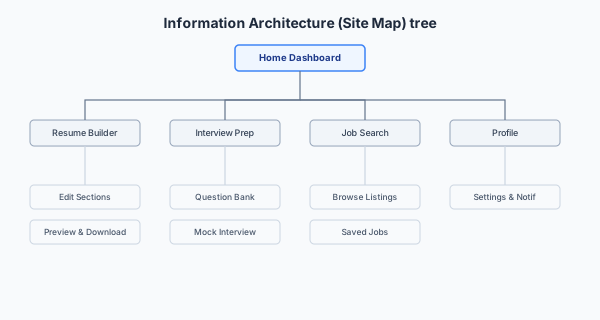
Worked Example: Career-Guidance App (2025 style)
Home Dashboard
├── Resume Builder
│   └── Edit Sections (Summary, Experience, Education, Skills)
│   └── Preview & Download
├── Interview Prep
│   ├── Question Bank
│   └── Mock Interview Mode
├── Job Search
│   ├── Browse Listings
│   └── Saved Jobs
├── Networking Tips
└── Profile
    └── Settings & Notifications
The IA answers the structural questions: how many top-level sections? How deep is the hierarchy? Which items are siblings vs children? These decisions should be validated through user research (card sorting), not designer intuition.
Common IA Usability Issues
When asked to identify and evaluate an IA issue, follow the three-step pattern: name the issue → point to where it occurs in the given system → propose a usability study (with method, participants, data, and analysis) to confirm whether it is genuinely a problem.
| Issue | Explanation | Relates to |
|---|---|---|
| Ambiguous labels | Users cannot tell which section contains what they need. “Reports” vs “Submissions” might mean the same thing to the designer but different things to users. | Card sorting reveals how users naturally name and group concepts. |
| Too many top-level categories | Increases cognitive load at the point of navigation. The user must scan many options to decide where to go. | Hick’s Law: more options → slower decisions. Grouping into fewer top-level categories reduces the effective at each decision point. |
| Important functions buried too deep | Functions that users need frequently require multiple taps to reach, violating efficiency and increasing errors. | Usability goal: Efficiency. Nielsen Heuristic #7: Flexibility and Efficiency of Use. |
| Inconsistent labelling | The same function is called different names on different screens — or different functions share the same name. | Violates Nielsen Heuristic #4: Consistency and Standards. Also increases LTM encoding burden (memory note). |
| Poor navigation feedback | Users do not know where they are within the hierarchy. | Breadcrumbs, highlighted current-section indicators, and consistent page titles address this. |
IA and Card Sorting
Card sorting directly informs IA design. Open card sorts (participants create their own groups) are used to discover a new IA. Closed card sorts (predefined groups, participants only assign cards) are used to validate an existing IA. The similarity analysis (covered in the Evaluation section) provides the quantitative basis for grouping decisions — cards that a high percentage of users co-group should be co-located in the final hierarchy.
Expected Learning
- Define IA and its four components (organisation, labelling, navigation, search).
- Draw an IA diagram for a described system as a labelled tree.
- Name at least four common IA usability issues and link each to a relevant theory (Hick’s Law, Nielsen’s heuristics, memory constraints).
- Explain how card sorting informs IA design (open for discovery, closed for validation).
- Apply the three-step IA issue pattern: name the issue → locate it → propose a usability study to confirm.
Past Paper Questions
IA appears in: 2025 Q5 (career-guidance app — IA diagram), 2023 Q5 (CamCORS — IA issue and evaluation study). Card sorting and similarity analysis (directly informing IA) appears in 2019 Q5.